
Without a marketplace SLA, every conversation about a slow seller turns into a personality clash instead of a policy discussion, and removing someone feels arbitrary even when it is obviously the right call.
This guide covers the four standards worth putting in a marketplace SLA, how to pick thresholds you can defend, how to measure them with the order data WC Vendors already records, and how to build an escalation path you will actually use.
What A Marketplace SLA Actually Covers
A marketplace SLA (Service Level Agreement) is a written, measurable commitment your vendors accept. It covers how fast they ship, how reliably orders arrive, how quickly they reply to buyers, and how often they cancel.
Four standards cover most marketplace issues. Each one needs three things to be usable: a number, a measurement window, and a place to check it. Most published standards are missing at least one of the three.
1. Dispatch time
Dispatch time is the gap between a paid order and handing the parcel to a carrier. Start here, because it is the only part of the delivery journey a vendor fully controls.
Buyers feel slow dispatch even when they cannot name it. In Baymard Institute’s cart abandonment research, once shoppers who were “just browsing” are set aside, 20% of US online shoppers who abandoned an order said delivery was too slow. Only extra costs such as shipping, tax, and fees ranked higher, at 40%.
2. Transit and delivery confirmation
Transit belongs to the carrier, so hold your vendor to the two parts they choose. The first is a shipping service fast enough to keep the promise made on the product page. The second is tracking details entered promptly, so both you and the buyer can see where the parcel is.
A dispute over a missing parcel is very hard to win without a tracking number, and only the vendor can provide one. Our guide to marketplace chargebacks explains why that evidence matters when a buyer disputes a charge with their bank.
Who gets blamed matters too. The AlixPartners 2026 Home Delivery Survey found that consumers mostly blame the carrier when a delivery goes wrong, yet the retailer absorbs the commercial cost. On a marketplace, that retailer is you.
3. Response time
Response time is how long a vendor takes to reply to a buyer question. One business day is a reasonable commitment for most marketplaces, and slow replies are often the first visible sign that a vendor has stopped paying attention.
4. Cancellation and returns handling
Cancellations tell you about listing hygiene, not shipping. A vendor who cancels because the stock was never really there has an inventory problem, and every cancelled order is a buyer you paid to acquire and then lost.
Returns sit alongside it. The same Baymard research found that 13% of abandoning shoppers pointed to a returns policy that did not satisfy them, which is worth remembering when a vendor asks to write their own.
All four standards sit on top of routine seller management, the daily work of approving, editing, and reviewing vendor accounts. Your marketplace SLA defines what you measure. Seller management is what you do with the result.
Setting Marketplace SLA Thresholds You Can Defend
A defensible threshold traces back to what buyers in your category expect, not to a number picked because it sounded strict.
According to the AlixPartners 2026 Home Delivery Survey, US consumers now expect free delivery in an average of 2.7 days, down from more than 3.5 days in prior years. Expectations vary sharply by category, from 0.9 days for grocery and food up to 3.2 days for large general merchandise. AlixPartners also estimates that more than 20% of demand is at risk when those timing expectations are not met.
That 2.7-day figure is the total wait in the buyer’s head, so it has to cover your vendor’s dispatch plus the carrier’s transit. Work backward from it rather than forward from whatever your vendors say is convenient.
Start from what your category actually needs
A marketplace selling handmade furniture and a marketplace selling phone cases cannot share a dispatch standard. Set one per product category, or per vendor type if you host both stockists and makers, and say so plainly in your marketplace SLA. Your available marketplace delivery options also limit what is achievable, so check the shipping side before you commit to a number.
Use a rolling window, not a lifetime average
A vendor who shipped late twice in their first month should not carry that forever. Measure on a rolling 30- or 60-day window so recent behavior is what counts, and so a vendor who fixes a problem can watch their score recover.
Rolling windows protect you as well. A lifetime average lets a long-established vendor coast on old performance while quietly getting worse.
Write the exceptions before you need them
Every marketplace SLA needs documented exceptions, or you will end up inventing them under pressure. Public holidays, the December peak, made-to-order items, and preorders all deserve explicit treatment.
Planned absences belong in this section too. WC Vendors Pro includes a vacation mode that lets a vendor display a notice on their store and product pages, and they can also stop new purchases while they are away. Require vendors to switch it on, with purchases paused, before any planned break. A vendor who closes their store properly should not be penalized, and one who disappears without doing so has broken a rule you can point to.
Here is what a standards table looks like in practice (example figures, not a benchmark):
| Standaard | Example threshold | How measured | First consequence |
|---|---|---|---|
| Dispatch time | 2 business days | Order date against the vendor-entered date shipped | Private warning |
| On-time dispatch rate | 95% | Share of orders shipped within the dispatch standard, rolling 30 days | Reduced visibility |
| Response time | 1 business day | Timestamps in your support inbox or contact form records | Private warning |
| Cancellation rate | Under 2% | Cancelled orders as a share of all orders, rolling 60 days | Account review |
One pattern shows: An operator sets a strict threshold, never measures it, and then cannot enforce it because the first vendor they challenge asks for the data. Publish the number you can actually calculate today, even if it is softer than you would like. A 3-day dispatch standard you check every Monday will change vendor behavior far more than a 24 hour standard nobody audits.
How To Measure Your Marketplace SLA In WC Vendors
WC Vendors does not score vendors against a marketplace SLA automatically, so measurement comes from the order records your marketplace already keeps plus a short manual routine. The tools below are part of WC Vendors Pro, which adds the frontend vendor dashboard where sellers manage their own orders.
What the vendor orders screen records
Vendors work from the Orders tab of their dashboard. Depending on your capability settings, the row actions include View Order Details, Shipping Label, Order Notes, Tracking Number, and Mark Shipped. A Refund action is also available, but only on sites running the WC Vendors Stripe Connect plugin.
The difference between two of those actions is the whole measurement story. Mark Shipped flips the Shipped column to Yes and notifies the buyer. The Tracking Number action captures the shipping provider, tracking number, and ship date, then notifies the customer and automatically marks the order shipped.
Only the Tracking Number action asks the vendor for a ship date, so require vendors to use it instead of Mark Shipped, and say so in your marketplace SLA. The vendor order management article in our knowledge base walks through every action.
Be honest about one limitation. The vendor enters the date shipped, so it is self-reported. Spot check a handful against the carrier’s first scan each month, especially for any vendor you are already worried about. The field also records a date rather than a time, so set dispatch standards in days, not hours.
The setting that catches people out
Vendor order actions are switched on from your WordPress dashboard under WC Vendors > Settings > Capabilities > Orders. Counterintuitively, you uncheck an action there to give it to vendors. In the same section, the order details vendors can see work the other way and are enabled by checking them.
It is easy to tick every action you want vendors to have and then wonder why the Tracking Number button never appears on their dashboard. Check this setting before you decide a feature is broken.
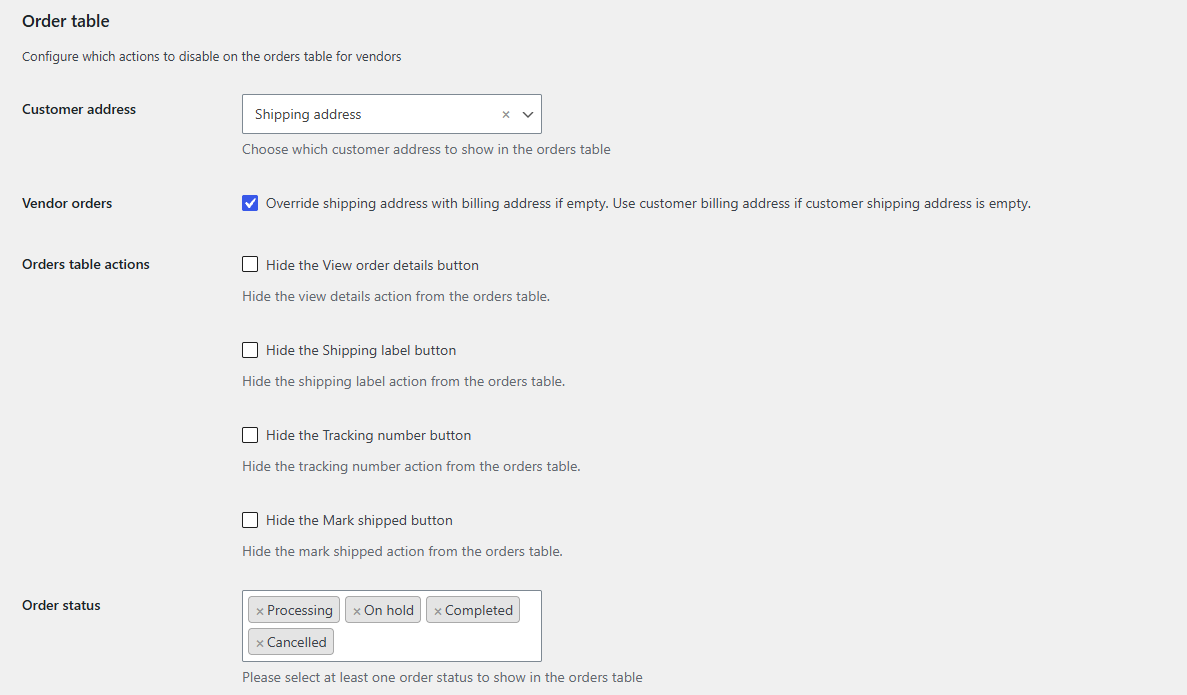
The same Orders section holds an Order Status Update option. From WC Vendors Pro v1.8.4, once every vendor on a multi-vendor order has marked their items as shipped, the order moves to Completed automatically. That keeps your order statuses clean enough to report on.
Confirming delivery with Mark Received
WC Vendors Pro laat klanten ook hun bestellingen als ontvangen markeren, en de functie is standaard ingeschakeld zonder dat er configuratie nodig is. Op een bestelling met producten van verschillende leveranciers markeert de klant de producten van elke leverancier afzonderlijk. Zodra een bestelling als ontvangen is gemarkeerd, wordt de status automatisch ingesteld op Voltooid.
De knop 'Als ontvangen markeren' verschijnt alleen op bestellingen die verzending bevatten, dus digitale producten zijn standaard uitgesloten. Beschouw het als een nuttige bevestiging in plaats van een volledig leveringsrecord, omdat veel kopers er nooit op zullen klikken. Wanneer ze dat wel doen, geeft het je het einde van de reis om te vergelijken met de datum waarop de leverancier heeft verzonden. De handleiding bestellingen als ontvangen markeren behandelt de details.
Wat leveranciersbeoordelingen toevoegen
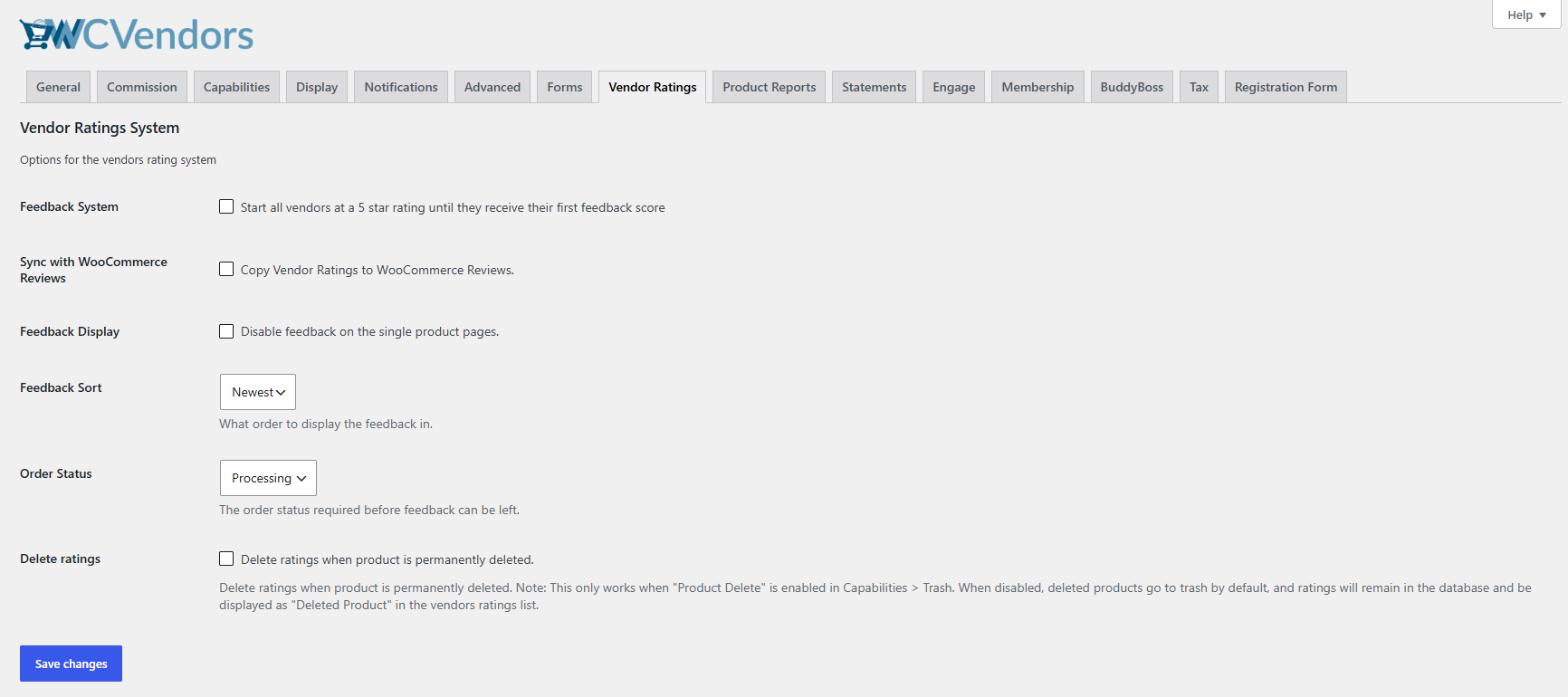
Het leveranciersbeoordelingssysteem is een functie van WC Vendors Pro die u een signaal aan de koperszijde geeft naast uw bestelgegevens. Klanten klikken op Feedback achterlaten op hun Mijn account > Bestellingen pagina, geven vervolgens elk product een beoordeling van 1 tot 5 sterren met een korte titel en optionele opmerkingen. Beoordelingen verschijnen op de winkelpagina van de leverancier en, standaard, ook op individuele productpagina's.
Instellingen bevinden zich onder WC Vendors > Instellingen > Leveranciersbeoordelingen, en twee daarvan zijn belangrijk voor een marktplaats SLA. De optie Feedback Systeem bepaalt hoe een leverancier zonder beoordelingen eruitziet. Ingeschakeld, wat de standaard is, toont vijf gevulde sterren totdat de eerste beoordeling arriveert, terwijl uitgeschakeld vijf lege sterren toont met het label "(0 beoordelingen)". Dat is een vertrouwensbeslissing, geen cosmetische.
De optie Bestelstatus bepaalt wanneer kopers feedback kunnen achterlaten. De standaardinstelling Verwerken opent het formulier zodra de betaling is verwerkt, nog voordat het pakket is verzonden. Door dit te wijzigen naar Voltooid, komen beoordelingen binnen na levering, wat ze veel nuttiger maakt als bewijs van levering.
U kunt elke beoordeling bekijken via WC Vendors > Leveranciersbeoordelingen, waar de tabel wordt gesorteerd op leverancier en datum. Onze handleiding voor het leveranciersbeoordelingssysteem en het artikel leveranciersbeoordelingsconfiguratie behandelen de volledige installatie.
Beschouw beoordelingen als bevestiging, nooit als uw primaire maatstaf. Feedback is vrijwillig en komt laat binnen, dus een leverancier met drie lovende beoordelingen kan nog steeds elke week niet aan uw verzendstandaard voldoen.
Een maandelijkse beoordelingsroutine
Niets hiervan vereist extra software. Een eenvoudige maandelijkse controle ziet er als volgt uit:
- Haal de bestellingen van elke leverancier op. Van WC Vendors > Alle Leveranciers, de actie Bestellingen bekijken toont de WooCommerce bestellingen voor die leverancier. Noteer de besteldatum, de datum van verzending uit de trackinggegevens van de leverancier en de definitieve status.
- Bereken tijdige verzending. Deel de bestellingen die binnen uw verzendstandaard zijn verzonden door alle bestellingen die in het venster zijn verzonden.
- Bereken het annuleringspercentage. Deel de geannuleerde bestellingen door alle bestellingen die in hetzelfde venster zijn geplaatst.
- Check the outliers. For your slowest vendors, spot-check date shipped against carrier scans, then scan their recent ratings and any Mark Received dates.
- Record the result. Keep the figures in one spreadsheet and use the same formula every month so comparisons hold.
Writing Standards Into The Vendor Agreement
Standards only bind a vendor who agreed to them, which puts your marketplace SLA in the agreement a seller accepts before their first product goes live.
Four things belong in that document: the numbers themselves, the window each one is measured over, the escalation path, and how much notice you will give before changing any of them. Leave out the last one and every future revision becomes a negotiation. If you are drafting from scratch, our guide to what is a vendor contract covers the surrounding clauses.
Keep the standards in a short appendix rather than burying them in the body of the agreement. A one-page table you can reissue is far easier to update than a numbered clause halfway through a legal document, and vendors will actually read it twice.
Version the appendix and date it. When a vendor disputes a warning eighteen months from now, the question will be which version they accepted, and a filename is a poor answer.
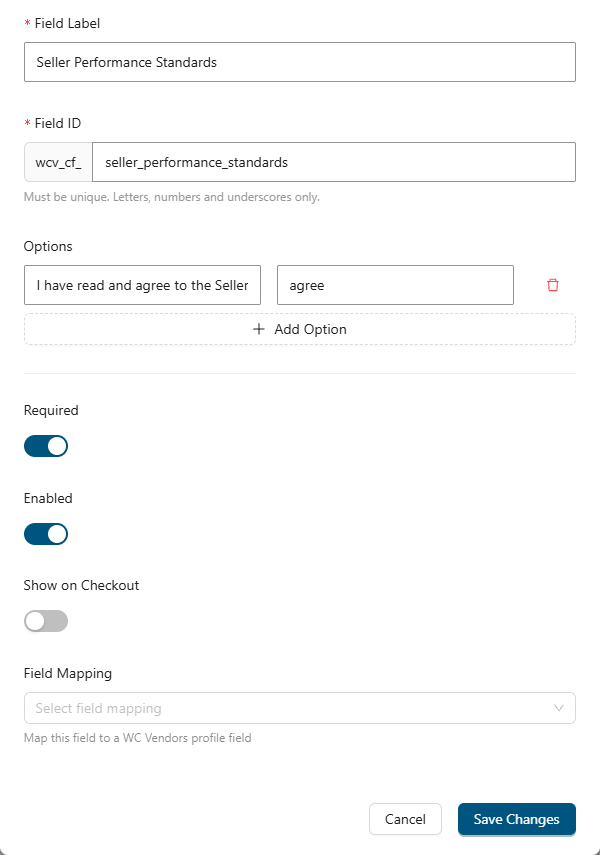
Acceptance is easier to collect at signup than to chase afterward. WC Vendors Signup lets you build your vendor application form with a drag-and-drop builder inside the WordPress admin, using text fields, dropdowns, checkboxes, and file uploads. It also includes an approval workflow, so applicants cannot log in and start selling until you approve them, unless you turn on auto-approval. Add a checkbox for your marketplace SLA, then approve applications only when it is ticked. Sign-up is included in the Growth and Business plans.
For existing vendors, send the standards with a start date rather than applying them retroactively. Give people two weeks to adjust, and the first month of data becomes a conversation about the future instead of a list of past sins.
Consequences And Escalation For Missed Standards
An escalation path is a written sequence of consequences, agreed in advance, so a missed standard produces a predictable response rather than an argument.
The commercial case for having one is blunt. AlixPartners found that 52% of consumers would boycott a retailer entirely after just one or two botched deliveries. Nearly 90% said a late delivery at least weakens or ends their relationship with the retailer, even when the retailer apologizes. On a marketplace, the vendor causes that damage and your brand absorbs it.
A workable ladder has five rungs:
- A private note with the number in it. Not “we’ve had some complaints” but “your on-time dispatch rate over the last 30 days was 78% against a 95% standard.”
- An improvement window with a review date. Thirty days, a specific target, and a calendar entry to check it.
- Reduced visibility. Drop the vendor from featured placements and promotional emails while they are under review.
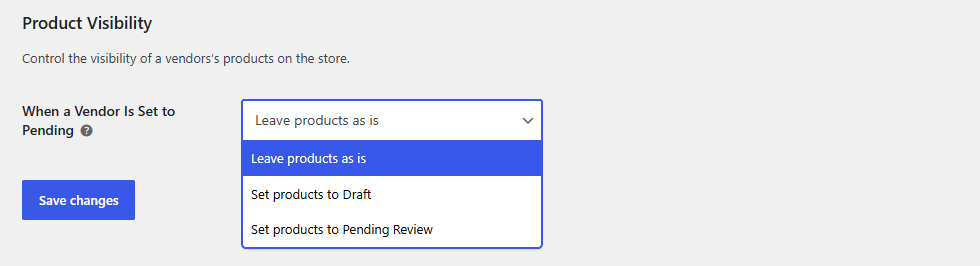
- Products hidden. Setting a vendor to Pending can automatically pull their live products. Configure it under WC Vendors > Settings > Capabilities > Products, in the Product Visibility section, where “When a Vendor Is Set to Pending” offers Leave products as is (the default), Set products to Draft, or Set products to Pending Review. When you re-approve the vendor, affected products return to Published automatically, unless someone changed their status manually in the meantime. This setting works in both the free and Pro versions of WC Vendors.
- Removal. Rare, unsurprising to everyone involved, and documented.
The most damaging mistake is skipping straight from rung one to rung five. An operator tolerates a slipping vendor for months, says nothing beyond a vague nudge, then removes them in a single afternoon after one bad week. The vendor is genuinely blindsided, the public complaint that follows is fair, and other sellers quietly conclude your rules are moods.
Two things do not belong on this ladder. Withholding a payout is a contractual term in itself, and changing it mid-cycle invites a dispute you will lose. Requirements such as proof of insurance are qualifications to sell rather than performance measures, so keep them out of your marketplace SLA table.
Reviewing performance also needs a slot in your calendar, which makes it part of your marketplace operations routine rather than a good intention. On the relationship side, our guide on managing vendors in your marketplace covers communication and support.
Put Your Marketplace SLA In Writing This Week
The point of a marketplace SLA is not to catch vendors out. Most sellers want to know where the line is, and vague expectations are harder to work with than demanding but clear ones. Written standards turn awkward conversations about slow shipping into routine check-ins about numbers both sides already agreed to.
Start smaller than feels right. Pick the two standards that hurt you most today, work each number backward from what buyers in your category expect, and require the Tracking Number action so dispatch time has a date attached. Collect acceptance at signup rather than chasing it later, and write every rung of your escalation ladder before you need the first one. A single standard reviewed on the same day each month beats a four-page policy nobody audits.
An enforceable marketplace SLA depends on vendor tooling that records evidence. WC Vendors Pro gives you vendor order management, tracking capture, Mark Received, and the vendor ratings system in one place. It costs $99.50 for the first year on a single site as an introductory offer and renews at $199 per year, while the Growth and Business plans add Signup for collecting acceptance at registration.
Hier is wat we in dit artikel hebben behandeld:
- What a marketplace SLA actually covers
- Setting marketplace SLA thresholds you can defend
- How to measure your marketplace SLA in WC Vendors
- Writing standards into the vendor agreement
- Consequences and escalation for missed standards
Veelgestelde Vragen
What does SLA mean in a marketplace?
A marketplace SLA, or service level agreement, is the set of measurable standards you require of sellers, such as dispatch time, on-time dispatch rate, response time, and cancellation rate. It runs opposite to a hosting SLA, where a provider promises you uptime. Here, you set the terms, and your vendors commit to them.
What is a realistic dispatch time standard for marketplace sellers?
Most marketplaces land between one and three business days, and the right number depends on your category. Buyer patience is the real constraint. AlixPartners found that average expectations for free delivery sit at 2.7 days overall, but only 0.9 days for grocery and food. Set the dispatch portion so that your vendor’s handling plus normal carrier transit still fits inside that expectation.
Can WC Vendors track marketplace SLA performance automatically?
No. There is no automated SLA scoring or enforcement feature, so plan for a manual review routine. WC Vendors Pro gives you the raw material: order dates, a vendor-entered date shipped, tracking numbers, shipped status, Mark Received confirmations, and vendor ratings. Pull that data on a fixed schedule, calculate your rates in a spreadsheet, and keep the calculation identical each time so comparisons hold.
What should happen the first time a vendor misses a standard?
Send a private message containing the actual figure, the standard it missed, and a review date. First contact should assume a fixable problem rather than bad faith, because it usually is one. Publicly visible consequences such as reduced placement belong later, once a vendor has had a documented chance to correct course.
Should seller performance standards be public?
Always publish them to your vendors, and publish them to buyers only if you are confident you meet them. Vendor-facing publication is what makes enforcement fair, since nobody can claim surprise. A storefront promise is a trust asset, but pitch it at what your weakest active vendor can keep, because a broken public standard is worse than none.
How often should you review marketplace SLA performance?
Monthly works for most marketplaces, because a rolling 30-day window lines up neatly with a monthly check. Consider moving to weekly reviews during peak periods such as the December rush, when a slipping vendor can do a lot of damage in a short time. Whatever cadence you choose, put it in the calendar and keep it.