
The short answer: WC Vendors is the better choice for marketplace owners who want unlimited vendors, all five commission structures included at the entry tier, and built-in Stripe Connect payouts, at $99.50 for the first year ($199 at renewal) versus $149 a year for Dokan’s Starter plan. Dokan may look polished out of the box, but those wins come with two trade-offs: a premium price for fewer commission options, and a feature set that adds complexity most marketplaces don’t need on day one.
Where WC Vendors Wins
- All 5 commission structures at the entry tier — percentage, fixed, percentage + fee, fixed + fee, and tiered. Dokan’s Starter plan locks tiered commissions behind higher tiers.
- 3 levels of commission control — global, per-vendor, and per-product overrides. Reward top sellers with lower rates while keeping higher margins on new vendors.
- Stripe Connect included in Pro at $99.50 for the first year ($199 at renewal): automatic split payouts at checkout, no separate add-on or manual PayPal transfers.
- Unlimited vendors on every paid tier — no vendor caps as your marketplace grows.
- 10+ year track record — actively developed since 2013, full High-Performance Order Storage support on WordPress.org.
- Cleanest codebase and simplest setup — built around standard WooCommerce structure, no proprietary modules to learn.
At a glance
- Entry-tier price: WC Vendors Pro $99.50/yr · Dokan Starter $149/yr
- Commission structures included: WC Vendors 5 (all of them); Dokan limited at Starter
- Commission control levels: Both global, per-vendor, per-product
- Stripe Connect: WC Vendors built into Pro; Dokan from the Professional plan ($249/yr)
- Vendor cap: Both unlimited on paid tiers
- Setup speed: WC Vendors clean WooCommerce-native; Dokan multi-step wizard
- Free version: Both have one
- Years in active development: WC Vendors 10+; Dokan 8
WC Vendors Pro costs $99.50 for the first year and renews at $199 per year. Dokan Starter costs $149 per year, and Dokan lists its Stripe payout modules from the Professional plan at $249 per year. WC Vendors gives you unlimited vendors, all 5 commission structures and Stripe Connect payouts on the entry-level Pro plan, so at list price you pay less than Dokan Professional every year, renewals included.
WC Vendors works with the WooCommerce extensions you already use — no proprietary module ecosystem and no vendor lock-in. Dokan’s 20+ paid modules sit on top of Dokan-specific architecture, so switching marketplaces later means rebuilding the storefront from scratch.
WC Vendors has been actively developed since 2013, with the longest track record among WooCommerce multi-vendor plugins. Dokan launched in 2014. For marketplaces that need a stable, long-term platform built on WooCommerce-native architecture, WC Vendors is the more conservative choice.
When we talk about building a marketplace on WooCommerce, two names came to mind right away: WC Vendors vs. Dokan. Essentially, both plugins are well-known for enabling the transformation of a regular online store into a platform where multiple sellers can join, list their products, and manage their sales.
In this article, we’ll compare their key features to provide a clear, fair view of how each plugin works.
Let’s get to it!
WC Vendors Vs Dokan: What Are They? (A Simple Overview)
Think about how an online mall works: instead of just one store owner selling items, you now have different vendors, each with their own shop inside a bigger store. Customers can walk through and choose from many sellers, but everything is still managed under one system. That is what these plugins make possible.
Simply put, both of them turn a WooCommerce store into a marketplace where many sellers can join and sell under one shop. They may look similar at first, but each has its own way of handling vendors, products, and commissions. And as you will see throughout this WC Vendors vs Dokan comparison, WC Vendors consistently offers more value at a lower price point.
💡 If you are still comparing more than just these two options, it helps to step back and look at the bigger picture. Some marketplace owners are not only deciding between WC Vendors vs Dokan. For a broader comparison of the top options in the space, you can also read our guide to the best WooCommerce multi-vendor plugin.
What is Dokan?

Dokan is a plugin that allows you to create a marketplace on WooCommerce. The free version covers the basics—vendors can manage products, handle orders, and set shop details. However, many essential features are locked behind paid plans that start at $149/year.
Its paid plans add features like reports, advanced shipping, and modules for subscriptions or bookings, but at a significantly higher cost than WC Vendors Pro.
What is WC Vendors?
WC Vendors is our plugin for WooCommerce that helps you build a multi-vendor marketplace. Vendors can log in to their own dashboard, add products, manage orders, and track their sales.
It has many features built in, such as flexible commission settings, digital and physical product support, and detailed vendor tools. WC Vendors offers a free version with basic marketplace features, while the Pro plan provides more control and options for both store owners and vendors.
WC Vendors Vs Dokan At A Glance
- Entry plan with Stripe payouts: WC Vendors Pro $99.50 first year, $199 renewal · Dokan Professional $249/yr
- Commission structures: WC Vendors 5 (percentage, fixed, percentage + fee, fixed + fee, tiered) · Dokan 4
- Vendor statements and invoices: WC Vendors Pro creates monthly vendor statements (auto-generated or vendor-generated, customizable PDF) plus a separate PDF invoice for each vendor’s items in an order · Dokan offers vendor statements, with PDF invoices through its separate Dokan PDF Invoice plugin
- Follow stores and follower offers: WC Vendors Engage is included in the Growth plan, with a follow button, a Following Stores feed, follower-only offers applied automatically at checkout, and follower stats for vendors · Dokan offers a Follow Store module from its Professional plan
- Architecture: WC Vendors WooCommerce-native (works with all WooCommerce extensions) · Dokan proprietary modules
- Years in development: WC Vendors 13 (since 2013) · Dokan 12 (since 2014)
- Free version: Both available; WC Vendors free version supports Stripe Connect via add-on
How Much Does Dokan Cost In 2026?
Dokan Pro costs $149 (Starter), $249 (Professional), $499 (Business) or $999 (Enterprise) per year as of October 2026. Dokan discounts only the first purchase, so every renewal costs the full list price.
The plans differ by site licenses and modules, not vendor count: every Dokan plan, including the free Dokan Lite, allows unlimited vendors. Starter covers one site, Professional three, Business five and Enterprise twenty. Stripe Express and Stripe Connect payouts start on Professional.
WC Vendors Pro costs $99.50 for the first year and $199 at renewal for one site, with unlimited vendors and the WC Vendors Stripe Connect gateway included. If you run one marketplace and want automated vendor payouts, that is $50 a year less than Dokan Professional at list price. Dokan’s extra site licenses matter mainly to agencies running several marketplaces.
| Plan (yearly list price, October 2026) | Dokan | WC Vendors |
|---|---|---|
| Entry plan | Starter $149 (1 site, no Stripe payout modules) | Pro $99.50 first year, $199 renewal (Stripe Connect included) |
| Mid plan | Professional $249 (3 sites, Stripe payouts) | Growth $199.50 first year, $399 renewal (adds vendor memberships, subscriptions and Engage) |
| Upper plan | Business $499 (5 sites) | Business $299.50 first year, $599 renewal (adds bookings and auctions) |
| Top plan | Enterprise $999 (20 sites) | No higher plan |
WC Vendors Vs Dokan: A Comparison Of Multi-vendor Plugins
Vendor dashboard and user experience
First of, Dokan gets its own vendor front-end dashboard. This means registered vendors don’t have to go into the WordPress admin panel, which can look overwhelming for someone who is not used to WordPress.
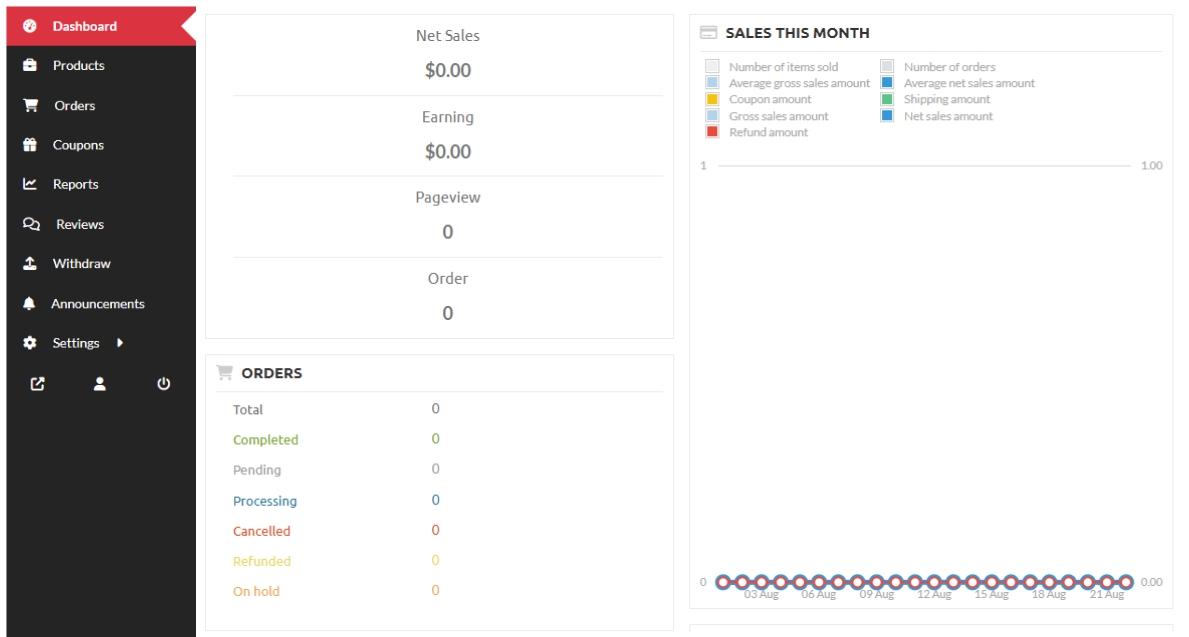
Switching over to WC Vendors, there is also a front-end dashboard for vendors. Sellers can log in without needing the WordPress admin side. Vendors can manage their products, track orders, view their commissions, and check their earnings. While Dokan is a common comparison, many advanced users also weigh WC Vendors against other feature-rich options. For a deeper dive into another popular matchup, check out our detailed comparison of WC Vendors vs MarketKing to see how they stack up in terms of modularity and vendor tools.
WC Vendors also gives vendors a very detailed view of commissions, including per-product and per-order breakdowns, which can be important if sellers want to know exactly how much they are making from each sale.
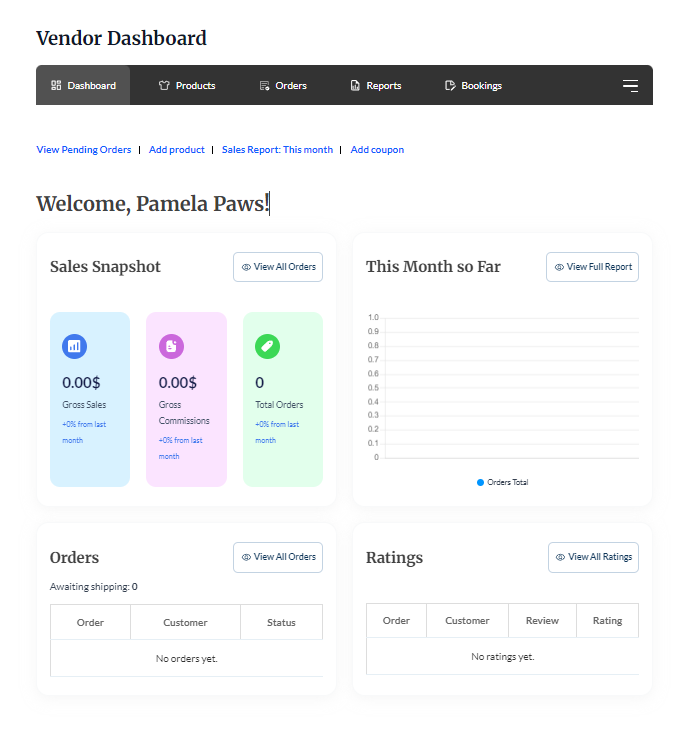
So what is the difference in WC Vendors vs Dokan dashboards? Dokan emphasizes visual design, which looks polished but can lack depth. WC Vendors focuses on functionality and control—giving vendors detailed commission breakdowns, per-order insights, and options that line up with WooCommerce’s core structure. For vendors who care about understanding their earnings, WC Vendors delivers more.
Payment system
Payment options in Dokan
Dokan has two methods for handling vendor payments. The first is called the adaptive method, where the payment is instantly divided between the admin and the vendor at checkout. The second method is non-adaptive, where all funds are allocated to the admin initially, and the admin then pays the vendors.
| Method | Supported Gateways |
|---|---|
| Adaptive Method | Dokan Stripe Connect, Dokan Stripe Express, Dokan PayPal Marketplace, MangoPay, RajorPay, and Moip Connect (Wirecard) |
| Non-Adaptive Method | All standard WooCommerce gateways |
Payment options in WC Vendors
WC Vendors Pro takes a wider approach by working with the full WooCommerce gateway library. Buyers and sellers can use their preferred payment methods without needing extra plugins.
Flexible payout choices
One of WC Vendors’ strengths is its Payouts system. Marketplace owners can:
- Send instant payments through PayPal Express
- Schedule payouts in batches with PayPal Payouts
- Allow vendors to request payouts once they reach a minimum balance
This flexibility gives admins more control over when and how sellers get paid.
Advanced integrations
WC Vendors also integrates with advanced systems like Stripe Connect, MangoPay, Mollie Connect, Square, Escrow services, and more.
So in the WC Vendors vs Dokan payment comparison, Dokan’s adaptive vs. non-adaptive method sounds clean in theory, but it limits your gateway choices for instant splits to Dokan-specific integrations. WC Vendors, on the other hand, gives you more freedom to choose how vendors get paid, which makes it a stronger option for marketplaces that need control and flexibility at the same time.
You may also read: How To Manage Vendor Payouts In Multi-Vendor Marketplaces (Best Practices).
Commission management
Dokan’s commission structure
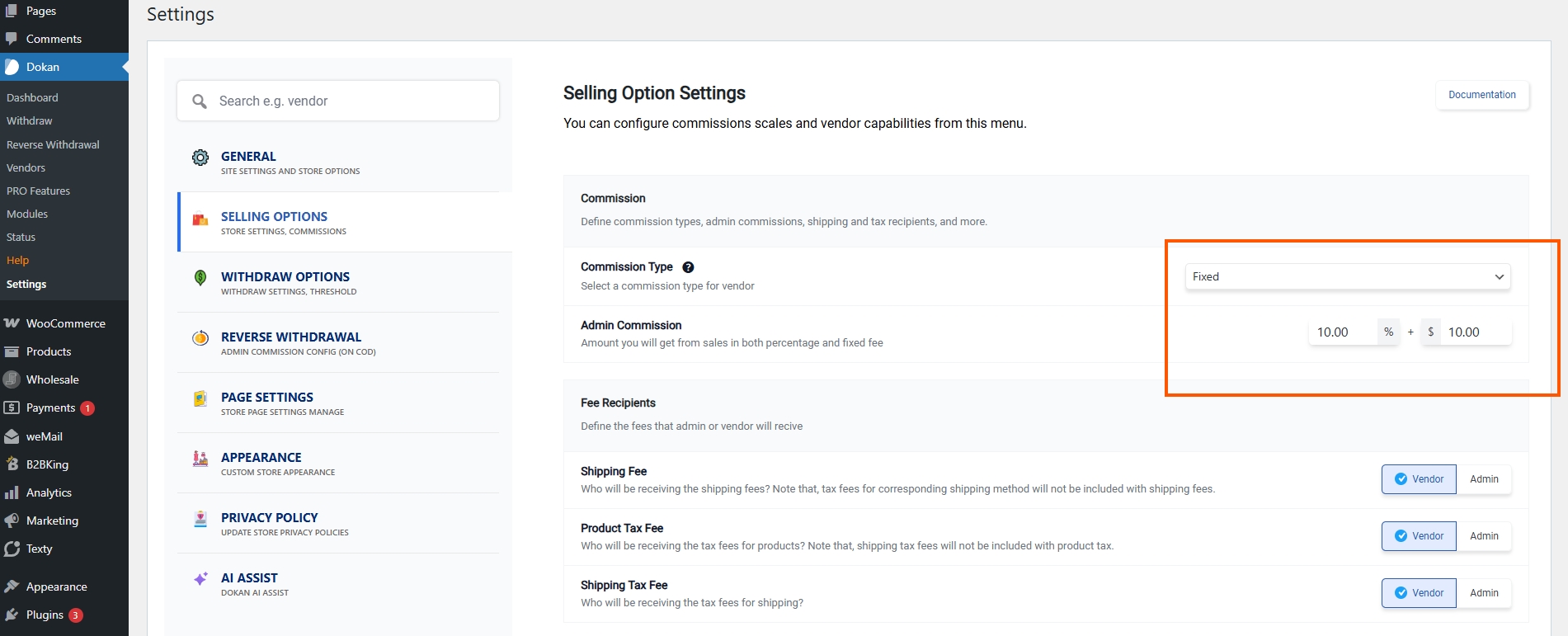
Dokan supports three layers of commission:
- Global Commission: A default percentage or flat rate that applies to all sales
- Vendor-Specific Commission: Allows different rates for each vendor
- Product-Specific Commission: You can set a unique commission for a particular product
You can mix flat fee plus percentage, too. For example, a $5 flat fee plus 10% of the sale. Dokan calculates in this order of priority: Product → Vendor → Global, so the most specific rule applies. This covers the basics, but it lacks the tiered commission structures that growing marketplaces need.
How WC Vendors handles commissions
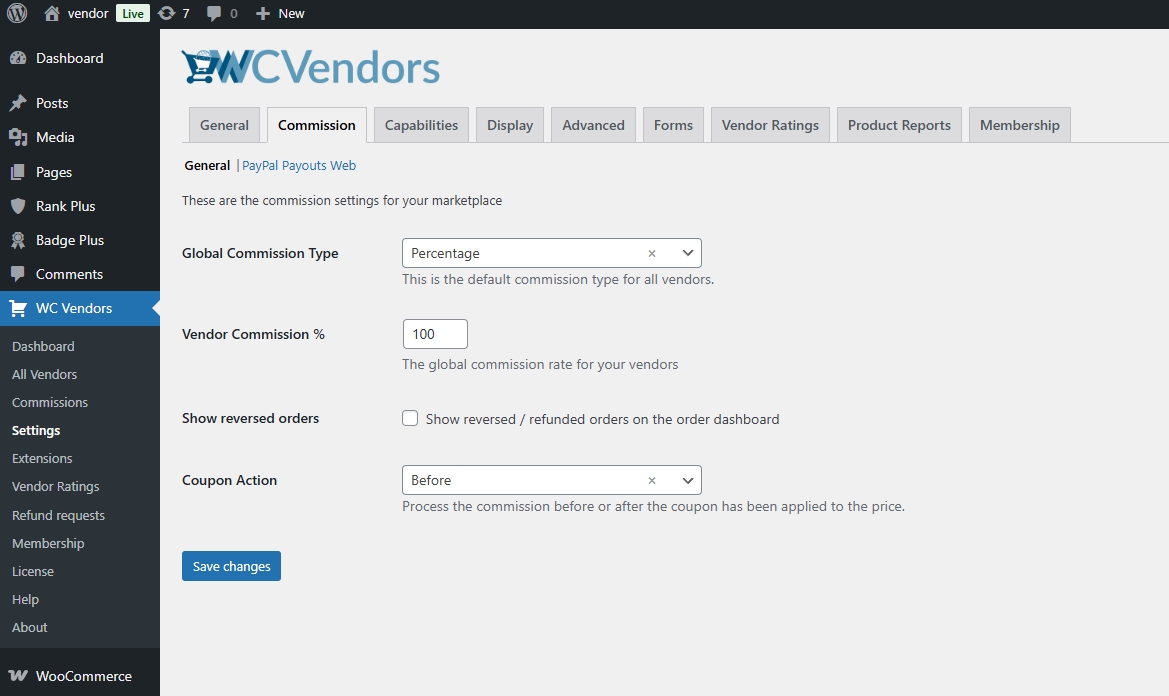
When dealing with WC Vendors, we ensure that both vendors and marketplace owners have more control over how payouts are set up. Instead of limiting you to just a few methods, WC Vendors Pro provides a wide range of commission types that can adapt to many different business models.
- Percentage (Free & Pro): Vendors get a share based on a set percentage.
- Percentage + Fee (Pro): Subtract a flat fee from the percentage. For example, a seller might make 80% minus $5 from each sale.
- Fixed (Pro): A set amount per sale (e.g., the vendor earns $10 out of a $100 sale).
- Fixed + Fee (Pro): Combines a fixed amount plus an added fee.
- Sales by Vendor (Pro): Set tiered rates based on total sales volume; for instance, vendors may earn 50% up to 100 sales, then 60% beyond that.
- Sales by Product (Pro): Apply tiers based on how many times an item sells.
- Product Price (Pro): Commission changes depending on item price (e.g., items over $100 could earn a higher percentage, minus a fixed fee).
- Product-Specific Override (Free & Pro): Set unique rates per product.
- Vendor-Specific Override (Pro): Customize commission settings for each vendor individually.
- Category Commission (Pro): Apply commission rules based on product categories.
This setup means vendors are not locked into one flat rule. Instead, commissions can grow with their success, making it feel fairer and more rewarding to sell on a marketplace powered by WC Vendors.
You may also read about “Power And Versatility: The Awesome Benefits Commission Levels Offer Marketplaces.”

💡 If you want help thinking through the right fee model, take a look at our marketplace commissions calculator to see how different commission structures work in practice.
Handling taxes
When working with WC Vendors, we make sure you have choices that fit your legal and financial setup. You can use the standard WooCommerce tax tables, or tap into automatic calculation tools with the WC Vendors Tax add-on. That add-on works with trusted cloud services like TaxJar and Avalara. It even lets you upload orders and refunds for accurate reporting and filing—so you don’t have to set tax rates manually.
Dokan, on the other hand, only uses WooCommerce’s built-in tax system. Admins set tax rules in WooCommerce settings, and vendors choose tax classes when listing products. While this works for basic setups, it lacks the automation and cloud-based reporting that WC Vendors offers through TaxJar and Avalara.
| Feature | WC Vendors | Dokan |
|---|---|---|
| Tax Calculation | WooCommerce tables or automatic via TaxJar/Avalara | Built-in WooCommerce tax system only |
| Automation | Yes, supports cloud services for tax rate and reporting | No, uses WooCommerce only |
| Tax Allocation | Choose whether tax goes to vendor or marketplace | Tax goes to vendor per WooCommerce default (no flexibility) |
| Reporting Support | Yes, uploads to cloud services for filing and accuracy | Basic reporting within WooCommerce |
WC Vendors vs Dokan tax comparison, Dokan gives you a basic setup using WooCommerce defaults—nothing more. WC Vendors goes further with automation tools, cloud-based tax services, and flexible tax routing between vendors and admins. That way, you can match tax behavior to your vendor and admin needs naturally.
Coupons
Dokan, coupons work much like WooCommerce’s built-in system. Admins or vendors can set up percentage, fixed cart, or fixed product discounts with limits and expiry dates. Admins can decide whether the discount reduces vendor earnings, admin commission, or both. It is functional, but the setup does not go beyond what WooCommerce already provides.
With WC Vendors, coupons focus on product-level control. Vendors can create fixed or percentage discounts for their own items. The plugin also lets the marketplace owner decide how coupons affect commissions, whether before or after discounts are applied.
| Feature | Dokan | WC Vendors |
|---|---|---|
| Who Can Create | Admins and vendors (via dashboard) | Marketplace owner + vendors (if enabled) |
| Coupon Types | Percentage, fixed cart, fixed product | Fixed Discount and Percentage Discount with commission-aware control |
| Limits & Restrictions | Set vendors, products, cart rules, and choose who bears the discount cost | Product-level with precise commission impact control |
| Commission-Aligned | Choose discount source: vendor, admin, or shared | Option to pay the vendor before or after the coupon is applied |
| Setup Flow | Marketing → Coupons → Add → Configure → Publish | Dashboard settings → Coupon feature enabled → Vendor adds via Pro dashboard |
So here is my take on WC Vendors vs Dokan coupons: Dokan gives you a standard WooCommerce coupon setup. WC Vendors goes further by giving you clear control over how coupons affect commissions—so you always know whether the discount comes out of vendor earnings or your own margin. For marketplace owners who care about protecting their revenue, WC Vendors’ approach is smarter.
You may also read: How To Set Up Marketplace Coupons (Easy, Complete Guide).

Compatibilities
Dokan lists a range of third-party integrations, but many require Dokan-specific versions of popular plugins rather than working with standard WooCommerce extensions directly.
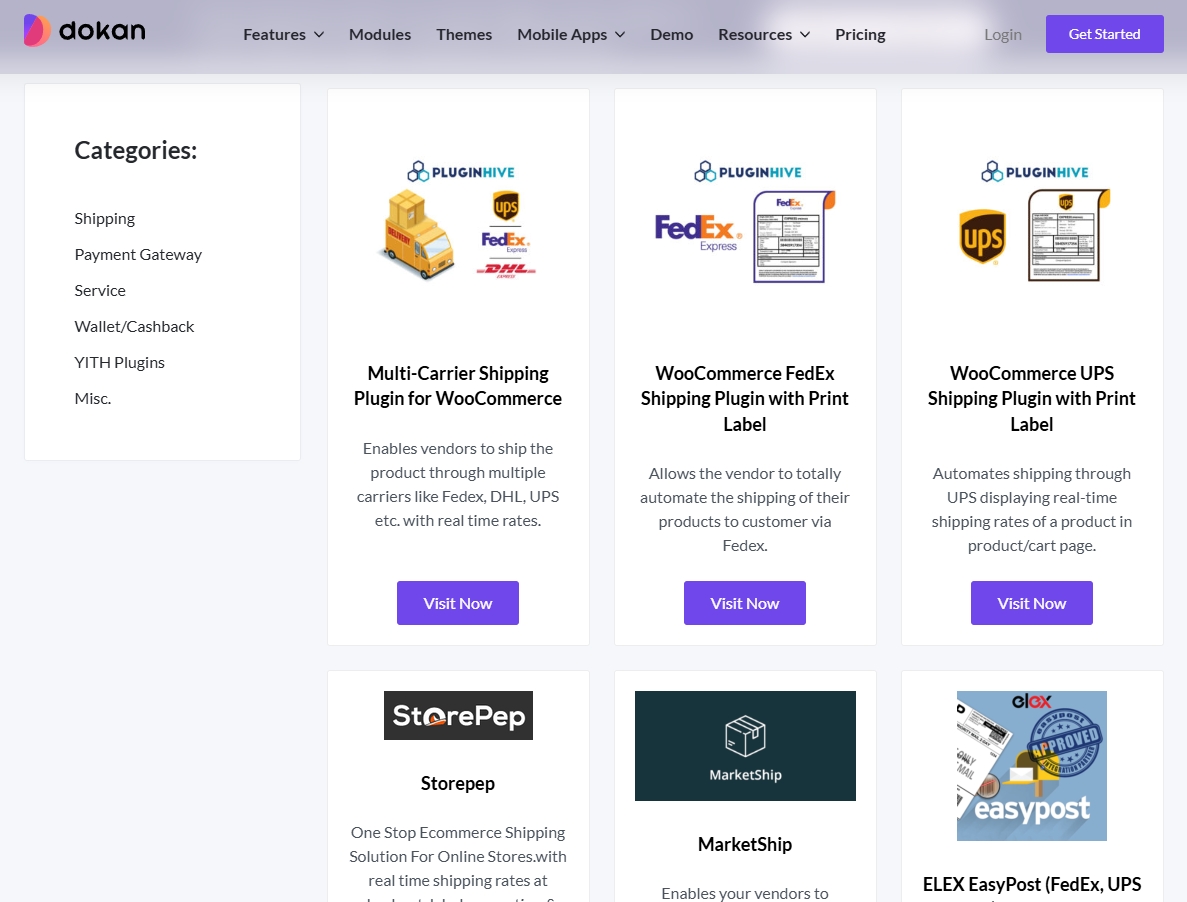
WC Vendors, on the other hand, takes a more curated approach to compatible plugins. Each one adds significant value to the core marketplace experience.
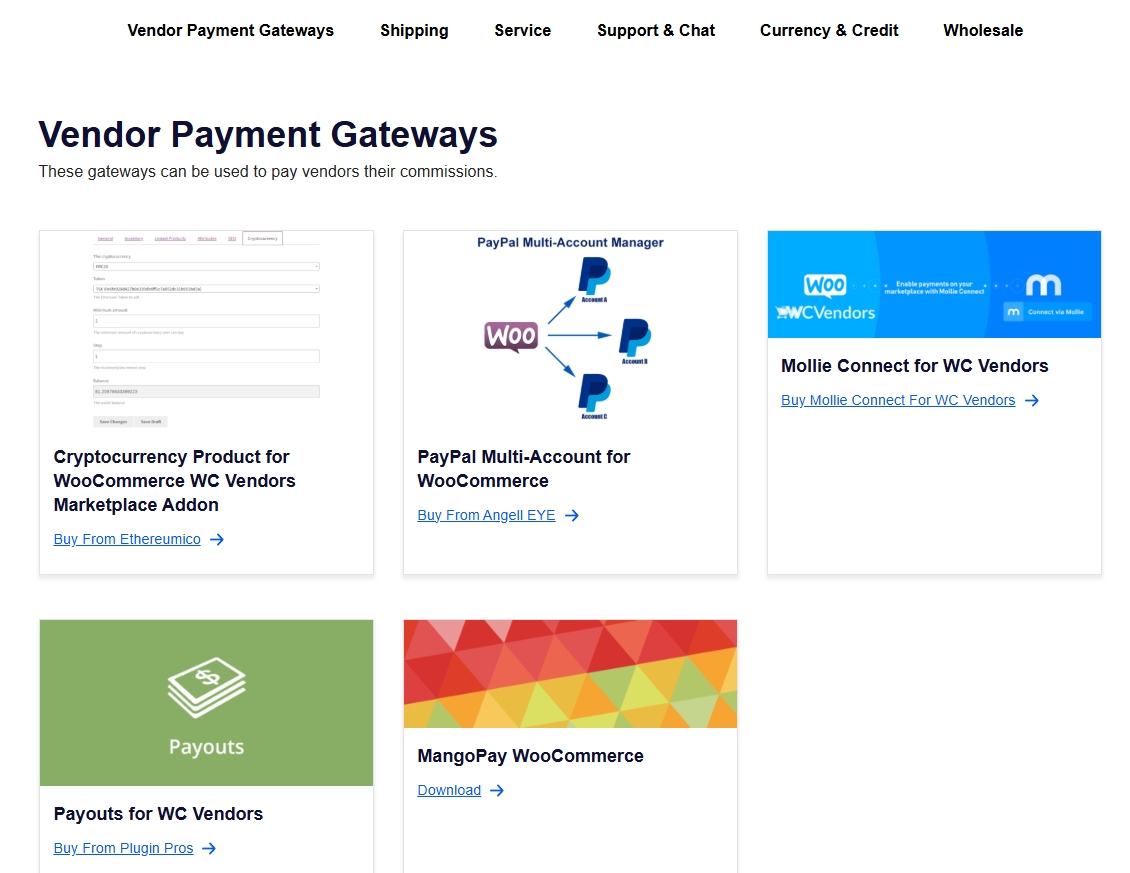
In the WC Vendors vs Dokan compatibility comparison, Dokan builds its own ecosystem of plugins, which can create vendor lock-in. WC Vendors works with standard WooCommerce extensions, so you get more freedom to choose the tools that fit your marketplace without being tied to one brand’s add-on library.
Pricing plan
Dokan’s pricing starts higher, and many essential features are locked behind its paid tiers.
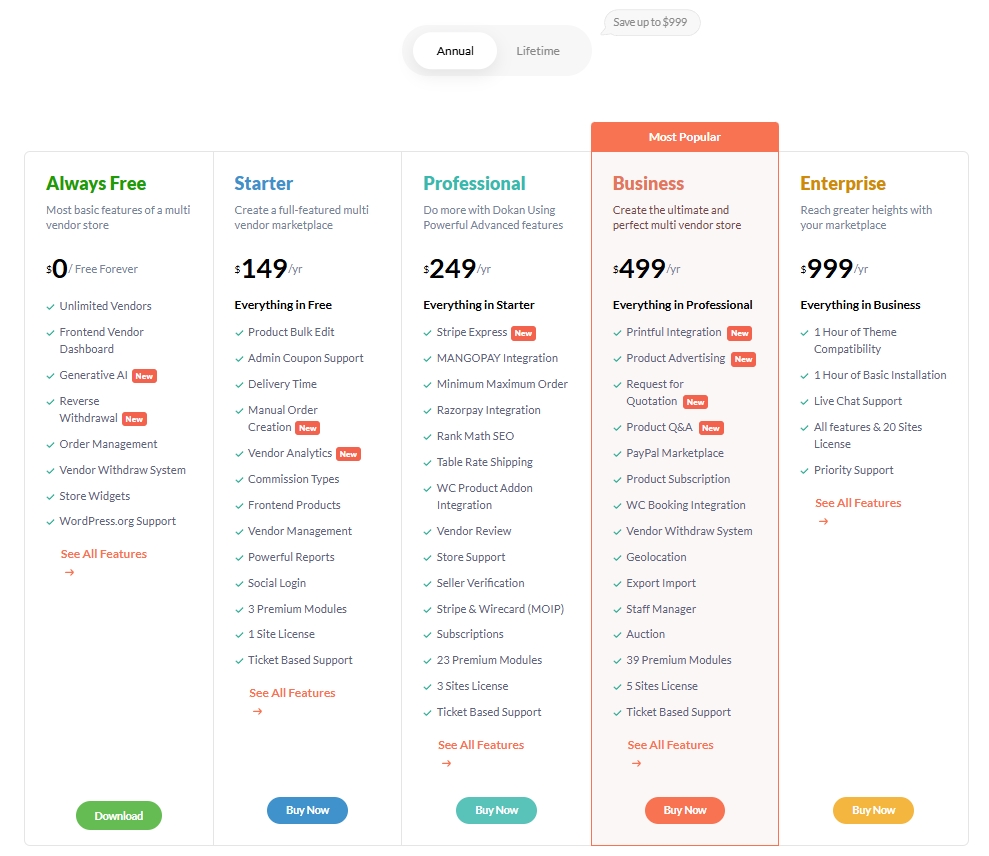
On the other hand, WC Vendors gives you more value right from the start. For about $99.50/year, the Pro plan already includes the essentials: a vendor dashboard, flexible commissions, payment options, shipping tools, and coupons. As I see it, WC Vendors’ higher plans also stay cost-effective as your marketplace grows. These upgrades remain below Dokan’s mid to top tiers, which range from $149 to nearly $1,000 annually. That means you can scale your business with WC Vendors without draining your budget, while still giving vendors the tools they need to succeed. In the WC Vendors vs Dokan pricing comparison, WC Vendors Pro at $99.50/year delivers more features than Dokan’s $149/year Starter plan—making it the clear value winner.
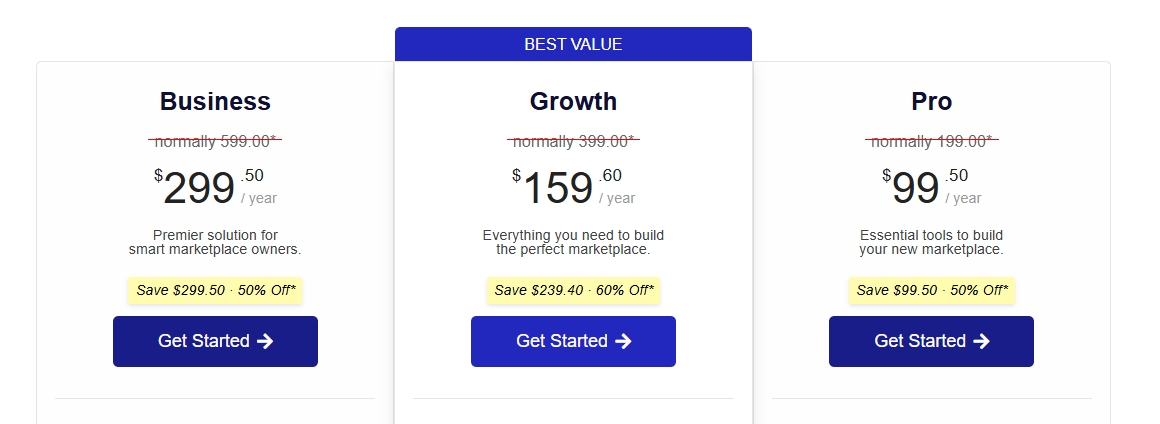
Visit our pricing plan and check out the corresponding features to see which package fits best for your marketplace.
💡 If you want to compare another major option before making a decision, take a look at our full WC Vendors vs WCFM comparison to see how the two platforms differ in day-to-day marketplace management.
Final Thoughts
After going through this comparison with WC Vendors vs Dokan, I can say that while Dokan covers the basics, WC Vendors consistently offers more—more commission types, more payment flexibility, more tax automation, and a lower price point. If you want real control over the parts that affect your revenue and vendor experience, WC Vendors is the best choice.
Let’s do a quick recap on what we discussed in this article:
WC Vendors vs Dokan: A comparison
- Vendor dashboard and user experience
- Payment system
- Commission management
- Handling taxes
- Coupons
- Compatibilities
- Pricing plan
Choose WC Vendors if you want lower entry pricing, all five commission structures available from day one, Stripe Connect payouts built into the base Pro plan, and a clean WooCommerce-native codebase that doesn’t lock you into proprietary modules. It’s the right call for most marketplaces, especially those still figuring out their commission model and not ready to commit $149/year before validating the marketplace concept.
You can switch from Dokan to WC Vendors later if you change your mind — WC Vendors includes a migration path.
To help you make a more informed decision, explore our case studies to see how marketplace owners have thrived using WC Vendors.
Frequently Asked Questions
Does WC Vendors have a frontend vendor dashboard like Dokan?
Yes. WC Vendors Pro includes a complete frontend vendor dashboard where vendors manage products, orders, payouts, and store settings without WordPress admin access. The dashboard ships in the Pro plan, alongside Stripe Connect payouts and the full commission system.
Can I switch from Dokan to WC Vendors?
Yes. WC Vendors publishes a complete migration guide at /migrate-from-dokan-to-wc-vendors/ covering vendor data, products, commission history, and Stripe Connect transition. Most marketplaces complete migration over a single weekend.
Which has better support — WC Vendors or Dokan?
WC Vendors is praised on WPBeginner and WordPress.org for top-notch support and 13 years of stable releases.
Is WC Vendors a good Dokan alternative?
Yes. WC Vendors is one of the best Dokan alternatives for WooCommerce. It offers more advanced commission types (percentage, fixed, tiered by sales volume, tiered by product quantity, and more), broader WooCommerce payment gateway compatibility, and a lower entry price at $99.50/year vs Dokan’s $149/year Starter plan. WC Vendors has been actively developed for 10+ years and is trusted by 8,000+ marketplace owners.
What is the main difference between WC Vendors and Dokan?
The main differences are commission flexibility and pricing. WC Vendors supports all 5 commission structures, including tiered commissions based on vendor sales, product sales or product price, while Dokan’s free version only supports percentage commissions and requires higher-tier plans for advanced options. WC Vendors Pro also includes tax management (TaxJar/Avalara integration) and broader payout options, including PayPal Express and escrow — features that Dokan charges extra for.
Is WC Vendors cheaper than Dokan?
Yes. WC Vendors Pro costs $99.50 for the first year and $199 a year at renewal, with unlimited vendors, the full commission system, vendor dashboards, shipping and coupons. Dokan’s cheapest plan with Stripe payout modules is Professional at $249 a year, so WC Vendors Pro costs less at list price every year.
Does WC Vendors have a free version like Dokan?
Yes. WC Vendors has a free version available on WordPress.org that includes vendor registration, a basic dashboard, percentage commissions, and support for simple, variable, and digital products. WC Vendors Pro adds advanced commission types, frontend dashboards, shipping management, and more — starting at $99.50/year with a 14-day money-back guarantee.
Can I migrate from Dokan to WC Vendors?
Yes, migrating from Dokan to WC Vendors is possible. WC Vendors uses standard WooCommerce data structures, so vendor products and orders remain intact. You’ll need to reassign vendor user roles and reconfigure commission settings. The WC Vendors support team can assist with migration planning — contact them via wcvendors.com/contact-us/.
Which is better for large marketplaces — WC Vendors or Dokan?
WC Vendors is better for marketplaces that need sophisticated commission structures and payment flexibility, regardless of size. WC Vendors offers greater control per vendor — particularly for marketplaces with complex tiered pricing or multiple product types (physical, digital, subscriptions, bookings, and auctions all supported in Pro).
Does WC Vendors support Stripe Connect?
Yes. The WC Vendors Stripe Connect gateway is included in WC Vendors Pro and every higher plan. It automatically splits payments between the marketplace and vendors, and pays vendors on Stripe’s default schedule, on a daily, weekly, every-2-weeks or monthly schedule, or manually when you trigger each payout. Unlike Dokan, which requires you to use their proprietary Stripe Connect module, WC Vendors’ Stripe Connect works within the standard WooCommerce framework.
Does WC Vendors have vendor reporting and analytics?
Yes. Vendors see their sales, orders, products sold and commission on the dashboard, with sales charts and recent orders. WC Vendors Pro also creates monthly vendor statements that vendors can generate themselves, plus a separate PDF invoice for each vendor’s items in an order. Admins get full commission records with due, paid and reversed statuses.
Is WC Vendors harder to set up than Dokan?
No. WC Vendors is built around the standard WooCommerce structure with no proprietary modules to learn, so the setup is straightforward for anyone already familiar with WooCommerce. Dokan markets a “complete marketplace in under 30 minutes” wizard, but that speed comes with a heavier, more opinionated feature set. For a clean, WooCommerce-native build, WC Vendors is the simpler foundation.

