
Great news! WC Vendors now has an AI-powered product moderation and review system through an integration with StoreAgent. In simple terms, AI content moderation helps you review product content faster by providing review results, a risk score, and actionable suggestions. This kind of vendor-facing automation is exactly the direction of AI vendor tools reshaping marketplaces in 2026.
In this article, I will walk you through what the feature is and what it does. I will also explain how it helps you as a marketplace owner and how it helps your vendors. After that, I will explain how to activate the feature and what to expect once it is on.
Let’s begin!
What Is AI Content Moderation?
When I say AI content moderation, we are talking about using AI to review text and content so it can spot problems faster than a human can. In a marketplace, that content is usually the vendor’s product title, description, and other details that show up on the product page.
So instead of you reading every line first, AI content moderation does an initial check and points out what looks risky or out of place. After that, you still decide what happens next: you can approve the product, ask for changes, or you can reject it from going live.
What makes this useful is the output. The system can give you:
- Review results that tell you what it noticed
- A risk score so you can quickly tell what needs attention first
- Suggestions that explain what should be changed and why it may be a problem
Because of that, you spend less time editing and analyzing small details in your marketplace and scanning every product from top to bottom.
How it benefits marketplace owners
If you run a multi vendor marketplace, you already know the hardest part is keeping quality consistent while vendors move fast. That is where AI content moderation helps a lot.
Here is what you get as the marketplace owner:
1. Faster reviews when the queue is full
Instead of starting from zero on every product, you start with the AI review results. As a result, you can focus on items that look risky first, then move to the easier ones.
2. More consistent rule checks
People get tired. People miss things. However, a system can check the same patterns without getting distracted. That helps you keep moderation rules consistent across vendors.
3. Cleaner product catalog over time
Spammy titles and messy descriptions make a marketplace look untrustworthy. With AI content moderation, you can catch low-quality listings earlier, so your catalog stays cleaner as you grow.
4. Less back and forth with vendors
A vague rejection message often causes long conversations. A clear note about what needs fixing usually speeds things up. Since the system can provide specific suggestions, your change requests can be more direct.
5. Better trust signals for buyers
When fewer bad listings reach the public catalog, buyers complain less. They also trust the marketplace more. Over time, that trust can matter as much as your vendor count.
Implementing specialized tools like this is a key component of a successful AI system integration for e-commerce platforms. By automating the review layer, you free up resources to focus on scaling your marketplace operations. If your current platform struggles to support these advanced capabilities natively, exploring the best Dokan alternatives can help you find a more robust solution.
How it benefits vendors
This feature is not only for admins. Vendors feel the impact too, especially when they are trying to publish products quickly.
Here is how it helps them:
1. Clear guidance on what to fix
With AI content moderation, vendors can get suggestions that point to the exact problem. That means less guessing and fewer revisions.
2. Less confusion about why a product was held
Many vendors get frustrated when a product stays pending, and they do not know why. However, when feedback is clearer, they understand what they need to change.
3. Faster approvals when their content meets the rules
When vendors follow the guidance and submit cleaner listings, approvals tend to move faster. At the same time, the review queue is easier to manage.
4. Suggestions appear in the workflow
Instead of hiding feedback in a long email thread, vendors can see review suggestions directly while editing the product. Because of that, fixing the listing feels more natural.
If you are thinking, “Okay, this sounds helpful, but how does it connect to WC Vendors and StoreAgent?” that is exactly what we will cover next.
How To Activate AI Content Moderation And Review System In WC Vendors (With StoreAgent Integration)
Step 1: Confirm prerequisites
Before you switch anything on, it helps to do a quick check. Otherwise, you might waste time clicking around and wondering why nothing shows up.
Here is what you need:
- WooCommerce is active and on the latest version.
- WC Vendors is active and on the latest version.
- StoreAgent is installed, activated, and most importantly, connected.
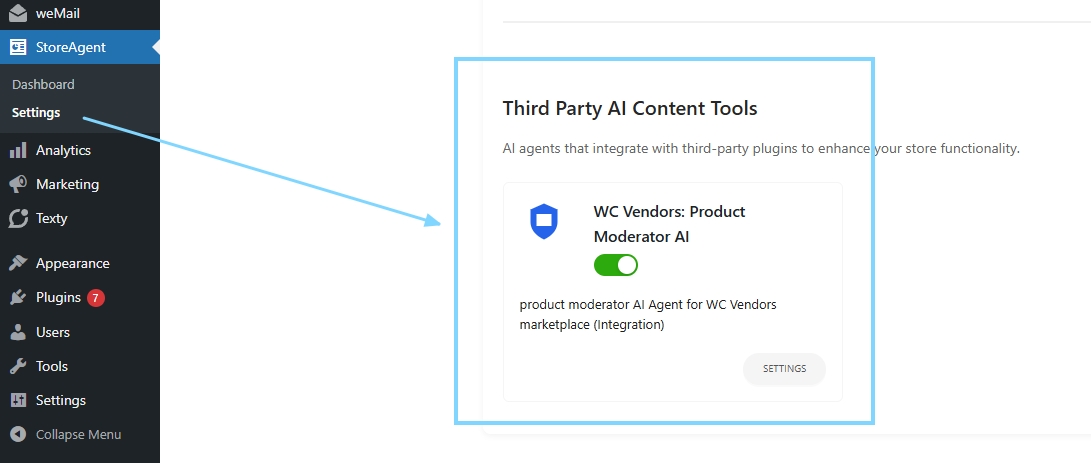
Also, do not forget to turn on WC Vendors: Product Moderator AI in StoreAgent settings. You can turn this on by: StoreAgent → Settings → AI Content Tools → Third Party AI Content Tools.
Step 2: Enable the AI Moderate capability
Once the basics are ready, you can turn the feature on inside WC Vendors. Go to: WC Vendors → Settings → Capabilities → General
Then look for the option that says: AI Moderate
Turn that on.
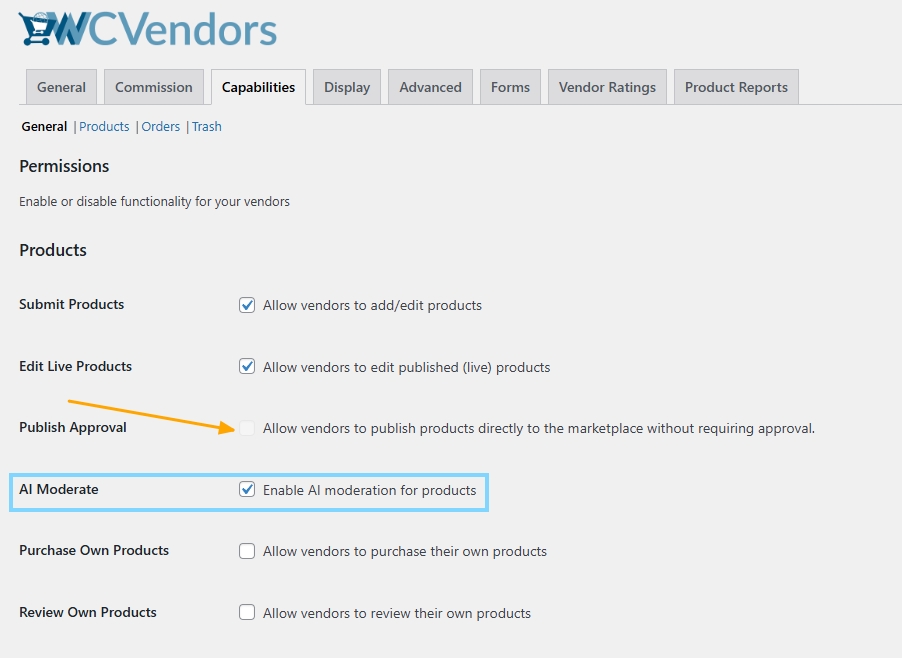
📝 Note: When AI Moderate is enabled, Publish Approval is automatically disabled.
After you enable it, you are telling WC Vendors that you want AI-based review data to be part of your product moderation flow. In other words, this is the switch that activates the AI content moderation layer for product submissions.
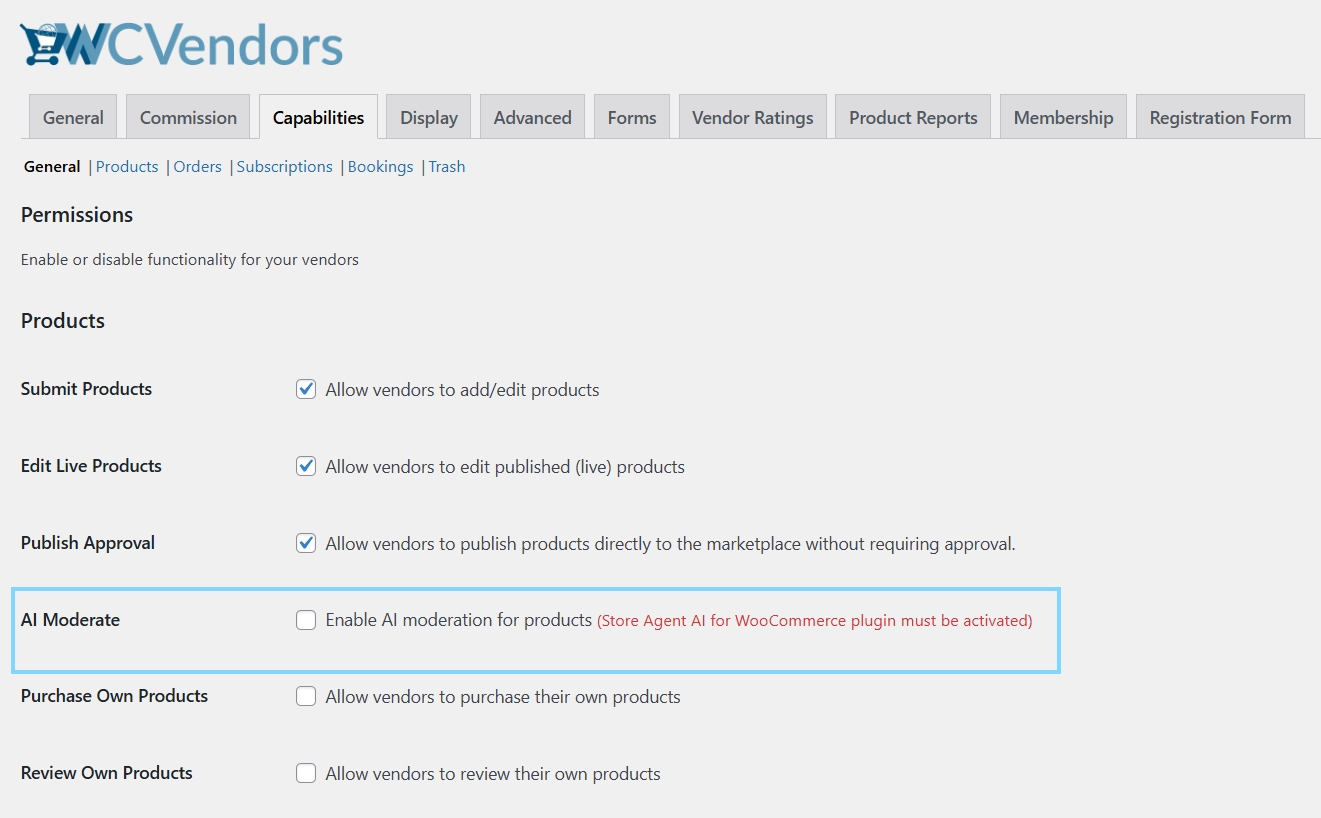
Also, as I’ve mentioned above, it’s important that you install and activate the Third Party Tool first from StoreAgent in order for you to activate AI Moderate in WC Vendors settings.
Step 3: Where to moderate products in the admin
You will see a Products menu under WC Vendors. This becomes your main place to handle pending product submissions. You may also notice a pending count badge, which helps you spot how many products are waiting for review.
From there, you can:
- View products based on status
- Filter by vendor
- Search for specific listings
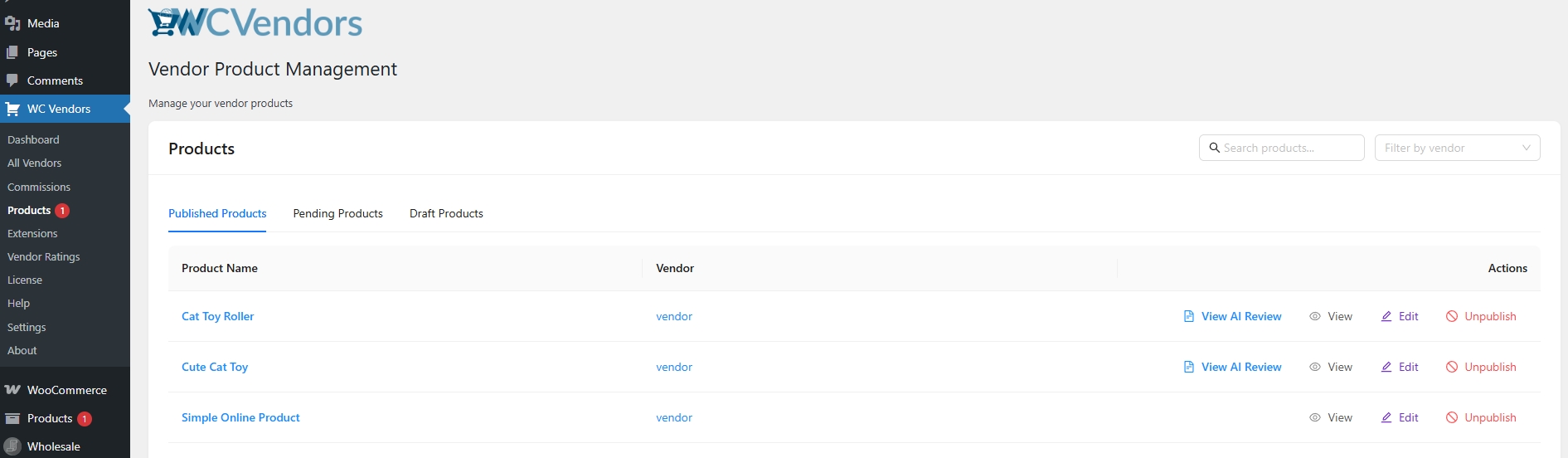
Step 4: Reviewing and taking action
When you open a product for review, you can access the AI review details through the review drawer. This is where you see the information that helps you make a quick decision.

You will typically see items like:
- Review status
- Risk score
- Feedback signals
- Audit-style results
- Suggestions tied to the product content
After you review that info, you can take action right away. The core actions are:
- Approve
- Request changes
- Unpublish
Bonus Tip: If a vendor’s overall account gets flagged and needs a manual review, you don’t have to hide their items one by one. You can easily configure your marketplace to auto unpublish vendor products when a vendor becomes pendingto safeguard your catalog.
Step 5: Request changes with optional AI suggestions
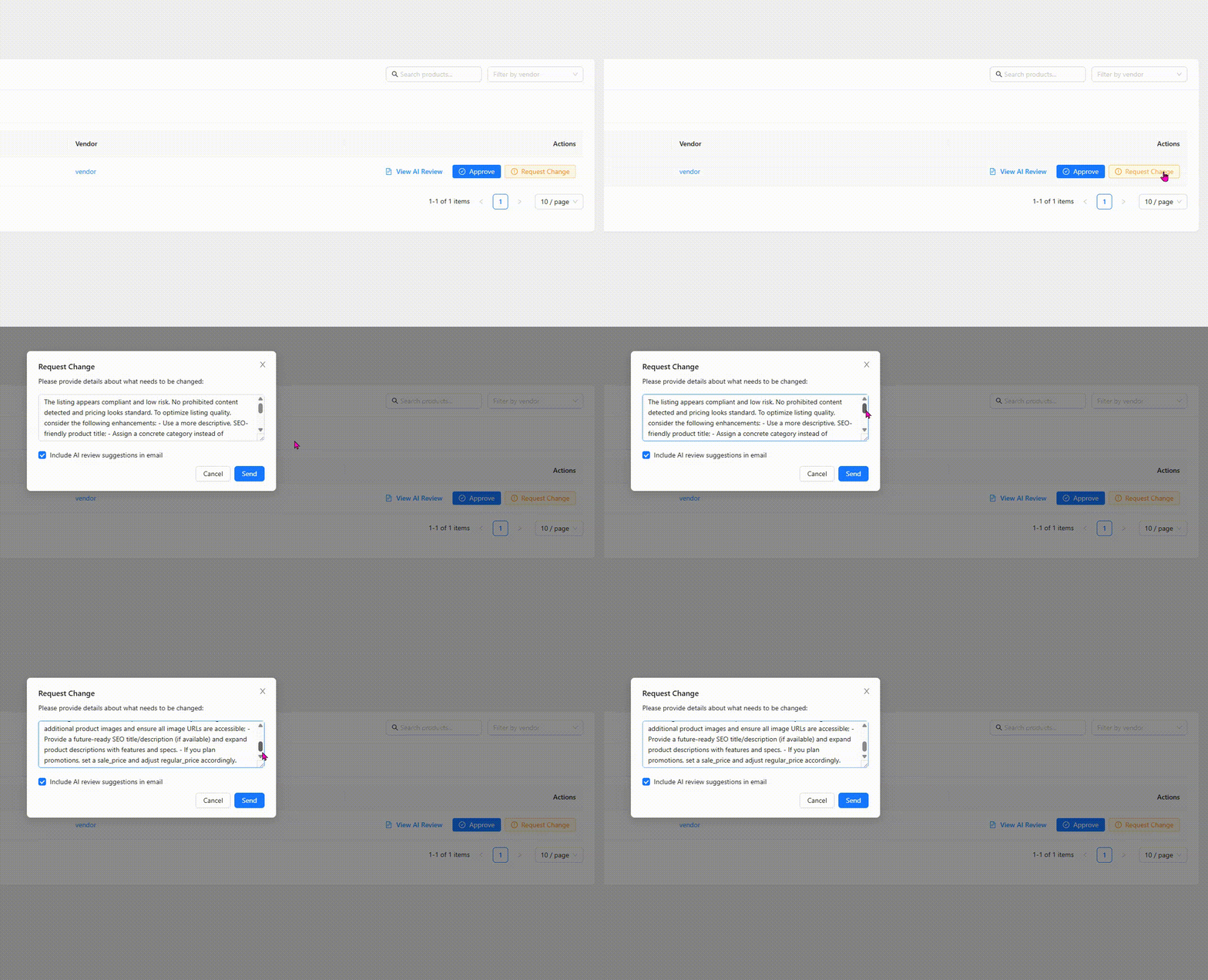
If a product needs work, you can use the Request Change action.
In that modal, you can write your own message to the vendor. You can also choose an option that includes AI review suggestions in the vendor email.
This option can be a big time saver.
Step 6: What vendors will see
Now let’s talk about the vendor side.
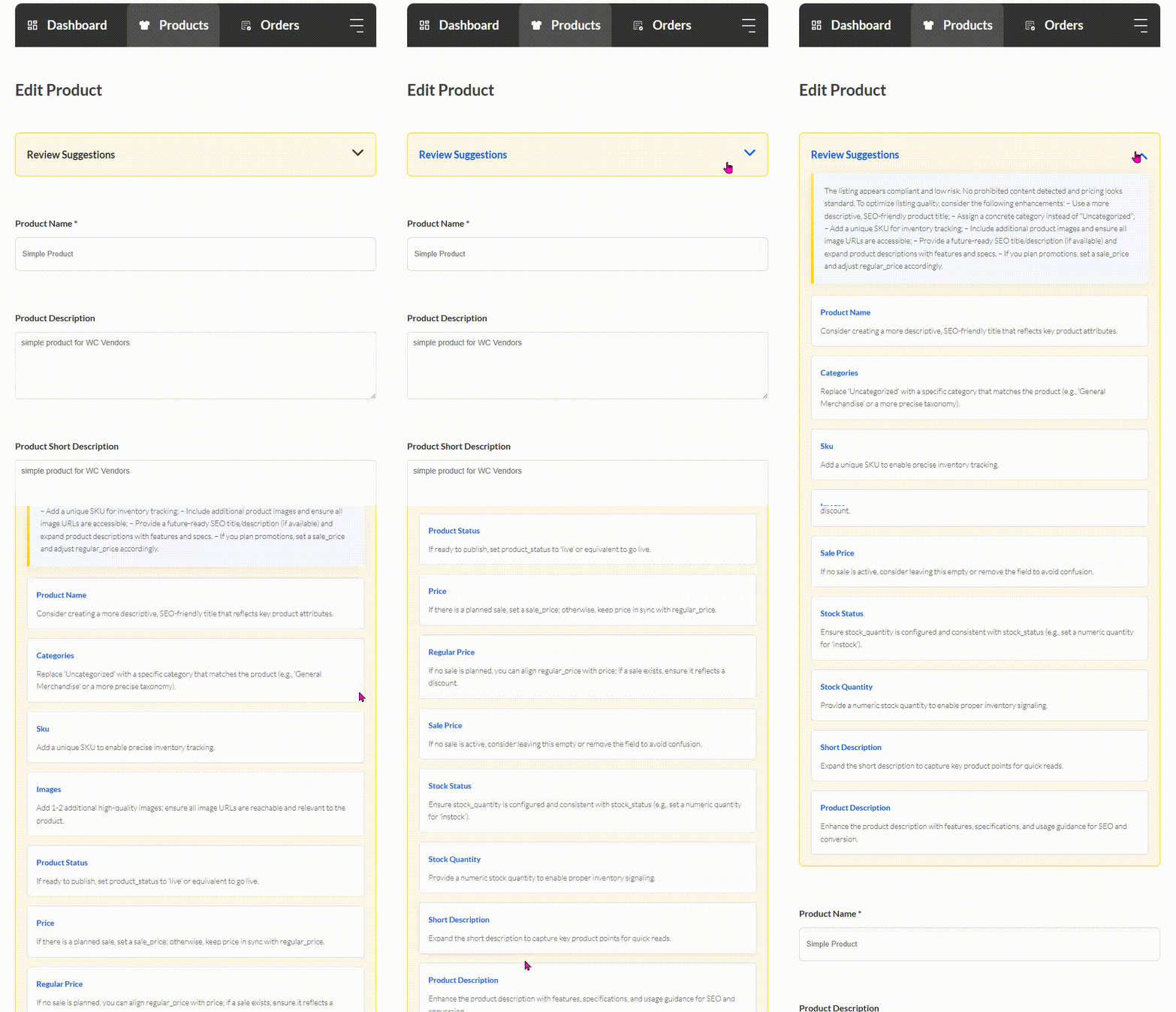
Vendors will see a Review Suggestions section inside their product edit form. The suggestions are organized by fields, so it is easier for them to connect feedback to the exact part of the product. For example, they may see notes tied to the title, the description, or other product details.
Because the suggestions are placed directly in their workflow, vendors do not need to guess what you want. They can edit, review the suggestions, and resubmit with more confidence.
📝 You can learn in-depth knowledge about StoreAgent Integration by clicking HERE.
Takeaways
From my perspective, this feature helps me review vendor products faster because AI content moderation gives me clear review results and a risk score, so I know what needs attention first. At the same time, I still stay in control because the AI does not entirely decide for me. I can still approve a product, request changes, or unpublish it.
Let’s look back on what I’ve discussed on this new feature so far:
On the vendor side, the direction now becomes clearer because Review Suggestions show up inside the product edit form, which makes fixes easier and reduces back and forth.
Lastly, my honest advice is to treat this feature like a helper that makes moderation more consistent, not like a shortcut that removes your role. AI content moderation works best when you combine it with clear marketplace policies and a review habit you can keep up with. If you do that, you get a cleaner catalog, fewer messy listings, and less back and forth over time.
Frequently Asked Questions
Does AI automatically approve or reject products?
No. AI content moderation does not make the final decision. It provides review results and guidance, but you still choose what to do next. You can approve the product, request changes, or unpublish it based on the information provided.
Can I include AI suggestions in vendor emails when requesting changes?
Yes. When you request changes, you can write your message and choose an option to include the AI review suggestions in the vendor email. This helps vendors understand what to fix faster, so there is less back and forth.
Why is Publish Approval disabled when AI Moderate is enabled?
Publish Approval is automatically disabled to keep the admin approval flow enforced. If products could be published without going through review, moderation would have gaps. With AI Moderate enabled, listings are meant to pass through an approval process, so you can review them before they go live.

