WooCommerce Multi-Vendor Marketplace Plugin Trusted For 10+ Years

Easily Build & Manage Your WooCommerce

Multi-Vendor Marketplace

Turn your WooCommerce store into a fully scalable multi vendor marketplace

with a streamlined setup and reliable workflows.

Marketplace Ready
WooCommerce Setup

Independent Vendor
Management Tools

Flexible Commission
System Setup

Order & Payout
Management

Works For All
Marketplace Models

FEATURED ON

The Multi Vendor Plugin That Simplifies WooCommerce Marketplace Operations

Start Your Marketplace Hassle-Free

Turn your WooCommerce store into a functioning multi vendor marketplace in just a few steps. No complicated setup, no confusing configuration—just clear tools that help you launch quickly.

Manage Vendors With Less Admin Work

Instead of manually handling products, stock updates, and order questions, you can give vendors the ability to manage their own stores. Get visibility and control, while vendors get the freedom to handle everyday operations.

Works For Any Marketplace Type You Want To Build

Whether you’re selling physical goods, digital downloads, services, subscriptions, or second-hand items, WC Vendors already supports your business model—flexible to adapt to whatever kind of marketplace you want to run.


Vendor Dashboard That Reduces Back-and-Forth

Every vendor gets access to a dedicated dashboard where they can manage their products, orders, and store settings. This gives vendors independence, and helps operations scale without needing a large support team.

Access To 100+ Payment Gateway Options

WC Vendors works with any WooCommerce-compatible payment gateway, giving your marketplace flexibility no matter where you operate. You can choose payment providers that fit your region, your fees, and your customers’ preferred payment methods.

Keep Orders And Payouts Organized

Get a central place to monitor vendor orders, track fulfillment, and manage commissions. You stay in command of operations without needing extra tools or spreadsheets.

Compatible With Hundreds of WooCommerce Themes and Plugins

Because WC Vendors is built on WordPress and WooCommerce standards, your marketplace works smoothly with the themes and plugins you already use. This gives you a familiar environment that’s easy to customize, easy to maintain, and supported widely across the WooCommerce ecosystem

Commission Options That Let You Earn Immediately

WC Vendors provides basic but effective commission options that let you earn from vendor sales from day one. This gives you a predictable revenue model while keeping things simple for vendors.

Build Any Type Of WooCommerce Marketplace

From physical products to digital downloads and recurring services, WC Vendors gives you the flexibility

to launch the marketplace model that fits your business goals.

Physical Goods Marketplaces

Like Amazon, Etsy, Ebay

Sell real-world products from multiple vendors under one WooCommerce store.

  • Ideal for electronics, fashion, handmade goods, and local sellers.
  • Vendors manage their own products, pricing, and inventory.
  • You earn commissions from every completed order.

Digital Product Marketplaces

Like Shutterstock, Envato


Support vendors selling downloadable and virtual products with ease.

  • Perfect for music, videos, software, graphics, and eBooks.
  • No shipping required, faster checkout for customers.
  • Automated order handling keeps operations simple.

Services & Subscription Marketplaces

Like TripAdvisor, Airbnb, CrateJoy, Birchbox

Enable vendors to sell services or recurring offerings in one platform.

  • Great for classes, consultations, memberships, and subscription boxes.

  • Vendors manage their own orders and customer relationships.

  • Recurring payments help vendors sell more while you earn consistently.

Second-Hand & Peer-to-Peer Marketplaces

Like Ebay, Facebook

Launch resale or community-driven marketplaces with confidence.

  • Works well for peer-to-peer selling, resale items, and collectibles.

  • Vendor profiles and reviews help build buyer trust.

  • Flexible commission rules ensure you profit as the platform grows.

How Real Multi-Vendor Marketplaces Use WC Vendors

See how other marketplace owners are using our WooCommerce Multi-vendor plugin

to grow their business. These case studies highlight real stores using WC Vendors

to manage vendors, products, and payments all within WooCommerce.

“Several vendors told us the new dashboard feels much easier to use. Uploading libraries is faster and more enjoyable. If you’re building a vendor-based marketplace and want something reliable that works out of the box, but also gives you room to grow, WC Vendors is a strong choice.”


— Tim McHugh, Founder of Sonniss

Set Up Your WooCommerce Marketplace With Ease And Confidence

Join thousands of WooCommerce stores using WC Vendors to manage vendors, products, and orders with ease
—your marketplace starts here.

What Marketplace Owners 💙 About WC Vendors

With 10+ years of marketplace experience, WC Vendors helps you build a multi vendor marketplace quickly

by giving vendors the tools they need for growing your WooCommerce marketplace.

Works For Niche Or General Marketplaces

Whether you’re selling physical goods, digital files, services, subscriptions, or second-hand products, WC Vendors adapts to your marketplace needs. You’re never limited by templates or rigid structures.

✅ Flexible product types included — Marketplace owners can support multiple categories without needing extra plugins or custom builds.​

✅ Scales as your categories evolve — You can expand into new product types anytime without restructuring your marketplace or changing your tools.

✅ Designed for easy experimentation​ — You can test new marketplace concepts or product types without worrying about breaking your store setup.​

Plays Well With Advanced Add-Ons

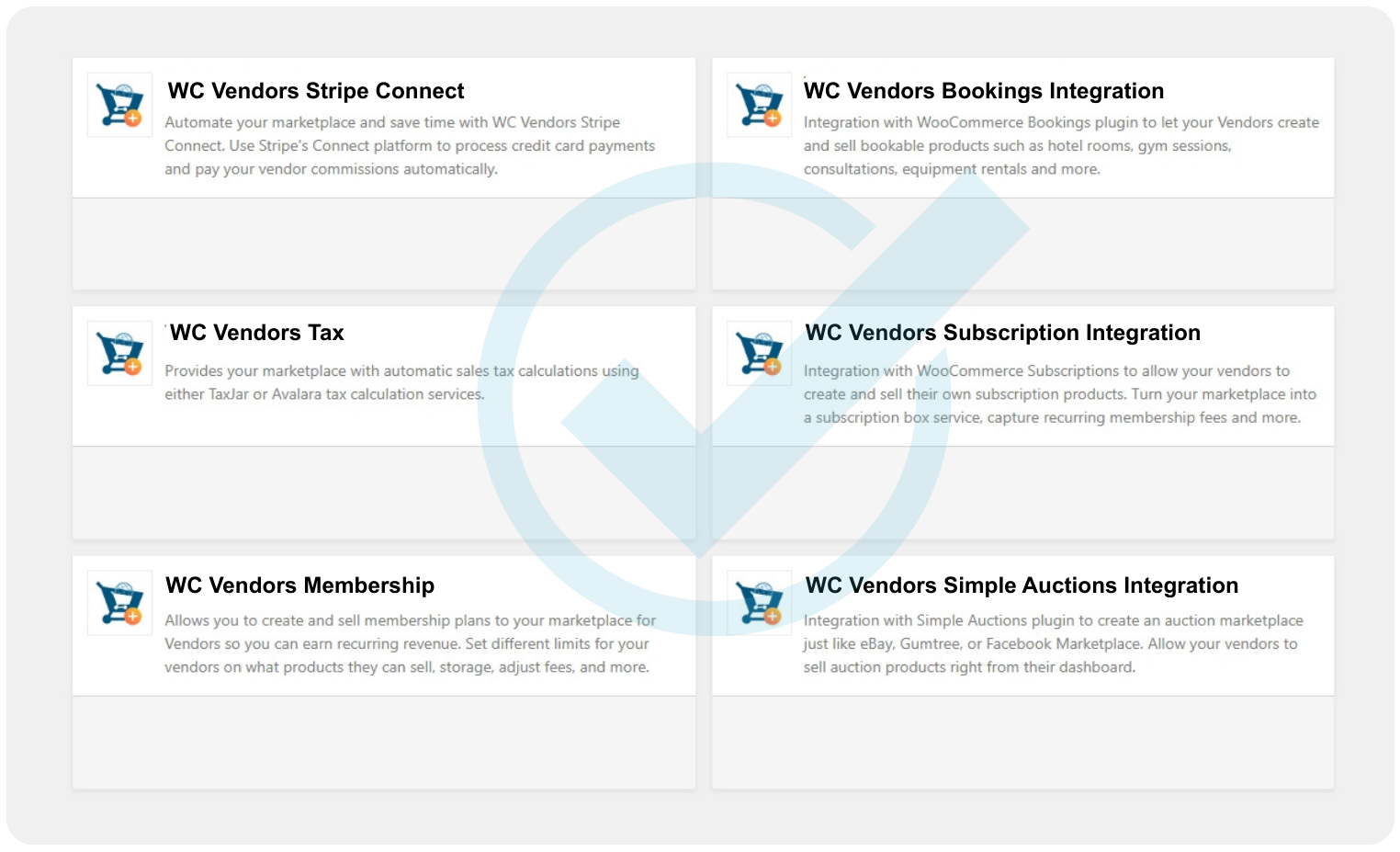
WC Vendors works seamlessly with WooCommerce extensions like Bookings, Subscriptions, Auctions, and Memberships—letting you expand your marketplace whenever you’re ready.

✅ Compatible with major marketplace extensions  — WC Vendors connects reliably with WooCommerce’s most powerful add-ons, so vendors can offer bookings, recurring subscriptions, auctions, and memberships without conflicts or custom scripts.

✅ Future features slot in naturally — You can add new marketplace models later without redesigning your site or changing your existing vendor flow.

✅Gives you long-term flexibility — Start simple, then add advanced marketplace features only when your business is ready for them.

Multiple Payout Options, Including Stripe Connect Support

WC Vendors supports Stripe Connect and other WooCommerce gateways, giving you full control over how vendors get paid.

✅ Flexible payout structures — Choose automatic, manual, daily, or scheduled payouts based on your marketplace policies.

✅ Smooth global payment workflows — Stripe Connect handles verification, identity checks, and multi-country payouts with ease.

✅ Transparent earnings tracking — Vendors always know when and how they’ll receive their commissions, reducing support questions.

Marketplace Structure Built Directly On WooCommerce Standards

WC Vendors builds directly on WooCommerce’s native architecture. This means your entire marketplace inherits the stability, flexibility, and plugin compatibility WooCommerce is known for, giving you a reliable foundation that grows naturally as WooCommerce evolves.

✅ Reliable integrations — Because WC Vendors stays close to WooCommerce’s core systems, this lets you customize your marketplace using the same extensions regular WooCommerce stores depend on.

✅ Fewer plugin conflicts — Using WooCommerce’s native structure minimizes compatibility issues, and reduces maintenance headaches. You spend less time troubleshooting and more time growing your community and vendor base.

✅ Stable marketplace behavior — Essential store functions behave exactly as WooCommerce intended. This consistency prevents unexpected behaviors and ensures that both vendors and customers get a seamless shopping experience.

Membership and Vendor Access Models Supported

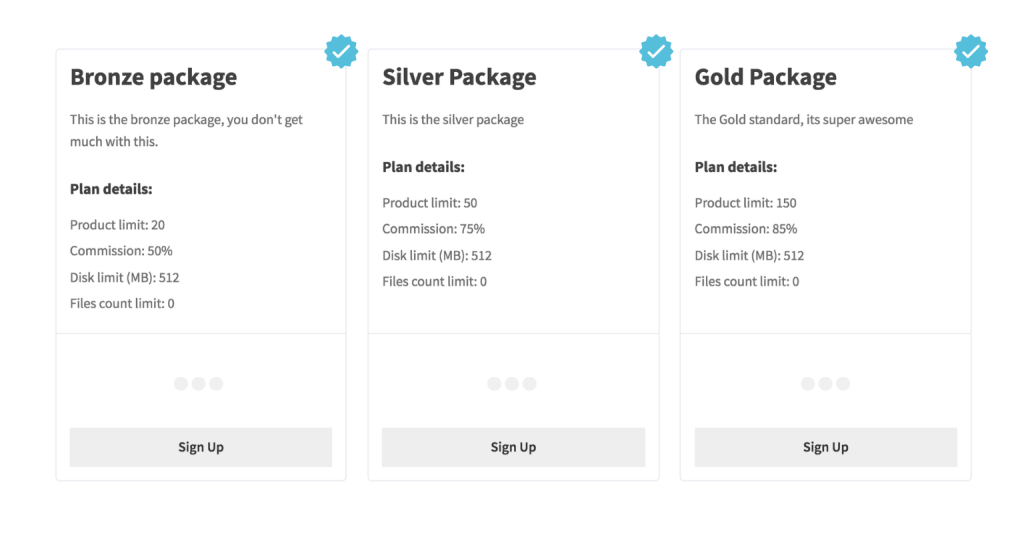
Whether you want to create vendor tiers, paid seller plans, or controlled-access setups, WC Vendors gives you a flexible foundation for managing seller access in a clear and organized way.

✅ Membership-based vendor levels — This is ideal for offering paid vendor plans, with additional privileges, all without custom development.

✅ Better vendor segmentation — By grouping vendors through memberships, you can easily organize sellers based on experience, subscription level, or business type.

✅ Improves overall marketplace quality —  Maintain higher standards across product listings, vendor behavior, and customer experience, resulting in a more trustworthy and professional marketplace.

Support You Can Rely On As Your Marketplace Grows

Running a marketplace comes with unique challenges, and WC Vendors is built with that in mind. Beyond the plugin itself, you’re supported by a team that understands vendor management, WooCommerce workflows, and real-world marketplace operations.

✅ Marketplace-specific expertise — WC Vendors support isn’t generic WordPress help. The team understands vendor onboarding, commissions, payouts, and marketplace structure, so you get answers that actually apply to your use case.

✅ Practical solutions — Support focuses on clear explanations and actionable steps, helping you resolve issues efficiently and keep your marketplace running smoothly.

✅ Strong self-serve resources — In-depth guides, setup walkthroughs, and feature documentation let you solve many issues on your own, reducing downtime and improving confidence.

Frequently Asked Questions On WC Vendors

Curious about how WC Vendors works for your marketplace? We’ve answered the most common
questions to help you understand what it can do for your store.

Yes. You can launch your marketplace using the free version of WC Vendors and upgrade to Pro, Growth, or Business plans as your marketplace grows. All paid plans come with a risk-free 14-day money-back guarantee, so you can explore advanced features with confidence and see if they’re the right fit for your marketplace.

To install the WC Vendors Marketplace plugin, follow these steps:

  1. Make sure you have WooCommerce installed, activated, and configured (version 4.0 or higher).
  2. Go to your WordPress admin area. Navigate to Plugins > Add New.
  3. In the search bar, type "WC Vendors". Click "Install Now" on the WC Vendors Marketplace plugin.
  4. After installation, click "Activate".

You can also use the setup wizard that appears after activation for a streamlined installation process.

Vendors manage their subscriptions in WC Vendors Membership through a dedicated Subscriptions menu added to the Pro Dashboard navigation after activating the plugin. This page lists all subscriptions belonging to the vendor in an informative table. Vendors can view subscription details by hovering over a subscription row and clicking the "View Subscription" link, which opens a popup with detailed information. They can also upgrade, downgrade, or cancel their plans, and see renewal or cancellation status. The system automates some management tasks, such as disabling product creation if a vendor exceeds their product limit. This setup allows vendors to easily handle their membership subscriptions and related options from their dashboard.

The requirements for WC Vendor Stripe Connect are:

  • WordPress and WooCommerce installed and configured
  • WC Vendors Marketplace
  • WC Vendors Pro (for some features)
  • A Stripe account for the marketplace connection
  • Standard Stripe accounts for vendors

You also need to follow the installation and configuration requirements before setting it up. 

The requirements for WC Vendors Membership are:

  • A self-hosted WordPress version 4.4 or higher
  • WooCommerce version 3.0 or higher (installed and configured)
  • WC Vendors Marketplace version 2.0 or higher (installed and configured)
  • WC Vendors Pro version 1.5.9 or higher (installed and configured)
  • WooCommerce Subscriptions version 2.4 or higher

Yes. WC Vendors integrates with WooCommerce Bookings, allowing vendors to offer services, appointments, rentals, or time-based products directly through their dashboards.

WC Vendors works with WooCommerce Simple Auctions, enabling vendors to create auction listings for bidding-based marketplaces such as collectibles or second-hand goods.

Build A Thriving Marketplace Today

Building a marketplace is a rewarding business where you get to help entrepreneurs just like yourself. WC Vendors give you everything you need to succeed.

Get Started With WC Vendors
Complete Your Purchase