

When running a multi-vendor marketplace, one of the most important areas is how sellers first join your platform. This step, known as the vendor registration process, sets the tone for all future interactions.
The vendor registration process acts as the gateway between your business and potential partners. Many marketplace owners do not realize how much time can be saved by improving this area. A clear process reduces back-and-forth communication, avoids repeated data entry, and helps vendors set up faster. The result is less frustration for vendors and less workload for you.
In WooCommerce marketplaces, tools like WC Vendors already include built-in features that make this step easier to manage.
In this article, you’ll learn how to make your WooCommerce marketplace more organized by improving the vendor registration process. By improving this foundation, your marketplace grows faster and establishes stronger partnerships with vendors who trust your system from the outset.
Why A Good Vendor Registration Process Matters For Marketplace Success
The vendor registration process plays a big part in shaping that feeling of eagerness to join. This initial step demonstrates to vendors that your system is well-organized and that you prioritize their experience.
A survey reported that 81% of people abandoned at least one online form, with many citing security concerns or the length as reasons.
When your marketplace makes joining easy to understand, it reduces drop-offs. That means more products, more activity, and more income flowing through your marketplace.
Think of it this way: your registration process is like a welcome mat. When it is clean, clear, and easy to walk on, visitors feel more encouraged to enter. The same idea applies to your vendors. The smoother their entry, the stronger your marketplace community becomes.
Common Challenges In The Vendor Registration Process
Running a marketplace is not only about attracting customers; it’s also about retaining them. While the vendor registration process may appear simple on paper, numerous hidden issues can make it more challenging for new sellers to complete the sign-up process. Understanding these problems helps you fix them before they push good vendors away.
1. Too many steps or fields
One common issue is having a form that feels too long. When vendors see ten or more boxes “required” to fill out, they may lose interest. Each extra field takes time and raises questions. Some might even think that your marketplace is challenging to join. Keeping only what is genuinely needed helps them complete the form faster.
2. Unclear requirements and documentation
Another problem is when vendors are unsure what information to prepare. If you request a document without explaining why it is needed, they may stop halfway and find it suspicious. Providing clear directions and concise notes beside each field helps them understand what to upload or type. A well-written guide beside the form also builds trust in your vendor registration process.
3. Manual approvals causing delays
Waiting for admin approval can be another pain point. Vendors want to start selling quickly, and every extra day of waiting can feel discouraging. If approvals take too long, vendors might forget about your site or move to another marketplace. Having a clear review schedule or partial auto-approval helps reduce frustration while maintaining a fair process.
4. Weak verification systems
Lastly, some marketplaces skip proper checks. Without clear verification, fake or spam vendors can sneak in. A fair system that verifies real contact details or emails protects both you and your vendors. A clear verification step also shows that your marketplace values safe and quality sellers.
How To Simplify Your Vendor Registration Process
There are many ways to make vendor registration clear, quick, and well-structured without losing control over who joins. Here are some things you can follow:
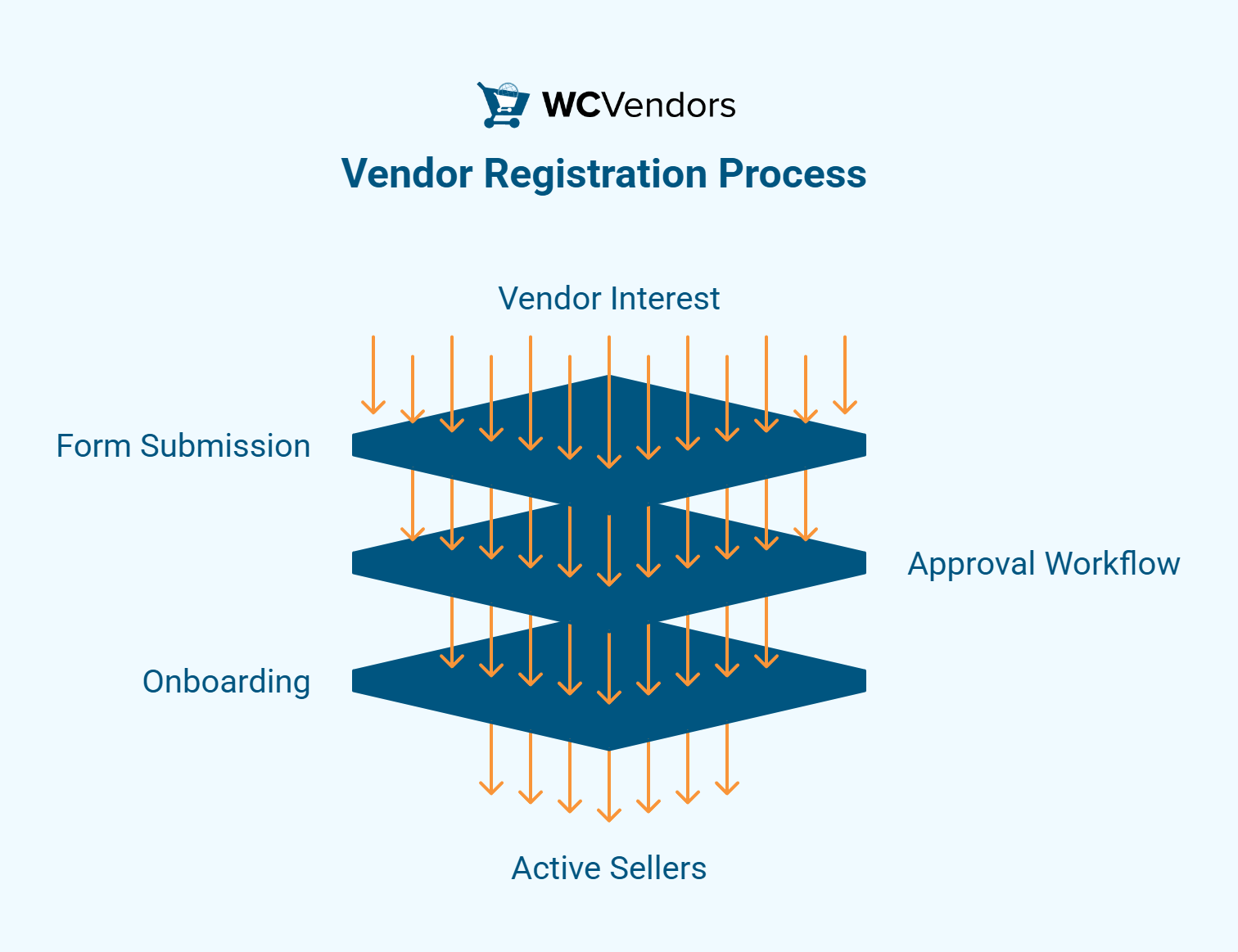
1. Use a dedicated vendor registration form
The first step is to provide vendors with a form specifically designed for them. Keep the form simple by asking only what is truly necessary, such as the store name, contact email, and payment details.
To make it easier, group related fields together and use short labels. Add clear notes when a field needs special input, such as “Enter your PayPal email” or “Provide your store logo.” This makes your vendor registration process smoother and easier to manage.
2. Automate the approval workflow
Once vendors submit their details, the next step is review and approval. Manual checks are fine, but performing them for every single vendor can be time-consuming. You can set up an approval system that allows you to accept trusted vendors more quickly while reviewing others later.
3. Provide clear instructions and eligibility guidelines
When vendors do not know what you expect, they can easily make errors. Avoid this by explaining the process before they start filling out the form. You can add a short message above the form stating what types of vendors you accept or what documents are required.
For example, you might say, “Please make sure your store is ready with product photos before applying,” or “Only vendors with active PayPal accounts can sell on our marketplace.” These simple reminders guide vendors and make the vendor registration process more transparent. Adding a short FAQ or a helpful tip beside each field can also help answer questions early.
4. Enable vendor self-onboarding after registration
Once vendors are approved, they should be able to get started right away. Providing them with instant access to a vendor dashboard enables them to upload products, set prices, and add shipping details immediately. This makes the onboarding journey smoother and keeps vendors excited to participate.
A self-onboarding flow saves time for everyone and helps vendors become active sellers almost immediately. This creates a sense of progress and makes them feel welcome in your marketplace.
Balancing Simplicity With Security
Making your vendor registration process simple should never mean ignoring safety. A marketplace grows only when both the vendors and the admin team feel secure. When you protect data and thoroughly verify vendor details, everyone benefits. It is possible to keep the process easy while still protecting your marketplace from risks.
Maintain compliance and fraud checks
In addition to basic verification, marketplaces must remain compliant with tax and legal regulations. This means verifying business information when needed. Some vendors may need to provide tax numbers or address details, and collecting this information correctly avoids potential problems later.
Protect marketplace data and payments
Data safety should always be part of your setup. Utilize secure connections, such as SSL certificates and anti-spam plugins, to safeguard user information. When vendors fill out your forms, they should feel confident that their personal details are safe.
WooCommerce already supports user roles that limit access based on permission levels. This means vendors can only reach parts of the site that belong to them. By establishing these rules, your vendor registration process becomes safer and more reliable for everyone involved.
Best Practices For A Better Vendor Onboarding Experience
Here are some practices that can make onboarding clear and enjoyable for everyone:
Keep communication open
Communication should not stop after registration. Sending an automatic welcome email is a great start. It tells vendors that their account is ready and gives them confidence that everything went smoothly.
You can include brief setup instructions in this message, such as how to upload products or set store details. Adding helpful links to guides or tutorials provides vendors with an easy way to find answers without needing to ask for help. This saves time for both the vendor and the admin team.
Offer quick start guides or tutorials
Even simple dashboards can feel confusing at first. Providing clear guides or short videos helps vendors learn more quickly. These resources should show how to upload products, manage orders, and view reports.
You can also create a “Getting Started” page that answers common questions. When vendors can learn independently, they become confident sellers who require less support later on.
Regularly test your registration flow
Sometimes, minor issues go unnoticed until someone points them out. Testing your registration flow regularly helps you catch problems early. Try signing up as a vendor yourself every few months. You may notice steps that seem unclear or sections that could be shortened.
You can also ask new vendors for feedback. A brief survey after sign-up helps you understand what worked well and what didn’t. This habit keeps your marketplace experience up to date and easy to follow.
How WC Vendors Streamlines The Registration Process
Even though each marketplace is unique, tools like WC Vendors can make vendor onboarding more organized and easier to manage. It was made for WooCommerce marketplaces that need clear systems for vendor sign-ups, approvals, and setup.
Here are some of the key features that help vendors register and get started:
Built-in registration forms for vendors
WC Vendors Signup includes a ready-to-use registration page that new sellers can fill out. This form can collect details such as store name, contact email, and payment information. Since it is already designed for vendor sign-ups, you do not have to build a new form from scratch.
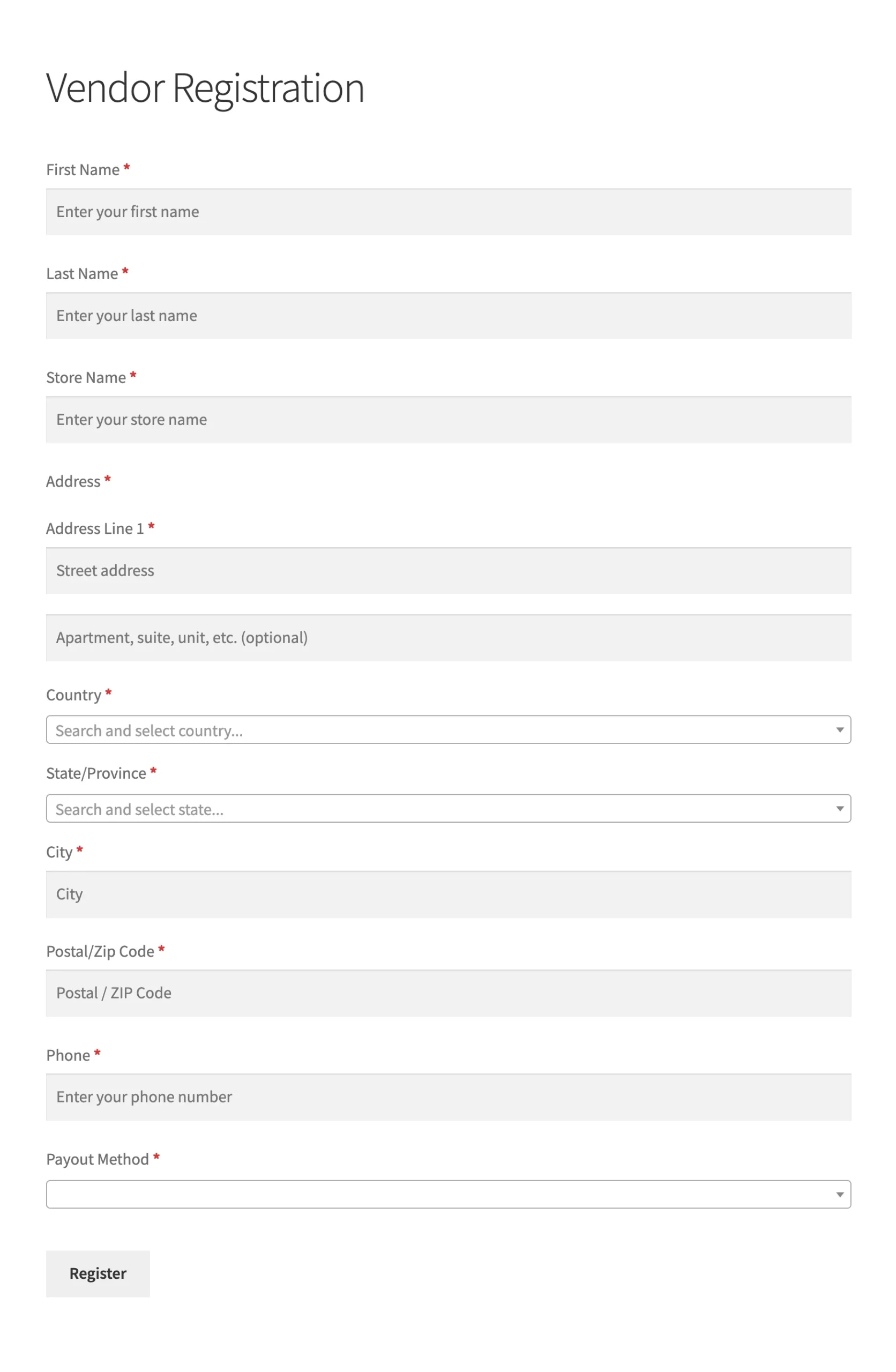
The form also supports customization. You can add or remove fields to match your marketplace’s needs. For example, if you only want vendors from a certain country, you can include a country field. This saves setup time while keeping your sign-up process clear.
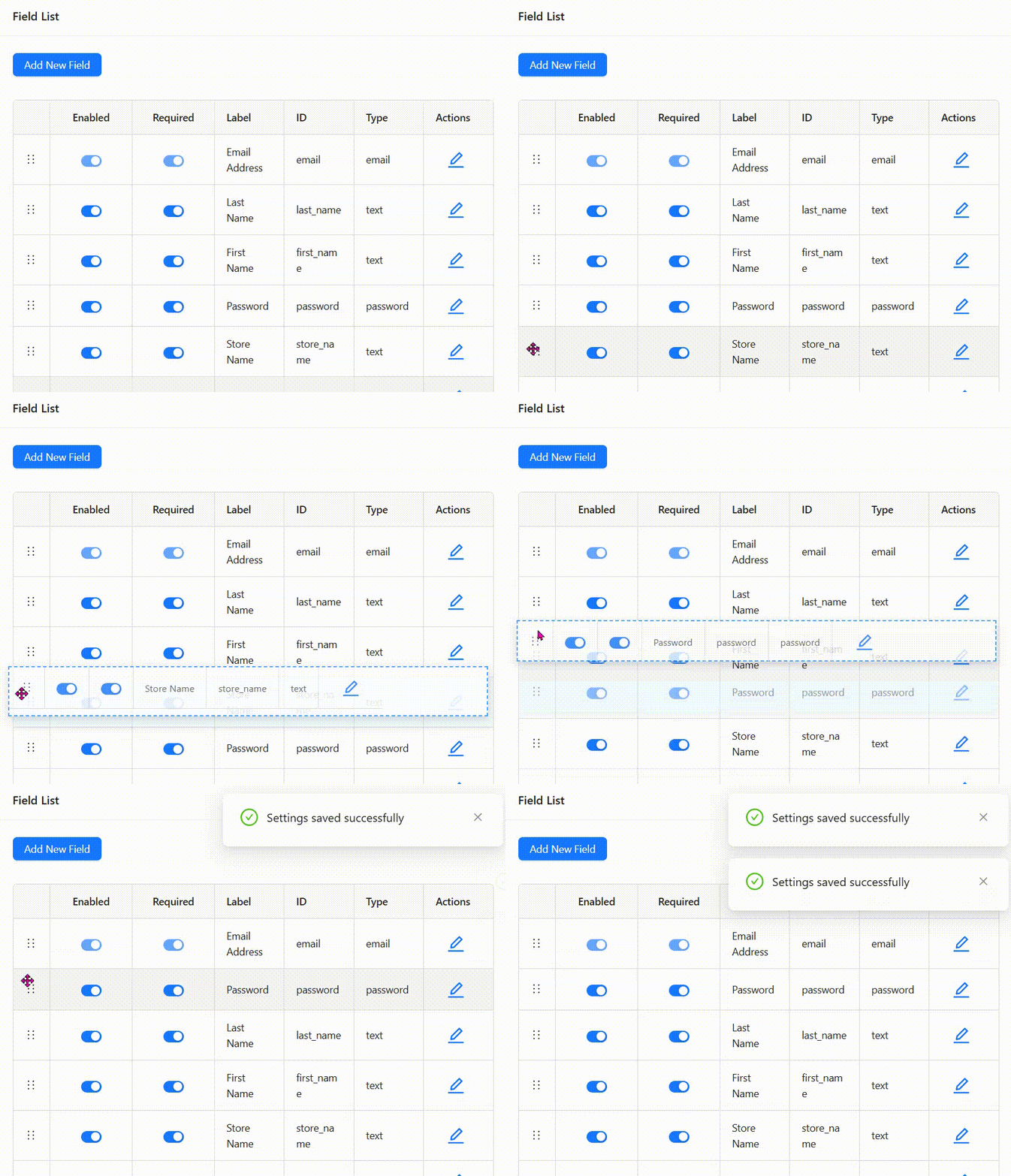
To know more about custom registration, you may read: Custom Registration Form For Vendor Onboarding.

Admin approval or auto-approval options
One of WC Vendors’ most helpful features is the control it gives admins over vendor approvals. You can choose between manual approval and automatic approval.
Manual approval allows you to review every application carefully before vendors can sell. This is ideal when your marketplace handles sensitive products or requires quality checks. On the other hand, auto-approval can be used when you trust your vendors or want faster onboarding.
Having both options helps strike a balance between speed and control. You can adjust your settings depending on how your marketplace operates.
Vendor dashboard for fast setup
Once vendors are approved, they can start working right away through the WC Vendors dashboard. From here, they can upload products, change prices, manage orders, and view earnings. The dashboard is simple and helps vendors understand how everything works without needing constant help from the admin team.
📝 Additional Note: You can try our Demo Site to explore all the WC Vendors Marketplace features live. Click HERE.
Conclusion
Running a WooCommerce marketplace takes planning and patience, especially when it comes to welcoming new vendors. A good start begins with a clear and friendly registration flow. This helps your marketplace grow steadily and reliably.
Let’s do a quick recap on what we discussed in this article:
- Importance of vendor registration process
- Common challenges
- Simplifying the vendor registration process
- Balancing simplicity and security
- Best practices
- How WC Vendors streamlines registration
WC Vendors Signup provides the tools that support all these goals. With its built-in registration forms, flexible approval options, and vendor dashboard, it gives marketplace owners an easy way to manage new vendors from start to finish.
When you focus on improving the start of the journey, you set the tone for lasting success. Every vendor who signs up with confidence adds more value to your community and strengthens the future of your marketplace.
Frequently Asked Questions
What is a vendor registration process?
It is the series of steps that a new vendor follows to join a marketplace. These steps include filling out a form, providing business details, and waiting for admin approval. The goal is to collect accurate information and make sure each vendor is real and ready to sell.
How can I simplify vendor onboarding in WooCommerce?
You can make onboarding easier by using clear forms and short instructions. Group related fields together and remove anything that is not needed. Adding a simple dashboard for vendors to upload their products also helps them start faster.
Does WC Vendors support automatic vendor approval?
Yes, WC Vendors includes a feature that allows automatic approval for new vendors. You can turn it on if you want faster onboarding, or keep manual approval if you prefer to check applications yourself. This gives you control over how vendors join your marketplace.
What should I include in a vendor registration form?
Ask only for the most important information. Examples include store name, contact details, payment method, and product category. Avoid asking for too many details at once. This helps vendors finish the form easily and keeps your system organized.

