

As more marketplaces grow, not every seller who signs up is a good fit. Some vendors may be fake, careless, or simply unprepared to sell responsibly. This is why a vendor verification process matters from day one. When a marketplace opens its doors to many sellers, it also opens the door to risk if no checks are in place.
It only takes one bad vendor to cause problems. These issues hurt buyer trust and damage the marketplace brand. Even if most vendors are honest, customers remember bad experiences more than good ones. That is why marketplaces cannot rely on luck or manual judgment alone.
A vendor verification process works best when it is treated as a system, not a one-time task. It should be clear, repeatable, and documented so every vendor is reviewed the same way.
We’ll break this down further in the sections ahead.
Vendor Verification Process & Its Importance
A vendor verification process is the set of steps a marketplace uses to confirm that a seller is real, legitimate, and allowed to sell on the platform. It helps marketplace owners check who they are working with before letting a vendor list products or receive payouts. Instead of relying on trust alone, verification gives structure and consistency to seller approvals.
It is important to understand how verification differs from other vendor-related steps.
A vendor verification process happens before or alongside onboarding. It answers a more basic question. Should this vendor be allowed to sell at all?
Verification usually involves reviewing documents and details that show a vendor is operating legally. This may include identity checks, business registration documents, tax information, and payout details. Some marketplaces also review the types of products a vendor plans to sell to confirm they meet platform policies. These checks help reduce the risk of fraud, chargebacks, and policy violations.
Risks Of Weak Or No Vendor Verification
Weak checks may look harmless at first, but they often create problems that grow over time. When sellers are allowed in without proper review, the marketplace absorbs risks that are difficult to reverse. A clear vendor verification process helps prevent these issues before they affect buyers and the platform.
1. Fraudulent vendors and payment abuse
One major risk is allowing fraudulent vendors to operate freely. These sellers may accept payments and fail to ship products. Buyers then file refund requests and disputes. The marketplace must step in to handle complaints and chargebacks. Over time, repeated cases like this reduce customer trust and strain platform resources.
2. Counterfeit and non-compliant products
Another issue involves product quality and compliance. Vendors may list counterfeit items, unsafe goods, or products that violate marketplace policies. Even if the platform did not approve these listings directly, buyers still associate the problem with the marketplace. Negative reviews and poor ratings can follow, which hurts long-term reputation.
3. High refunds and chargeback exposure
Vendors with frequent refunds or chargebacks can create serious financial risk. Payment providers may flag the marketplace for review or place limits on payouts. Without a structured vendor verification process, these warning signs are often missed until the damage is already done.
4. Long-term impact on the marketplace
These risks affect more than daily operations. Lost revenue, higher support volume, and declining trust all add up. This is why verification should never be handled casually. A documented and repeatable vendor verification process gives admins a consistent way to approve vendors and protect the platform as it grows.
Designing Your Vendor Verification Process
A clear workflow makes a vendor verification process easier to manage and easier to explain to sellers. Instead of handling each application differently, marketplaces benefit from one standard flow that everyone follows.
Step 1: Vendor registration and submission
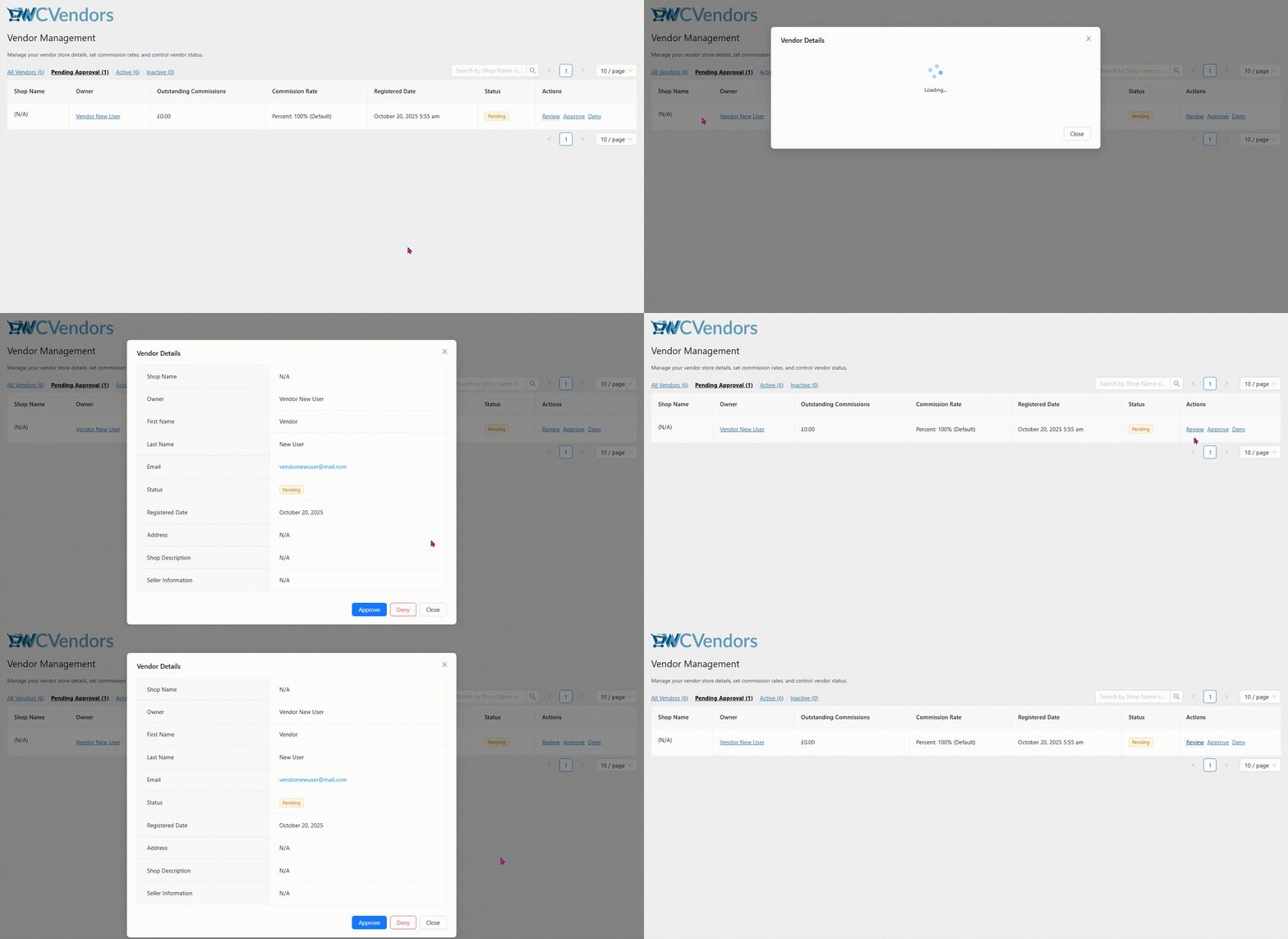
The workflow starts when a vendor submits a registration form along with verification details. These details may include identity information, business documents, and payout data. Once submitted, the vendor account is placed in a pending state. At this stage, access is limited, so the vendor cannot publish products or receive payouts yet.
Pending approval and restricted access
While in pending status, vendors can view their dashboard, but cannot perform selling actions. This step protects the marketplace while admins review information. It also sets clear expectations for vendors that approval is required before selling begins.
Step 2: Admin document review
Next comes the admin review phase. Marketplace admins check submitted documents and vendor details in one place. They confirm that information is complete and aligned with marketplace rules. If something is missing or unclear, admins can request more information instead of rejecting the application right away. This keeps communication clear and avoids unnecessary reapplications.
Step 3: Approval or rejection decision
After review, the admin approves or rejects the vendor. Approval unlocks permissions such as product listings and payouts. Rejection should always include a reason so vendors understand what went wrong. Clear feedback helps serious sellers correct issues and apply again properly. This step is a key moment in the vendor verification process because it sets expectations for future behavior.
Step 4: Ongoing checks and monitoring
Verification does not stop after approval. Marketplaces benefit from periodic checks and ongoing monitoring. This may include reviewing performance, checking for expired documents, or watching for risk signals. Many platforms support this step by creating an internal checklist or SOP document based on the workflow.
How WC Vendors Supports Vendor Verification
After defining the workflow, the next step is to apply it in WooCommerce. This is where WC Vendors helps streamline vendor verification. It gives marketplace owners tools to review vendors, control access, and approve sellers only when requirements are met.
Manual & automatic vendor approvals and pending states
WC Vendors allows marketplace owners to choose between manual approval and automatic approval for vendors. This flexibility helps marketplaces match their vendor verification process to their risk level and business goals.
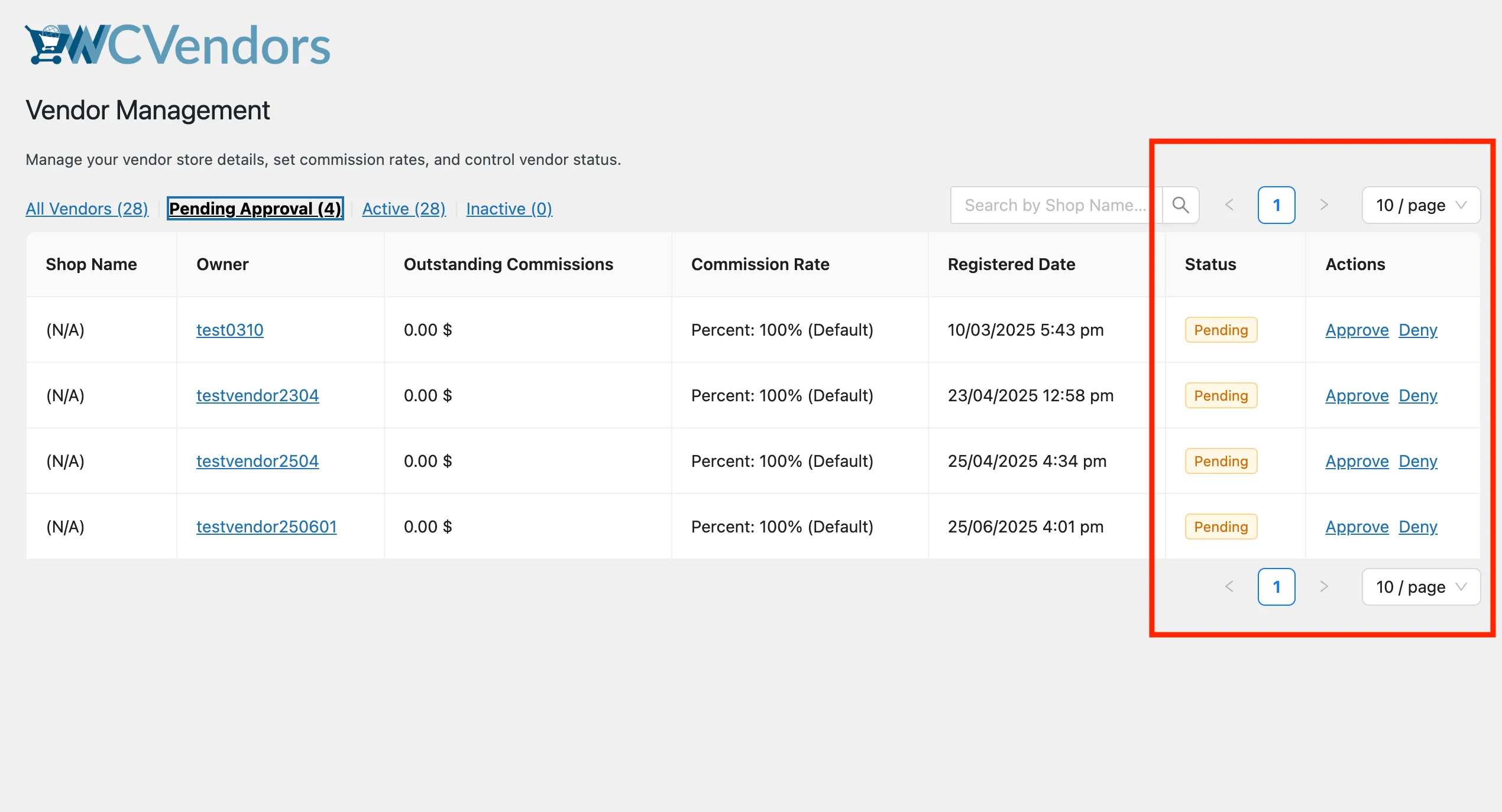
With manual approval enabled, vendor applications remain in a pending state until an admin reviews the submitted details. During this time, vendors cannot publish products or receive payouts. This option works well for marketplaces that require document checks or stricter compliance before allowing sales.
For lower-risk marketplaces, WC Vendors also supports automatic approval. In this setup, vendors can be approved as soon as they complete registration. Marketplace owners often combine automatic approval with limited permissions. For example, vendors may create profiles but cannot publish products until additional checks are completed.
Vendor application and registration fields
WC Vendors supports custom registration fields for vendor applications. Marketplace owners can collect details such as legal names, business information, tax data, and payout details. These fields can be grouped by purpose, which helps admins review information faster and keeps the vendor verification process structured.
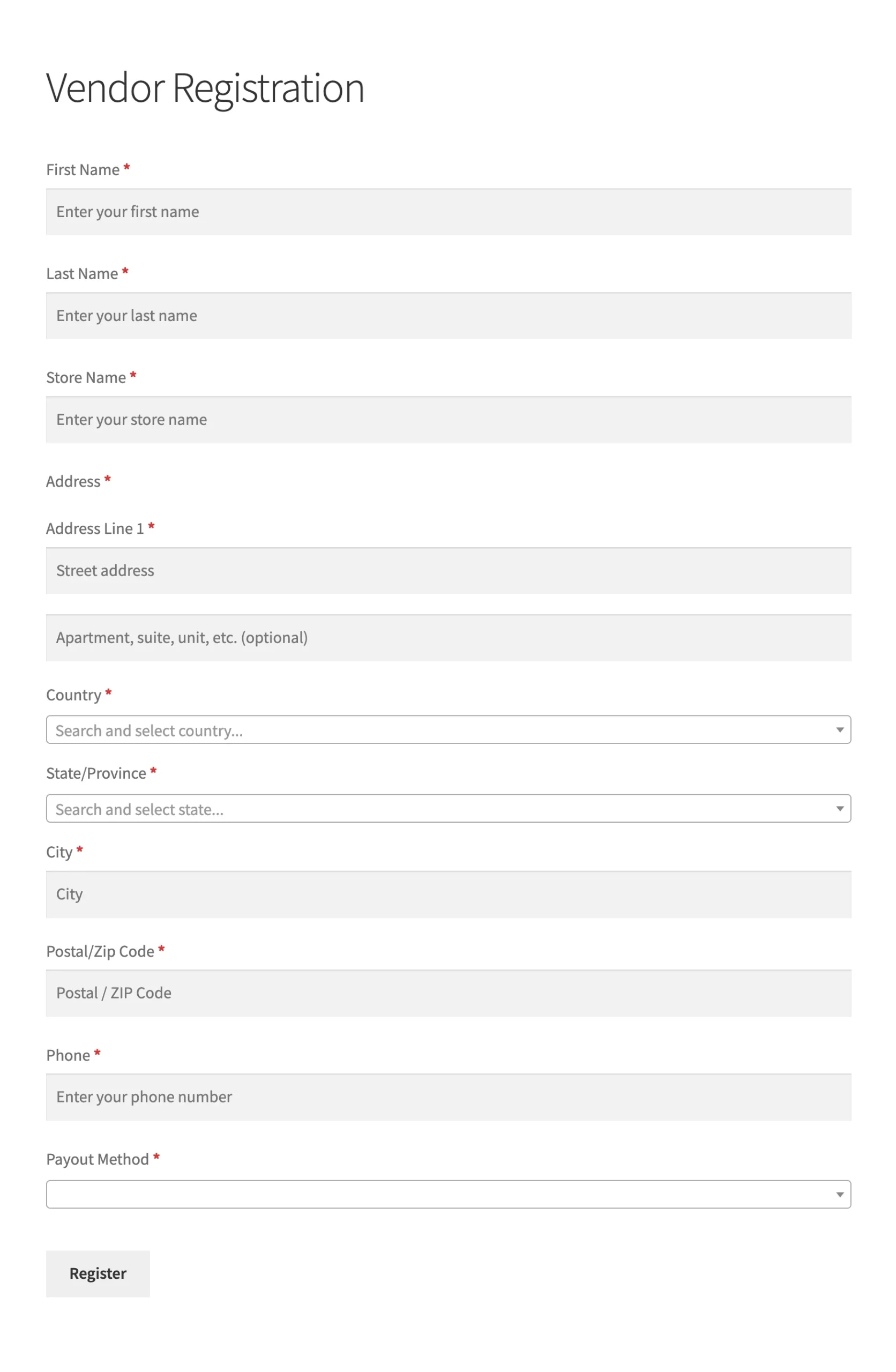
Organizing fields into identity, business, compliance, and payout sections also helps vendors understand what is required. Clear forms reduce mistakes and shorten review time.
You may also read: Custom Registration Form For Vendor Onboarding.

Vendor approval review screen
WC Vendors includes a vendor approval review screen that shows key vendor details in one place. Admins can review names, addresses, business descriptions, and submitted information without jumping between pages. This view supports faster and more accurate decisions, especially for teams handling many applications.
Controlling access until verification is complete
Marketplace owners can limit what vendors can do before approval. Unverified vendors can be blocked from publishing products, running promotions, or requesting payouts. Access can also be paused if documents expire or risk signals appear. This keeps the vendor verification process active even after initial approval.
Other Related Articles
Takeaways
Marketplaces that treat verification as a system tend to perform better in the long run. Instead of reacting to problems, they prevent them early. Clear workflows, regular checks, and fair reviews help reduce disputes, refunds, and support issues. A robust vendor verification process also helps serious vendors stand out, thereby improving overall quality across the platform.
Here’s a recap on what we have discussed so far:
- Verification process & its importance
- Risks of weak or no vendor verification
- Designing your vendor verification workflow
- How WC Vendors supports vendor verification
If you are running a marketplace today, this is a good time to review your current approach. Check whether your verification steps are documented, repeatable, and easy to explain to vendors. Use WC Vendors settings to apply approvals, control access, and monitor sellers over time.
When done right, a vendor verification process supports growth while protecting everyone involved. That is a solid way to build long-term trust.
Frequently Asked Questions
Is vendor verification the same as vendor registration?
No. Vendor registration is just creating an account. Vendor onboarding helps sellers get ready to sell. A vendor verification process decides whether a seller should be allowed to sell at all.
What happens if a marketplace skips vendor verification?
Without verification, marketplaces face higher risks such as fraud, counterfeit products, and chargebacks. These issues often lead to negative reviews, higher support costs, and loss of buyer trust.
What documents are usually required during vendor verification?
Common requirements include government IDs, business registration documents, tax information, and payout details. Requirements may vary based on location and product category.
Can vendor verification be automatic?
Yes. Some marketplaces allow automatic approval for low-risk vendors. This is often combined with limited permissions so vendors cannot sell fully until further checks are completed.
Can vendors sell while they are still under review?
Marketplace owners can choose. Some allow profile setup only, while others block product listings and payouts until approval is granted.
What should vendors do to pass verification faster?
Vendors should prepare documents early, complete their profiles fully, respond quickly to admin questions, and be honest about their business and products.
Is vendor verification required by law?
In some regions and industries, certain checks are required by law. Even when not legally required, verification helps marketplaces operate more safely.

