


Think about the last time you visited an online store that looked messy. The text was hard to read, the product page felt crowded, and nothing about it made you want to keep browsing. Most people leave sites like that within seconds. Now, compare that to a marketplace with a clean layout, clear images, and a design that feels well put together. That difference often decides who earns a sale. That’s where WooCommerce theme customization becomes important.
For any marketplace that wants to grow, design is not something extra, but a core part of success. It shapes how vendors present their products and how buyers move through the site. A marketplace that looks professional and easy to use can encourage more people to browse, interact, and eventually, buy.
In the following sections, we will teach you the importance of WooCommerce theme customization (why design matters for marketplaces) and how tools like WC Vendors make it easier to create a marketplace that looks unique and works well for both vendors and customers.
Why Marketplace Design Matters
A marketplace is not only about products. The design of the site sets the mood for both buyers and vendors. Let’s explain this thoroughly:
1. Customer trust and first impressions
A neat layout, clear product pages, and colors that feel right can help attract customers’ attention right away. A marketplace that looks professional gives shoppers confidence that their time and money are worth it.
2. Vendor branding and professionalism
Vendors also benefit from a well-designed marketplace. A strong layout gives them a stage where their products look professional. If vendors can customize WooCommerce storefronts with their own banners or colors, they can show off their brand without breaking the overall flow of the site. This makes the marketplace more appealing for sellers who want their work to stand out.
3. User experience and conversions
Marketplace design affects how easy it is for customers to move from browsing to buying. Simple navigation, readable text, and clear product pages all guide shoppers toward making a purchase.
💡Note: WooCommerce templates already give a starting point for layouts, but customizing WooCommerce templates lets owners improve the journey. From the homepage to checkout, design choices can reduce friction and keep buyers interested. A smooth experience often leads to more conversions and returning customers.
Basics Of WooCommerce Theme Customization
WooCommerce themes give store owners a base design. By learning the basics of WooCommerce theme customization, owners can shape the layout and design so that it fits their brand.
Adjusting layouts, colors, and fonts
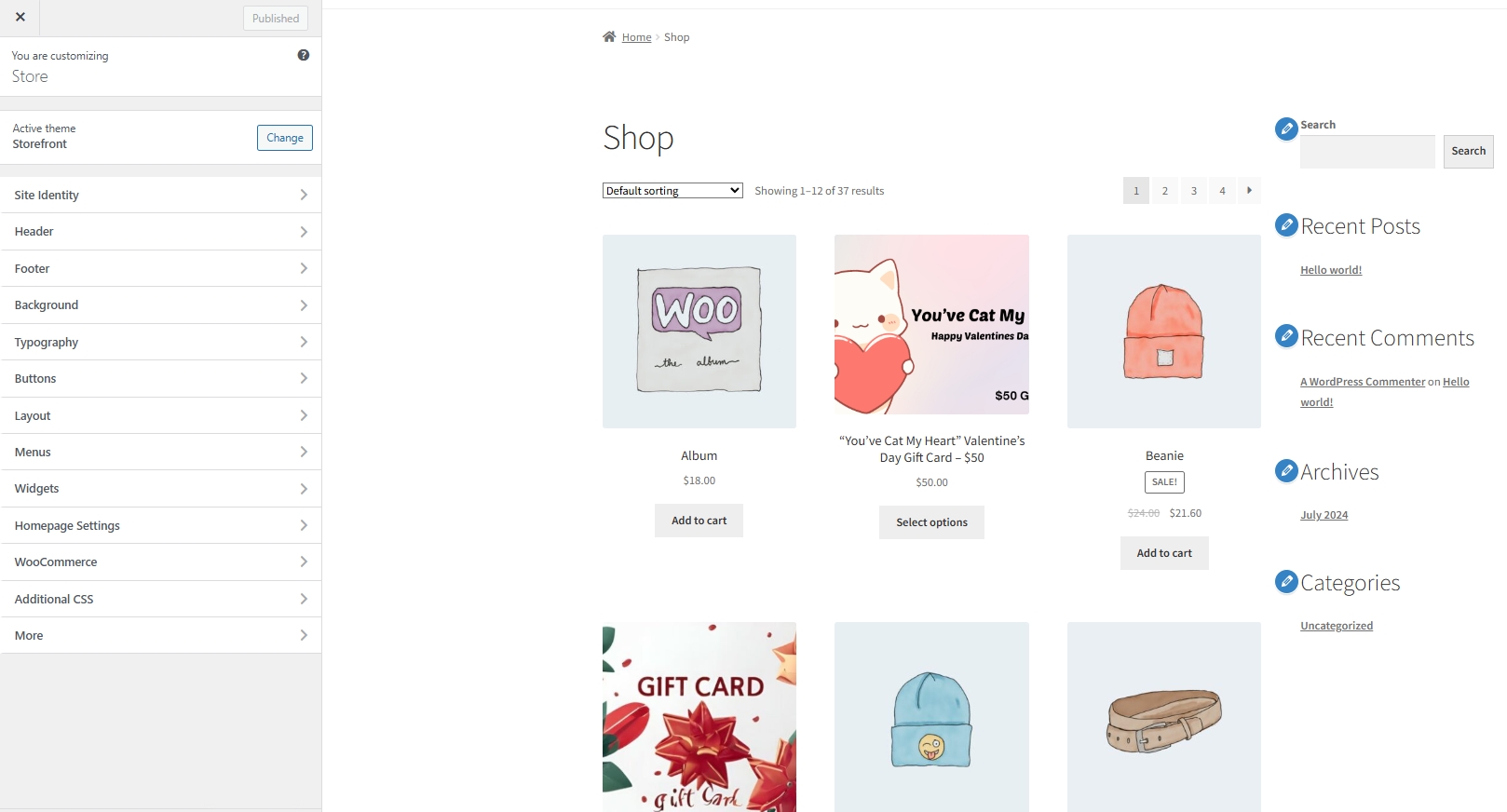
The layout is the backbone of any WooCommerce theme. It decides where menus, product pages, and images appear on the screen. By changing the layout, marketplace owners can guide buyers toward the most important sections. For example, putting featured products at the top can catch attention right away.
Colors and fonts also play key roles. Bright colors may fit a playful brand, while soft tones may fit a professional one. Fonts that are easy to read help buyers feel at ease when checking product details. A marketplace that mixes the right layout, colors, and fonts feels organized and easy to browse.
Using child themes and page builders
When owners want to customize WooCommerce without breaking the main design, they often use child themes. A child theme is like a safe layer placed on top of the main theme. Any changes made there will not be lost when the main theme updates. This makes it easier to keep the design stable over time.
Page builders, like Elementor or Gutenberg, also help. They let owners drag and drop elements such as images, buttons, and text blocks. Instead of coding from scratch, a marketplace owner can build pages quickly with these tools. Customizing WooCommerce templates through builders makes design easier for people who do not have a background in coding.
Pros and cons of customization
Changing a WooCommerce theme brings both benefits and challenges. On the positive side, a custom WooCommerce theme helps a marketplace stand out. Customization also makes it possible to design and edit WooCommerce product pages that match the brand’s style and values.
On the other hand, customization can sometimes create extra work. Too many changes can slow down the site or cause trouble when WooCommerce updates. Owners who aren’t careful may also break parts of the design. Because of this, it is smart to balance creative changes with stability. Small steps, like adjusting fonts or adding simple layouts, often work better than heavy redesigns.
Customization For Multi-Vendor Marketplaces
Running a multi-vendor marketplace is different from running a single online store. The design choices affect not just one seller but many vendors and all their customers, which is why WooCommerce theme customization matters even more in a marketplace setup.
Differences between single-store and multi-vendor design
A single-store site is simple because it only follows one brand. The colors, fonts, and layouts are all chosen to fit one seller’s identity. A multi-vendor marketplace is different because it must hold many vendors under one roof. Each seller may want to show their own style, but the overall marketplace still needs to look united.
This is where marketplace owners have to make smart choices. They can allow vendors to adjust some parts of their storefront, such as banners or logos, while keeping the main structure the same. That way, the site feels balanced without looking messy.
Importance of consistency across vendor stores
Consistency is an important part of marketplace design. When buyers move from one vendor page to another, they expect the same level of clarity and order. This does not mean every page must look identical, but it helps when the overall layout and structure feel connected. A shared style across vendor stores makes the marketplace easier to browse and gives buyers a smooth shopping experience, even as each seller shows their own products and brand.
Balancing marketplace identity with vendor individuality
Consistency is an important part of marketplace design. When buyers move from one vendor page to another, they expect the same level of clarity and order. This does not mean every page must look exactly alike, but there should be common elements that guide the shopping experience. For example, menus, product pages, and checkout steps should look and feel familiar no matter which vendor a customer visits.
Having a shared style across vendor stores makes the marketplace feel united. It gives buyers confidence that they can shop around without confusion, even if each vendor brings their own logos, product images, and banners. A simple layout, easy-to-read fonts, and clear product categories can tie the marketplace together while still allowing vendors to add their own touch.
How WC Vendors Supports Theme Customization
A multi-vendor marketplace needs tools that can balance the overall design with vendor freedom. WC Vendors is one of the plugins that helps WooCommerce site owners do just that. This makes WooCommerce theme customization more practical because it works hand-in-hand with vendor needs.
Vendor storefront layouts and branding options
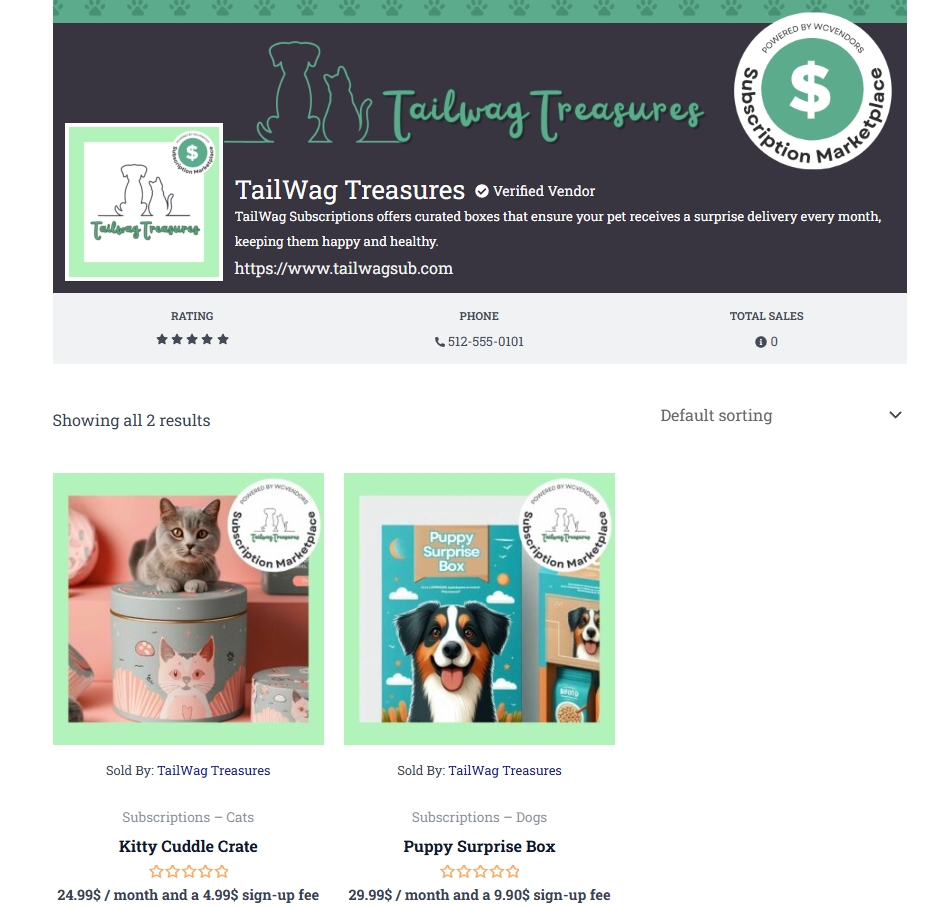
WC Vendors gives each seller a dedicated storefront. This space can include a logo, banner, and vendor description, so buyers can see the seller’s identity while still shopping within the same marketplace. By customizing WooCommerce templates, owners can let vendors highlight their branding without disrupting the shared structure of the site.
Compatibility with popular WooCommerce themes
One of the strengths of WC Vendors is that it works with many WooCommerce themes. This means owners are not stuck with one design, and they can choose a theme that matches their vision and still make it multi-vendor ready. Whether it is a simple theme for small stores or a feature-rich theme for large marketplaces, WC Vendors can fit right in.
💡Additional Note: This compatibility also makes it easier to customize WooCommerce without heavy coding. You can check the list of compatible themes directly on the WC Vendors website HERE.
You may also read about: 10 Best Multi-Vendor Theme WordPress Options For Your Marketplace.
Flexibility in vendor dashboard design
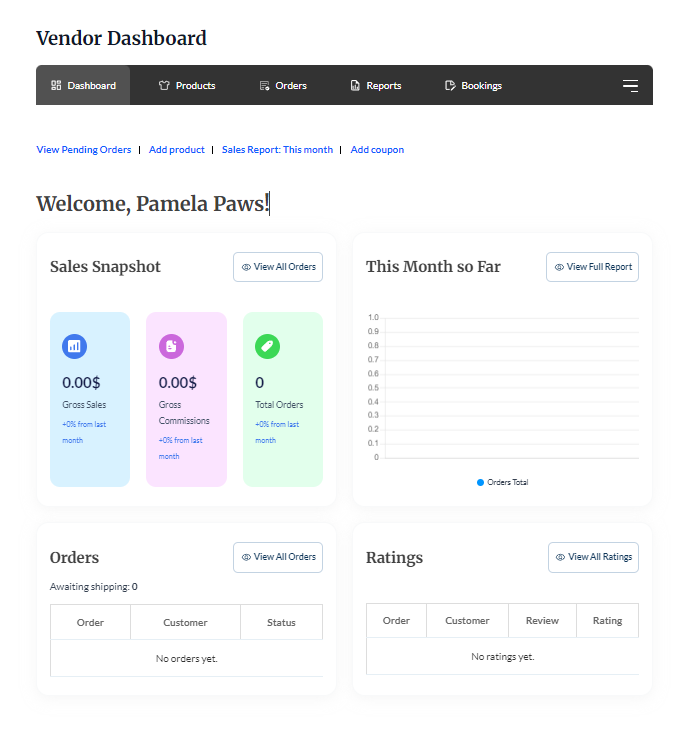
Beyond storefronts, WC Vendors also supports dashboard design. Vendors can log in and customize WooCommerce products, orders, and settings in a space that matches the overall marketplace theme. Custom WooCommerce themes can carry over into the dashboard, giving vendors a smoother and more familiar experience.
Customizing Themes In WC Vendors
Customizing themes in WC Vendors involves several considerations to make your marketplace unique and aligned with your brand. Here are some key points and steps to help you customize themes effectively:
1. Choose an easy-to-customize theme
Select a theme that allows customization through the WordPress customizer or a page builder like Elementor, and check if the theme supports template overrides, which is useful for developers. Ensure the theme updates templates regularly to stay compatible with WC Vendors, WooCommerce, and WordPress.
2. Use built-in WordPress customizer or page builders
Many themes allow you to customize colors, layouts, fonts, and other design elements via the WordPress customizer. For more advanced customization, use page builders such as Elementor to design pages visually without coding.
3. Customize vendor storefronts
Vendors can personalize their storefronts by adding store banners, icons, and descriptions. After vendors update their store details, these elements display on their storefront pages for visitors.
4. Brand your marketplace
Upload your brand logo to establish visual identity, and set up navigation menus to guide visitors through your marketplace. Likewise, create essential pages like the homepage, shop page, vendor registration, and terms of service to make your marketplace more seamless.
5. Consider template overrides (for developers)
If you have development skills, you can override theme templates to customize the layout and functionality further. Keep track of updates from WC Vendors and WooCommerce to maintain compatibility.
Practical Tips For Marketplace Owners
Designing a marketplace can feel like a big task, but small and smart steps can make the process easier. With the right approach, WooCommerce theme customization can help owners create a site that looks good, loads fast, and makes shopping simple for buyers. Here are some practical tips that can guide marketplace owners along the way:
1. Keep customizations simple and performance-friendly
It can be tempting to change every detail of a WooCommerce theme, but too many changes can slow the site down. A slow site can make buyers leave before even checking a product page. Start with changes that make the biggest impact, like layouts, colors, and fonts. These updates improve the look without adding heavy features that may affect speed.
2. Ensure mobile responsiveness
Most shoppers today use phones or tablets to check online stores. If a marketplace looks fine on a computer but broken on a small screen, buyers quickly lose interest. Customizing WooCommerce templates should always include testing on different screen sizes.
A responsive design makes the product page easy to read on any device. Buttons should be large enough to tap, images should scale correctly, and text should stay clear. By planning mobile design during WooCommerce theme customization, owners make sure the site welcomes buyers no matter what device they use.
You may also read more about: What Is A Digital Storefront? How To Build One That Sells.
3. Use design to guide buyer navigation
Design is not just about looks; it also directs where people go next. A well-placed menu, a clear search bar, and easy-to-find categories all guide buyers across the marketplace. The product page should show the most important details at the top, like images, price, and the “add to cart” button.
When the design helps buyers move through the site, they are more likely to complete a purchase. Simple cues like arrows, highlighted buttons, or featured product sections can guide the eye in the right direction.
4. Avoid over-customization (maintenance risk)
While WooCommerce theme customization is helpful, doing too much can cause problems when WooCommerce or WC Vendors updates. Heavy design changes sometimes break layouts or cause errors. To avoid this, it’s better to keep the design close to the base theme while still adding unique touches.
Marketplace owners can protect themselves by keeping a backup of their site and testing changes on a staging site before going live. This way, updates do not bring surprises. Taking a steady approach helps keep the design fresh without affecting the marketplace in the long run.
Conclusion
Looking back at everything we covered, it’s clear that design plays a huge role in how a marketplace works. From the way buyers view product pages to how vendors present their branding, every detail adds up to create trust. Through WooCommerce theme customization, marketplace owners can move past plain templates and build a space that feels unique, organized, and easy to use.
Let’s do a quick recap of what we discussed:
- Why marketplace design matters
- Basics of WooCommerce theme customization
- Customization for multi-vendor marketplaces
- How WC Vendors supports theme customization
- Customizing themes in WC Vendors
- Practical tips for marketplace owners
The journey to creating a unique marketplace look is not about changing everything at once. It’s about taking steady steps: adjusting layouts, testing on mobile, and using tools like WC Vendors to balance marketplace identity with vendor freedom. When design is given proper attention, a marketplace does more than just display products. It becomes a place where vendors feel valued, buyers feel comfortable, and trust grows naturally.
Frequently Asked Questions
What is WooCommerce theme customization?
WooCommerce theme customization is the process of changing the design of a WooCommerce site. This includes layouts, colors, fonts, and product pages. By customizing WooCommerce templates, marketplace owners can create a unique look that matches their brand and makes shopping easier for customers.
Do I need coding skills to customize a WooCommerce theme?
No, you do not always need coding skills. Many WooCommerce themes work with page builders that let you drag and drop sections. You can also use child themes to make changes safely. Coding may only be needed if you want advanced features for your custom WooCommerce theme.
How does WooCommerce theme customization help a marketplace?
A marketplace is different from a single store because it has many vendors. Customizing WooCommerce templates helps create a site that feels united while still giving vendors space for their own logos, banners, and product images. This balance builds trust for buyers and keeps vendors happy with their storefronts.
What should I focus on first when customizing WooCommerce?
Start with the basics like colors, fonts, and product page layouts. These small changes make a big impact without slowing the site down. Once you are happy with the look, you can move on to bigger design updates or add a custom WooCommerce theme for more control.
Is there a risk in customizing WooCommerce templates too much?
Yes. If you change too many parts of the theme, future WooCommerce updates may cause conflicts. This is why many owners use child themes or staging sites for testing. Keeping a balance between style and function makes WooCommerce theme customization safer and easier to manage.

