

If you are a first-time marketplace builder or an existing WooCommerce store owner, you probably want something that will grow with you. At the same time, you also want something that is not too hard to use. So in this guide, I will walk you through WC Vendors vs Product Vendors. We will compare features, pricing, vendor experience, commission flexibility, and long-term growth potential for you to have a better grasp on which plugin is a perfect fit for your marketplace.
Now, let us begin by understanding what each plugin actually does.
What Is WC Vendors?
WC Vendors is a multi-vendor marketplace plugin built specifically for WooCommerce. In simple terms, it allows you to turn your store into a marketplace where multiple vendors can register and sell their own products.
Vendors get their own dashboard. They can manage products, track sales, and handle orders. As a marketplace owner, you also get control over commissions and payouts.
Another important point is scalability. If you plan to start small and scale later, this is one thing to consider. WC Vendors supports different commission types. For example, you can set percentage commissions, flat fees, or vendor-specific rates. Because of that, you can adjust your business model as your marketplace grows.
In addition, WC Vendors works well if you want more control. You can customize how vendors interact with the store. You can also integrate it with payment gateways such as Stripe for automated payouts. In the discussion between WC Vendors vs Product Vendors, if you truly care about flexibility and long-term growth, WC Vendors is your go-to plugin.
Now that we have covered WC Vendors, let us look at what WooCommerce Product Vendors offers.
What Is WooCommerce Product Vendors?

Now, let us talk about WooCommerce Product Vendors. This plugin is an official extension sold on WooCommerce. While being an official extension may feel reassuring at first, the real test is whether it can keep up as your marketplace grows, and that is where differences become clear.
So, what does WooCommerce Product Vendors actually do?
It allows you to assign products to vendors. Each vendor can add products to your store. They can also receive commissions from sales. As the marketplace owner, you set the commission rate and manage payouts.
At first glance, this sounds very similar to WC Vendors. However, their depth and flexibility start to separate them.
Which moves us to the next part! Let us compare them directly.
Feature Comparison: WC Vendors Vs WooCommerce Product Vendors
When I do feature comparison for WC Vendors vs Product Vendors, I do not just look at whether both allow vendors. That is the basic requirement. Instead, I look at how much control I get as a marketplace owner and how much freedom my vendors receive.
So in the next sections, we will compare vendor dashboard experience, commission flexibility, payouts, scalability, customization, and overall vendor experience.
Vendor dashboard experience
First, let us talk about the vendor dashboard.
When vendors join your marketplace, they need a place where they can manage their products and view their earnings. Because of that, the vendor dashboard becomes very important.
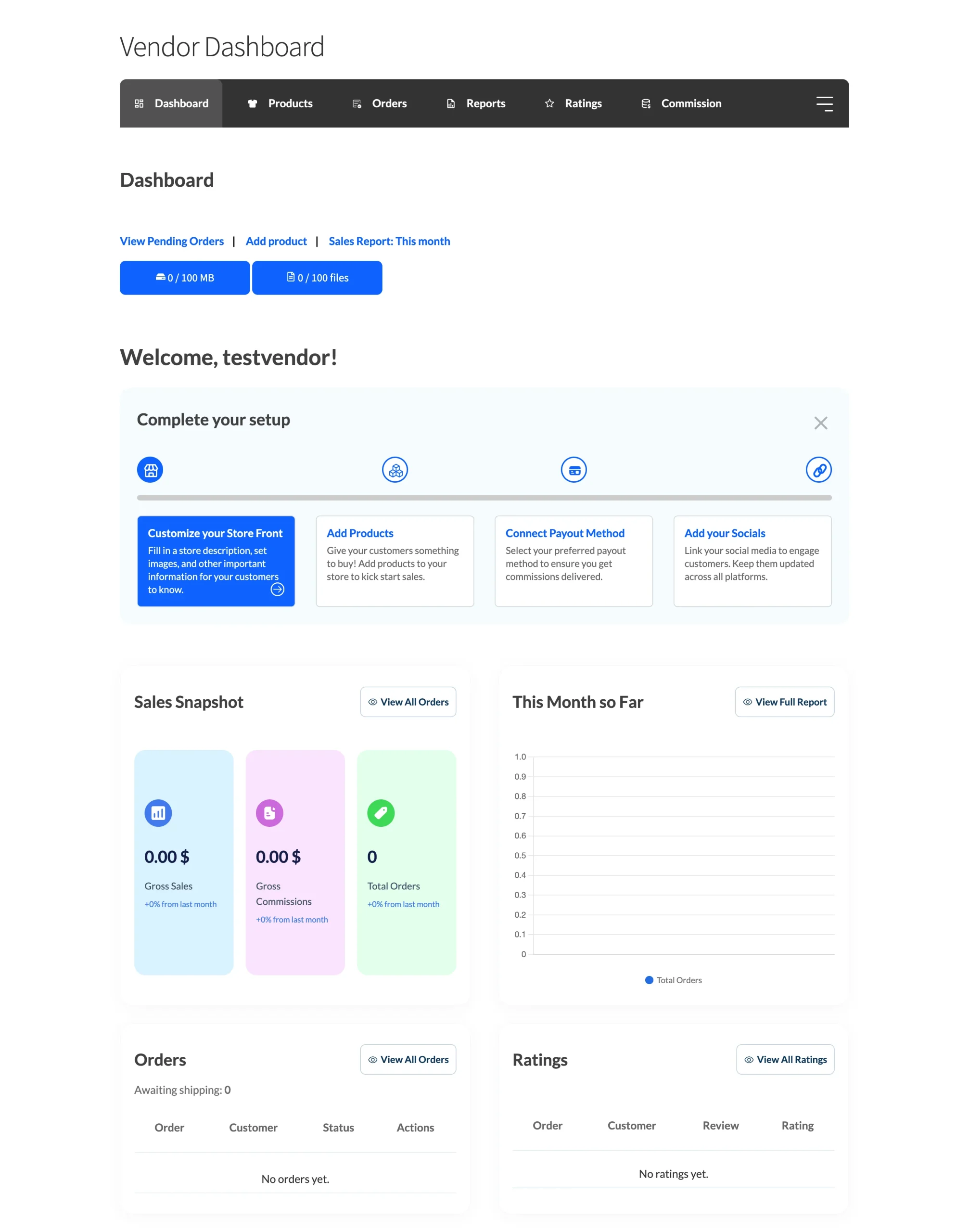
With WC Vendors, vendors get a front-end dashboard. They can log in and manage products, track sales, view commissions, and handle orders without entering the WordPress admin area. From my experience, this feels more direct for vendors. It also feels more professional.
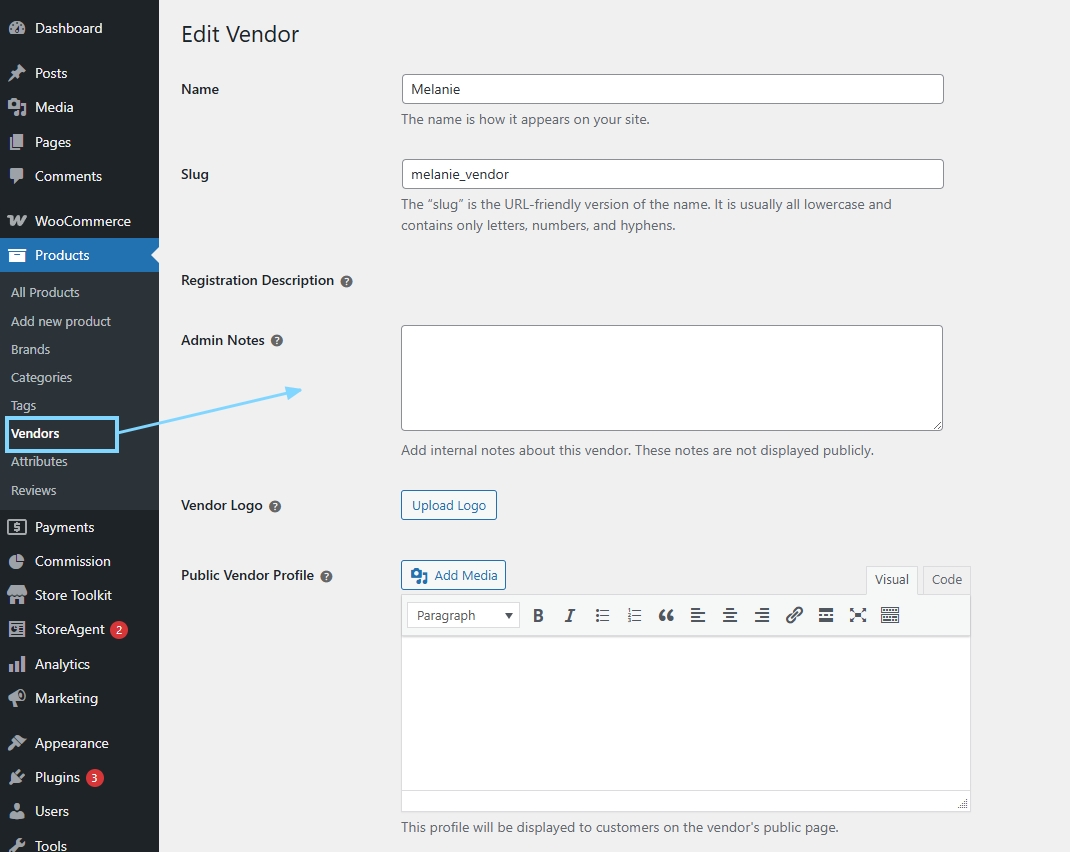
On the other hand, WooCommerce Product Vendors provides vendor management tools, but the experience is more tied to WooCommerce’s backend. Vendors end up working inside the WordPress admin area, which feels clunky and unfamiliar to most sellers. Even for smaller stores, this creates unnecessary friction. However, for growing marketplaces, vendor independence often matters more.
When you compare WC Vendors vs Product Vendors here, ask yourself this question: Do I want my vendors to feel like they truly run their own mini stores? If the answer is yes, then WC Vendors tends to offer more depth in that area.
Even if your marketplace is small today, starting with a proper front-end vendor dashboard saves you from a painful migration later.
Still, as your marketplace grows, vendor experience can affect retention. Vendors who feel comfortable using your system are more likely to stay.
Next, let us move to commissions.
Commission flexibility
Commissions can make or break a marketplace. So when I compare WC Vendors vs Product Vendors, I pay close attention to how much control I get over commission rules.
With WC Vendors, commission setup can be more flexible, especially if you use the Pro version. You can set a percentage commission, a flat fee, or a mix depending on what your marketplace needs. Also, you can adjust commissions per vendor. That matters when you have vendors with different agreements. For example, maybe one vendor brings in premium products, so you give them a better rate. That is easy to imagine once your marketplace grows.
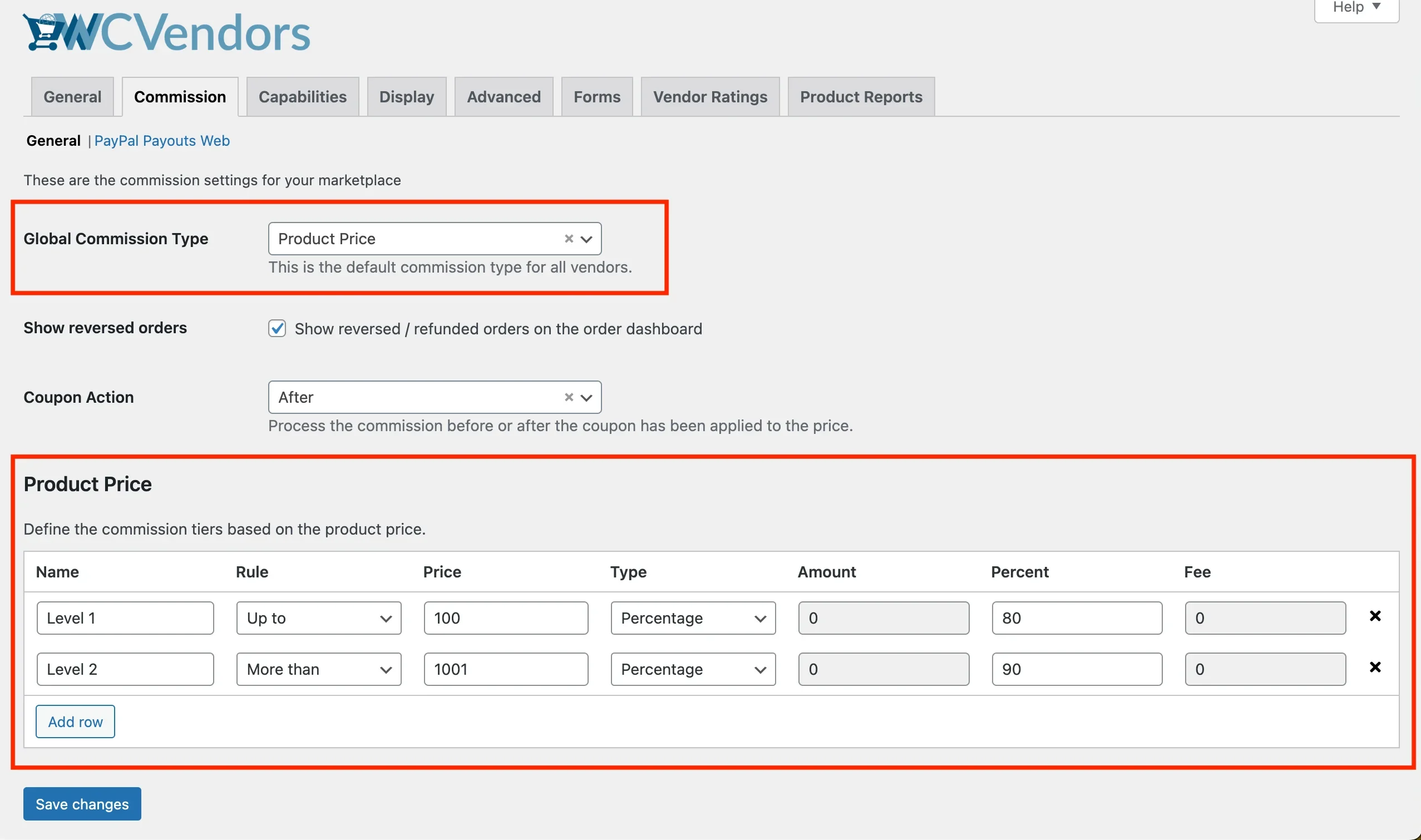
On the other hand, WooCommerce Product Vendors supports commissions too. You can assign vendor commissions and manage how earnings are split. However, the commission logic is basic—you get a simple split and not much else. That may feel “simple,” but it also means you hit a wall quickly when you need different rates for different vendors or categories. WC Vendors gives you significantly more room to set different commission rules as your marketplace evolves.
Also, marketplace owners often want to set commissions by product type or category. For example, you might take a higher cut from low-margin items and a smaller cut from high-ticket products. So if you already see that kind of pricing structure in your future, you should think about how each plugin handles it.
You may also read about “Exploring Standard Commission Types: Amazing Benefits And Applications For Marketplaces.”

So at this point, my take on WC Vendors vs Product Vendors is this. WooCommerce Product Vendors only covers the most basic commission setups. However, WC Vendors is often better if you want commission rules that can grow with you. WC Vendors is the better choice if you want commission rules that grow with you, and most serious marketplace owners do.
Next, let us talk about payouts. This is another section where growth matters a lot.
Payout options and payment flow
Now, this is the part where many marketplace owners feel the “stress.” You can set up vendors and products. However, if payouts are messy, your vendors will more likely complain.
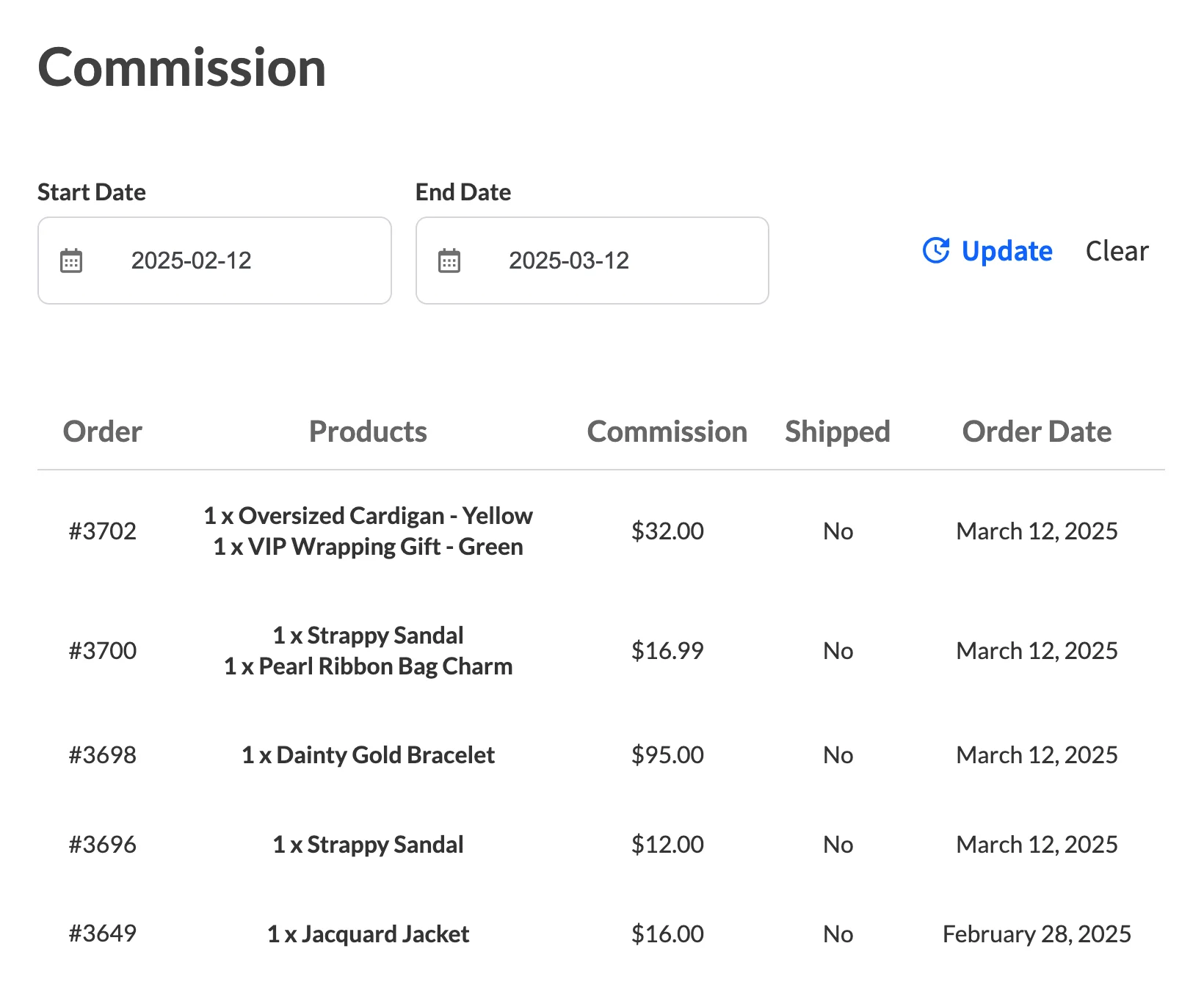
With WC Vendors, you can manage payouts in different ways depending on your setup. Many marketplaces want automated vendor payouts through Stripe. Others prefer manual payouts at first, especially when they are still testing the business model. The key point is that WC Vendors offers options and supports a more scalable payout setup as your vendor count grows.
📝 You can check how to set up vendor commission schedules by clicking HERE.
On the other hand, with WooCommerce Product Vendors, automated payouts are tied to PayPal Payouts. So if you want commissions to send out automatically, you need PayPal Payouts set up, plus a pre-approved PayPal Business account. That is a significant restriction—if PayPal does not approve your account, you simply cannot automate payouts at all. If you do not have that approval, automated commission payments will not run. However, you can still pay vendors manually. WooCommerce Product Vendors does let you choose a payout schedule, but remember: this only works if the PayPal Payouts requirement is met first. If you set it to manual, unpaid commissions will stay unpaid until you send them yourself.
So when you think about WC Vendors vs Product Vendors, ask yourself how you want payouts to run in six months. Also, ask yourself how you want payouts to run in two years. If you can already imagine having dozens of vendors, you probably want a payout flow that does not require you to babysit everything. WC Vendors with Stripe Connect gives you that freedom. Product Vendors with its PayPal-only automation does not.
Also, payout transparency matters. Vendors want to understand how much they earned, which fees were deducted, and when they will receive their funds. If your vendor dashboard clearly shows this, it can reduce support messages. That is another reason the vendor experience matters.
Next, let us talk about scalability.
Scalability for a growing marketplace
When I say “scalability,” I am not talking about some fancy concept. Can your marketplace handle more vendors, more products, and more orders without becoming hard to manage?
This is one of the biggest reasons people compare WC Vendors vs Product Vendors in the first place. Store owners start with a small vendor setup. Eventually, they would want to expand. That expansion can include more vendors, more categories, and more complex rules.
WC Vendors is the go-to plugin for marketplace owners who plan to grow. The vendor dashboard experience can support more vendor activity. The commission settings can grow with different vendor agreements. Also, the overall marketplace control feels more adjustable.
On the other hand, WooCommerce Product Vendors may seem like an easy starting point, but “easy to start” does not mean “easy to scale.” However, as your marketplace grows, you may begin to feel limitations on how much you can customize and how much vendor autonomy you can provide.
So, in a practical sense, here is how I see WC Vendors vs Product Vendors for scalability. Even for small marketplaces, WC Vendors’ free version gives you a stronger foundation than Product Vendors. If you are building a marketplace that you expect to grow into something bigger, WC Vendors is the better long-term fit.
Next, let us talk about customization and extensibility. This is where non-technical users can still benefit, because customization does not always require code.
Customization and extensibility
This is the part that usually gets people nervous. When you hear “customization,” you might think you need to code. However, that is not always the case. Sometimes, customization just means you can adjust settings to match how you want your marketplace to run.
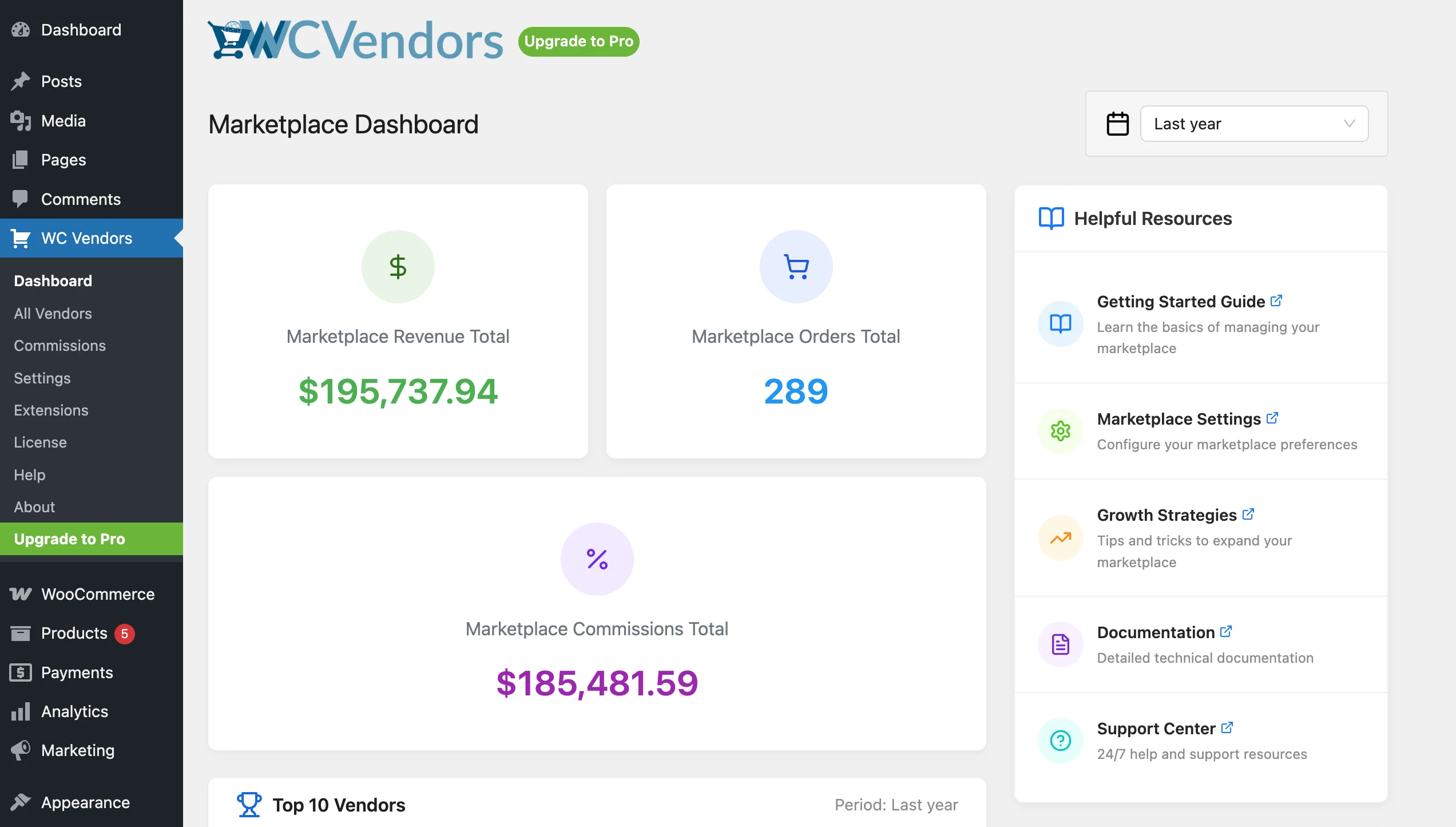
With WC Vendors, I have more control over the vendor experience. For example, I can control how vendors manage products, how they view orders, and how commissions appear in their dashboard. Also, if I want extra features later, there are add-ons and settings that help me expand the setup. Because of that, WC Vendors is the stronger choice when you want to grow and change things over time.
On the other hand, WooCommerce Product Vendors is more locked into the WooCommerce backend style. While that might feel familiar, it also means you are limited to what WooCommerce’s admin area allows—which is not designed for a vendor-first experience. Still, the tradeoff is that bigger changes can feel limited, especially if you want a more vendor-first dashboard experience.
WC Vendors pricing plan
WC Vendors offers different plans, including a free version and paid Pro plans. The free version allows you to start a simple marketplace. However, most serious marketplace owners opt for the Pro version because it unlocks additional commission types, advanced vendor features, and finer-grained payout control.
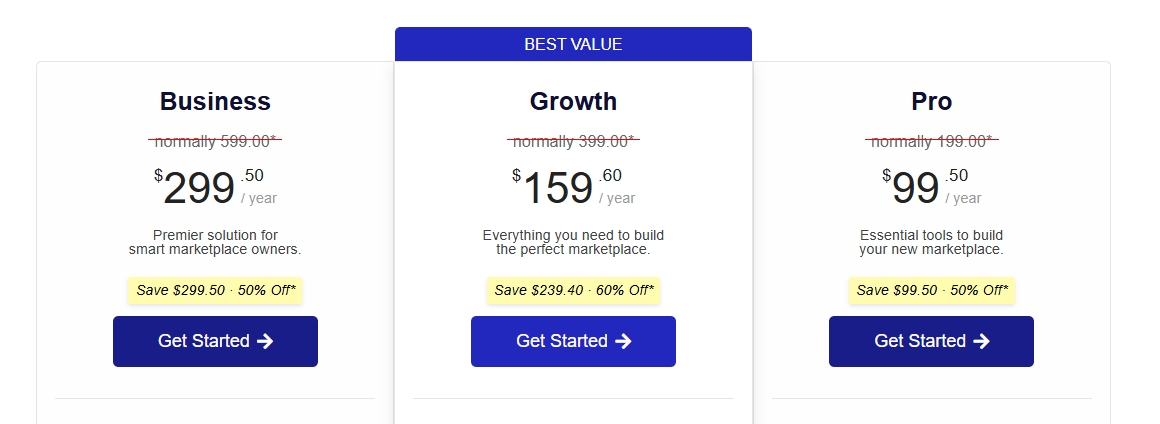
If you are just testing an idea, starting small can be a good fit. However, if you already know you want commission flexibility and stronger vendor tools, you should likely look at the Pro plan.
One thing I like to consider when comparing WC Vendors vs Product Vendors is renewal pricing. Both plugins require annual renewals to receive updates and support. So the real question is not only the first-year cost. It is also what you get long-term.
With WC Vendors Pro, you are paying for deeper vendor management and more flexibility. If you plan to grow your vendor base, that cost is justified because you are building on a stronger foundation.
WooCommerce Product Vendors pricing
WooCommerce Product Vendors is sold as a single premium extension. Unlike WC Vendors, there is no free version; you pay up front just to test it.
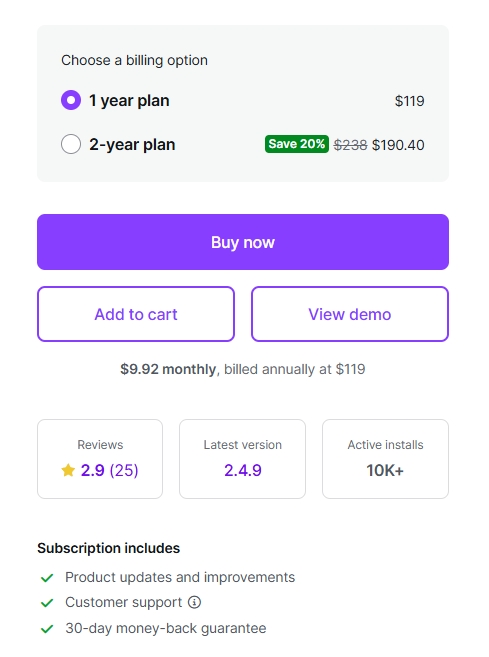
The price includes access to the plugin and updates for one year. After that, you renew if you want continued support and updates. This model is common for WooCommerce extensions.
The cost may seem comparable to WC Vendors Pro at first glance, but the value is not. For example, if you need automated payouts, you must configure PayPal Payouts correctly. Also, if you want more advanced commission logic later, you will need custom development—an extra cost that WC Vendors Pro already covers out of the box.
When comparing WC Vendors vs Product Vendors from a pricing perspective, I try to think beyond the numbers. If I expect growth, I want pricing that supports that path. WC Vendors gives you more features per dollar and a free option to test first—Product Vendors does not.
Quick Table Comparison (WC Vendors Vs Product Vendors)
| Plugin | Pros | Cons |
|---|---|---|
| WC Vendors | Good for growth. If you plan to add more vendors over time, it gives you more room to expand. More control for commissions. You can set different commission rules depending on your marketplace setup. Stronger vendor experience. Vendors usually get a cleaner dashboard experience, so they can work without asking you for help all the time. More ways to customize. If you want your marketplace to work a specific way, WC Vendors often gives you more settings and options. Free version available. You can test the full marketplace flow before spending anything—Product Vendors does not offer this. | More setup decisions. Since it gives you more control, you may spend more time choosing settings at the start. Some features are in Pro. If you want the advanced tools, you will likely need a paid plan. |
| WooCommerce Product Vendors | Official WooCommerce extension. It comes from WooCommerce.com, so it integrates with the WooCommerce ecosystem. Basic vendor selling. If you need only the simplest possible vendor setup, it covers the minimum. Familiar WooCommerce backend. Setup happens inside the WooCommerce admin you already know. | Automated payouts depend on PayPal Payouts. If you do not have a pre-approved PayPal Business account, automated commission payouts will not work. This is a hard requirement with no alternative. Less flexible for complex rules. If you want more advanced commission setups later, you will feel limited. Vendor tools can feel basic. Vendors may need more guidance, especially when your marketplace grows. No free version. You must pay before you can even test it. |
Which One Should You Choose?
So here is the honest answer. If you are serious about building a marketplace, WC Vendors is the better choice. Here is why.
Choose WC Vendors if you plan to grow and add more rules over time
Now, if you are building a marketplace with growth in mind, WC Vendors is the best fit.
This is where I lean when comparing WC Vendors vs Product Vendors. If you want your marketplace to support more vendors later, you will likely want more control over vendor dashboards, commissions, and payout workflows.
Also, if you expect different commission rules per vendor, WC Vendors can help manage them more easily. You might start with one simple rule today. Later, you can add other rules when your marketplace becomes more complex.
In addition, vendor experience matters more when you have more vendors. A cleaner vendor dashboard can reduce questions. It can also help vendors manage their work without always asking you for help.
If you want a marketplace that grows with you, WC Vendors is the right choice.
If vendor experience is a big deal for you…
Vendors are not just “users.” They are your partners. If vendors have difficulty uploading products or tracking sales, they will likely complain. Some of them might even leave your marketplace. That is why the clarity of the vendor dashboard is important.
If you want vendors to feel confident when working on your site, WC Vendors is the best fit. In the WC Vendors vs Product Vendors comparison, this is not even close—WC Vendors’ front-end dashboard is leagues ahead of Product Vendors’ backend-only approach.
Takeaways
If I am being real with you, both plugins let vendors sell on your WooCommerce site. But that is where the similarities end. WC Vendors is built for marketplace owners who plan to grow. Product Vendors covers the basics but leaves you stuck when you need more.
Let’s take a look on what we’ve discussed so far:
- What is WC Vendors
- What is WooCommerce Product Vendors
- WC Vendors vs Product Vendors (feature comparison)
- Comparison table
- Which one should you choose
If you want something that can grow with you, I recommend WC Vendors. The commission setup is more flexible, the vendor experience is more complete, payouts are more reliable, and you get a free version to test first. If your goal is growth, WC Vendors gives you more room to expand without feeling constrained. In every area of this WC Vendors vs Product Vendors comparison—dashboard, commissions, payouts, scalability, and pricing—WC Vendors comes out ahead.
Frequently Asked Questions
Does Product Vendors have a free version like WC Vendors?
No. WooCommerce Product Vendors is sold exclusively through woocommerce.com as a paid extension with no free tier. WC Vendors has a free version on WordPress.org with 750,000+ downloads.
How do payment options compare between WC Vendors and Product Vendors?
WC Vendors Pro includes Stripe Connect for fully automatic vendor payouts at checkout. Product Vendors uses PayPal Payouts. Stripe Connect has wider geographic coverage; PayPal is simpler if your vendor base is PayPal-heavy.
How do commission structures compare between WC Vendors and Product Vendors?
WC Vendors Pro supports 5 commission types (percentage, fixed, percentage + fee, fixed + fee, tiered) at 3 control levels. Product Vendors offers commission as fixed or percentage, configurable per-vendor, per-product, or per-store.
Which plugin is actively developed in 2026?
WC Vendors development since 2013, includes HPOS compat and AI support agent. Product Vendors last updated Feb 2026 by the WooCommerce team.
Can I migrate from Product Vendors to WC Vendors?
Yes. Vendor data, products, and order history can be migrated using the WC Vendors migration documentation. Most common motivation: needing tiered commissions, per-product overrides, or Stripe Connect checkout-time splitting.
Which is better between WC Vendors vs Product Vendors?
For most marketplace owners, WC Vendors is the better choice. It offers more commission flexibility, a stronger vendor dashboard, and better payout options. WooCommerce Product Vendors covers only the basics and locks you into PayPal for automated payouts.
Does WooCommerce Product Vendors support automatic vendor payouts?
Yes, but only through PayPal Payouts—and only if your PayPal Business account is pre-approved. If PayPal does not approve your account, automated payouts simply will not work. WC Vendors, by contrast, supports Stripe Connect for automated payouts—a more widely accessible option.
Can I pay vendors manually with either plugin?
Yes. Both WC Vendors and WooCommerce product vendors can support manual payouts. If you want to manage payments yourself at the start, you can.
Do I need to decide perfectly on day one?
No, and you should not pressure yourself. Still, switching later can be annoying once you already have many vendors and products. If you already expect growth, choosing a plugin that aligns with that future can save you time. Also, WC Vendors has a free plan, so you can try it first. It will not cost you a dime if you are still unsure and just want to test the flow before paying. Product Vendors has no free option, so you are paying before you can even test the experience.

