
A digital product marketplace is an online platform where people can buy and sell items that exist only in digital form. These platforms allow sellers from around the world to reach customers instantly. This kind of marketplace has opened many doors for small creators who want to earn from their work without handling physical inventory.
Building a digital product marketplace in 2026 makes a lot of sense. The demand for online learning, digital art, and software continues to grow each year. The global digital goods market is expected to reach USD 124.32 billion in 2025 and grow to about USD 416.21 billion by 2030.
In this article, you’ll learn what a digital product marketplace is, what makes it successful, and how tools like WC Vendors can help you build one that runs smoothly and grows fast.
What Is A Digital Product Marketplace?
As I’ve said from the beginning of this article, a digital product marketplace is a website or platform where many vendors can sell goods that exist only in digital form. These items include things like ebooks, stock photos, video templates, mobile apps, or online courses. When a customer buys something, they don’t receive a physical box. Instead, they get instant access to a file or link they can download or use right away.
For example, an artist can sell hundreds of digital prints online without ever running out of stock. A teacher can offer recorded lessons to students from any country. All of these sales happen in one digital product marketplace that connects creators with customers easily.
How digital marketplaces differ from physical ones
The biggest difference between digital and physical marketplaces is what they sell and how they deliver it. A physical marketplace focuses on tangible goods like clothes, furniture, or gadgets. Those items need storage, packaging, and delivery to reach customers.

A digital product marketplace doesn’t need any of that. Instead of tracking packages, the focus shifts to things like file security, license handling, and delivery speed. For example, imagine selling a printable poster design online. You don’t need to print or ship anything. Once the buyer pays, they can download the file instantly and print it themselves.
This is one of the reasons why digital marketplaces are attractive. They save time and resources while reaching people worldwide.
Key Components Of A Successful Digital Product Marketplace
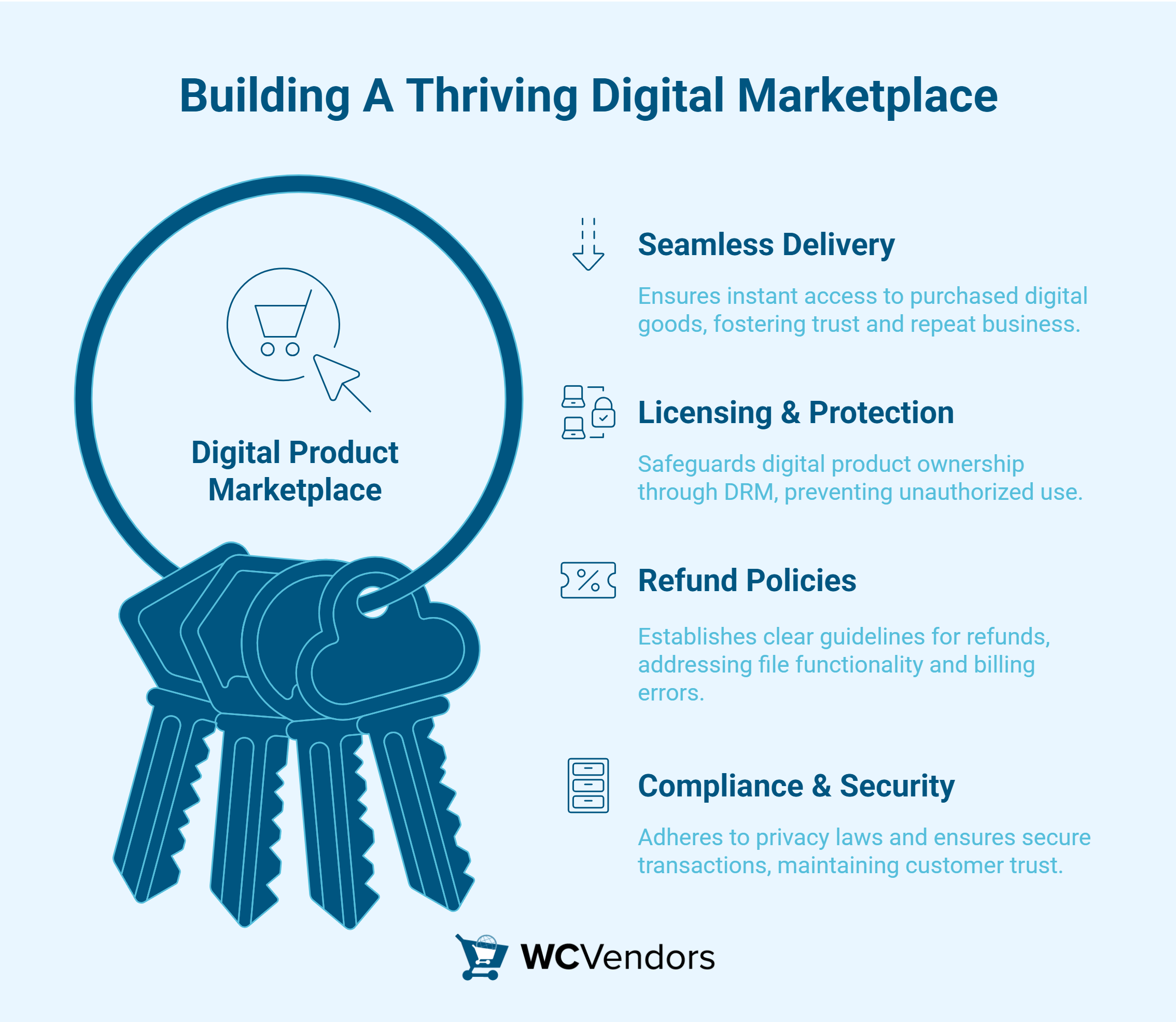
1. Seamless digital file delivery
One of the most important parts of a digital product marketplace is how buyers receive what they pay for. When someone buys a product like a music track, a digital planner, or an app, they expect to get it right away. Instant delivery helps build trust and gives customers a reason to buy again. It also keeps sellers from spending hours sending files manually.
2. Licensing and product protection
Selling digital goods also means thinking about ownership rights and protection. A design, song, or software file can easily be copied or shared without permission, so sellers need tools that help them stay safe. This is where digital rights management, or DRM, becomes important. DRM helps control who can use the file, how many times it can be downloaded, and whether it can be shared.
3. Refunds and customer policies
Refund rules for digital products can be tricky. Once a buyer downloads a file, they already have it forever. That’s why most digital product marketplaces treat refunds differently from physical stores. Instead of returning an item, the focus is on checking if the file works properly or if there was a billing mistake.
To avoid confusion, it helps to write clear refund policies. Vendors can explain when a refund is allowed, like when a file is corrupted or accidentally bought twice.
You may also read: How To Simplify Refund Management In A Multivendor Marketplace.
4. Compliance and security
When running a digital product marketplace, it’s also important to follow local laws about privacy and taxes. Customers’ data must stay safe, and transactions must be appropriately recorded for reports.
Managing Vendors And Ensuring Quality
Running a digital product marketplace also hinges on building a strong community of vendors who care about quality and customer trust. That’s why managing vendors well is key to keeping your marketplace healthy and growing.
Vendor onboarding best practices
When building a digital product marketplace, it helps to make vendor onboarding as simple and clear as possible. This means giving sellers a quick and easy way to sign up, submit documents, and start uploading their products.
Having clear rules also helps new vendors feel more confident. A simple checklist for product requirements, pricing, and digital rights can guide them to do things correctly the first time. When the process is easy to follow, vendors are happier and more likely to stay active.
💡 Using WC Vendors, marketplace owners can handle onboarding smoothly. The vendor dashboard lets new sellers fill in their details, upload files, and request approval right away. Admins can check each submission before allowing it to go live, making sure that every product meets marketplace standards. This helps maintain trust and keeps low-quality or unsafe products out of the site.
Vendor commissions and payouts
One of the key reasons creators join a digital product marketplace is the chance to earn without running their own store. That’s why commission and payout systems matter a lot. Every seller should know exactly how much they earn from each sale and when they will be paid.
WC Vendors includes built-in tools to handle commissions automatically. Marketplace owners can set flexible rules for how payments are divided—whether it’s a flat rate per sale or a percentage of the total amount. The system tracks every order, calculates commissions, and prepares payouts on time. Vendors can also check their income anytime from their dashboard. This kind of transparency helps build long-term trust.
You may also read: “The Awesome Benefits Commission Levels Offer Marketplaces.”

Maintaining product quality
High-quality products make a marketplace stand out. When customers know they can find reliable and well-made digital goods, they keep coming back. That’s why every digital product marketplace needs clear standards for quality.
Admins can set simple review rules, such as checking for broken links, incomplete descriptions, or missing license details. WC Vendors supports this by giving marketplace owners control over product approval. Before an item appears on the site, it can be reviewed for content, design, or accuracy.
Feedback also plays a big part in maintaining standards. Buyers can leave reviews and ratings that help others decide what to purchase. This kind of open feedback system encourages vendors to keep improving their work. When sellers care about their reputation, the whole marketplace becomes a trusted space for digital creators and buyers alike.
You may also read about “How To Enable WooCommerce Product Reviews And Encourage Customer Feedback.”
Smarter customer support with chatbots
If you’ve ever run a digital product marketplace, you know how often customers need help right away. Maybe their download link expired, or the file didn’t open properly. It happens all the time, and replying to every message can eat up your whole day. That’s where StoreAgent, a helpful chatbot for customer support, makes a big difference.
In my experience, having StoreAgent connected to your store feels like adding a support teammate who never sleeps. It can answer common questions, resend files, and even check order details automatically. Customers get the help they need within seconds instead of waiting for an email reply. Pretty cool if you ask me.
Learn more by reading: “How To Set Up AI Chatbot For WordPress (Step-by-Step Guide).”
Subscription-based digital products
Not all digital products are one-time purchases. Some, like online courses or software updates, work better as subscriptions. WC Vendors supports subscription-based models through WooCommerce Subscriptions. Vendors can sell recurring plans, while customers enjoy continued access to updated content. This setup encourages loyalty and stable income for both the seller and the marketplace.
Scaling Your Digital Product Marketplace In 2026
Scaling starts with your base hosting. A digital marketplace serves downloads and processes orders around the clock, so build on a host that can handle that load from day one. We recommend Levamo (formerly Rapyd Cloud) — managed WordPress hosting purpose-built for dynamic, database-heavy marketplaces, with server-level caching, an enterprise Cloudflare CDN, daily backups, and free migration built in. Plans start at $29/month. From that foundation, you can layer on the storage and delivery upgrades below as your catalog grows.
Once your digital product marketplace starts growing, the next goal is to scale it the right way. Growth isn’t just about adding more vendors. It’s also about improving systems, introducing new products, and keeping both customers and vendors mutually satisfied. Part of improving systems may involve application modernization, updating your marketplace’s software architecture and tech stack to support more users, enhance performance, and enable new features without disruptions.
Add more product categories
A good way to grow is by offering more kinds of digital products. If your marketplace started with ebooks, you can expand into templates, graphics, or online courses. The more variety you offer, the more reasons customers have to come back.
Encourage vendor collaboration
Teamwork among vendors can help everyone grow faster. Vendors can bundle related products, like a design template with matching stock photos or a course with a workbook. This kind of collaboration not only increases sales but also builds a sense of community. Customers enjoy getting complete packages, while vendors reach new audiences through each other’s products.
Use data and analytics to make decisions
Numbers tell the real story of your marketplace. It helps to track which products sell the most, which vendors perform best, and what customers like to buy. Checking these numbers often enables you to focus on what works instead of guessing.
Connect marketing tools for growth
To reach more buyers, your marketplace needs simple marketing tools. You can use these tools to announce new products, send discount codes, or reward loyal buyers. Small, consistent marketing efforts can bring steady traffic and attract new vendors who want to sell on a trusted platform. If your marketplace is powered by WooCommerce, finding the right extensions is crucial for scaling your tech stack with advanced SEO, performance, and conversion features. For a great roundup of these tools, check out the comprehensive guide published by Easy Digital Downloads.
Maintain quality and trust as you grow
Scaling your marketplace should never mean lowering standards. Remind vendors to keep their products updated and reply to customer feedback quickly. Buyers notice when a store feels cared for. Marketplaces that focus on clear communication and good product upkeep build long-term trust. And trust is what keeps people buying.
How To Build A Digital Downloads Marketplace With WooCommerce
What you’ll need
- WordPress — your site foundation
- WooCommerce — provides native downloadable product support (free)
- WC Vendors Pro — the multi-vendor layer that gives each creator their own dashboard, listings, and commission tracking
- A Stripe account — for automated payment splitting at checkout (optional but strongly recommended at scale)
No additional plugin is required for basic digital file delivery. WooCommerce handles it natively. The WC Vendors layer adds vendor management, commission routing, and storefront functionality.
Step 1: Configure WooCommerce For Digital Products
Before vendors can upload files, WooCommerce needs to be configured for digital delivery.
Set your download method:
Go to WooCommerce → Settings → Products → Downloadable Products and choose your download method:
- Redirect only — Sends buyers to the direct file URL. Simple but less secure — the URL can be shared.
- Force downloads — Forces the browser to download the file through WordPress rather than redirecting to the URL. More secure; the file URL is never exposed to the buyer.
- X-Accel-Redirect / X-Sendfile — Server-level download handling (nginx/Apache). Fastest and most secure, but requires server-level configuration. Best option for high-traffic marketplaces.
When I set up a test digital downloads store, the download method setting was the first thing I had to revisit — the default redirect method doesn’t protect files the way forced download does. Unless you’re confident with server configuration, force downloads is the right choice for most new marketplaces.
Configure download limits:
On the same settings page:
- Download expiry: Set how many days the download link remains active (e.g., 7 days, 30 days). After this period, buyers need to request a new link. Setting this prevents links shared indefinitely from remaining valid.
- Download attempts: Limit how many times a single purchase can download the file. A limit of 3–5 attempts allows for legitimate re-downloads without enabling widespread file sharing.
These two settings protect your vendors’ intellectual property. Configure both before your first vendor goes live.
Step 2: Install & configure WC Vendors
- Install WC Vendors from Plugins → Add New and activate it
- Upload and activate your WC Vendors Pro license (required for Stripe Connect and advanced commission features)
- Run the setup wizard — configure your marketplace name, vendor registration settings, and default commission rate
- Navigate to WC Vendors → Settings → Products and confirm that vendors can create Downloadable product types
The vendor product dashboard in WC Vendors mirrors the WooCommerce product editor: when a vendor creates a new product and selects “Downloadable,” the file upload field appears. They upload their file; WooCommerce handles delivery when an order is placed.
Step 3: Allow vendors to upload their own digital files
By default, WC Vendors Pro gives vendors access to the full WooCommerce product editor, including the downloadable file upload field. There’s no special configuration required to enable this — but there are settings worth reviewing:
File type restrictions
WordPress has an allowed file type list that governs what can be uploaded to the media library. If your vendors sell file types that WordPress doesn’t allow by default (e.g., SVG, EPS, .zip archives containing executables), you’ll need to extend the allowed file types.
File size limits
Your PHP configuration controls the maximum upload size (upload_max_filesize and post_max_size). For font files and templates, the defaults are usually fine. For audio files, video, or large design bundles, you may need to increase these limits in your hosting configuration.
Storage considerations
For small marketplaces, storing files on the server is fine. As the vendor count and file volume grow, consider a cloud storage solution (Amazon S3 with WooCommerce integration) that keeps files off your server and handles delivery via a CDN. This becomes relevant at 100+ vendors with large file libraries.
Step 4: Set up commission for digital products
Navigate to WC Vendors → Settings → Commissions and configure your commission structure.
For a digital downloads marketplace, two common models:
Flat percentage commission
You take a fixed percentage of every sale (e.g., 20%). Simple, predictable, and the standard for most digital marketplaces. A $30 template sale: you keep $6, the vendor receives $24.
Tiered commissions (WC Vendors Pro)
Vendors who generate more sales earn a higher percentage of each sale. This incentivises active vendors and rewards your top performers. Example: 80% commission for vendors with under $1,000/month in sales, 85% for $1,000–$5,000/month, 90% above $5,000/month.
Category-level commissions
If you sell mixed product types (digital and physical), you can set different commission rates per category. This lets you charge different rates for fonts vs. templates vs. audio — or apply a different rate for physical products if you expand.
Step 5: Protect download links
Beyond the WooCommerce download method settings from Step 1, there are additional layers of protection worth implementing:
Per-product download limits
Even with global limits configured, vendors can set product-specific limits when creating their listings. A vendor selling a font might allow 5 downloads per purchase; a vendor selling a course PDF might allow 2. WC Vendors passes this control to the vendor.
Download link generation
Every download link WooCommerce generates is unique to the order and encrypted. Buyers cannot guess other buyers’ download URLs. The expiry and attempt limits are the primary controls on whether that unique URL remains usable.
What you can’t fully prevent
A determined buyer can always share the downloaded file itself. Download link protection prevents casual link sharing; it doesn’t prevent file redistribution. For marketplace operators, this is primarily a vendor expectation to manage — make clear in vendor terms that you cannot guarantee against file piracy, only against direct link sharing.
Step 6: Configure payouts for digital sales
Set up WC Vendors Stripe Connect to automate the commission split at checkout.
For digital products, the payout flow is identical to physical products — but with one important operational difference: there’s no fulfillment delay between purchase and payout eligibility. For physical product marketplaces, you may hold vendor commissions until the order is confirmed received. For digital products, delivery happens instantly at checkout, so there’s no logical reason to hold commission beyond your configured payout schedule.
Recommended configuration for digital-only marketplaces:
- Hold period: Minimal or none — delivery confirms immediately
- Payout schedule: Weekly or monthly, based on your cash flow preferences
- Refund handling: Digital products have different refund norms than physical products. Many marketplaces offer no refunds on digital goods (since the file is delivered immediately). Define this clearly in your policy before your first vendor goes live.
Step 7: Set your marketplace policies
Digital marketplaces live and die by the quality and legitimacy of their vendor files. Define your standards before accepting your first vendor:
File quality standards:
- Minimum resolution for images/graphics (e.g., 300 DPI for print-ready files)
- Accepted file formats and any format-specific requirements
- Prohibition on reselling files the vendor doesn’t own (stock art, licensed assets)
Licensing requirements:
- What licence does the buyer receive? Personal use only? Commercial use? Extended commercial?
- Vendors should specify this clearly in their product descriptions
- Consider a standard licence framework buyers can trust across all vendors
Refund policy:
- Most digital marketplaces are no-refund or credit-only (since the file is already delivered)
- Define this clearly on your checkout page, in order emails, and in your vendor terms
- Be specific about what exceptions exist (corrupted file, file significantly different from description)
Marketplace Examples And Niches
WooCommerce + WC Vendors supports the full range of digital download categories:
| Niche | Example products | Typical price range |
|---|---|---|
| Fonts & typography | OTF/TTF font files, font bundles | $10–$60 |
| Design templates | Canva templates, Figma UI kits, Illustrator files | $10–$80 |
| Stock photography | JPG/RAW image packs | $5–$30 |
| Music & audio | Royalty-free tracks, sound effects, samples | $5–$50 |
| Software & tools | WordPress plugins, scripts, apps | $20–$200 |
| Written content | eBooks, guides, templates | $5–$50 |
| Game assets | Sprites, 3D models, sound effects | $5–$100 |
| Education | Course materials, workbooks, templates | $10–$150 |
The advantage of niching your marketplace (e.g., fonts only, or audio samples only) is that your vendor community and buyer base develop trust faster. A marketplace that sells everything from fonts to software asks buyers to trust quality across very different categories.
Conclusion
Building a digital product marketplace takes time, patience, and a fundamental understanding of what your vendors and customers need. When you take the time to plan your marketplace, set clear rules for vendors, and focus on a good buying experience, you create something that lasts.
In this article, we discussed what you need to know about a digital product marketplace:
- What is a digital product marketplace
- Key components
- Managing vendors and ensuring quality
- Scaling a digital product marketplace
- How to build a digital downloads marketplace
- Marketplace examples and niches
In our experience working with digital sellers, the most successful marketplaces are the ones that keep things simple. They use the right tools, like WC Vendors, to manage tasks efficiently with commissions and vendor management. Adding tools like StoreAgent for customer support also helps, since it gives buyers quick help when they need it most. These improvements make a big difference in how professional your platform feels.

