

If Vendor Shipping per Quantity is not working as expected, the issue is usually related to the configuration of your Vendor Shipping settings.
Shipping calculations in a multi-vendor marketplace depend on settings at multiple levels, and a single incorrect value can prevent per-quantity shipping fees from applying correctly. This issue is especially common with the Flat Rate shipping method.
This guide walks through the key areas you should review to resolve the issue.
1. Check Global Vendor Shipping Settings
Start by verifying the global vendor shipping settings in the WordPress admin area. This configuration will be applied to all vendors in your marketplace.
- Go to WP Admin → WooCommerce → Settings → Shipping
- Ensure to enable vendor shipping
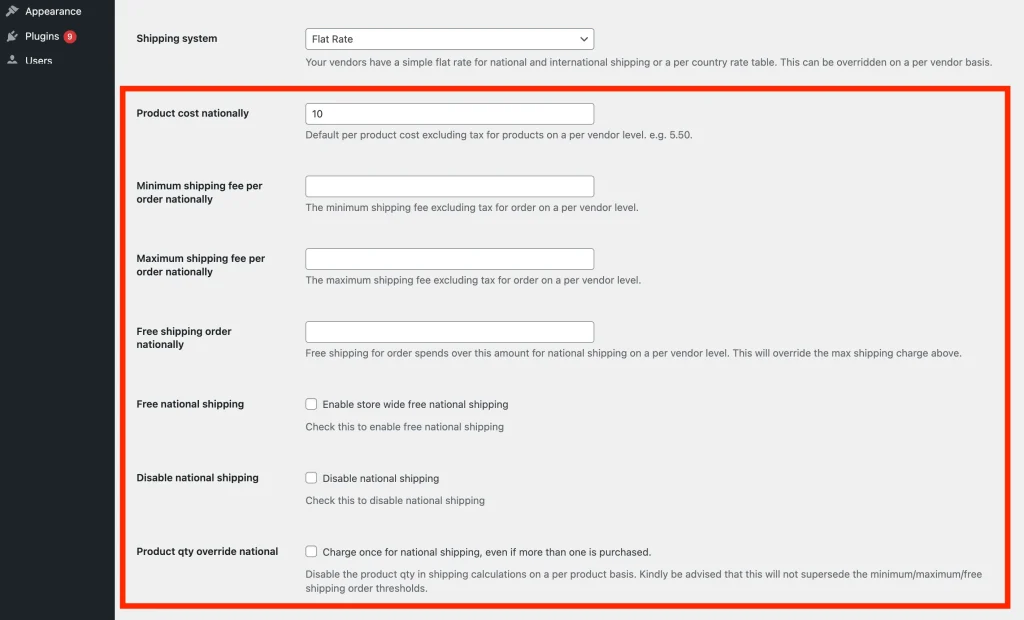
- The shipping per quantity is applied by default.
- Ensure to disable the “Charge once for national shipping, even if more than one is purchased.” option.
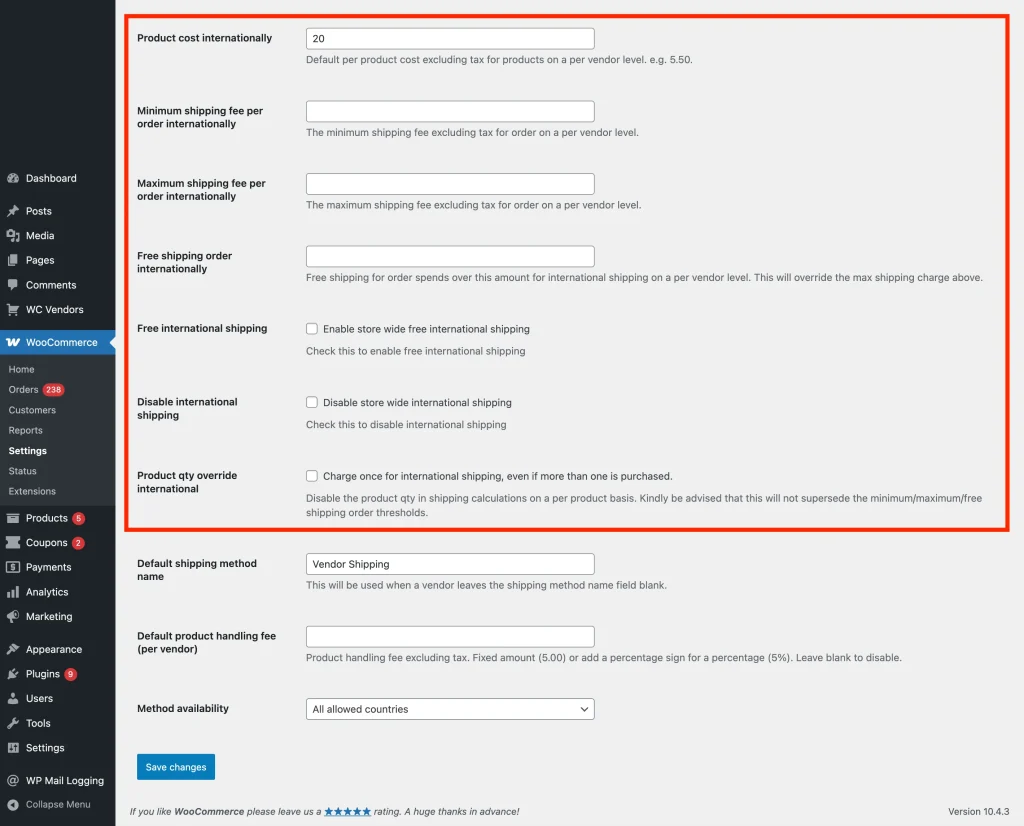
- Review any global limits or overrides that could affect vendor shipping calculations
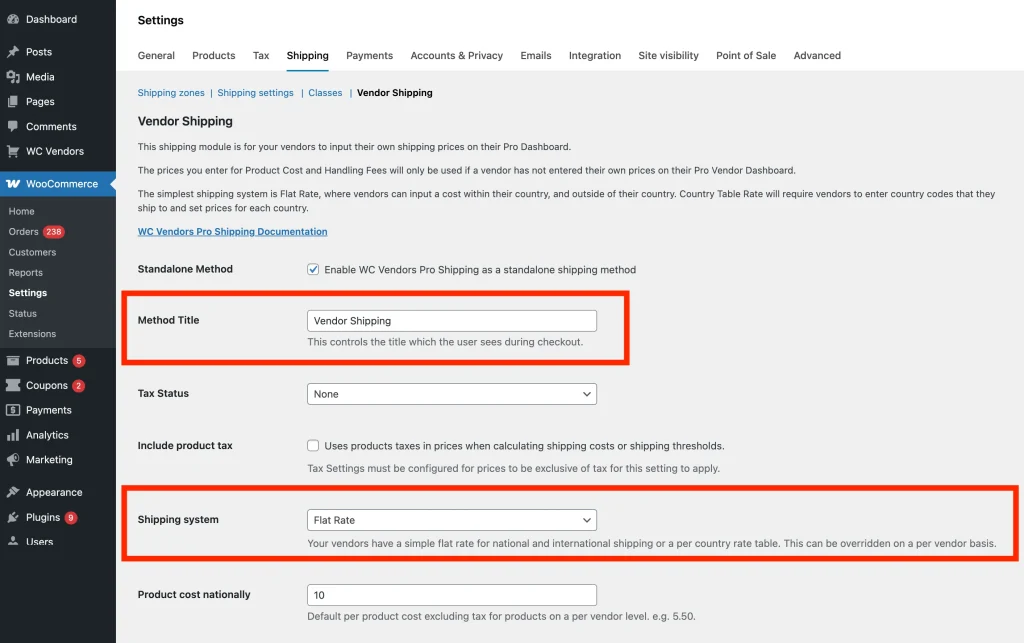
If Vendor Shipping is disabled, individual vendor or product settings will not apply.
2. Check Vendor-Level Shipping Settings
Next, confirm that the vendor has configured their own shipping settings correctly.
- Log in as a vendor
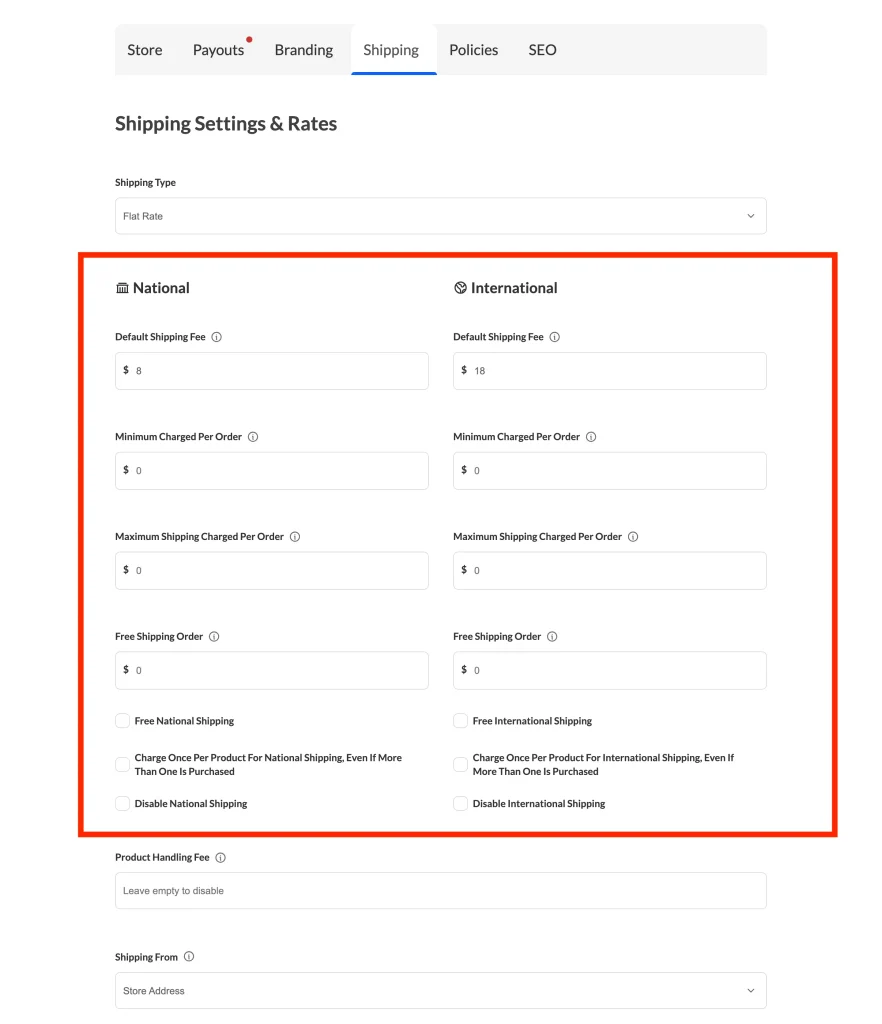
- Go to Vendor Dashboard → Settings → Shipping
- Verify that the shipping fee has been entered
- Ensure to disable the “Charge once for national shipping, even if more than one is purchased.” option. Otherwise, shipping fees will default to the flat rate.
3. Check Product-Level Shipping Settings
Shipping per quantity can also be affected by product-level overrides.
- In the Vendor Dashboard, edit the affected product
- Navigate to the Shipping section
- Confirm that the product:
- Requires shipping
- Has overridden vendor-level shipping costs
- Ensure to disable the “Charge once for national shipping, even if more than one is purchased.” option.
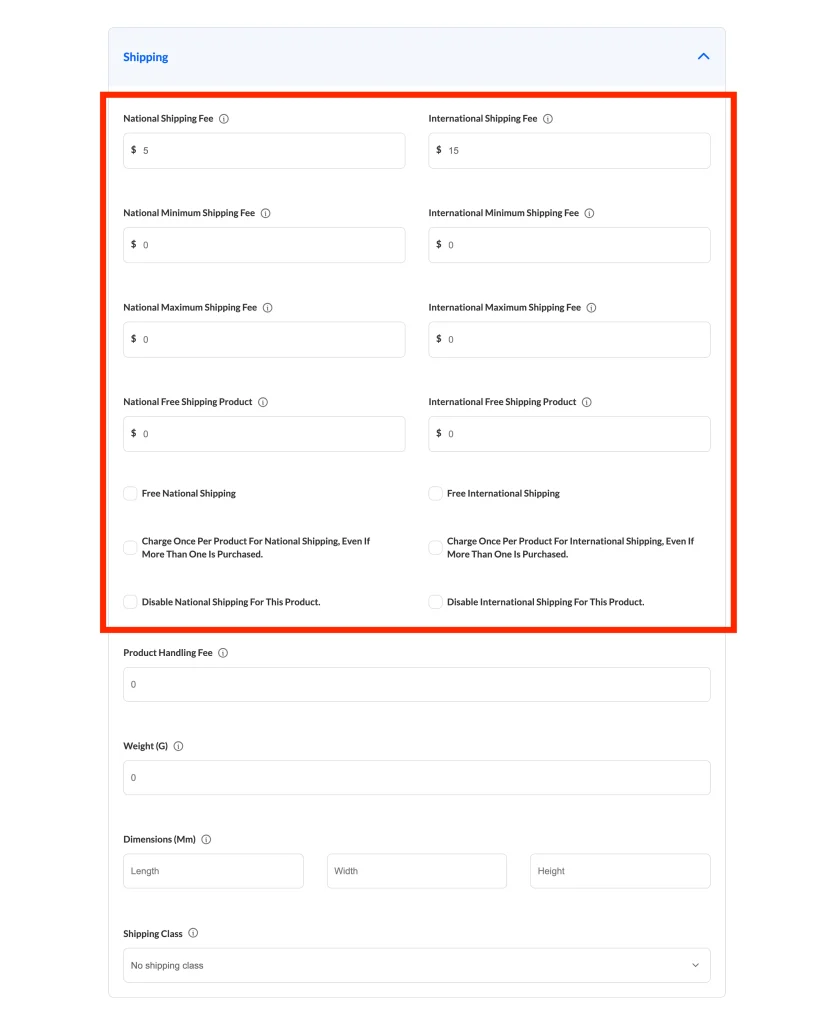
If you set the shipping configuration for a specific product, the per-quantity logic you set at the vendor settings page will not be applied to that product.
4. Check the “Max Shipping Fee Per Order” Setting
One of the most common reasons vendor shipping per quantity appears “broken” is the Max Shipping Fee Per Order setting from the Flat Rate shipping method..
It’s important for you to check this because if a maximum shipping fee is set, WooCommerce will cap the shipping total, even when per-quantity shipping is working correctly.
For example:
- Shipping per quantity = $5
- Quantity ordered = 10
- Expected shipping = $50
- Max shipping fee per order = $20
Result: Shipping is capped at $20, making it seem like per-quantity shipping isn’t applied.
Follow the instruction below to check your maximum shipping fee per order in your marketplace:
- Go to WP Admin → WooCommerce → Settings → Shipping
- Locate Max Shipping Fee Per Order
- Set it to:
- 0 (unlimited), or
- A value high enough to allow per-quantity shipping to calculate properly
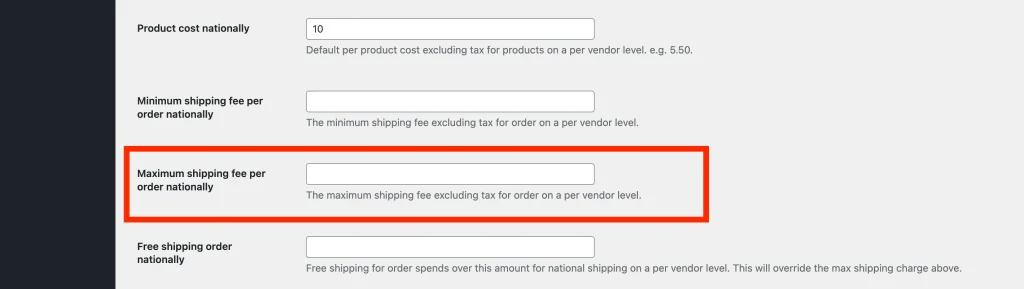
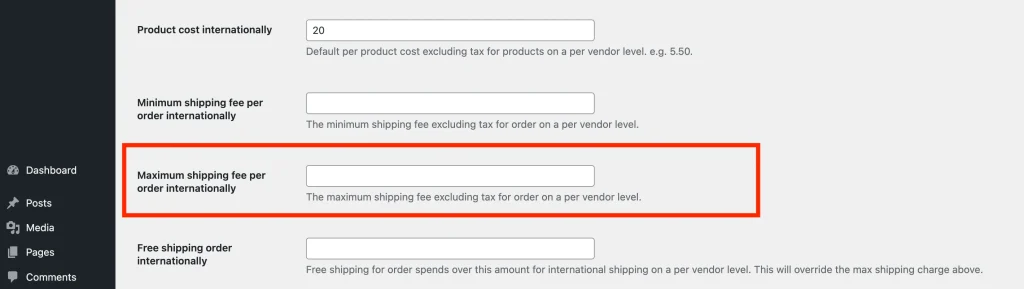
Also verify the maximum shipping fee per order at the vendor-level shipping settings :
- Go to Vendor Dashboard → Settings → Shipping
- Locate Max Shipping Fee Per Order
- Set it to:
- 0 (unlimited), or
- A value high enough to allow per-quantity shipping to calculate properly
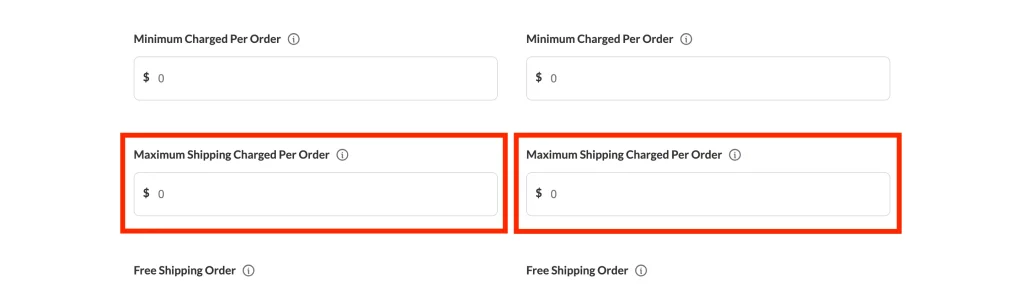
In addition to vendor-level shipping settings, be sure to check the product-level configuration:
- In the Vendor Dashboard, edit the affected product.
- Navigate to the Shipping section.
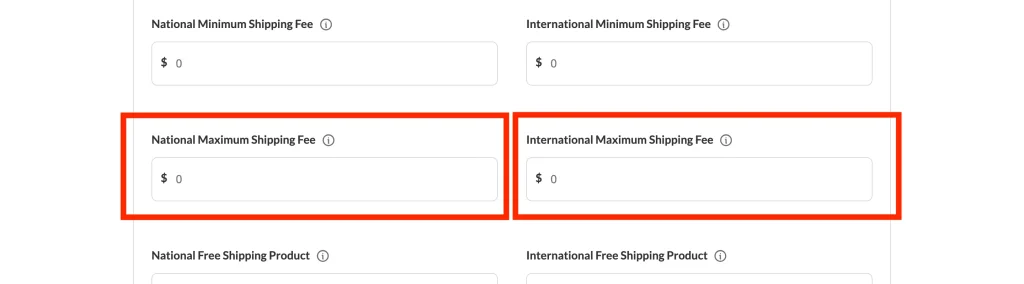
- Locate the Maximum Shipping Fee for that product and ensure it is not restricting per-quantity charges.
5. Test the Configuration
After reviewing all settings:
- Add multiple quantities of a vendor’s product to the cart
- Proceed to checkout
- Verify that shipping increases based on quantity
- Confirm the shipping total is not capped unexpectedly
Testing with multiple quantities is the best way to confirm the issue is resolved.
Summary Checklist to Fix the Vendor Shipping Per Quantity Issue
If vendor shipping per quantity isn’t working, confirm the following:
- ✅ Vendor shipping is enabled globally (WP Admin)
- ✅ Vendor shipping settings are configured in the Vendor Dashboard
- ✅ Product-level shipping settings are correct
- ✅ Max Shipping Fee Per Order or Per Product is not limiting the shipping cost
- ✅ Shipping is tested with multiple quantities in the cart
You can resolve the majority of vendor shipping per quantity issues by correcting these settings . If the problem persists after checking all levels, review any custom shipping plugins or overrides that may be affecting WooCommerce’s shipping calculations.