
Chasing vendors and then closing orders by hand adds up fast on a busy marketplace. WC Vendors Pro can complete an order for you as soon as every vendor on it has marked their items as shipped, and you can hold that off for a set number of days if you want a returns window first. This guide shows you how to switch both on, and how the related option that works the other way round behaves.
Prerequisites
| Requirement | Details |
|---|---|
| WC Vendors Pro | Version 1.8.4 or later for automatic completion. Version 2.0.5 or later for the completion delay |
| Access | An admin account that can reach WC Vendors settings |
Complete orders automatically after shipping
All three of these options live in the same place, under the Order Administration group.
- In your WordPress admin, go to WC Vendors → Settings → Capabilities → Orders.
- Tick Order Status Update.
- In Order Completion Delay, which appears once you tick the box above, enter the number of days to wait. Leave it at
0to complete the order straight away. - Save your changes.
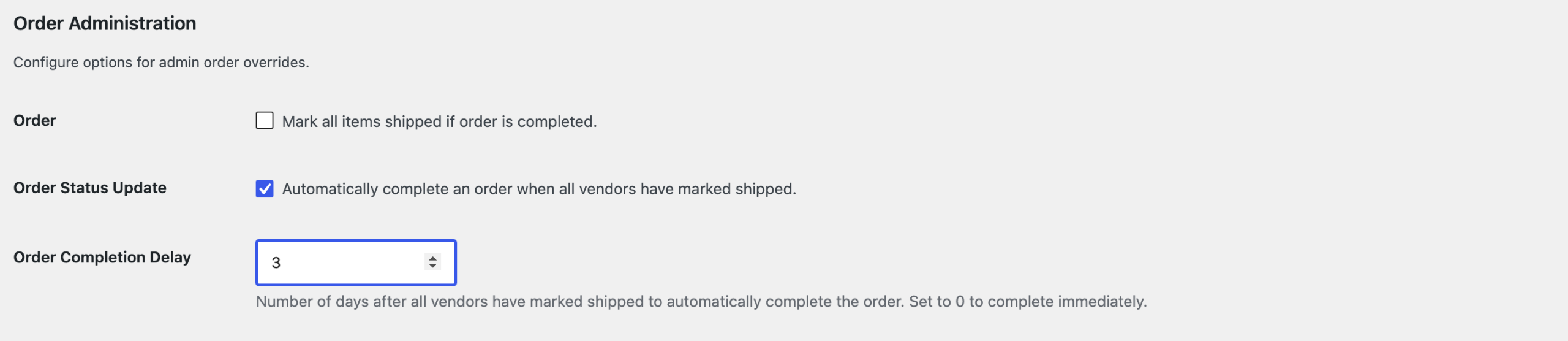
From now on, once every vendor on an order has marked their items as shipped, the order moves to Completed on its own.
How the completion delay works
The countdown starts only after the last vendor on the order marks their items as shipped. If one vendor is still to ship, nothing is scheduled yet.
With a delay of 0, which is the default, the order completes the moment the last vendor marks shipped. With any number above 0, WC Vendors Pro schedules the completion for that many days later and leaves the order as it is until then.
If a vendor un-marks their items and then marks them shipped again, the pending completion is cancelled and a fresh one is scheduled. You will not get two completions from the same order.
Mark all items shipped when an order is completed
This option does the reverse. When you complete an order yourself, WC Vendors Pro marks every item on it as shipped, so you do not have to update each vendor’s line separately.
- Go to WC Vendors → Settings → Capabilities → Orders.
- Tick Order, described as “Mark all items shipped if order is completed”.
- Save your changes.
Need help?
If you have a question or run into any issues, we’re here to help.
- Premium users: Open a support ticket
- Free users: Visit our community forum