


Vendor comparison plays a big role in building a successful marketplace. It helps WooCommerce marketplace owners see which vendors offer the best mix of quality, pricing, and reliability. Without vendor comparison, it is easy to make decisions based only on price or first impressions, which can lead to problems later.
Many marketplace owners face the same challenge: too many vendors to choose from and not enough time to look at all the details. Some vendors might have low prices but struggle with late deliveries. Others might offer good products but have poor communication. Comparing vendors helps prevent these issues before they happen.
In a competitive marketplace, choosing the right vendors shapes the customer experience. It affects product quality, delivery times, and even customer trust. Taking time for vendor comparison sets the foundation for smooth marketplace operations and long-term growth.
Why Vendor Comparison Matters For Marketplace Success
Vendor comparison matters because it helps marketplace owners make better choices for their business. Owners can see who meets the needs of their marketplace and who might fall short. This step is not only about finding the cheapest vendor. It is about making sure the vendors match the marketplace goals and keep customers happy.
Vendor comparison also creates healthy competition between vendors. When vendors know they are being compared based on quality, price, and service, they work harder to perform better.
Another reason vendor comparison matters is reputation. Marketplaces grow when people trust them. If the marketplace is filled with vendors who meet deadlines, communicate well, and sell quality products, customers feel confident buying there repeatedly.
Key Criteria For Comparing Vendors
When doing a vendor comparison, marketplace owners need clear criteria. Without clear points to compare, it is easy to miss small details that can cause big problems later. These criteria help owners look at each vendor fairly before making a decision.
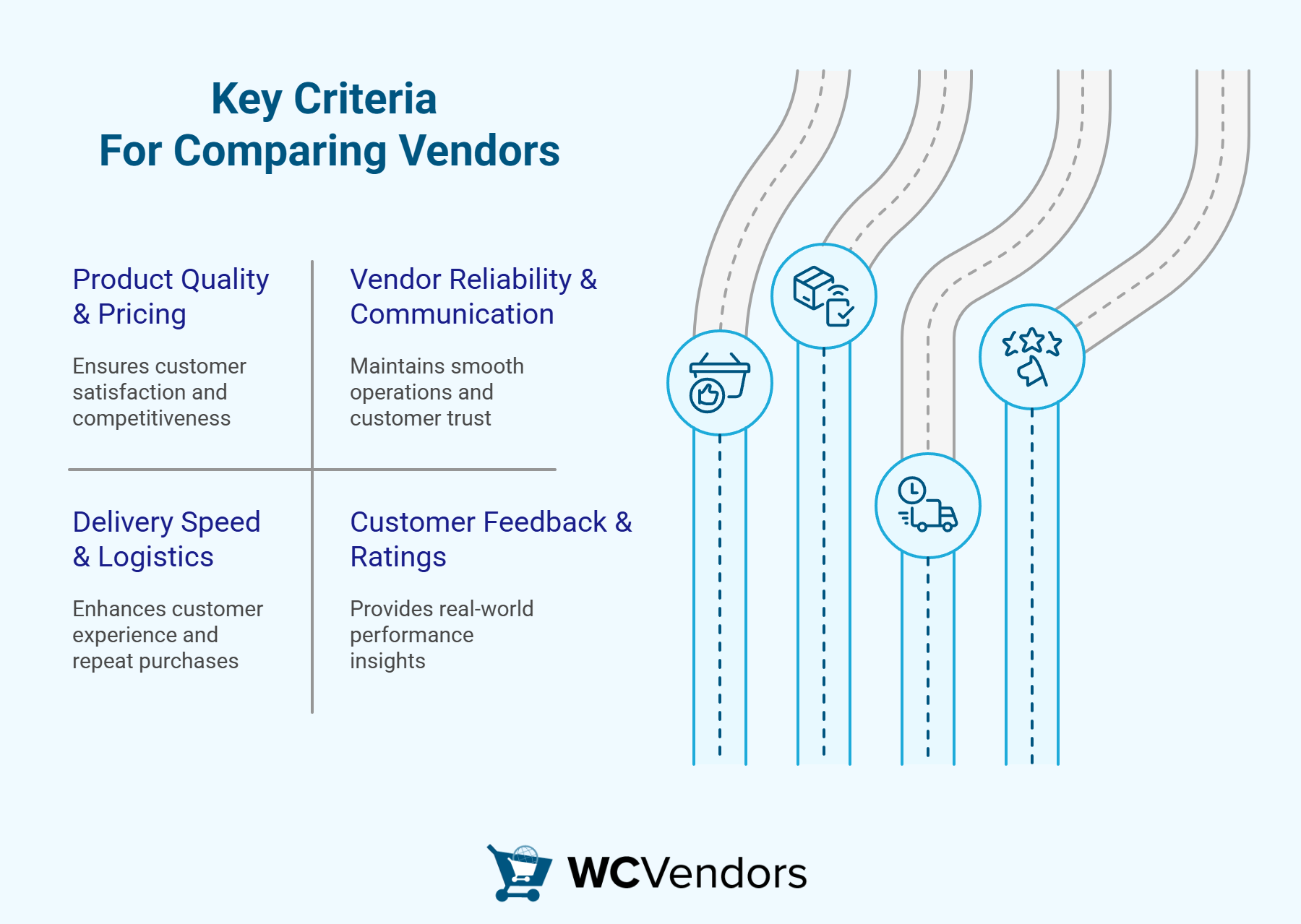
1. Product quality and pricing
The first thing most people notice in a vendor comparison is product quality. Customers expect items that match their descriptions and last as promised. Poor-quality products bring complaints and refunds, which hurt the marketplace’s reputation. Pricing matters too, but low prices mean little if the quality is bad. A balance between cost and quality helps the marketplace stay competitive.
2. Vendor reliability and communication
Reliability is another key factor in vendor comparison. Marketplace owners need vendors who deliver on time and keep their promises. When vendors fail to meet deadlines, it delays orders and frustrates customers.
Communication is equally important. Vendors who reply quickly to questions or problems make marketplace operations run smoothly. A vendor who answers clearly and quickly can solve issues before they grow into bigger problems.
💡 Additional Note: StoreAgent AI Chat is a tool powered by AI that vendors and marketplace owners can use. It answers simple questions instantly, such as order status or shipping details, so customers do not wait long for help. The chat organizes questions by topic, shows how fast vendors respond, and reminds them when follow-ups are needed. It can even reply after hours or support more than one language, so no customer is left waiting.
3. Delivery speed and logistics
Delivery speed often decides whether a customer buys again or not. When doing a vendor comparison, owners should look at how fast each vendor ships products and how well they handle logistics. A vendor who ships quickly and packs items properly creates a better customer experience.
You may also read: How To Optimize WooCommerce Shipping Setup For Better Store Sales.
4. Customer feedback & ratings
Customer reviews and ratings tell the real story. Marketplace owners can see how vendors perform based on real experiences from buyers. If a vendor has many complaints about late shipping or poor quality, it is a red flag for potential issues. Positive ratings and repeat buyers show that a vendor meets expectations consistently.
Get more insights on “Seller Reviews: How To Use The Vendor Rating System To Boost Customer Trust.”

Practical Vendor Comparison Strategies
When marketplace owners finish gathering vendor details, the next step is to use practical strategies to compare them fairly. Vendor comparison works best when there is a clear system instead of guessing or relying on first impressions. These strategies help turn vendor information into simple points that owners can study before making choices.
Creating a vendor scorecard
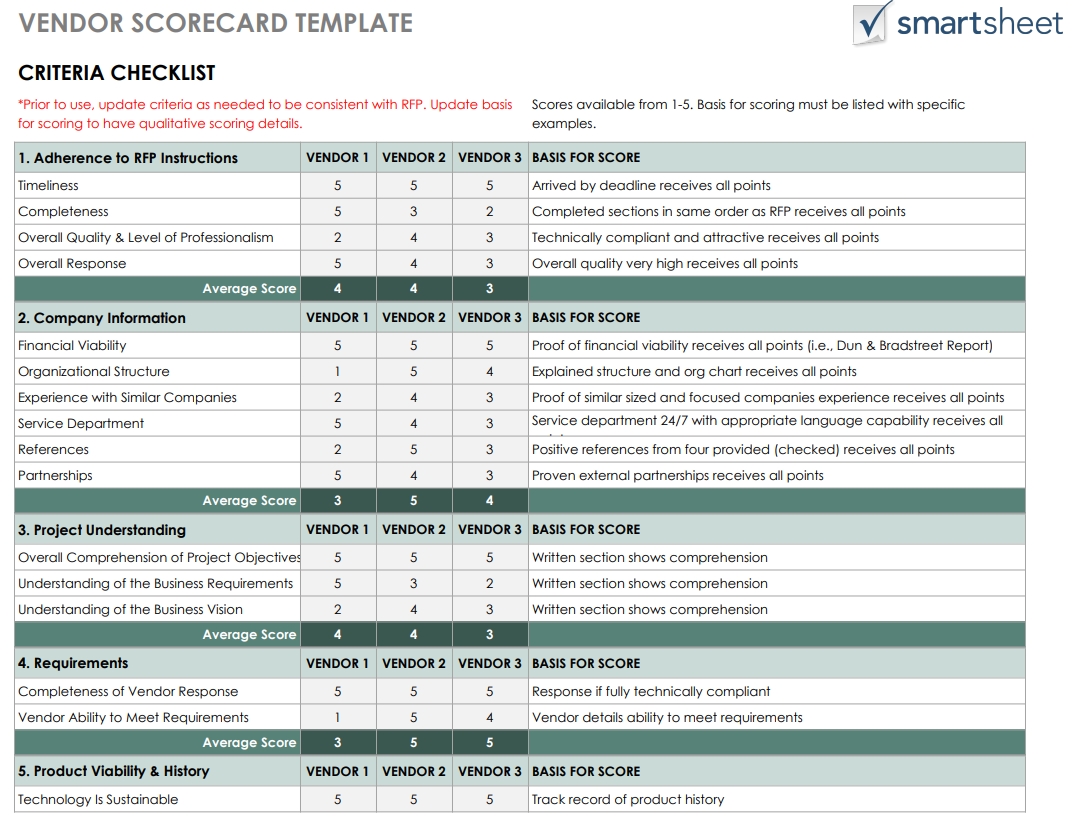
A vendor scorecard is a chart where owners list all vendors on one side and important criteria on the other side. Each vendor gets a score for every point, such as one to five stars or a number scale.
The benefit of using a scorecard is that it removes bias. Instead of choosing a vendor based on feelings, owners can see actual scores. For example, a vendor with high-quality products but slow delivery might score well in one area but poorly in another. This makes it easier to compare vendors side by side and see who meets most of the marketplace needs.
Take a look at this vendor scorecard sample from Smartsheet:
Using data and analytics for decision-making
Data turns vendor comparison into a fair and accurate process. Sales reports show how often customers buy from each vendor, while shipping logs reveal late delivery patterns.
When owners look at data, they see trends that feelings or opinions might miss. For instance, two vendors might seem similar, but the data might show one has fewer complaints or faster delivery times. Data removes guesswork and gives owners clear evidence.
Setting benchmarks for performance
Benchmarks are standards that vendors should meet to stay in the marketplace. These can include rules like “reply to messages within 24 hours” or “ship orders within three days.” When vendors know the benchmarks, they understand the expectations clearly.
Owners can then use these benchmarks during vendor comparison to see who meets or passes the standards. Vendors who meet the benchmarks consistently become strong partners, while those who fail often may need to improve before staying in the marketplace.
Tools And Features To Simplify Vendor Comparison
Vendor comparison takes time when owners check data by hand. This is why the right tools and plugins make the process faster and more accurate. Instead of guessing or using scattered reports, marketplace owners can use built-in features and add-ons to gather all the information they need in one place.
One of the main tools for WooCommerce marketplaces is WC Vendors. It helps owners manage multiple vendors inside the WooCommerce dashboard. With WC Vendors, marketplace owners can:
- Complete vendor reports:
Owners can view vendor sales, order histories, and customer reviews directly in the WC Vendors dashboard. This makes it easy to compare vendors without switching between multiple tools. - Commission control:
Marketplace owners can set commission rates for each vendor based on performance. Vendors who deliver high-quality products, fast shipping, and positive customer reviews can earn higher commissions as a reward. - Vendor ratings and feedback:
WC Vendors allows customers to leave reviews for each vendor. Marketplace owners can read this feedback to see real customer opinions before making decisions. - Integration with other tools:
WC Vendors works with platform integrations to give real-time updates on sales growth, delivery speed, and customer satisfaction. - Centralized vendor management:
Instead of juggling spreadsheets and separate apps, marketplace owners can handle everything—sales, reviews, commissions, and ratings—in one location.
Another helpful tool is StoreRadar. It sends real-time alerts about product changes, sales trends, and updates. With StoreRadar, marketplace owners can spot problems early, such as drops in product quality or slow delivery times. They can also see which vendors stand out in terms of sales growth or customer reviews, making vendor comparison faster and based on real-time information.
Other tools that can help with vendor comparison
- WooCommerce Analytics: Gives detailed sales reports, product performance charts, and customer behavior insights right in the WooCommerce dashboard.
- Metorik: A reporting tool that connects with WooCommerce to create easy-to-read reports about sales, customers, and vendors. It also sends automated email reports so owners stay updated.
- Google Data Studio: Turns vendor and sales data into visual dashboards. Owners can connect WooCommerce data here to create graphs and charts for easier comparisons.
Final Tips For Choosing Vendors For Your Marketplace
Start with clear goals
Before doing a vendor comparison, marketplace owners need to decide what matters most. Clear goals help guide every decision and prevent mistakes when choosing vendors.
Use both numbers and feedback
Sales reports and delivery data show how vendors perform, but customer reviews reveal what numbers cannot. Combining performance data with real customer feedback gives a complete picture of each vendor’s strengths and weaknesses.
Check consistency, not just one-time results
A vendor might have one month of great sales but fail in the next. Looking at long-term performance during vendor comparison helps owners choose vendors who deliver quality and service consistently, not just occasionally.
Keep communication open
Even top-performing vendors can face problems. Marketplace owners should stay in touch with vendors to solve issues quickly. Open communication keeps operations running smoothly and customers satisfied.
Review vendors regularly
Vendor comparison should not be a one-time task. Setting a regular review schedule—monthly or quarterly—helps marketplace owners stay updated on vendor performance and maintain high standards as the business grows.
Takeaways
Vendor comparison is not just about looking at how they sell and bring profit to your store. It is about finding vendors who meet the marketplace goals, deliver quality products, and give customers a good experience. By checking factors like product quality, delivery speed, customer reviews, and long-term performance, marketplace owners can make better choices for their business.
In this article, we discussed what you need to know to make an effective vendor comparison:
- Why vendor comparison matters
- Key criteria
- Vendor comparison strategies
- Tools and features
- Final tips
With the right process and tools, vendor comparison becomes a way to build trust, improve quality, and develop your marketplace’s credibility.

