
Running a multi-vendor marketplace has always come with a paperwork headache. Customers buy from several vendors in a single cart, but admins are left untangling who sold what, who owes how much and how to send each seller a clean record at the end of the month. With the recent release of WC Vendors Pro, the new vendor monthly statement feature, paired with printable per-vendor invoices, turns a manual spreadsheet job into a built-in workflow inside your WordPress dashboard.
Why Vendor Monthly Statements Matter For Marketplaces
For most marketplace admins, payouts are not the only obligation. Every vendor expects clear documentation of what they sold, what was refunded, taxes applied, and what commission was deducted. Without a vendor monthly statement, that information lives scattered across emails, dashboards, and CSV exports.
McKinsey argues that well-implemented marketplace procurement should facilitate reporting and data analysis, with greater transparency in product, service, and supplier availability. Per-vendor invoices fix the customer view, while the vendor’s monthly statement fixes the seller’s view.
What’s New In WC Vendors Pro
For the marketplace admin, the practical change is simple. In the WordPress orders screen, a new option lets you generate separate, printable invoices, broken down by vendor, for any single order. At the same time, an automated job rolls all vendor transactions into each vendor’s monthly statement at the end of the month.
This release builds on the existing WC Vendors Pro foundation, which already adds commissions, Stripe Connect payouts, vendor dashboards, and shipping management to your WooCommerce marketplace. The new vendor monthly statement system inherits all of those existing data points, so commissions, taxes, and refunds are already in scope.
How to enable the automatic monthly statement for vendors
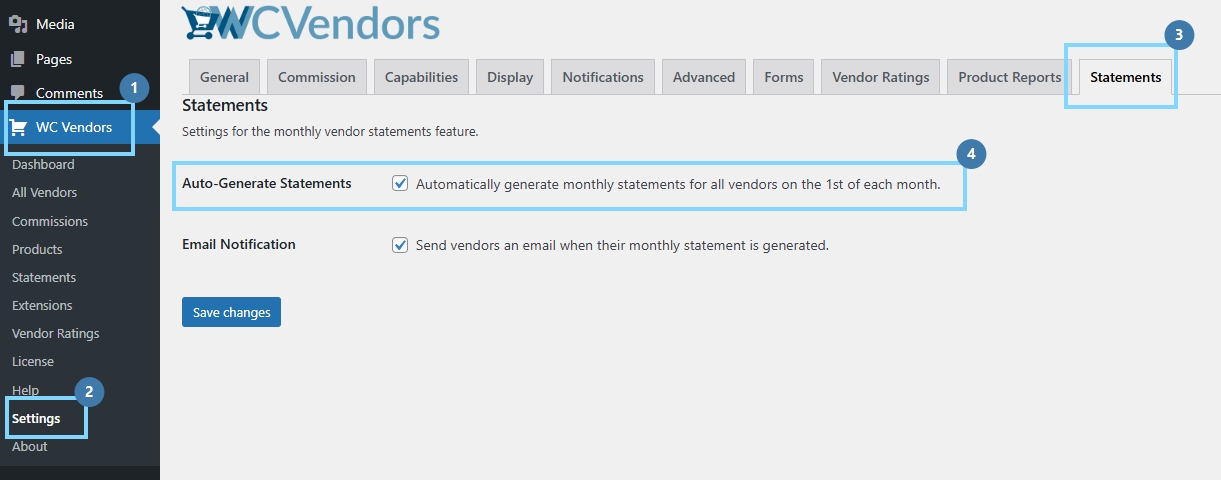
- From your WordPress dashboard, click WC Vendors > Settings > Statements.
- Tick the “Auto-Generate Statements” option to enable the automated rollup.
- Click Save Changes at the bottom of the page.
As a vendor:
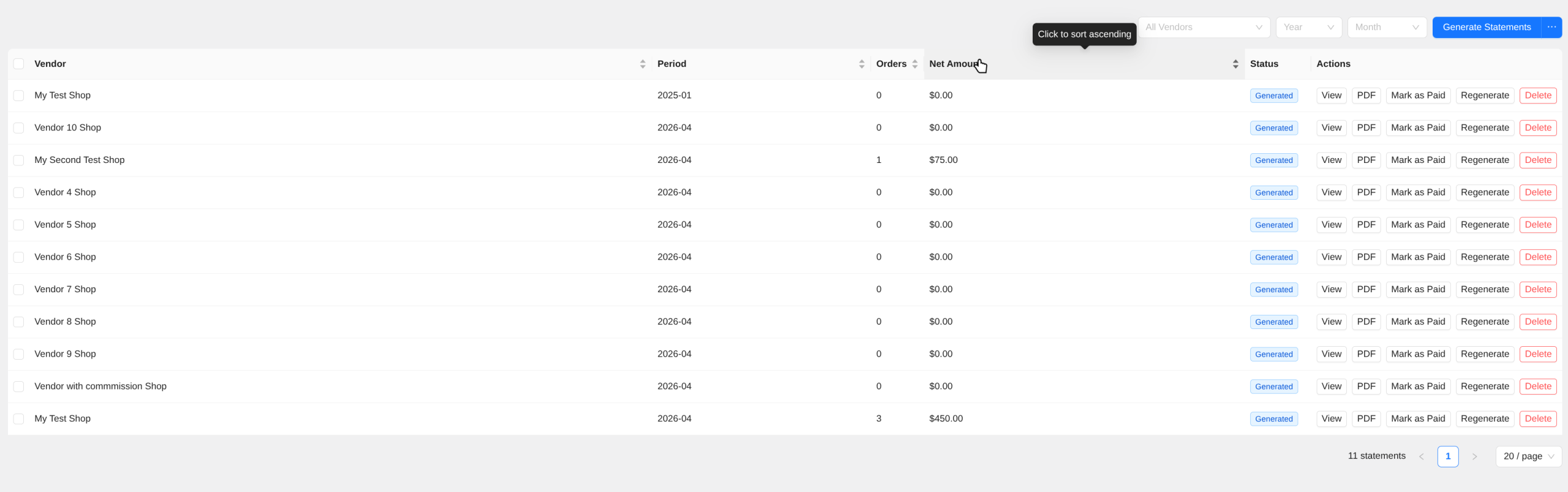
- Log in as a vendor and navigate to Vendor Dashboard > Statements
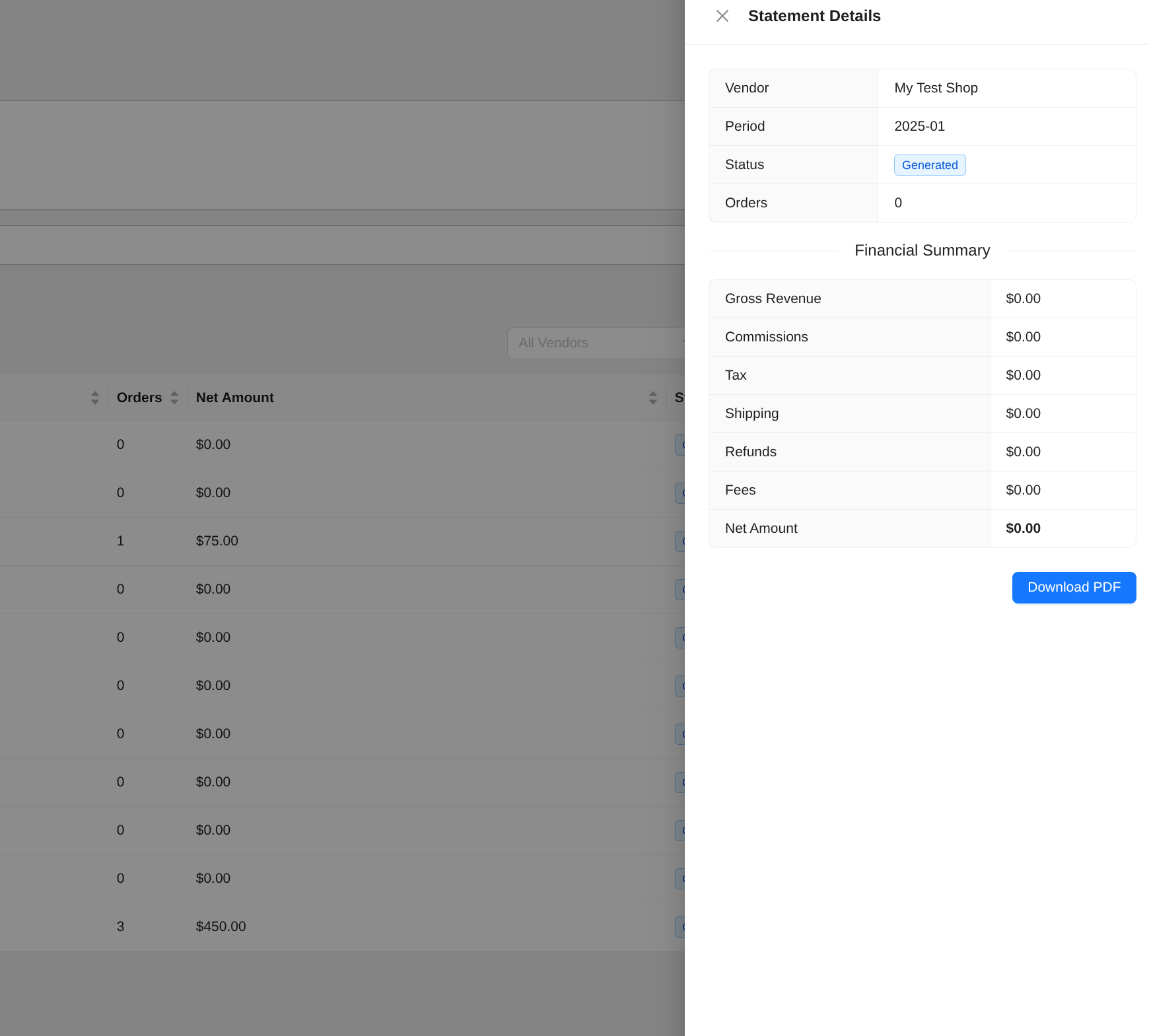
- Click View on a statement and confirm the detail breakdown (gross revenue, commissions, tax, shipping, refunds, fees, net payable)
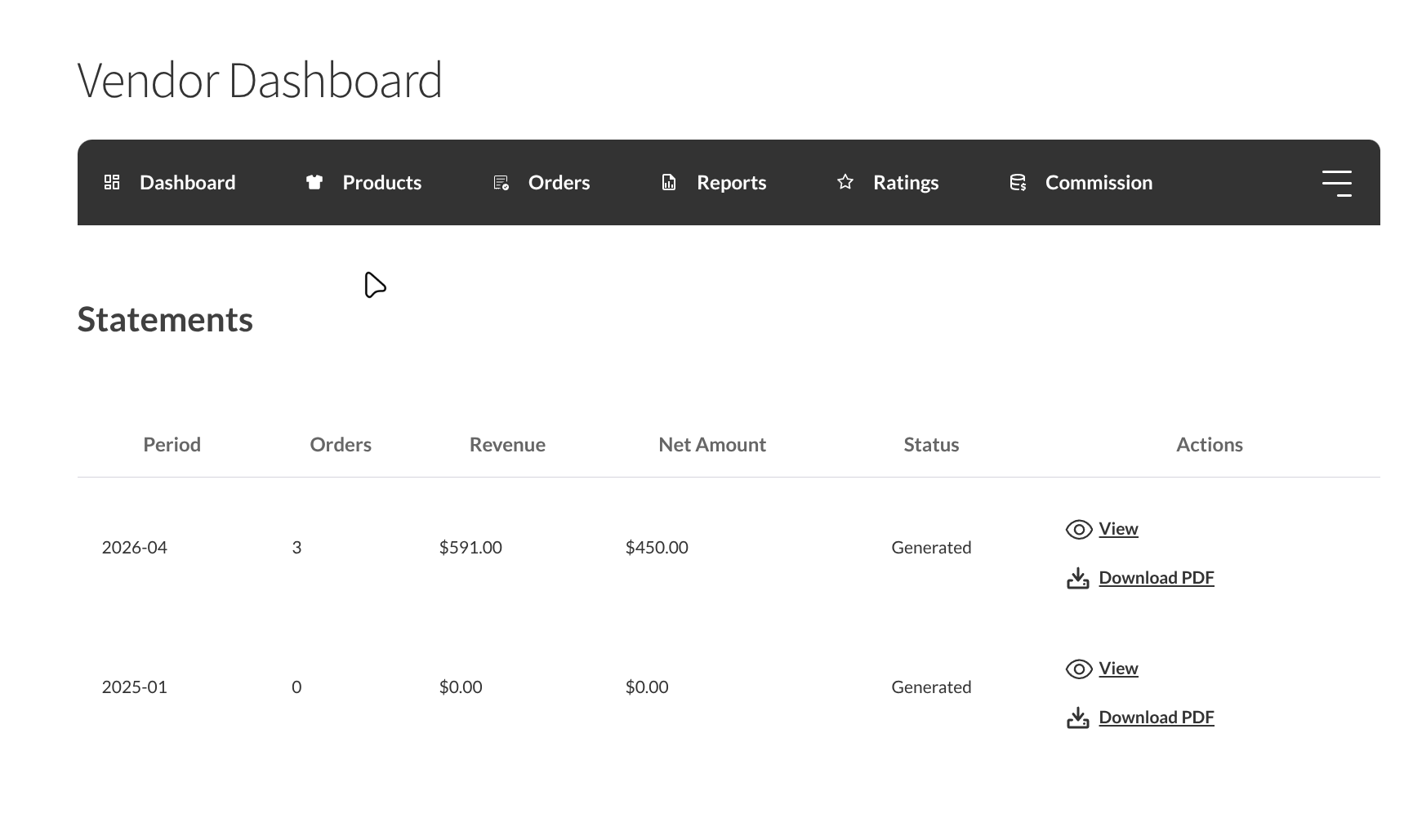
How the vendor monthly statement feature works
At a high level, the feature pulls from the same commissions table that already powers payout reporting in WC Vendors. Every order placed during the month with a “processing” or “completed” status has its commission entries grouped by vendor.
A typical vendor monthly statement includes the order total, any discount applied, the subtotal, tax, and the final commission amount due. This mirrors the breakdown provided by one of the originally requesting users as a reference, and it matches what most accounting workflows expect to see when reconciling marketplace income.
Once generated, the document is available to the admin and can be shared with the vendor. Marketplaces using a manual payout flow can attach the vendor’s monthly statement to the bank transfer or check they send out. For those using Stripe Connect or PayPal Payouts, the document gives them a paper trail that maps cleanly to each scheduled disbursement.
How to enable printable separate invoices per vendor
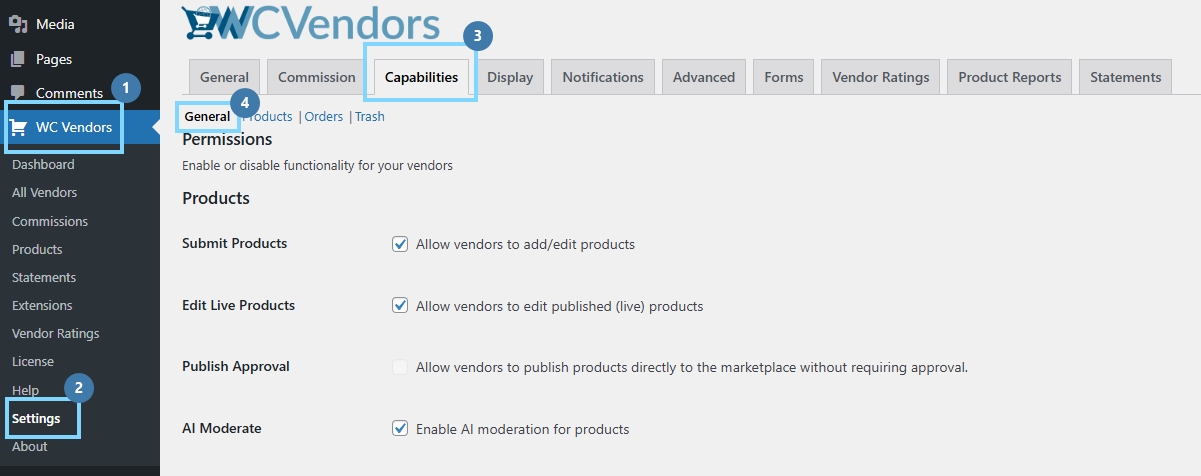
- From your WordPress dashboard, go to WC Vendors > Settings > Capabilities > General.
- Scroll down to the section Pro Features > PDF Invoices. Tick the checkbox to turn it on.
- Click Save Changes.

On the vendors’ side:
- Log in and navigate to Vendor Dashboard → Orders
- Confirm that the Send Invoice button appears on orders
- Click Send Invoice, and the button should change to “Sending…” then “Invoice sent!” then “Resend Invoice.”
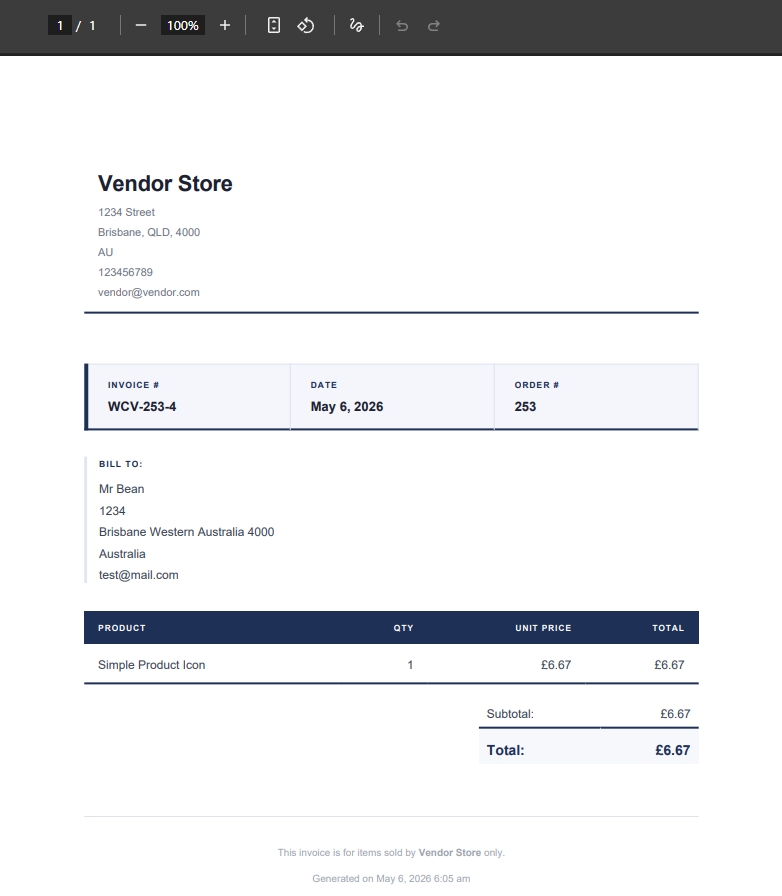
- Check the customer’s email inbox — a PDF invoice email should have arrived with a per-vendor PDF attachment
- Refresh the orders page. The button should still show Resend Invoice
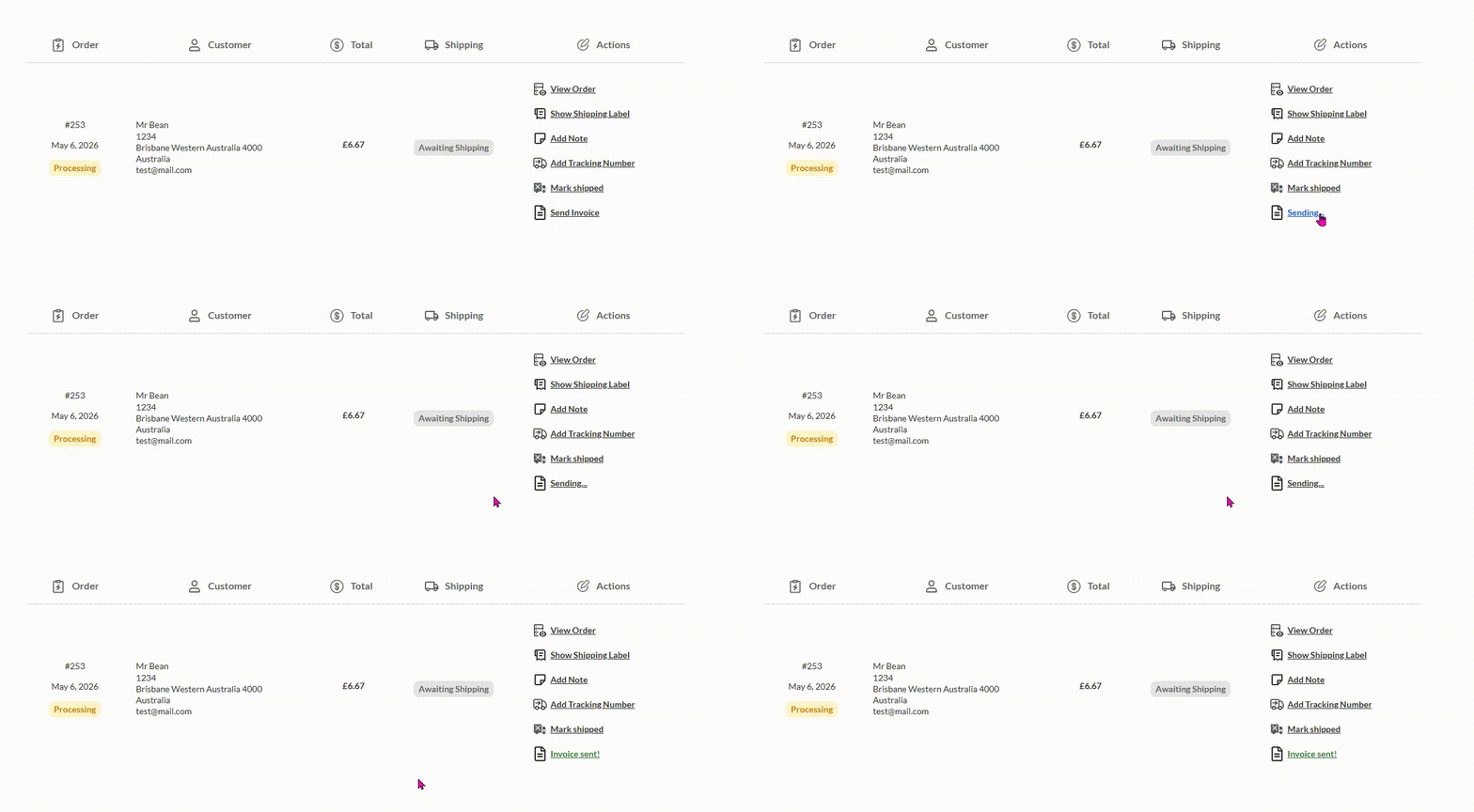
The new option appears only on the admin side. From the WP admin orders screen, you can now select an order and generate a printable invoice for each vendor that participated in it. You can also control exactly which vendor details print on that invoice, such as hiding a seller’s phone number from the customer.
Conclusion
The arrival of the vendor monthly statement and printable per-vendor invoice features in WC Vendors Pro closes a gap for marketplace operators. If you want finer control over who receives one, the new WooCommerce vendor statement settings let you limit statements to selected vendors and skip vendors with no activity that month. For marketplace owners who have been holding off on scaling due to operational drag, this update is an open invitation to revisit the math, and greater clarity across the transaction chain means a noticeably longer runway for growth.
Across the article we looked at:
Together, these pieces form a complete picture of the new vendor monthly statement workflow and what it means for any marketplace running on WC Vendors Pro.
Frequently Asked Questions
Do I need a third-party plugin to use these features?
No. Both the printable per-vendor invoice and the vendor monthly statement are now native to WC Vendors Pro. Marketplaces that previously relied on tools like WooCommerce PDF Invoices and Packing Slips for similar functionality can now handle the workflow directly within WC Vendors.
Does the vendor monthly statement work with Stripe Connect or PayPal Payouts?
Yes. The statement pulls from the commission’s table regardless of which payout method you use. Whether you process payments manually, through Stripe Connect, or via PayPal Payouts, the vendor monthly statement gives both sides a paper trail that reconciles cleanly with the actual disbursement.
Will refunds and partial refunds appear on the statement?
Refunds and reversed commissions are tracked in the WC Vendors commissions table, which means they should reflect on the vendor monthly statement automatically. If a refund is processed mid-month, the statement issued at month end will show the adjusted commission total.

