
Imagine selling other people’s products and leveraging the promotional power of a team of vendors. Do such advantages sound fantastic? Sure. But they are, in fact, what the multi-vendor ecommerce business model is all about.
Popularized by ecommerce giants like Amazon and eBay, the online multi-seller marketplace is a website where multiple vendors can showcase their products. With all the benefits this type of business can produce, it’s no surprise many are eager to start their own online shopping hub. If you’re considering diving into the world of multi-vendor ecommerce, however, it’s important to remember one thing: It’s crucial to choose the right platform to support your venture.
Thus, today’s article will guide you through the essential considerations for selecting the perfect multi-vendor ecommerce platform. Furthermore, we’ll explain why WC Vendors is among the best platforms that can help you achieve your marketplace goals.
So let’s jump right into it!
What Is A Multi-Vendor Ecommerce Marketplace?
Before we discuss what to look for when choosing the right multi-vendor ecommerce platform, we must first understand what an online multi-vendor marketplace is (feel free to jump ahead if you’re already familiar with the concept).
An online multi-vendor marketplace is an online platform where multiple independent sellers can list and sell their products or services to customers. Unlike a traditional e-commerce store where a single entity sells its products, a multi-vendor marketplace allows various third-party vendors to create their own accounts, manage their inventory, set prices, and handle their sales within the same platform. Selecting the right plugin is the most critical decision in your build process. If you are narrowing down your choices between the industry’s most flexible tools, read our WC Vendors vs MarketKing comparison to ensure you choose the architecture that supports your long-term vision.

The key features of a multi-vendor ecommerce marketplace
The multi-vendor marketplace boasts various features that set it apart from the traditional retail model. Some of these include:
Multiple vendors: The platform hosts a variety of sellers who offer a wide range of products or services. Each seller has their own virtual storefront within the marketplace.
Individual storefronts: Vendors can customize their storefronts with their branding, logos, banners, and descriptions. This gives them a certain degree of autonomy and the ability to differentiate themselves.
Product management: Vendors can manage their product listings, including adding images, descriptions, prices, and quantities. They can also update product availability and stock levels.
Order processing: When customers purchase products from different vendors, the marketplace system manages the orders, collects payment, and distributes the order details to the respective vendors for fulfillment.
Commission and fees: Marketplace owners usually charge a commission or fee for facilitating the transactions. This revenue model is how marketplace operators earn their income.
The advantages of a multi-vendor ecommerce marketplace
A multi-vendor marketplace offers marketplace operators several advantages. Here are some of them:
Diverse revenue streams: The marketplace operator earns revenue through commissions or fees charged to vendors for using the platform, which can be a significant source of income.
Minimal inventory risk: Since vendors manage their own inventory, the marketplace operator isn’t burdened with the cost and risk of holding stock.
Low operating costs: The costs associated with maintaining and updating the platform can be shared among the vendors, making it a cost-effective model.
Attractiveness to customers: A diverse range of products from various vendors can attract a larger customer base, increasing the marketplace’s overall appeal.

11 Factors To Consider When Choosing A Multi-Vendor Ecommerce Platform
So we’ve established that the online multi-seller marketplace can be lucrative for anyone hoping to start an ecommerce venture. However, to make things work, you must pick the right software for the job.
For this reason, be on the lookout for solutions to your specific needs. With that in mind, here are the eleven factors to consider when choosing a multi-vendor ecommerce platform.
1. Vendor management tools
Efficiently managing multiple vendors is at the heart of a successful multi-vendor ecommerce platform. Therefore, look for platforms that offer robust vendor management tools, such as streamlined onboarding processes, performance analytics, and easy communication channels.
At the end of the day, the ability to oversee vendor activities, track sales, and manage inventory will contribute to a smoother operation. Thankfully, modern marketplace solutions boast robust vendor management tools.
For example, the WooCommerce plugin WC Vendors allows you to keep track of your vendors’ sales as well as control how much sales data said vendors can access. It even comes with a review system that can also serve as an excellent performance indicator.
2. Customization and branding
Branding plays a pivotal role in attracting and retaining customers. Thus, your chosen platform should provide a high level of customization, allowing you to create a unique and visually appealing marketplace that aligns with your brand identity.
Customization options might include personalized storefronts for vendors, adjustable themes, and flexible layout designs.
Again, customizability is a feature that the best marketplace solutions provide. For instance, WC Vendors lets you choose your marketplace’s colors, images, and text. In addition, you can grant your vendors the power to use their unique store icons, headers, store and product descriptions, and more.

3. Commission structure
A commission refers to a percentage or fixed fee that the marketplace operator charges vendors for each successful sale they make through the platform. Basically, it serves as a reliable source of revenue for the marketplace owner in exchange for providing the platform, infrastructure, and customer base that vendors can access to sell their products or services.
For example, let’s say a vendor sells a product for $100 on a multi-vendor ecommerce marketplace that awards sellers a commission percentage of 80%. When the sale is completed, the marketplace would deduct $20 as a commission, and the vendor would receive $80.
A transparent and flexible commission system can attract more vendors to your marketplace. For example, WC Vendors allows you to create various types of commissions. The most powerful among these include tiered commissions, which award additional benefits to vendors who make the most sales, thus encouraging optimal performance from your team.
4. Scalability and performance
One of the primary factors to consider when choosing a multi-vendor ecommerce platform is its scalability.
As your marketplace grows, you’ll need a platform that can handle increased traffic, transactions, and product listings without compromising performance. Therefore, look for a platform that offers seamless scalability options, as this can accommodate the growth of your business without causing slowdowns or technical glitches.
Keep in mind that scalability isn’t only about the platform; it’s also about what the platform runs on. A multi-vendor marketplace is database-heavy, so even a scalable platform will feel slow on cheap shared hosting once traffic and product listings climb. For serious performance, run WC Vendors on a host built for dynamic, database-heavy sites. We recommend Levamo (formerly Rapyd Cloud), managed WordPress hosting purpose-built for marketplaces, with an enterprise Cloudflare CDN, Object Cache Pro, instant staging, daily offsite backups, and free migration included.
If your current setup is struggling to keep up with your growth, it might be the perfect time to plan a WooCommerce migration to a more robust, scalable marketplace solution.

5. Search and navigation
A user-friendly search and navigation system is crucial for helping customers discover products easily.
For this reason, look for a multi-vendor ecommerce platform that offers advanced search filters, category management, and intuitive navigation menus. The smoother the shopping experience, the more likely customers are to make purchases and return for future transactions.
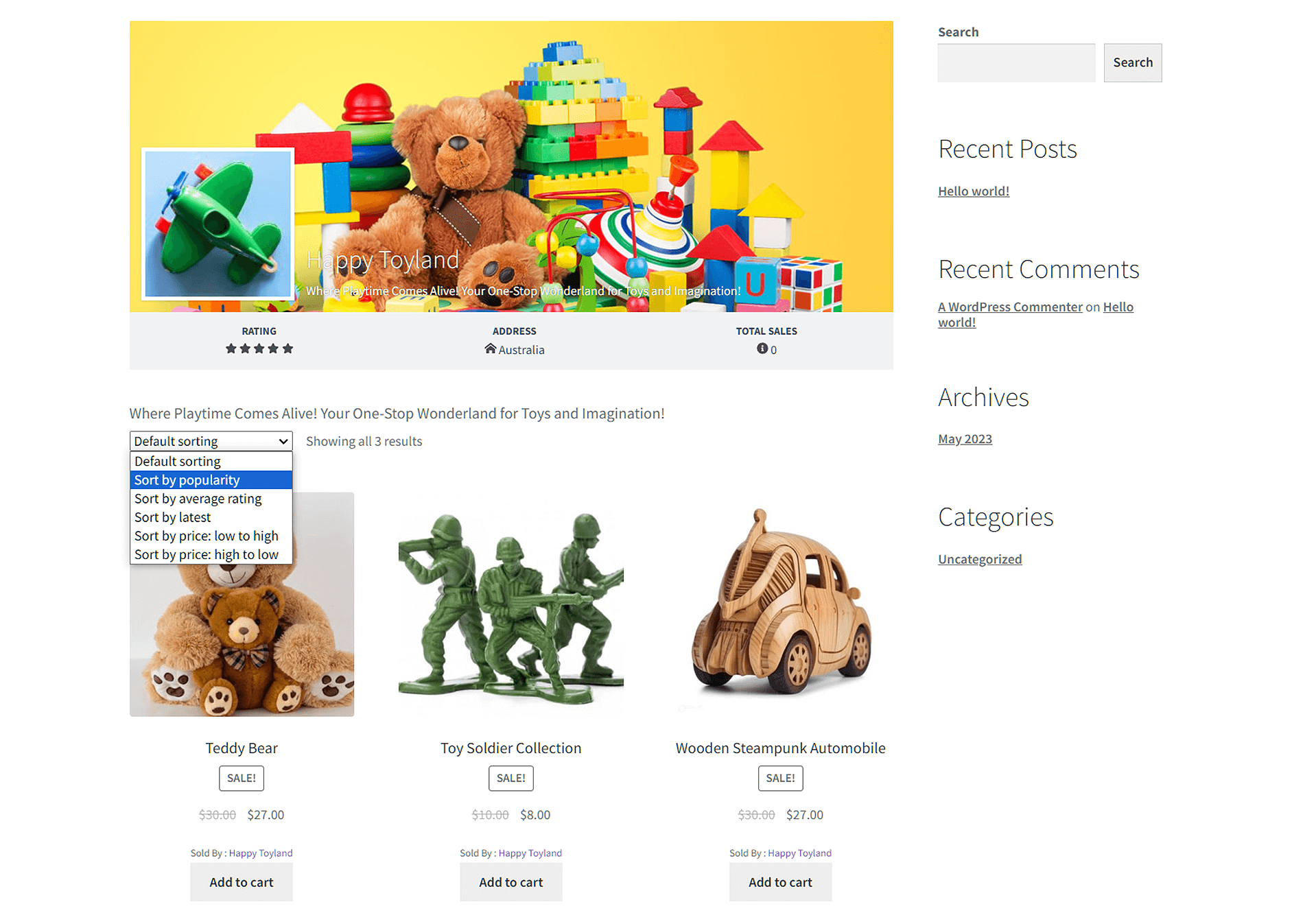
Once again, this is where top-rated marketplace solutions can help. Case in point, WC Vendors comes with an intuitive search functionality that makes it easy for shoppers to search for desired items. Moreover, it provides a marketplace that’s simple to navigate, requiring users as few clicks as possible to arrive at their intended destinations.
6. Mobile responsiveness
A lot of online shopping today is done via mobile devices. According to a Statista report, in the initial quarter of 2023, about 74% of global retail site traffic originated from smartphones, leading to 63% of online shopping orders.
With the growing prominence of mobile devices as vehicles for online shopping, having a mobile-responsive platform is essential. Therefore, your chosen multi-vendor ecommerce platform should offer a seamless shopping experience across various devices and screen sizes.
Mobile-friendly interfaces and intuitive navigation enhance customer satisfaction and drive higher conversions. Thus, make sure your chosen platform lets you build a marketplace that customers can visit using their smartphones or tablets.

7. Payment gateways
Payment processing is a critical aspect of any ecommerce platform. And the more diverse your payment options, the more convenient it will be for customers to buy what you’re selling and for you to pay your vendors.
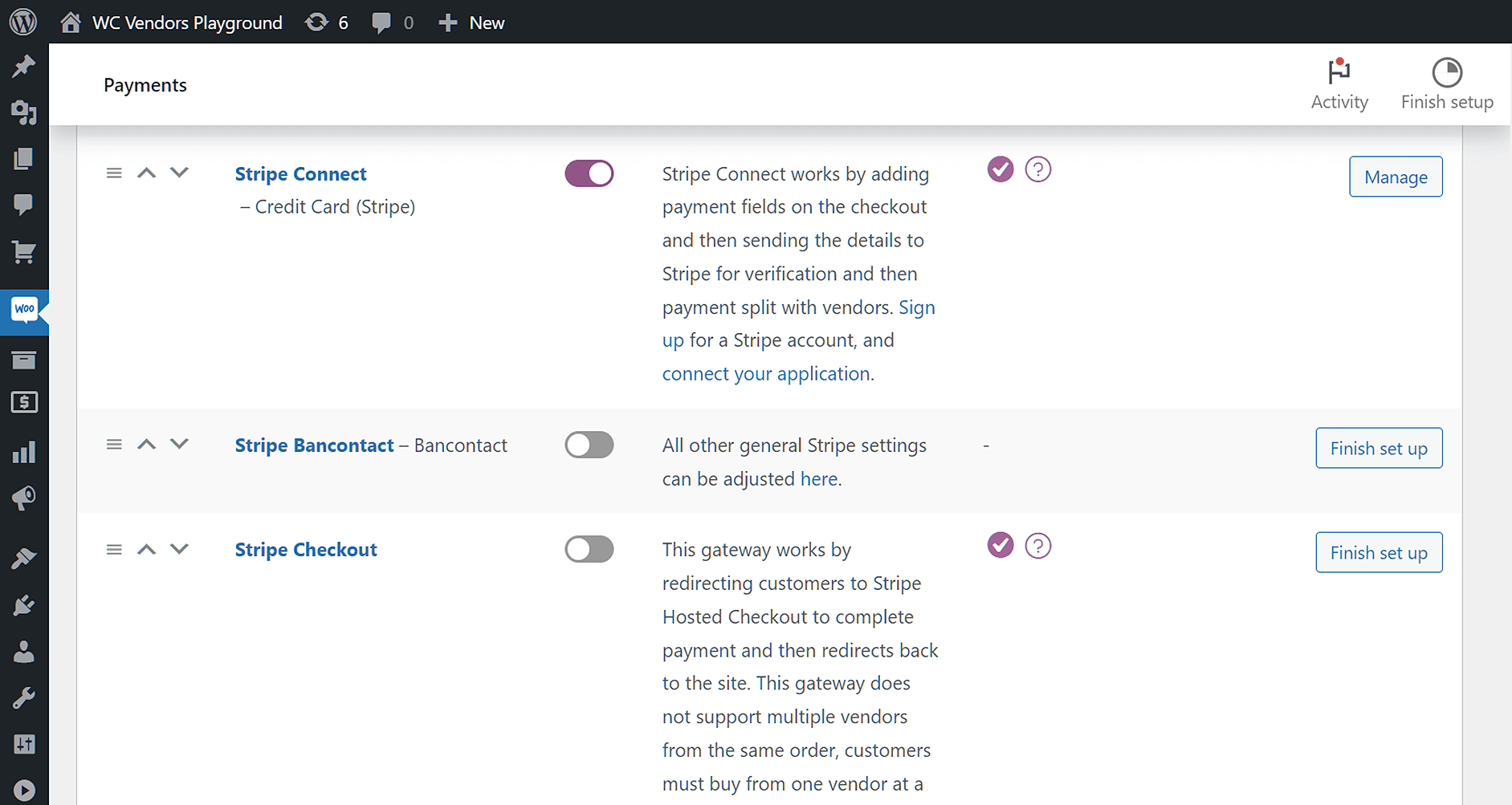
The right multi-vendor ecommerce platform should support a variety of payment gateways and offer secure transaction options. In addition to boasting a wide range of payment methods, WC Vendors is fully integrated with Stripe Connect. Available in over 40 countries, this popular online payment processor allows you to process credit card payments and pay your vendor commissions automatically.
8. Security measures
Security is paramount in ecommerce, especially when dealing with multiple vendors and customers. Therefore, ensure that your chosen multi-vendor ecommerce platform follows best practices for data encryption, secure payment processing, and protection against fraudulent activities.
We already mentioned WC Vendors’ Stripe Connect integration, which guarantees all payments made via the platform are protected.
In addition, it’s a good idea to display trust badges and maintain compliance with industry standards, as these can boost customer confidence in your marketplace.

9. Integration and third-party apps
Consider the integration capabilities of the multi-vendor ecommerce platform of your choice. Ideally, it should effortlessly connect with a variety of third-party applications such as inventory management systems, accounting software, and marketing tools. Such integration can streamline operations and enhance the overall functionality of your marketplace.
WC Vendors integrates with versatile tools capable of elevating your marketplace’s functionality. For example, thanks to its full integration with WooCommerce Subscriptions, you grant vendors the power to create and sell their own subscription products. You can even turn your platform into a subscription box service, guaranteeing steady income via recurring vendor payments.
Then there’s WC Vendors WooCommerce Simple Auctions, which is ideal for those looking to run an online auction marketplace that mirrors platforms such as eBay, Gumtree, or Facebook Marketplace.

10. Customer support and documentation
When issues arise, responsive customer support can make a significant difference. Choose a platform that offers comprehensive documentation, tutorials, and a dedicated support team. Timely assistance in troubleshooting technical problems or addressing vendor concerns will contribute to a positive user experience.
WC Vendors offers extensive support via detailed documentation and tutorial videos as well as a support ticket system. Furthermore, the WC Vendors team is committed to resolving all customer concerns as quickly and thoroughly as possible.

11. Pricing structure
Finally, evaluate the platform’s pricing structure. Some platforms charge a monthly fee, while others take a percentage of each sale or offer a combination of both. Choose a pricing model that aligns with your business goals and projected revenue, ensuring that the costs are manageable as your marketplace expands.
WC Vendors offers three affordable plans for interested parties. The cheapest, Pro Plan, supplies you with all the tools you need to craft a marketplace capable of generating impressive profits. If you want to enjoy the platform’s more advanced and powerful features, you can opt for the Growth Plan. Lastly, there’s Business Plan, which boasts all the tools you need to compete with the biggest online marketplaces in the industry.

Building A Multi-Vendor Ecommerce Website: The Convenient Way
Building a multi-vendor ecommerce website may sound overwhelming, but it’s surprisingly straightforward with the right tools.
Once you’ve installed and activated WC Vendors, the built-in Setup Wizard (covered in the Getting Started guide) will automatically create your online marketplace framework. From there, all you need to do is configure your marketplace settings to match your brand, business model, and vendor needs.
In most cases, setup is as simple as selecting checkboxes or toggling options. WC Vendors is designed to be user-friendly, so even beginners can launch a multi-vendor ecommerce platform without technical expertise.
Here’s what you’ll do next:
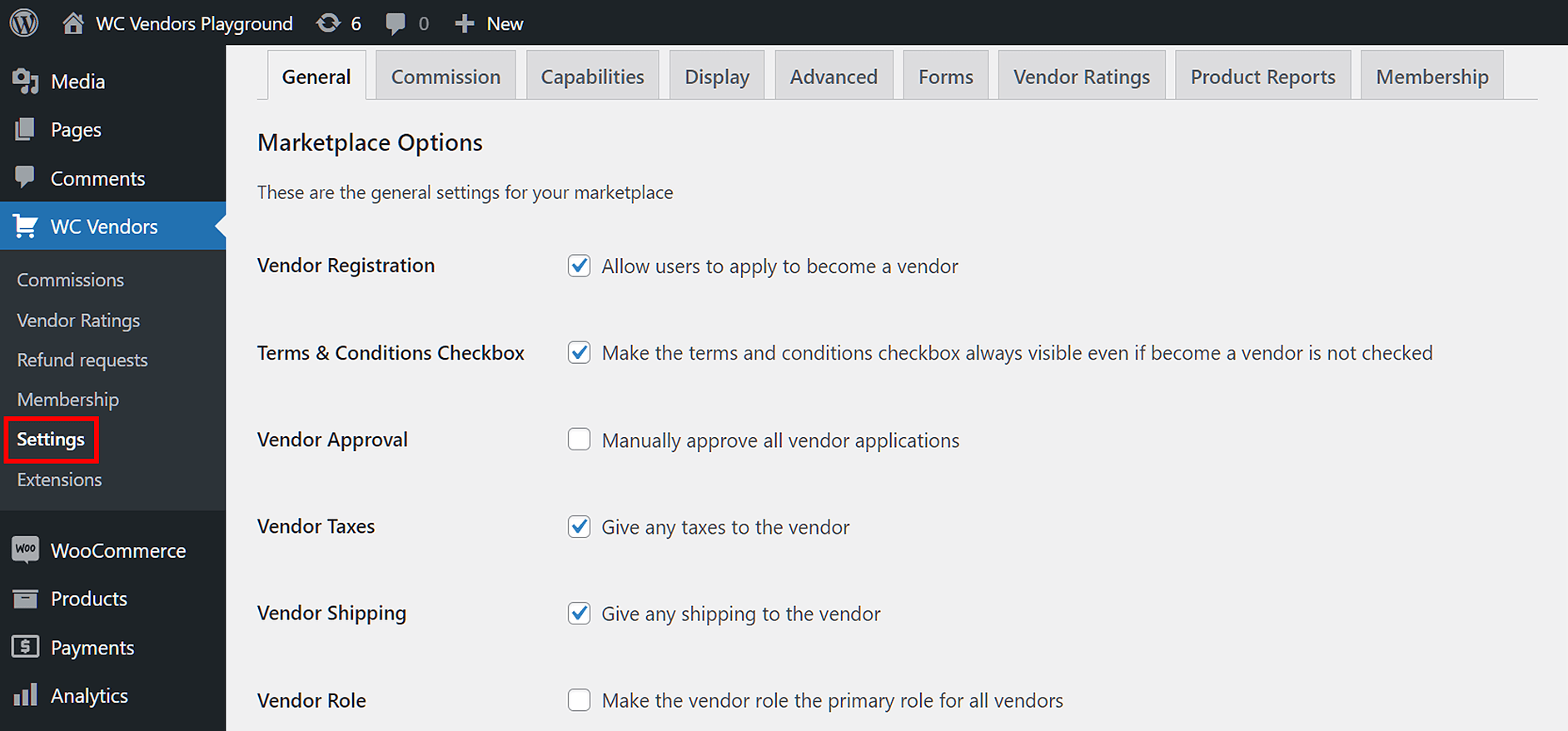
- Access your WordPress dashboard
- Go to WC Vendors > Settings
- Adjust key settings like vendor permissions, commissions, and display options
The settings dashboard is clearly organized and comes with built-in explanations to help you understand each option.
Watch the process in action:
1. General: Determining how vendors join your marketplace
For your marketplace to make money, it needs vendors with products to sell.
Once you’ve attracted potential vendors to your platform, you must let them apply to your marketplace as vendors. To do this, select the General tab, where you’ll find the options related to vendor registration.
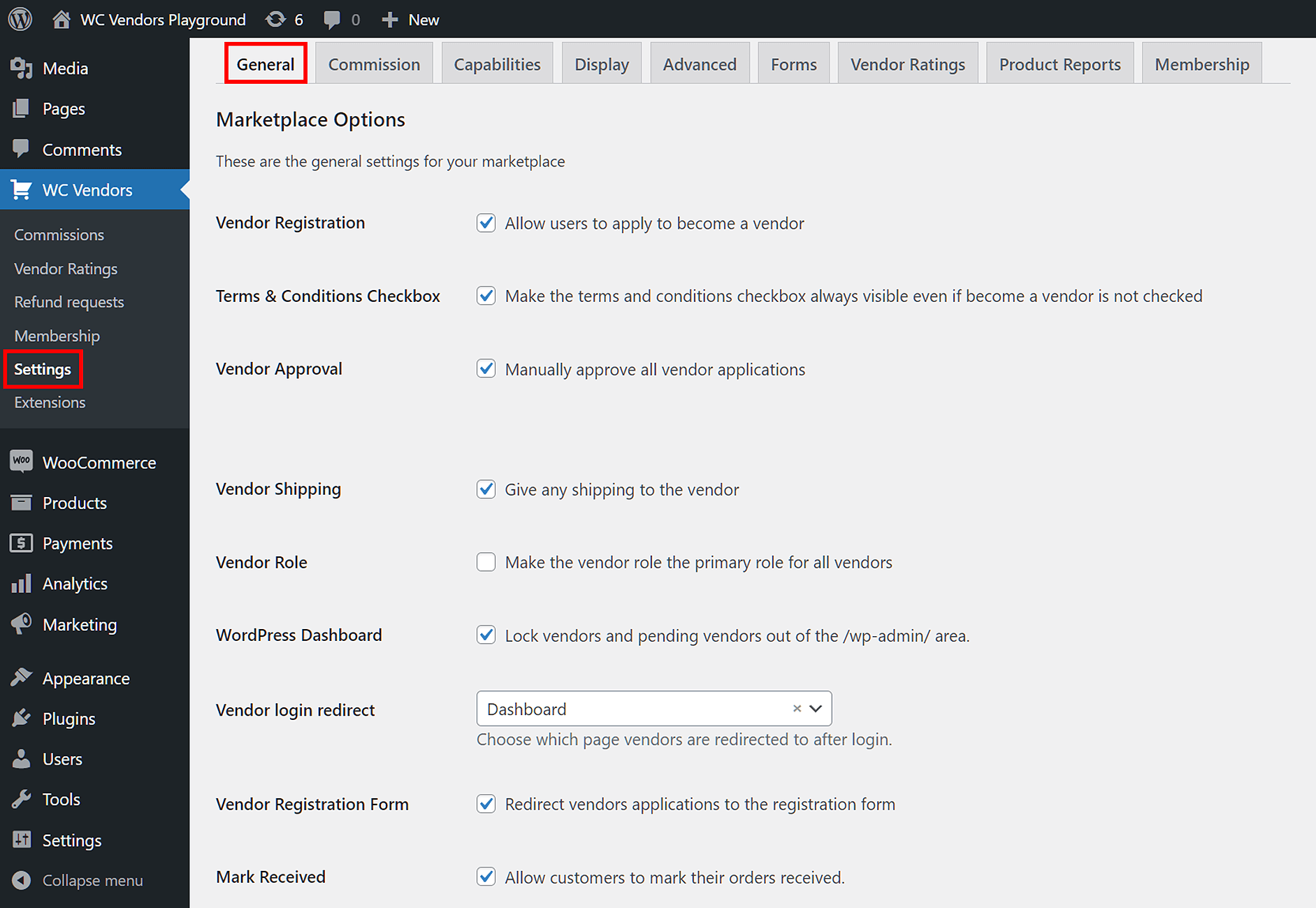
Here’s how to configure it:
- Enable Vendor Registration
Tick this option to allow users to apply as vendors on your marketplace. - Show the Registration Box on Your Site
In your WordPress dashboard, go to:WooCommerce > Settings > Accounts & Privacy→ under Account Creation, tick Allow customers to create an account on the ‘My account’ page. - Redirect to Vendor Registration Form
Tick Vendor Registration Form to send applicants to the vendor registration form, where they can submit important details about their business. - Set Vendor Approval Process
Decide how to handle new applications:- If Vendor Approval is unticked, users are automatically added as “Vendor” roles with full dashboard access and product listing ability.
- If Vendor Approval is enabled, users are assigned the “Pending Vendor” role. You can manually approve or reject them via:
Users > All Users→ hover over their username → click Approve or Deny.
This approval step gives you control over who joins your marketplace, allowing you to review their submitted details and maintain quality standards.
Recommended settings
- Stick with WC Vendors’ default settings.
- Make sure Vendor Registration Form is enabled.
- Set Vendor Login Redirect to Dashboard.
- Enable Vendor Approval and Vendor Role for better control.
For a full walkthrough, visit the General Settings overview in our Knowledge Base.
2. Commissions: Choosing how your marketplace earns revenue
Once you’ve recruited vendors and they’re ready to sell, it’s time to set up how your marketplace generates revenue.
The most common revenue model for multi-vendor ecommerce websites is commissions.
What are commissions?
A commission is a fee you collect from each vendor’s sale. For example, if a vendor sells a product for $100, you might take a $20 commission and pay the vendor $80. This approach ensures that your marketplace earns revenue as vendors grow their sales.
To access your commission options, click the Commission tab.
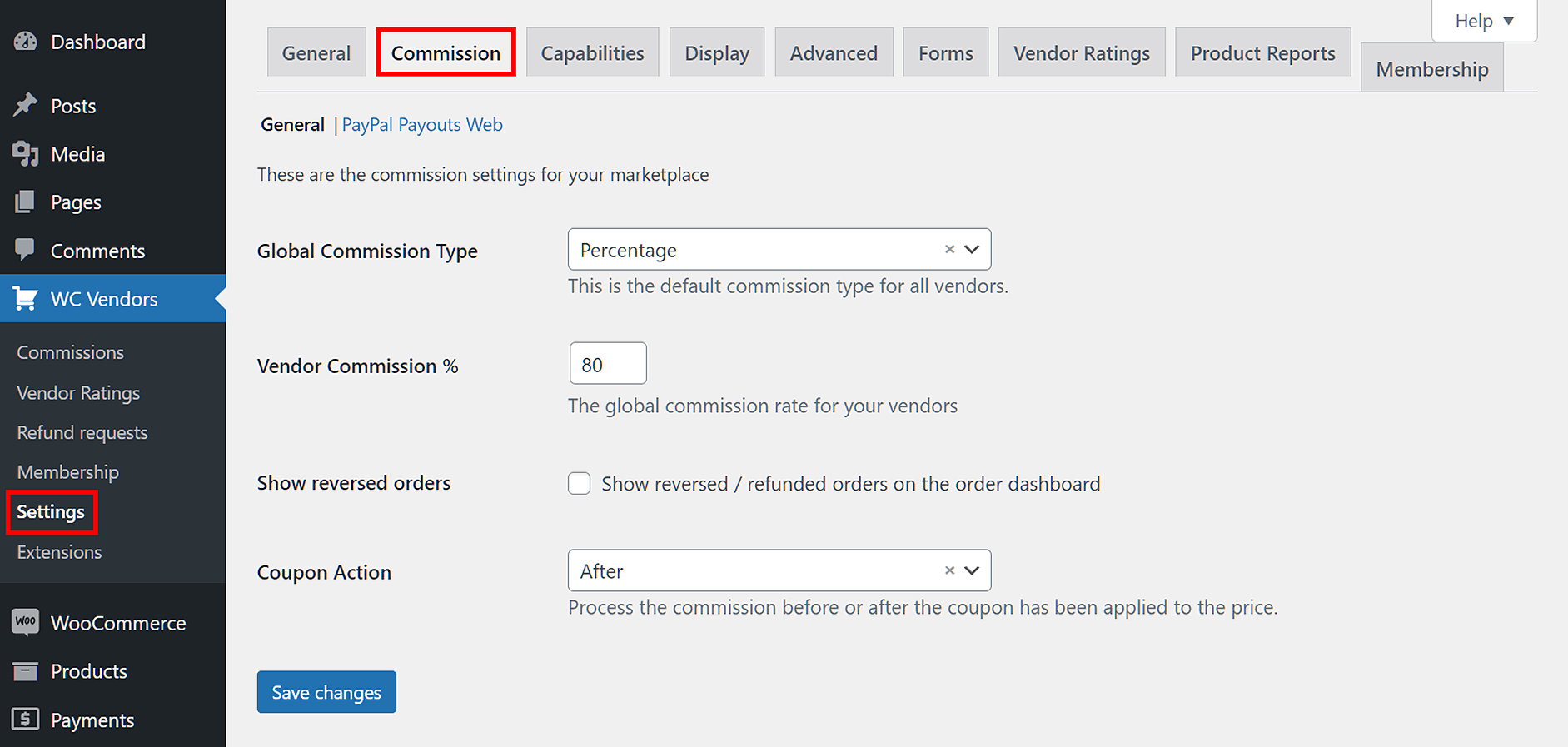
- Choose your Global Commission Type.
- For beginners, we recommend:
- Select Percentage from the dropdown.
- Set a vendor commission percentage between 70% and 80%. This keeps vendors happy while ensuring your marketplace remains profitable.
- Decide if you want to explore other revenue streams.
- WC Vendors also supports membership subscriptions, which allow you to charge vendors a recurring fee for access or premium features.

We’ve prepared a detailed guide on how to implement a commission structure for your marketplace: “How To Charge Vendors In Your Marketplace: A WooCommerce Commissions Guide.”
Another way for your marketplace to make money is through membership subscriptions. Read our article “How To Charge Vendors In Your Marketplace: A Membership Subscriptions Guide.”

Recommended settings
- Set Global Commission Type to Percentage.
- Start with a 70–80% vendor commission rate to balance vendor satisfaction and marketplace profit.
For a step-by-step setup, visit the Commissions documentation in our Knowledge Base.
3. Capabilities: Granting vendors the abilities they need to succeed
The Capabilities tab lets you configure what abilities your vendors can use via the Vendor/Pro Dashboard.
Your options are further categorized into several sub-tabs, some of which we’ll discuss below.
General
The General sub-tab lets you determine how vendors can manage their products and customers’ orders.
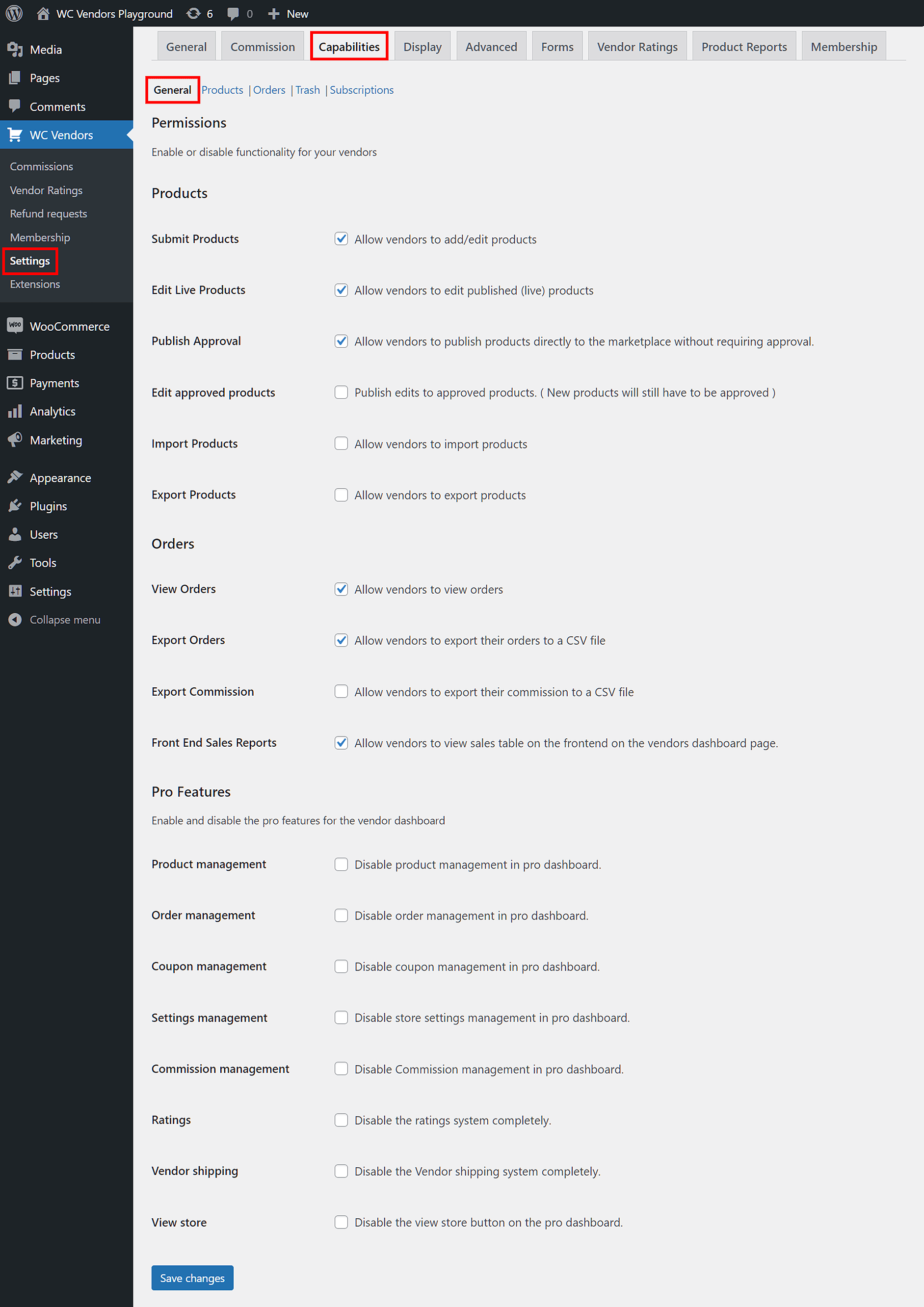
Here’s what you can enable with a few checkboxes:
- Products:
- Allow vendors to add products to their store.
- Let vendors publish products without needing your approval.
- Enable vendors to edit existing products.
- Orders:
- Allow vendors to view their customers’ orders.
- Enable order export to CSV files.
- Display a sales table on the Vendor/Pro Dashboard.
WC Vendors Pro offers additional controls:
- Disable product management on the Pro Dashboard.
- Disable commissions management.
- Turn off the rating system.
- Disable vendor shipping options.
Products
The Products sub-tab lets you configure what products and product information to hide from vendors when they’re creating or editing a product.
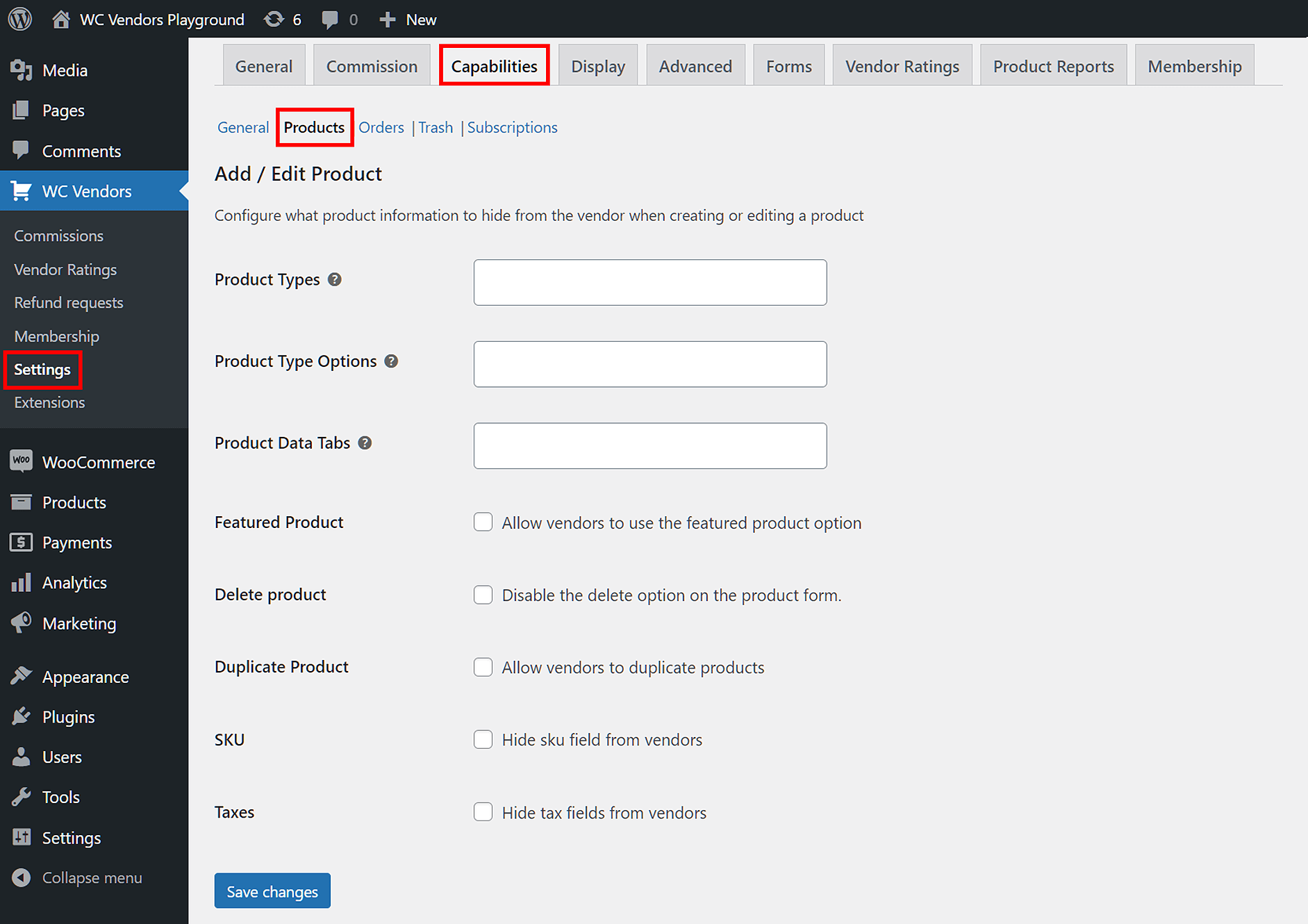
Key options include:
- Duplicate Product: Decide if vendors can duplicate products to save time..
- Product Types: Use the dropdown to hide specific product types.
- Delete Product: Choose whether vendors can delete products.
Orders
The Orders settings grant you control over the customer and order information a vendor can view.
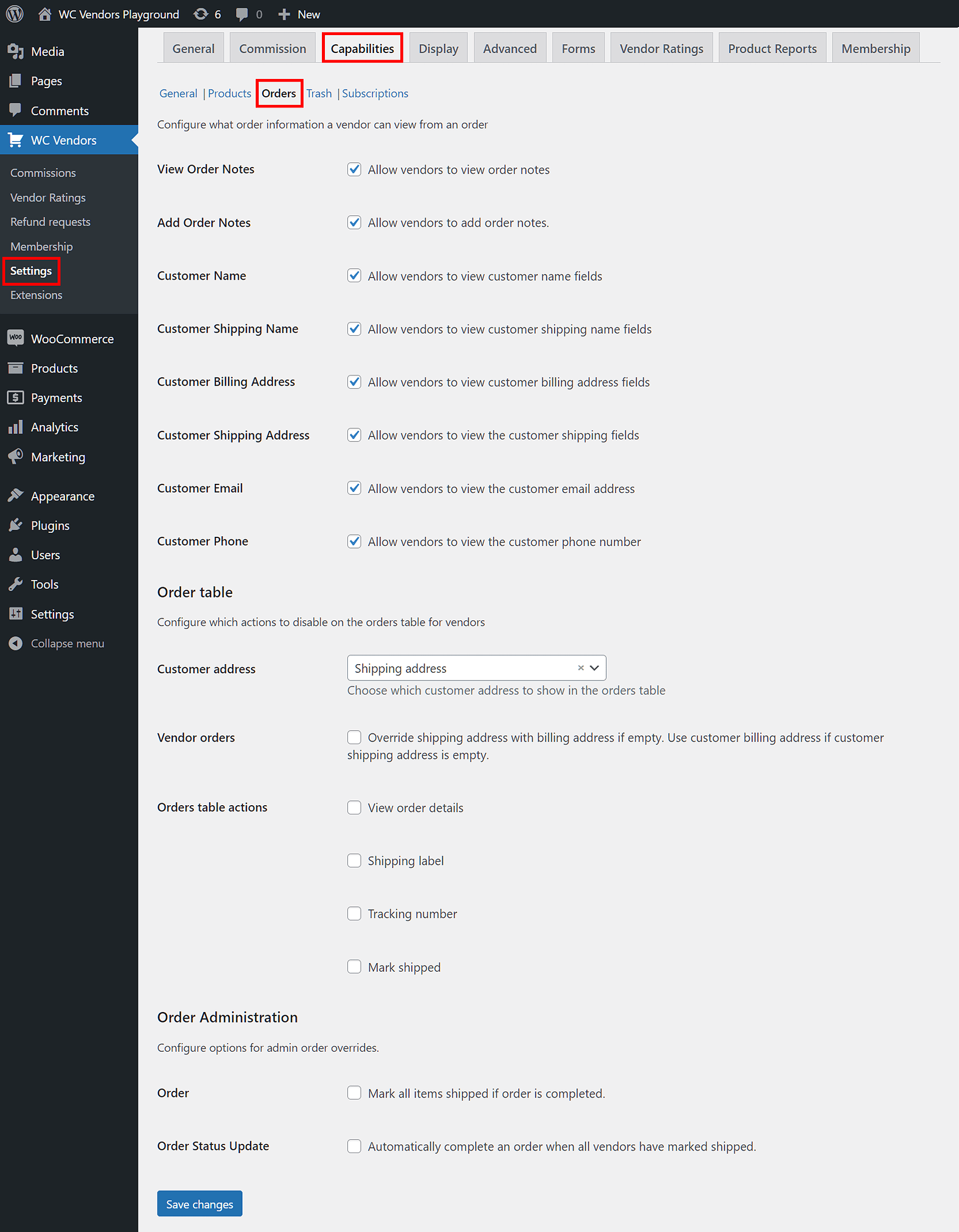
For example, you can allow vendors to:
- View order notes
- Add order notes
- View the customer’s name, email, and phone number
- View the customer’s billing and shipping address
The Order Table settings also let you:
- Control whether vendors can see order details, shipping labels, and tracking numbers.
- Show or hide customer details like billing or shipping addresses.
Recommended settings
For most marketplaces, we recommend keeping the default settings for General, Products, Orders, Trash, and Subscriptions. These provide a balanced starting point that works well for beginners and advanced users alike.
For full guidance, visit the WC Vendors Capabilities documentation.
Pro tip for SEO and customer experience: Carefully configuring vendor capabilities improves marketplace security, enhances vendor satisfaction, and helps maintain a consistent customer experience. All factors that contribute to better ecommerce SEO performance.
4. Display: Controlling the information the dashboard reveals to vendors
The Display tab lets you configure various aspects of the display on the front end, such as how your vendors’ stores appear to customers. Additionally, it grants you control over the information that the Vendor/Pro Dashboard presents to vendors regarding activities involving their store and customers.
Display boasts many sub-tabs. Let’s explore some of them!
General
The General sub-tab options let you decide how your vendors view pages on the front end.
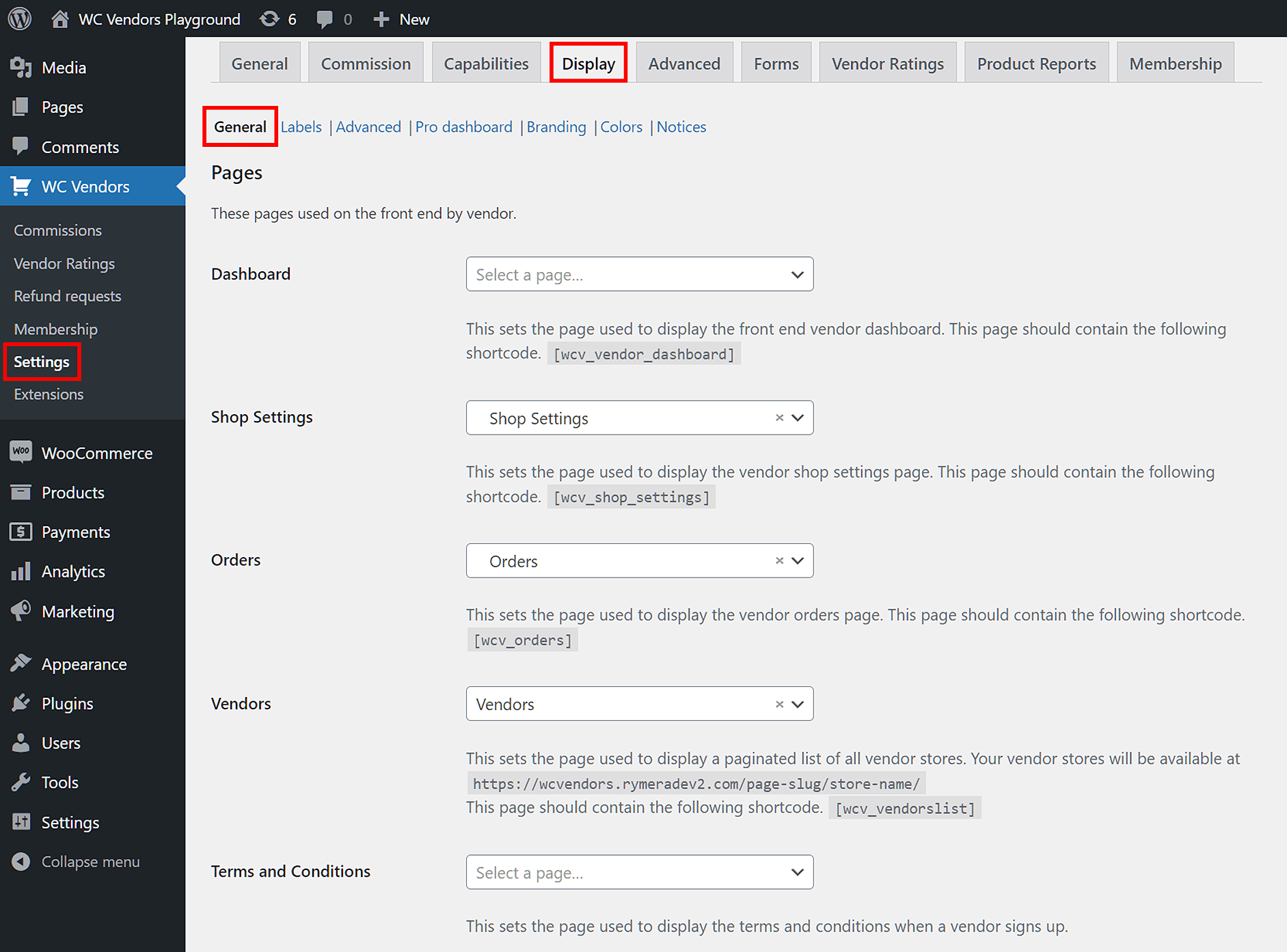
Key features you can configure:
- Vendors List Settings: Decide how vendors are displayed (grid or list view) and customize how vendor avatars appear.
- Pages: Select where key marketplace pages (like the vendor dashboard) appear.
- Store Settings: Choose whether vendor shops display headers and store descriptions.
Pro Dashboard
Available to WC Vendors Pro users, the Pro Dashboard settings grant you fine control over the data displayed on the Pro Dashboard.
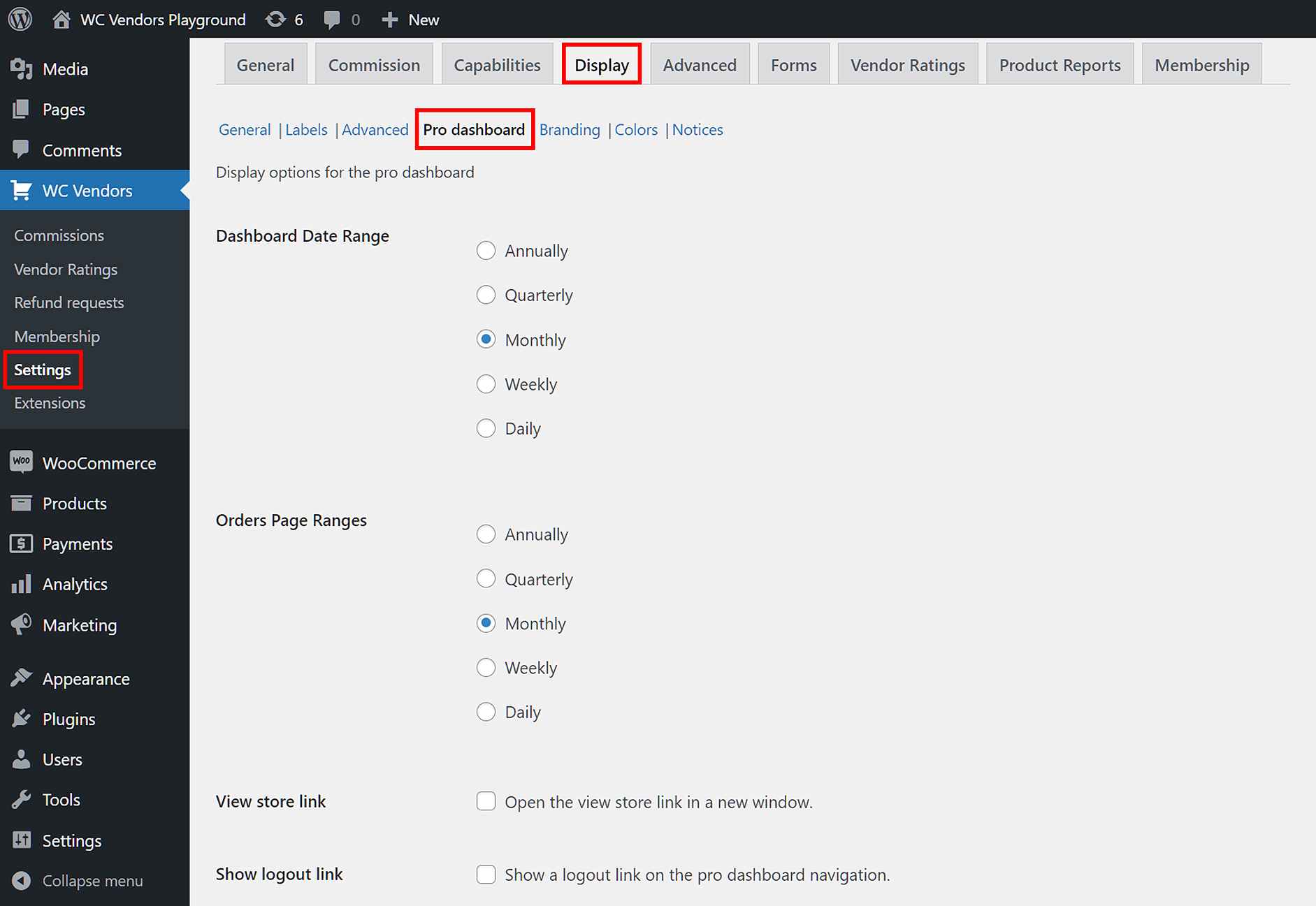
For example, you can:
- Customize dashboard layouts to match your brand’s look.
- Set the number of products shown per page.
- Display file usage limits so vendors know how many media files they’ve uploaded.
Notices
The Notices sub-tab boasts options that let you configure the messages your vendors receive from you.
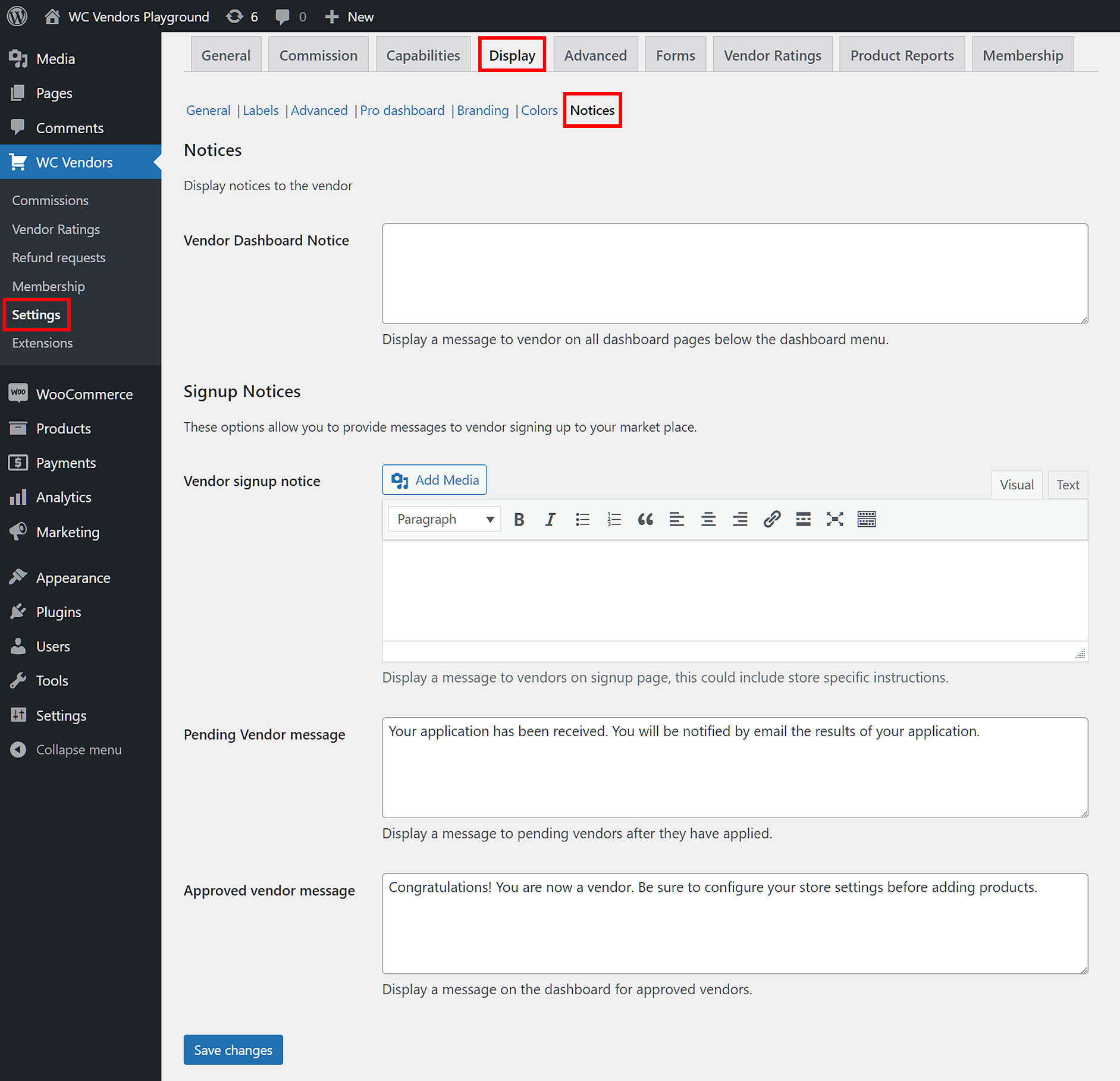
Examples include:
- Signup Notices: Custom messages shown to users during vendor registration.
- Vendor Dashboard Notice: A global message shown on all vendor dashboards (great for updates or announcements).
Recommended settings
For most marketplaces, we recommend:
- Selecting either Vendor Dashboard or Pro Dashboard (if you’re using Pro) from the Dashboard dropdown.
- Keeping default settings for General, Labels, Advanced, and Pro Dashboard.
- Personalizing your Branding, Colors, and Notices to match your marketplace’s identity.
For detailed guidance, visit the WC Vendors Display documentation.
SEO tip: Optimizing your display settings improves user experience, reduces bounce rates, and increases time on site.
5. Forms: Configuring the functionality of various forms
Your multi-vendor ecommerce website relies on several forms to collect and display important data. And with the WC Vendors Forms tab, you can control the data that these forms share.
Like the other tabs, Forms tab includes several sub-tabs that let you fine-tune form behavior. Here’s an overview of the most important ones:
Product
The product form gathers details about the items vendors want to sell. By adjusting the Product sub-tab, you can control which fields appear on the product edit form and whether they are required.
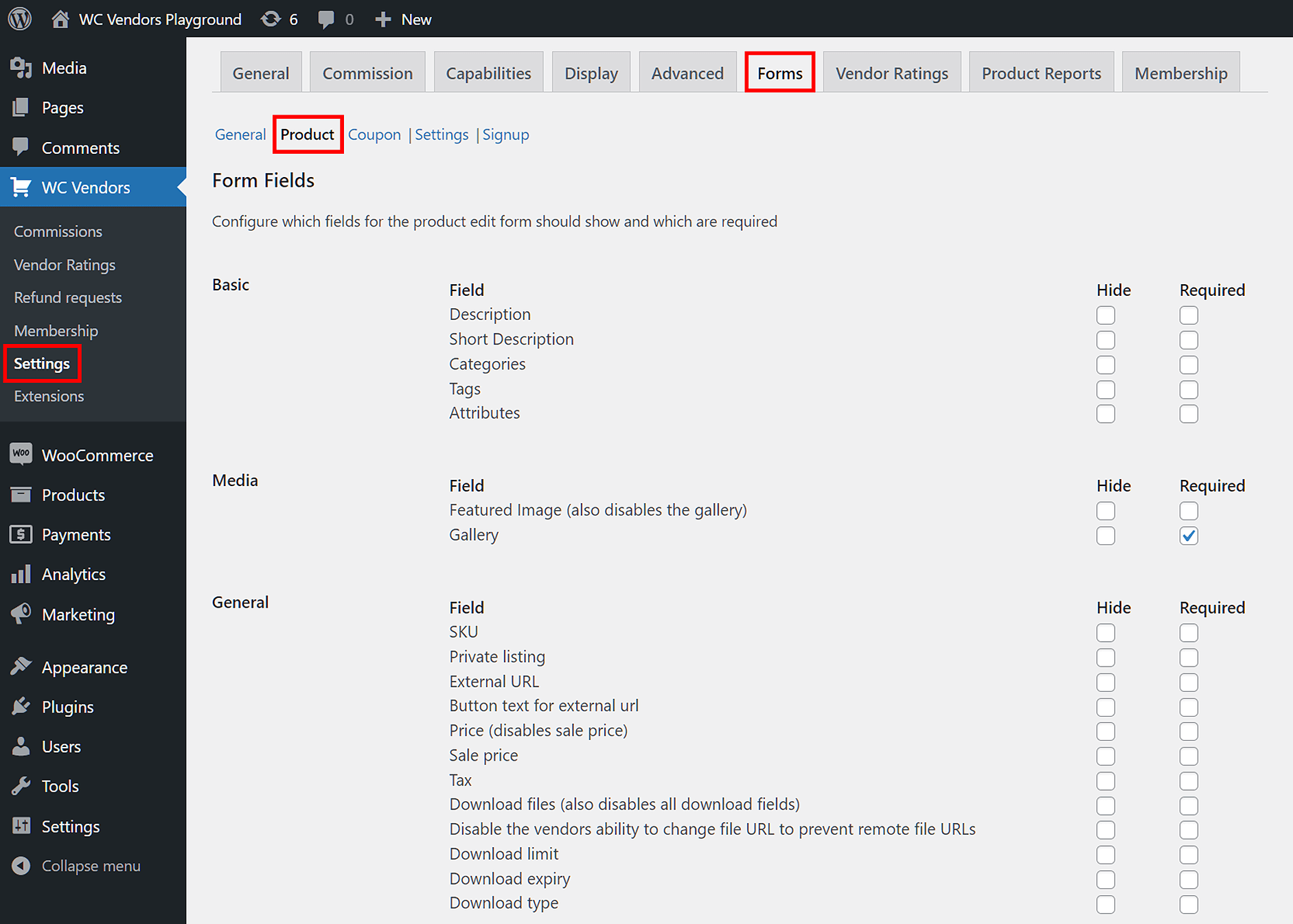
- Form Fields: Allow you to decide what information vendors must provide. For example, if you want a short description for every product, just tick the “Required” checkbox next to the Short Description field. To hide this field entirely, check the “Hide” box.
- Product Form settings: Give vendors more control, such as allowing them to upload media (like product images) and defining how many gallery images they can add, along with the size limits for each.
Settings
The Vendor/Pro Dashboard allows vendors to configure the settings for their store. Do you want to control what settings they’re allowed to modify? Then play around with the Settings Form options!
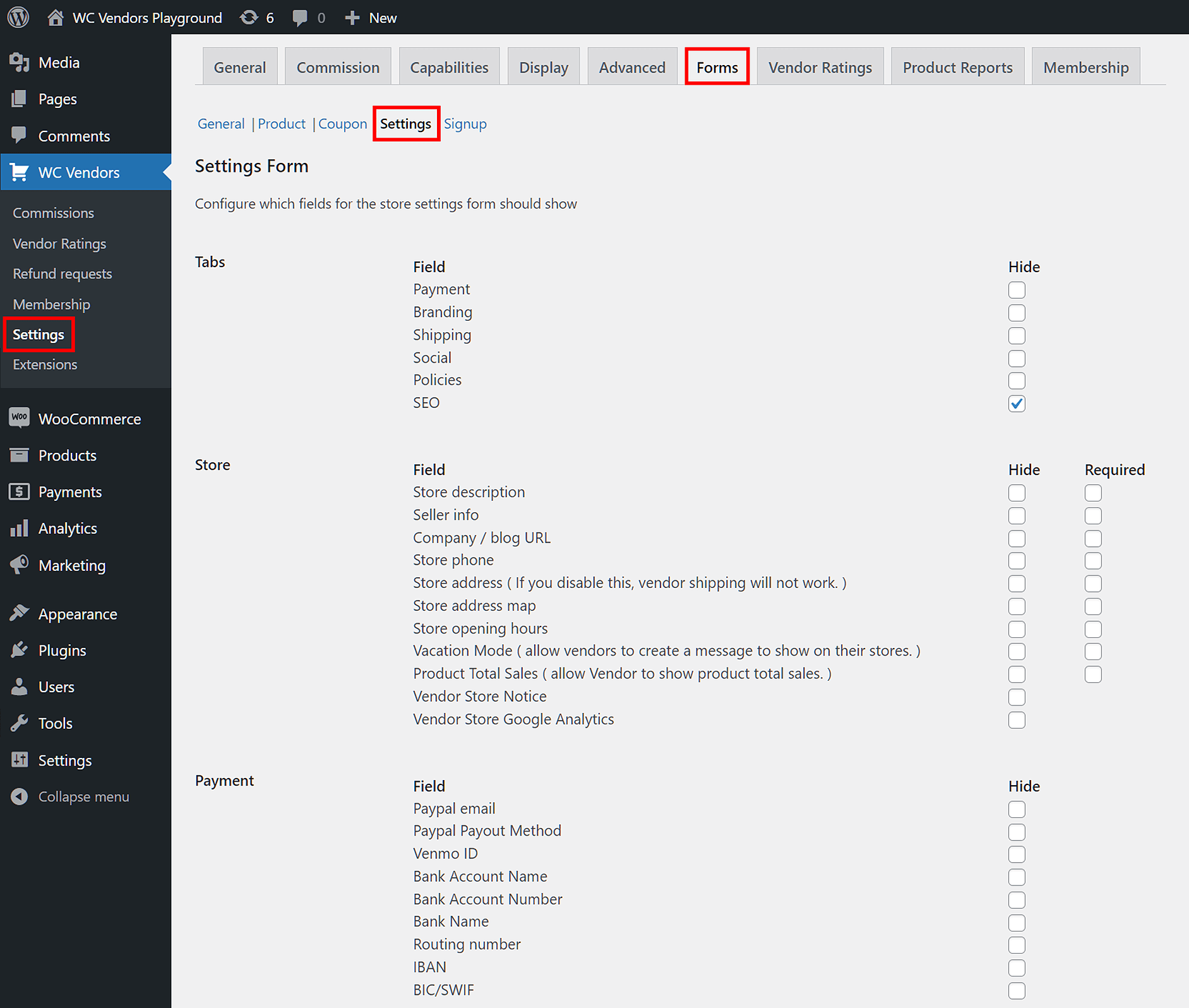
- For example, to let vendors add a link to their blog, leave the Company/blog URL field visible.
- To restrict social profile fields, just tick the “Hide” checkboxes for Twitter, Instagram, Facebook, and similar platforms.
Signup
The signup form is the vendor registration form users fill out to apply as vendors on your multi-vendor ecommerce site. Customizing this form allows you to select what information to gather from aspiring vendors during the application process.
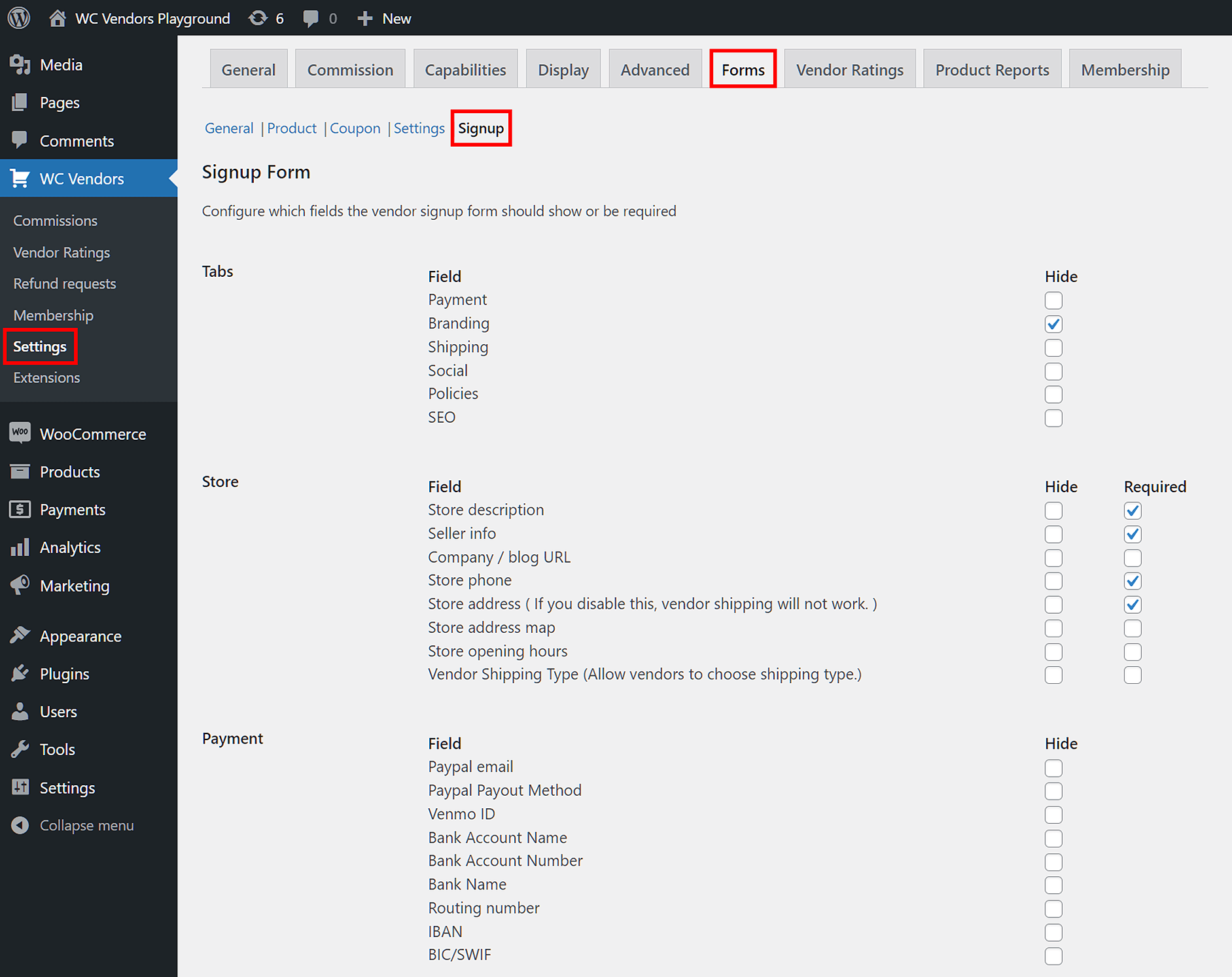
- You can decide which fields are required by ticking the appropriate boxes.
- For example, you might require Store phone, Store opening hours, PayPal email, Store icon, Facebook, and SEO Title if those details matter to your marketplace setup.
Recommended settings
For beginners, it’s a good idea not to change any of WC Vendors’ default settings for General, Product, Coupon, Settings, and Signup.
Check out the Forms documentation here.
6. Vendor Ratings: Setting up your feedback system
Transparency is indispensable in any business. By letting customers review vendors and examine other shopper’s feedback, you establish credibility and trust. This, in turn, can boost the reputation of your multi-vendor ecommerce website.
The Vendor Ratings tab gives you full control over how customer reviews work on your site.
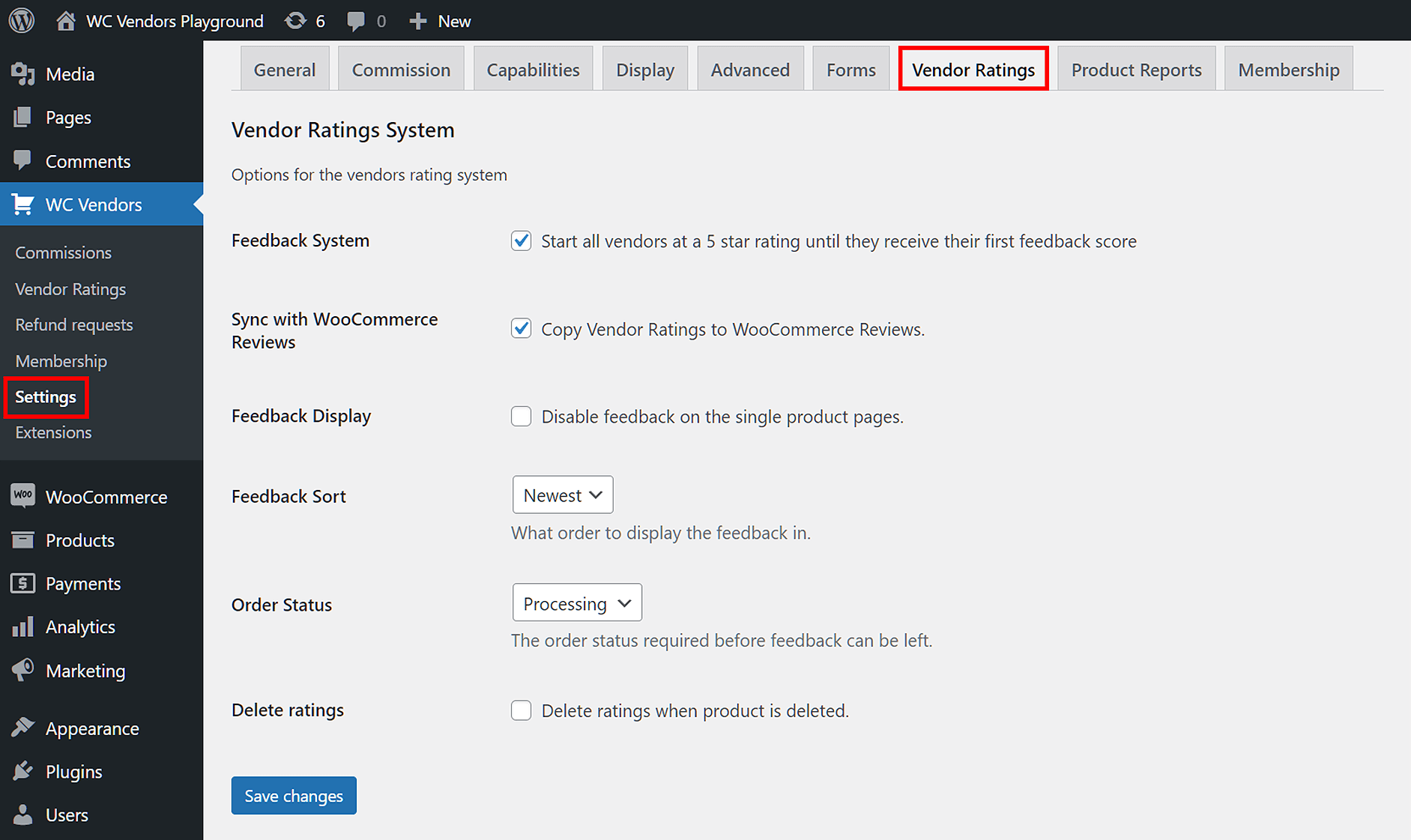
- Feedback System: When enabled, every new vendor starts with a 5-star rating. This prevents vendors from appearing with zero stars, which can leave a negative impression on potential customers.
- Order Status: Use this dropdown to decide whether customers can leave feedback during order processing or only after orders are marked complete.
- Delete Ratings: When enabled, this option automatically removes a product’s ratings if the product is deleted from the marketplace.
Recommended settings
We recommend keeping WC Vendors’ default settings and ensuring the Feedback System is enabled, so your vendors get a fair starting point and your marketplace maintains credibility.
Check out the Vendor Ratings documentation here.
7. Product Reports: Letting vendors and customers report products
Product Reports lets customers and vendors report products that they deem inappropriate. For example, if one vendor observes that another vendor is selling products that don’t comply with the rules of your multi-vendor ecommerce website, they can create a report.
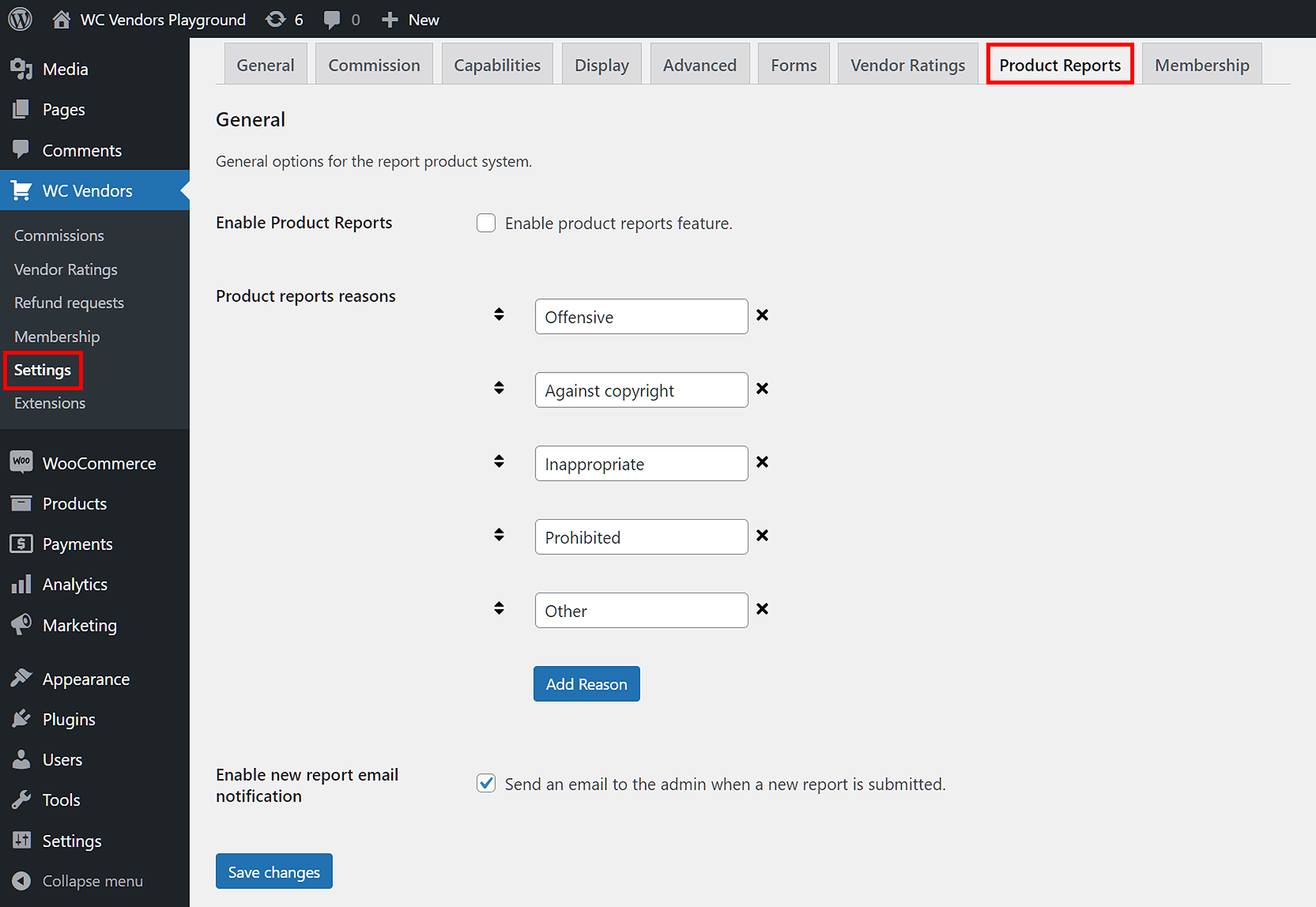
- Enable Product Reports: Activate this setting by checking the box, allowing users to submit reports on problematic products.
- Product Reports Reasons: Customize the list of reporting reasons. You can click Add Reason to create your own, or use the four default reasons WC Vendors provides.
For example, if a vendor notices another seller listing counterfeit goods or violating platform guidelines, they can quickly file a report. As a result, this helps you maintain a trustworthy, high-quality marketplace.
Recommended settings
Stick with WC Vendors’ default settings for this section, as they offer a balanced and effective reporting system right out of the box.
Check out the Product Reports documentation here.
Hosted Platform Vs WooCommerce: Which Multi-Vendor Approach Fits?
Standalone platforms like CS-Cart Multi-Vendor and Sharetribe host everything for you, which is fast to start but means monthly fees that scale with revenue, limited customization, and no ownership of your stack. A WooCommerce-based marketplace runs on your own WordPress site, so you own the data, avoid revenue-based platform fees, and can extend it with the wider WooCommerce ecosystem.
WC Vendors turns a standard WooCommerce store into a full multi-vendor ecommerce platform: each vendor gets a front-end dashboard and storefront, you choose from several commission structures (including tiered and per-vendor rates), and vendor earnings are paid out automatically through Stripe Connect. You keep full control of design, SEO, and customer data — without paying a percentage of revenue to a hosted platform.
For most store owners who already use WordPress, building on WooCommerce with WC Vendors wins on cost and control. See our multi-vendor marketplace guide and the best WooCommerce multi-vendor plugin comparison to plan your build.
Putting It All Together
By now, if you’ve completed the Getting Started guide and applied the recommended settings, you should have a fully functional multi-vendor ecommerce marketplace ready to serve your target audience.
But remember, building a multi-vendor ecommerce website is just the beginning.
The steps you need to take to create a multi-vendor marketplace
Building a multi-vendor ecommerce website is one thing, but to become an online marketplace operator, you must first understand the steps you need to take before establishing such a platform.
For this reason, we highly recommend checking out our article, “How To Create A Multi-Vendor Marketplace (A Step-By-Step Overview).” This walks you through the essential strategies for building and scaling a marketplace that fits your business goals.

For even more actionable advice, check out these helpful resources:
- How To Run An Online Marketplace: A Beginner’s WooCommerce Marketplace Guide
- Promoting Your New Marketplace: How To Get Vendors
- 8 Best Marketplace Tips: How To Boost Your E-Commerce Traffic
- 7 Best Ways To Supercharge Your Multi-Vendor Marketplace Promotion
- How To Monetize Your Multi-Vendor Marketplace: Strategies For Success
These guides will help you go beyond the technical setup and give you a clear roadmap for growing your marketplace, attracting vendors, and increasing revenue.
If you’d like more valuable guides on how to establish and manage a multi-vendor ecommerce website, make sure to follow our blog!
Essential backend paths for managing your multi-vendor marketplace
To successfully manage a multi-vendor ecommerce website, it’s crucial to know where to access key marketplace data in your WordPress dashboard.
Below are the essential backend paths that help you monitor vendors, products, commissions, and more:
- Vendors: Access your full list of vendors by navigating to Users > All Users. This page shows all user roles, including administrators, vendors, and customers. To quickly filter for vendors, use the Vendors and Pending Vendors sub-tabs.
- Products: Find all products listed by your vendors by going to Products > All Products. To narrow results to a specific vendor, enter the vendor’s username in the Search Vendor field and click Filter.
- Commissions: View all vendor commissions by selecting WC Vendors > Commissions. This section lets you track earnings, payouts, and commission details for each vendor.
- Vendor Memberships and Subscriptions: Manage vendor memberships by clicking WC Vendors > Membership. To view customer and vendor subscriptions, go to WooCommerce > Subscriptions.
- Vendor Ratings: Check vendor performance and customer reviews under WC Vendors > Vendor Ratings. This helps you monitor feedback, improve quality, and build trust across your marketplace.
- Refund Requests: Handle customer refund requests by visiting WC Vendors > Refund Requests. This area keeps you informed about pending and processed refunds.
Conclusion
For your marketplace venture to succeed, you need to build and manage an online marketplace using the multi-vendor ecommerce platform that’s most suitable for all your business needs.
Thus, when looking for such a platform, it’s a good idea to consider the following factors:
- Vendor management tools
- Customization and branding
- Commission structure
- Scalability and performance
- Search and navigation
- Mobile responsiveness
- Payment gateways
- Security measures
- Integration and third-party apps
- Customer support and documentation
- Pricing structure
Also, to create a functional multi-vendor ecommerce website, you need to follow the WC Vendors Getting Started guide, then configure the settings for the following sections:
Do you have any questions about how to select the right multi-vendor ecommerce platform for you? How about WC Vendors, the platform that empowers you to effortlessly create and manage your own online marketplace? Let us know in the comments!
Frequently Asked Questions
Is WooCommerce a multi-vendor platform?
WooCommerce on its own is single-vendor, but adding WC Vendors turns it into a full multi-vendor ecommerce platform — multiple sellers manage their own products and orders, and you collect commission on each sale, all on your own WordPress site.
How much does a multi-vendor ecommerce platform cost?
Hosted platforms typically charge a monthly fee plus a percentage of sales, so cost rises with revenue. A WooCommerce-based marketplace is mostly a fixed plugin and hosting cost, so you keep more of your commission as the marketplace grows.
Can I switch from a hosted marketplace platform to WooCommerce?
Yes. Most operators migrate to escape revenue-based fees and platform limits. You export your products and vendors, rebuild the storefront on WooCommerce, and use WC Vendors to recreate vendor accounts, commissions, and automated payouts.