
Black Friday lands on Friday, November 27, 2026, and for a multi-vendor store it is a different animal than it is for a single-brand shop. You aren’t running one sale. You’re running dozens of sellers’ sales at once, on one checkout, under one brand, with one hosting setup carrying the load.
That is why a Black Friday marketplace needs its own playbook. Discounts still matter, but so do vendor deadlines, who pays for each coupon, how payouts flow after the rush, and whether your support inbox survives the long weekend.
This guide walks marketplace owners through the full plan, from setting sale rules and rallying vendors to stress-testing the site and measuring what worked. If you’re short on time, pair it with our week-by-week Black Friday preparation timeline and our November promotion ideas calendar.
Black Friday 2026 Dates Every Marketplace Owner Should Know
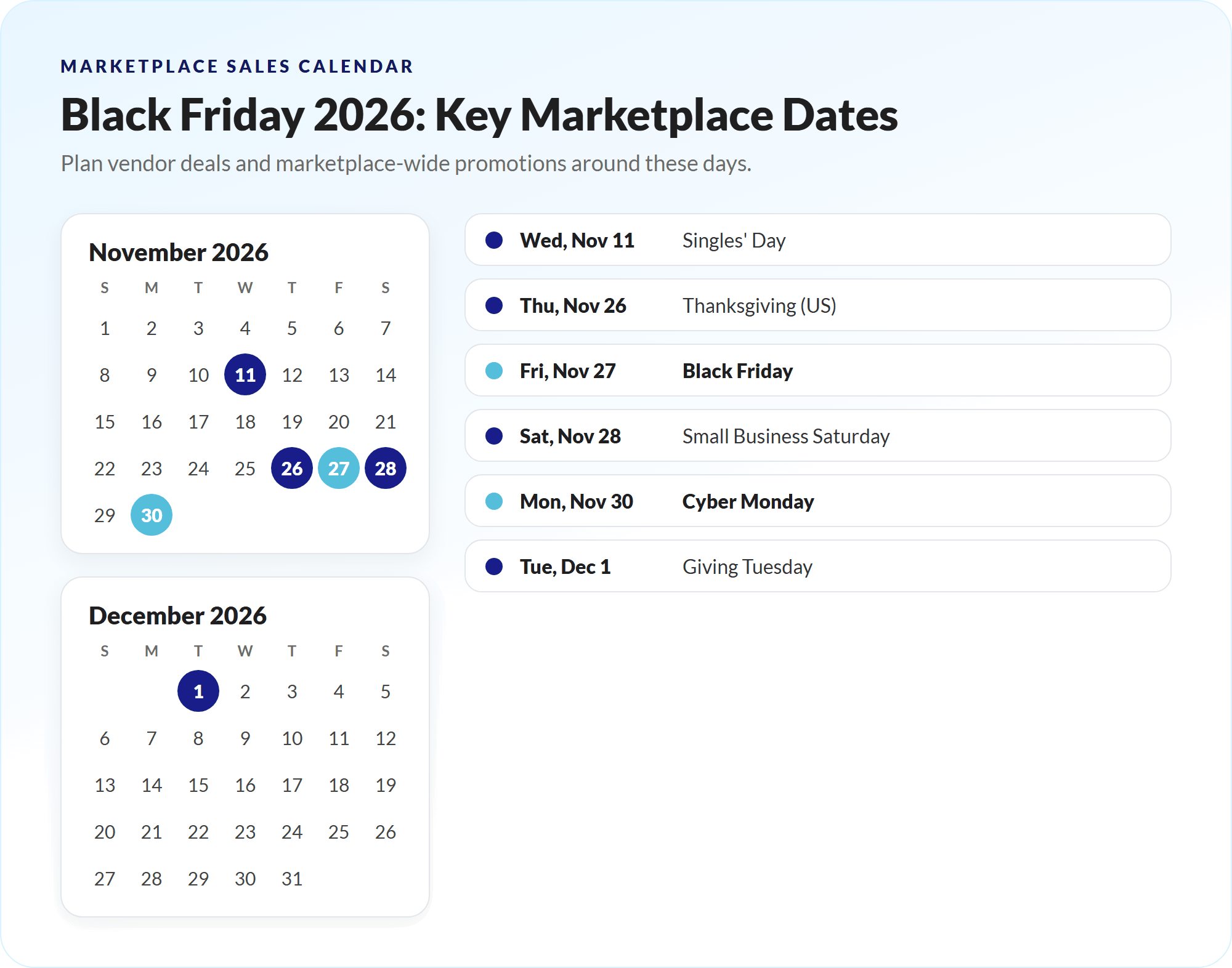
Black Friday is no longer a single day. Shoppers now expect a run of events that starts weeks earlier and stretches into December. Here are the dates to build your Black Friday marketplace calendar around:
- Singles’ Day: Wednesday, November 11
- Thanksgiving (US): Thursday, November 26
- Black Friday: Friday, November 27
- Small Business Saturday: Saturday, November 28
- Cyber Monday: Monday, November 30
- Giving Tuesday: Tuesday, December 1
- Green Monday: Monday, December 14
A practical structure for most marketplaces is an early-access week from November 16 to 25, a main event from November 27 to 30, and an optional extension through December 1. You don’t have to run every date. It’s better to execute three events well than seven events badly.
Why A Black Friday Marketplace Sale Matters In 2026
The numbers keep climbing. According to Adobe’s 2025 holiday results, US shoppers spent a record $11.8 billion online on Black Friday 2025 (up 9.1% year over year) and $14.25 billion on Cyber Monday. The five days from Thanksgiving through Cyber Monday brought in $44.2 billion.
The outlook for this season is even bigger. Adobe forecasts $275.1 billion in US online spending between November 1 and December 31, 2026, with $12.9 billion on Black Friday and $15.1 billion on Cyber Monday. Adobe also expects a record 63% of Cyber Week online spending to happen on mobile devices.
Shoppers are showing up in record numbers, too. The National Retail Federation counted 202.9 million people shopping over the 2025 Thanksgiving weekend, with 134.9 million of them shopping online.
For a marketplace, that demand is a natural fit. Deal hunters want to compare options, and a Black Friday marketplace puts many sellers’ offers on one site with one cart. The catch is that every extra vendor adds moving parts. The plays below keep those parts working together.
Play 1: Set The Rules For Your Marketplace-Wide Sale
Before you ask a single vendor to discount anything, decide how your Black Friday marketplace event works. Vendors join faster when the rules are clear, and you avoid awkward conversations in the middle of Thanksgiving week.
Write a one-page sale brief that answers these questions:
- Event dates: Which days are you promoting, and when does early access start?
- Opt-in deadline: When must vendors confirm participation and submit deals? A date around November 6 leaves time to build pages and emails.
- Minimum offer: What discount earns a spot on your featured deals page? Many owners set a floor, such as 15% off, and ban inflating regular prices beforehand.
- Who funds the discount: Is each deal vendor-funded, marketplace-funded, or shared?
That last question matters most. In WC Vendors Pro, the Coupon Action setting under WC Vendors > Settings > Commission decides whether commission is calculated before or after a coupon is applied. The choice changes how much each vendor earns on a discounted order, so place a few test orders with your planned coupons before November and share the math with vendors.
You can also reward participation. Some owners lower the commission rate for participating vendors during the event window, which is easy to configure per vendor. Whatever you choose, put it in writing so nobody is surprised when statements arrive in December.
Play 2: Recruit And Coordinate Your Vendors
Your vendors make or break your Black Friday marketplace results. A great site with half-hearted vendor deals still underperforms, so treat vendor coordination as its own project.
Start with a vendor kit. It should include the sale brief, key deadlines, banner and social templates in your brand style, and tips for writing strong deal listings. A design tool with ready-made templates, such as Canva, makes it easy to build one branded set that every vendor can customize. Send the kit by email, then pin the essentials where vendors can’t miss them. WC Vendors Pro includes a Vendor Dashboard Notice (WC Vendors > Settings > Display > Notices) that shows a message to every vendor when they log in, which is ideal for deadlines and reminders.
Next, help vendors get their stores in shape:
- Inventory and shipping: Ask vendors to confirm stock levels for featured items and their holiday shipping cutoff dates.
- Vendor coupons: With Pro, vendors can create their own coupons from the vendor dashboard, as a percentage or fixed discount, on all or selected products, with an expiry date, minimum spend and free shipping options. Ask them to set expiry dates that match your event window.
- Store notices: Vendors can display a short notice at the top of their store, which is perfect for “Order by December 15 for Christmas delivery” messages.
- Vacation mode: Vendors who can’t fulfill during the rush can switch on vacation mode and disable their cart. A paused store beats a pile of late orders and refund requests.
Check in weekly through November. A short status email with the number of vendors opted in, deals submitted and gaps by category keeps everyone moving.

Play 3: Build One Marketplace-Wide Sale Event
Shoppers don’t want to visit 40 storefronts to find deals. Give them one destination that showcases the best offers across your marketplace.
Build a dedicated Black Friday marketplace deals hub and link to it from your homepage hero, main menu and every campaign email. A drag-and-drop landing page builder like SeedProd lets you build and schedule the page without touching code. Organize it by category and price band, and feature a rotating set of “doorbuster” offers from different vendors so no single seller dominates. Swap your homepage headline for something specific, such as “Black Friday: up to 40% off from 120 independent makers,” rather than a generic welcome message.
Then layer in features that make your Black Friday marketplace feel like more than a list of coupons:
- Follower-only offers (Growth and Business plans): WC Vendors Engage lets shoppers follow their favorite vendors in one click and see new listings in a personalized feed in My Account. Vendors can create exclusive follower offers that apply automatically at cart and checkout, no code needed. Run a “follow your favorite shops” push in early November so those offers have an audience by Black Friday.
- Bookings and auctions (Business plan): If your marketplace sells services or one-of-a-kind items, the Bookings add-on and Simple Auctions integration let vendors offer holiday booking slots or Black Friday auctions alongside regular products.
- Marketplace-funded deals: Standard WooCommerce coupons handle simple percentage and fixed discounts. For marketplace-wide offers such as BOGO deals, cart conditions or gift cards, our sister plugin Advanced Coupons adds those deal types. Admin-owned coupons also feed into commission calculations, so test them against your Coupon Action setting first.
- Social proof: Embed social feeds that show real customer posts and product photos with Smash Balloon, so shoppers see your vendors’ products in use.
- Honest urgency: Countdown timers, limited quantities and short flash windows work, but only when they’re real. Fake scarcity erodes trust fast, and coupon usage limits are an easy way to make scarcity genuine.

Play 4: Get Your Site Ready For Peak Traffic
A multi-vendor site is heavier than a typical store. Every page pulls vendor data, every order can split across several sellers, and dashboards stay busy while shoppers browse. Black Friday marketplace traffic exposes every weak spot.
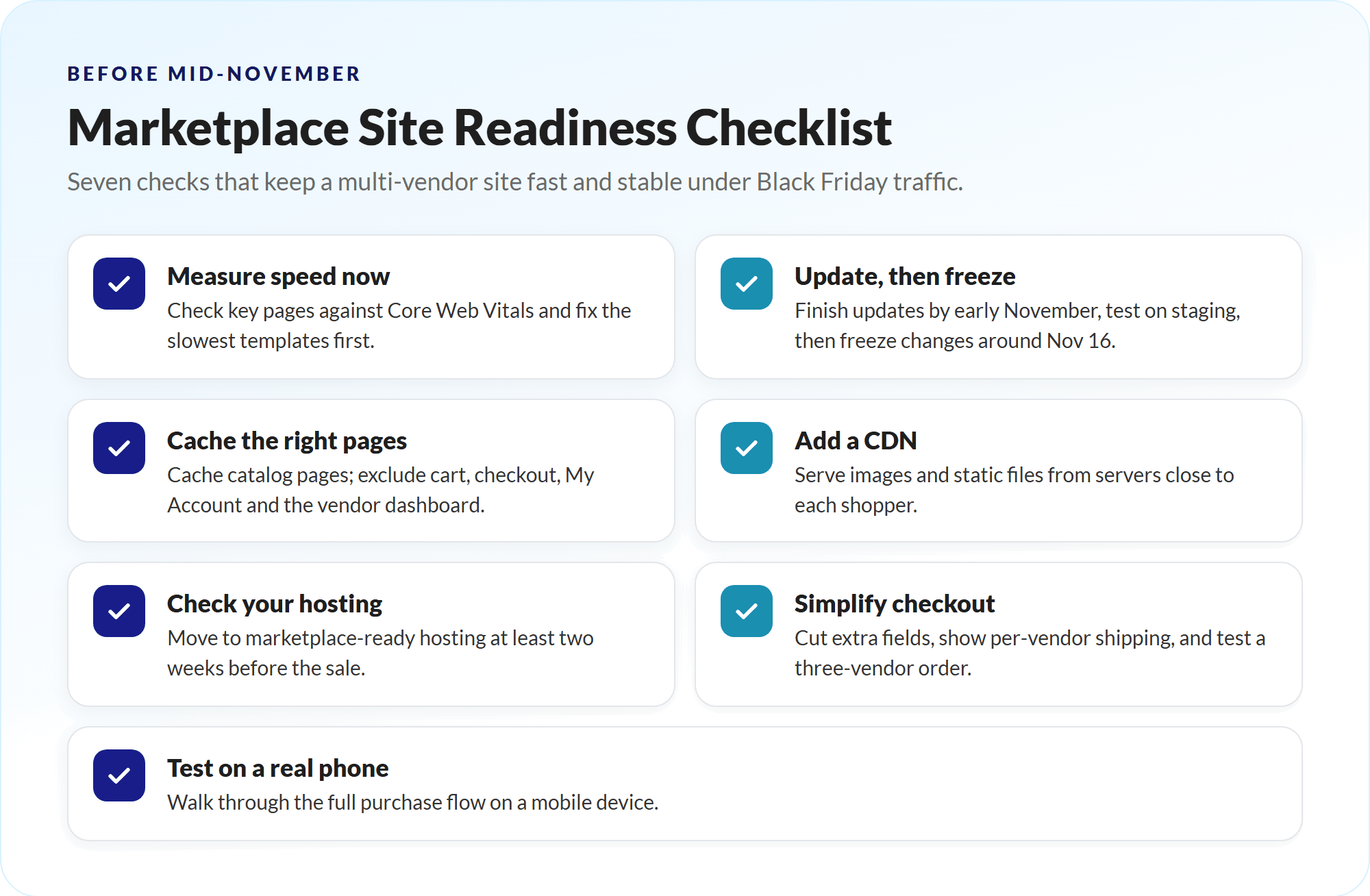
Work through this checklist before mid-November:
- Measure speed now. Check your homepage, deals hub, product pages and checkout against Google’s Core Web Vitals and fix the slowest templates first.
- Update, then freeze. Apply plugin, theme and WooCommerce updates by early November, test them on a staging site, then freeze changes from around November 16 until the event ends.
- Cache the right pages. Cache catalog and content pages, but exclude cart, checkout, My Account and the vendor dashboard so shoppers and vendors always see live data. A caching plugin like WP Rocket excludes the WooCommerce cart, checkout and account pages by default, so you only need to add your vendor dashboard page.
- Add a CDN. A content delivery network such as BunnyCDN serves images and static files from servers close to each shopper, which takes pressure off your host during traffic spikes.
- Check your hosting. Marketplaces are database-heavy, and shared hosting often buckles under holiday traffic. If you’re due for an upgrade, Levamo is managed WordPress hosting built for marketplaces, with free migration and no traffic overage fees. Move at least two weeks before the sale, not during it.
- Simplify checkout. Remove distractions, cut nonessential fields, show shipping costs clearly for each vendor, and offer more than one payment method. Then place a real test order with products from three different vendors. Our sister brand Wholesale Suite has a detailed walkthrough of WooCommerce checkout page customization if you want to go further.
- Test on a phone. With most Cyber Week spending expected on mobile, walk through the full purchase flow on a real device, not just a resized browser.
Play 5: Market The Sale Across Every Channel
Marketing a Black Friday marketplace has one advantage over a solo store: you have dozens of vendors who can amplify the same message. Use it.
- Email: Segment your list into past buyers, browsers and new subscribers. Plan a teaser, an early-access invite, a launch email, and a last-chance reminder. A marketing automation platform like Drip can schedule the whole sequence and send abandoned cart reminders automatically. Our guide to Black Friday emails for marketplaces covers subject lines and sequences in detail.
- Vendor amplification: Give every vendor ready-made graphics and a link to the deals hub, and ask them to share it with their own followers and customers.
- Social and paid ads: Lead with your strongest doorbusters, and retarget visitors who viewed the deals hub but didn’t buy.
- Push notifications: Web push alerts through PushEngage work well for flash deals and cart reminders, and you can schedule them before the weekend starts.
- Affiliates and creators: Run your partner program with AffiliateWP, and give each partner a unique code so you can see exactly who drove sales.
- Giveaways: About a week before Black Friday, launch a giveaway with RafflePress that rewards entrants for sharing, then email every entrant your launch offer.
- Giving Tuesday: Close the event by donating a share of commissions to a cause your vendors and customers care about.
Keep one message consistent across channels: the dates, the headline offer and the link to the hub. Mixed messages cost clicks.
Play 6: Prepare Payouts, Policies And Support
The rush doesn’t end when the sale does. Payouts, returns and support questions peak in the week after Cyber Monday, so build them into your Black Friday marketplace plan now.
Payouts: Decide when vendors get paid for event orders and tell them in advance. If you use the WC Vendors Stripe Connect integration, you can choose automatic, manual or scheduled payouts. A schedule that leaves room for refunds and chargebacks protects you, while a clear date keeps vendors happy.
Policies: Publish your holiday returns window, shipping cutoffs and refund process on one page, and link to it from checkout and the deals hub. Make sure every vendor’s store policy matches the marketplace rules.
Support: Expect a spike in “Where is my order?” messages. Prepare saved replies, a short FAQ, and a response-time expectation for vendors, such as replying to customers within 24 hours during the event. Assign someone to watch for suspicious orders, too, because fraud attempts rise with traffic.
Play 7: Measure Results And Learn For Next Year
You can only improve what you measure. Before your Black Friday marketplace sale starts, write down your baseline for the two weeks before the event, then track the same metrics during it:
- Revenue, orders and average order value
- Conversion rate on the deals hub and checkout
- Vendor participation rate and sales by vendor
- Coupon and follower-offer usage
- Support tickets and refund rate
Use WooCommerce Analytics and Google Analytics 4 for marketplace-wide numbers, and the WC Vendors Pro vendor reports for seller-level performance. MonsterInsights connects GA4 to WordPress with ecommerce tracking, while Metorik builds real-time WooCommerce dashboards that make it easy to watch sales and coupon usage hour by hour during the event. Global data helps with context, too. Global context helps too. Cross-border orders are a growing share of holiday sales, so check where last year’s buyers came from before you set shipping cut-offs, currency display, and vendor dispatch deadlines.
When the dust settles, run a short review with your top vendors. Our checklist of post-Black Friday tasks for marketplace owners walks you through follow-ups, retention offers and lessons to carry into 2027.
Conclusion
A successful Black Friday marketplace event comes down to coordination. When the rules are clear, vendors know their deadlines, and your site can handle the traffic, the discounts can do their job. When any of those pieces is missing, even great deals struggle to convert.
Start with the sale rules and the vendor kit, because everything else depends on vendor participation. Build one deals hub that shoppers can trust, prepare your hosting and checkout well before November 27, 2026, and plan payouts and support before the orders arrive. Finally, measure everything, so next year’s Black Friday marketplace plan starts from real data instead of guesswork.
Here’s what we covered in this article:
- Black Friday 2026 dates every marketplace owner should know
- Why a Black Friday marketplace sale matters in 2026
- Play 1: Set the rules for your marketplace-wide sale
- Play 2: Recruit and coordinate your vendors
- Play 3: Build one marketplace-wide sale event
- Play 4: Get your site ready for peak traffic
- Play 5: Market the sale across every channel
- Play 6: Prepare payouts, policies and support
- Play 7: Measure results and learn for next year