The search for a YITH Multi Vendor alternative starts with a wish to keep your stack tidy. Then it runs into something the tidy option cannot express, like a commission rule with exceptions or a payout schedule your vendors can count on. A marketplace is not really just a feature you bolt on. It is a payment arrangement, a commission policy, and a working relationship with people you call vendors.
This guide explains what YITH WooCommerce Multi Vendor does well and where marketplace-specific depth starts to matter. It also shows why WC Vendors Pro is the stronger YITH Multi Vendor alternative on the parts that are hardest to undo later: commissions, payouts, vendor tools, and total cost.
What Is YITH WooCommerce Multi Vendor And Who Uses It
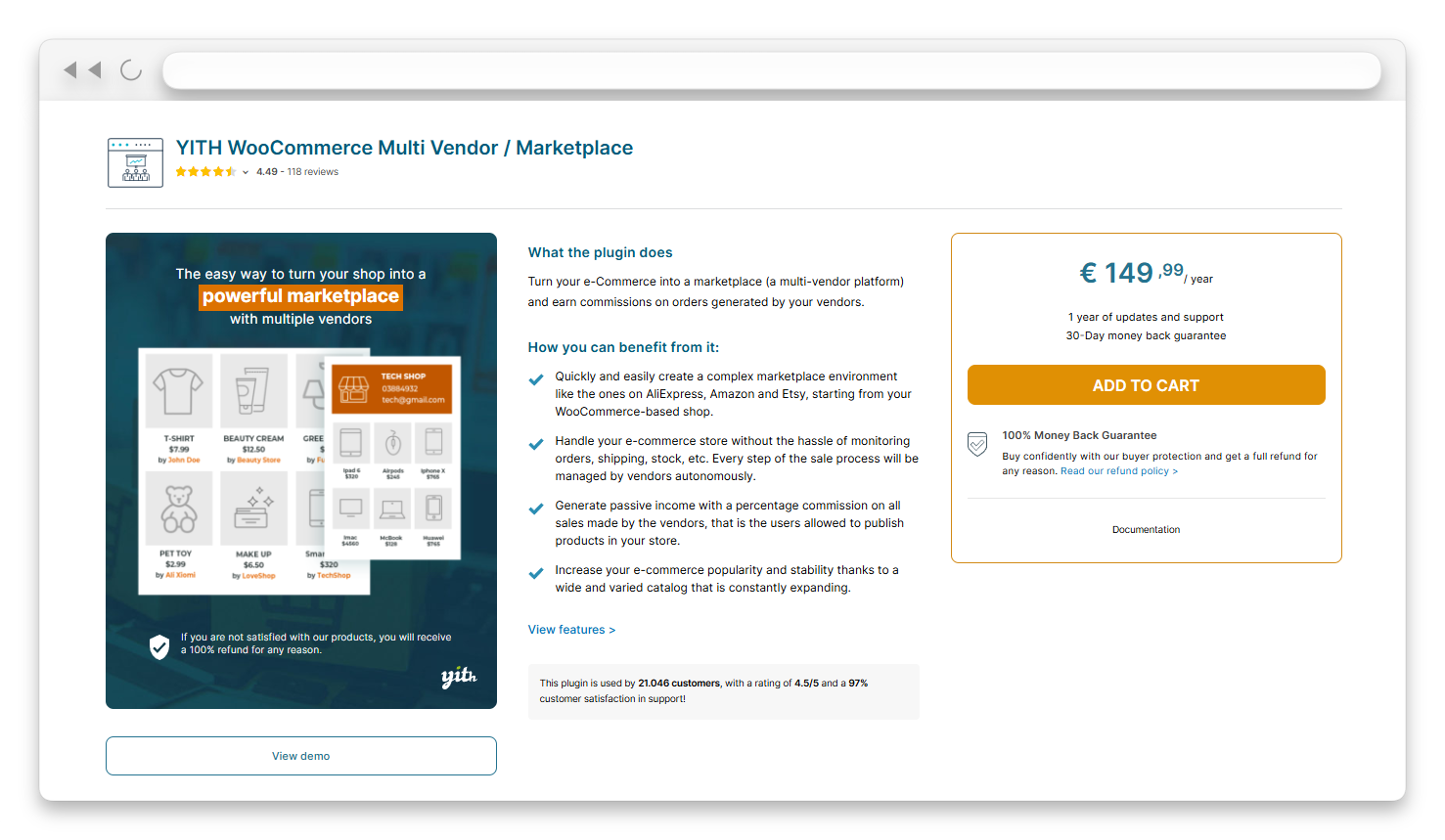
YITH WooCommerce Multi Vendor is a paid WooCommerce extension from YITH. It turns a single-seller store into a marketplace where vendors publish and manage their own products and orders.
It also includes a seller joining fee. You can require payment before anyone lists a product, and approved sellers are sent to checkout to pay it. Other modules cover vendor vacation mode, a “Report abuse” link, and a CSV export of commissions.
If you already run several YITH plugins, the marketplace layer arrives as the next item in a library you trust. One publisher, one support platform, and one set of conventions is a real convenience.
Scale explains why so many plugin families ship a marketplace module. According to W3Techs, WooCommerce powers roughly half of all the e-commerce systems in its surveys. With an audience that large, almost every major WordPress plugin catalog eventually adds a marketplace add-on.
That is also where the ecosystem argument starts to weaken. A general plugin library builds the marketplace features most of its buyers need. A dedicated marketplace product builds the features only marketplaces need. When you evaluate any YITH Multi Vendor alternative, that difference matters more than the length of either feature list.
Why Store Owners Look For A YITH Multi Vendor Alternative
Most people do not leave a plugin because it is broken. They leave because their marketplace grew into shapes the plugin was not designed for. In our conversations with marketplace owners, the same few triggers come up as frequently:
- Your commission policy stops being one number. A new vendor negotiates a different split, or one category carries thinner margins than the rest.
- Paying vendors becomes a recurring chore. Someone opens a bank tab every couple of weeks and moves money by hand.
- Vendors ask for a proper storefront dashboard. They do not want to learn the WordPress admin just to edit a product.
- The add-on bill keeps growing. Each new capability means another plugin license to buy, renew, and keep compatible.
Each of those triggers points at the same question. Does your marketplace layer treat commissions, payouts, and vendor tools as core features or as extras? That question is the best filter for any YITH Multi Vendor alternative you shortlist.
Where Marketplace Depth Starts To Matter
Marketplace depth matters the moment your commission policy needs exceptions. It also matters the moment paying vendors by hand becomes a regular job.
Volume forces both issues sooner than most owners plan for. According to the US Census Bureau, US retail e-commerce sales rose 12.2% year over year in the second quarter of 2026. Total retail sales rose 6.7% over the same period, and e-commerce reached 17.1% of all retail sales. Manual processes break quickly at that pace.
Commission that is not one flat rate
Commission stops being simple as soon as two vendor agreements differ. It also gets complicated when one category carries a margin the others do not.
YITH WooCommerce Multi Vendor handles commission with rates. You set a global percentage, then override it for selected vendors and selected products. You can also choose whether the rate applies to the regular or sale price and who receives the tax.
WC Vendors Pro starts from a much wider base. Its global commission type is a dropdown with seven options, split into two groups.
- Standard types: Fixed, Fixed + Fee, Percentage, and Percentage + Fee.
- Tiered types: Sales by Vendor, Sales by Product, and Product Price. These set the rate from a vendor’s running sales total, a product’s sales total, or a single product’s price.
Those shapes solve real problems. A fixed amount per item is not a percentage of anything, which suits low-cost or standardized products. Percentage + Fee deducts a flat charge from the percentage-based commission. That behaves much more like real payment-processing costs. Tiered types reward your best sellers automatically as their sales grow.
One detail catches new owners off guard. In WC Vendors, the commission value is what the vendor receives, not what the marketplace keeps. Entering 80 means the vendor earns 80% and the marketplace keeps 20%.
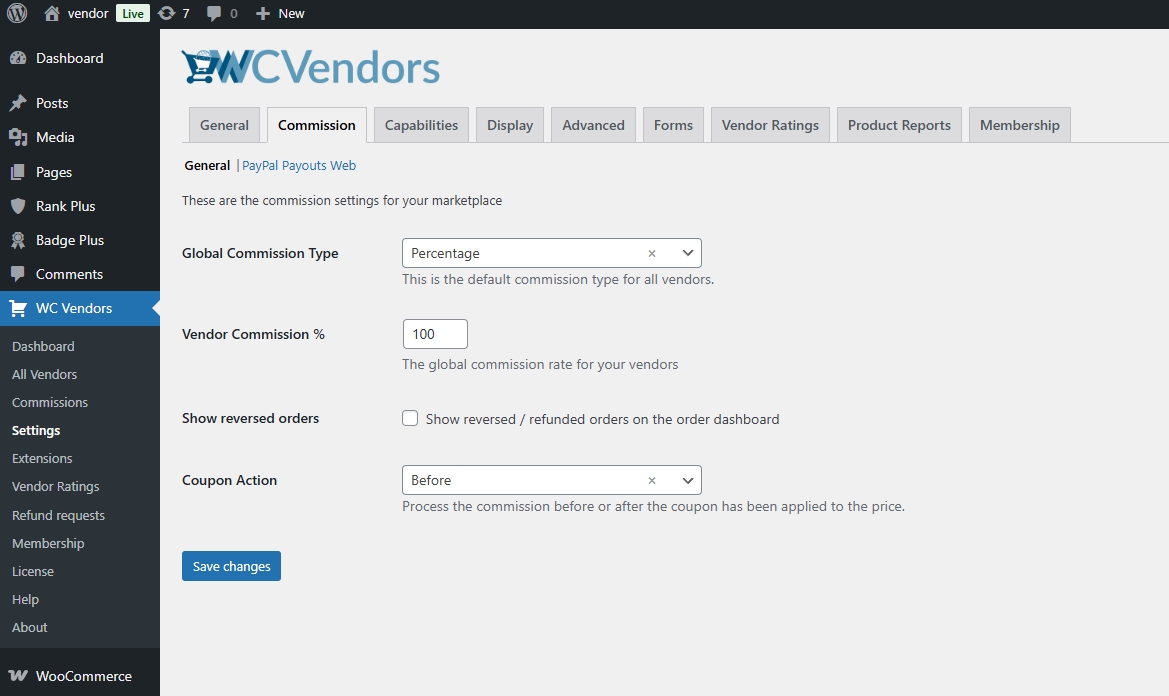
Beneath the global setting sit three override levels: per vendor in the user editor, per product in the product data panel, and per product category. WC Vendors checks the most specific setting first. It falls back to the global rate only when nothing more specific exists.
Here is a policy that shows why this hierarchy matters:
- Vendors keep 80% of every sale by default.
- Electronics sellers keep 88% because their margins are thinner.
- One clearance line pays its vendor a flat $4 per unit.
In WC Vendors Pro, that policy is a global Percentage rate, a category Percentage rate, and a product-level Fixed rate. A single percentage cannot express the clearance line at all. Our guide to standard commission types explains which shape suits which marketplace. For a full walkthrough, see our guide on how to charge vendors with WooCommerce commissions.
Charging the fee to the customer instead of the vendor
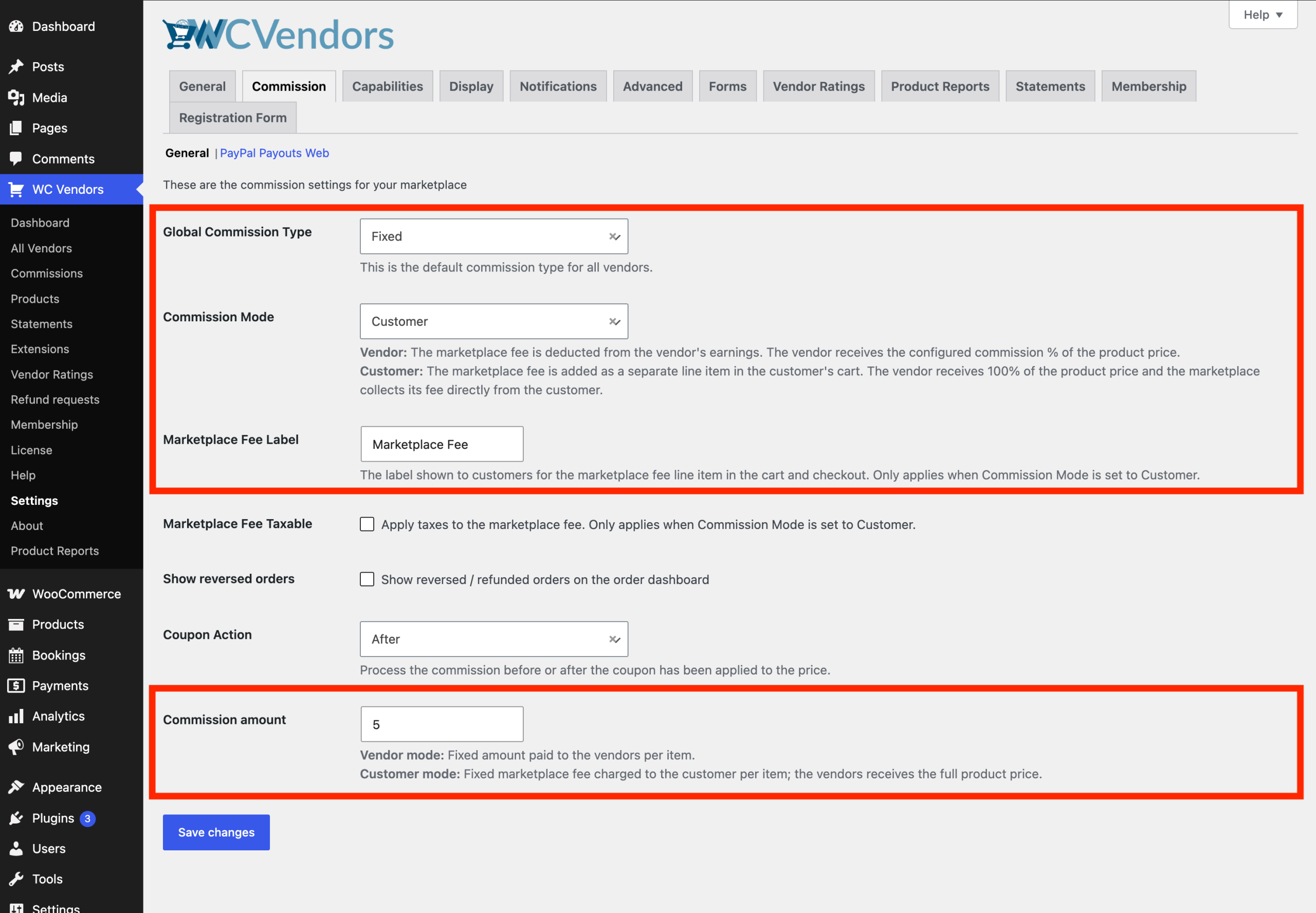
WC Vendors Pro has a fourth control that YITH does not list on its product page. Commission Mode can be set to Customer instead of Vendor.
In Customer mode, the marketplace commission is added to the customer’s cart as a separate fee. Vendors receive their full listed price. You write the label yourself, such as “Service Fee” or “Buyer Protection Fee.” The fee can be a percentage or a fixed amount. A checkbox also makes it taxable under your WooCommerce tax settings.
You can override the mode per vendor or per product. Mixed carts work too, with all Customer-mode fees combined into a single line item. Marketplaces that recruit sellers with “you keep 100% of your price” are describing this setting. Our knowledge base shows how to charge marketplace commission as a customer service fee step by step.
Paying vendors without a monthly admin session
Payout automation decides whether your marketplace runs itself or eats a day of your month.
YITH is clear about its approach. Commissions are paid manually and marked as paid, or automated through YITH Stripe Connect, YITH PayPal Payouts, or YITH WooCommerce Account Funds. Its FAQ confirms that automatic payments require one of those plugins. Each one is a separate premium purchase, so payout automation lives in a second product you buy, renew, and keep updated.
WC Vendors Pro includes the WC Vendors Stripe Connect gateway in the Pro plan itself. Its Payout Method setting offers three choices:
- Automatic: The payment splits at checkout, so the vendor’s share goes straight to their connected Stripe account.
- Manually: The marketplace collects the payment, and you trigger each payout yourself.
- Automatic Schedule: Payouts run on a recurring cycle, such as weekly on a chosen weekday or monthly on a chosen date.
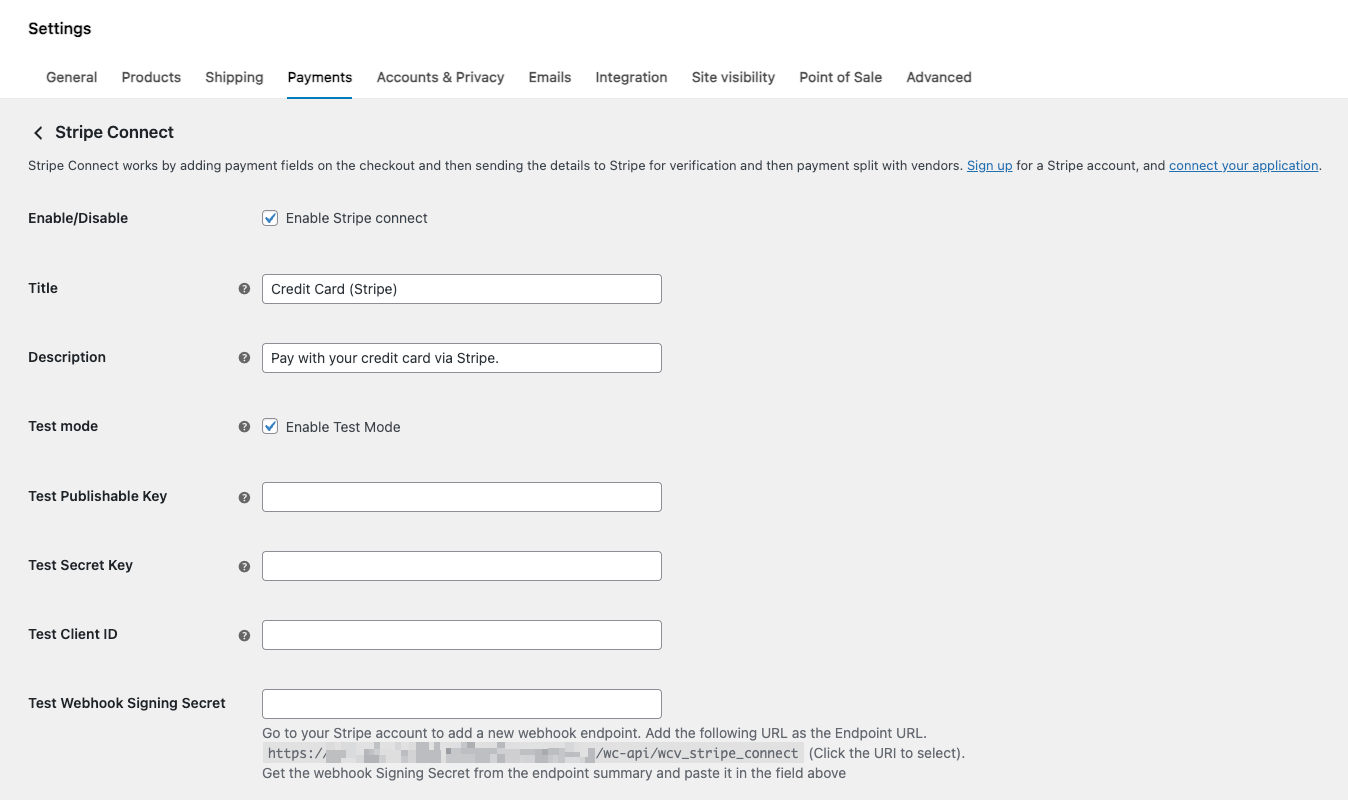
Vendors connect their own Stripe accounts with one click from their dashboard. You can require a connected account before a vendor adds products. A Split Stripe Fee option also shares processing fees between you and the vendor. Our guide to Stripe Connect vendor payouts covers the full setup.
Scheduling matters more than it sounds. A marketplace that pays out on a fixed cycle answers “When do I get paid?” once, in writing. Holding funds until the payout date also gives you time for refunds, disputes, and delivery confirmation. See how to set vendor payout schedules for every option.
Vendor tools past the first handful of sellers
Vendor management gets harder in steps, not smoothly. The painful step comes when you no longer know every seller by name.
Where vendors work matters a lot at that point. With WC Vendors Pro, every vendor gets a frontend dashboard that blends into your theme. Sellers manage products, orders, and coupons there without a WordPress admin login and without seeing anyone else’s data.
YITH takes a different route. Its vendors add and manage products from a reserved area in the backend. A frontend experience requires YITH Frontend Manager, a separate plugin.
WC Vendors Pro also bundles the vendor tools sellers ask for early. These include flat-rate and table-rate shipping, vendor coupons, vacation mode, a vendor feedback system, and vendor reports. Vendor coupons come with a Coupon Action setting. It decides whether a discount comes out of the vendor’s share only or is shared with the marketplace.
On the admin side, WC Vendors Pro keeps a commissions table at WP Admin > WC Vendors > Commissions. It lists each order’s commission line by line. One screen answers “What do we owe, and to whom?”
YITH documents a filterable commissions table too, which is fair to acknowledge. Seeing what you owe is not the hard part, though. Paying it without a person in the loop is the hard part. That is exactly where the right YITH Multi Vendor alternative earns its keep.
WC Vendors Pro As The Dedicated YITH Multi Vendor Alternative
The marketplace model is not a niche worth half-building for. Digital Commerce 360 projected that the top 100 global online marketplaces would reach $3.832 trillion in gross merchandise value in 2024. That would be a 10.0% increase on the year before. Software built for that model should treat it as the main event.
WC Vendors Pro has served marketplaces since 2013, and more than 10,000 stores use WC Vendors today. Here is what this dedicated YITH Multi Vendor alternative gives you out of the box:
- Seven commission types with vendor, product, and category overrides.
- Customer-mode marketplace fees with your own label.
- The WC Vendors Stripe Connect gateway with automatic, manual, and scheduled payouts.
- A frontend vendor dashboard for products, orders, and coupons.
- Vendor shipping, coupons, reports, feedback, and vacation mode.
- Unlimited vendors and unlimited vendor products.
What “dedicated” buys is narrow and useful. It does not mean more features overall. It means the features that exist are the ones you will actually ask for.
What each tier adds
WC Vendors pricing has a ladder rather than a single number. All prices are in USD, and the first-year figures are introductory.
- Pro: It covers the core marketplace, the Stripe Connect gateway, and the full commission system.
- Growth: It adds WooCommerce Subscriptions support, vendor memberships, the vendor signup form builder with an approval workflow, verified sellers, and Engage follower tools.
- Business: It adds WooCommerce Bookings support and the Simple Auctions integration.
A marketplace still running in year two is the normal case, and yours should be no exception. Each license covers one production domain plus staging. Every plan also comes with a 14-day money-back guarantee.
The True Cost Of Each Marketplace Stack
Sticker prices only tell part of the story. The number that matters is what you pay for the full stack your marketplace actually needs.
YITH states plainly that its integrations are not included in YITH WooCommerce Multi Vendor. Each one requires you to buy and activate the premium version of the related plugin. For a marketplace that wants automatic payouts and a frontend vendor dashboard, that typically means:
- The core YITH WooCommerce Multi Vendor plugin for the marketplace itself.
- A payout plugin, either YITH Stripe Connect or YITH PayPal Payouts, for automated commission payments.
- YITH Frontend Manager for a frontend vendor dashboard.
- Optionally, YITH WooCommerce Membership for different product limits per vendor.
Each item is a separate annual license with its own renewal date and update cycle. The promise of “one publisher, one renewal” quietly becomes several renewals from the same publisher.
WC Vendors Pro covers the first three needs in one license that renews at $199 per year. Per-vendor limits come with memberships on the Growth plan. Fewer moving parts also means fewer compatibility checks every time WooCommerce updates.
Before you commit to any YITH Multi Vendor alternative, price the complete stack rather than the headline plugin. Our free marketplace calculators can help you test commission rates and margins at the same time.
Feature And Pricing Comparison
Here is how the two plugins compare on the controls that decide whether your commission policy survives growth. WC Vendors details come from our pricing page and knowledge base. YITH details come from its own product page and FAQ.
| WC Vendors Pro | YITH WooCommerce Multi Vendor | |
|---|---|---|
| Global commission types | Seven: Fixed, Fixed + Fee, Percentage, Percentage + Fee, plus tiered Sales by Vendor, Sales by Product, and Product Price | Percentage rate |
| Commission overrides | Per vendor, per product, and per category | Per vendor and per product |
| Who pays the marketplace fee | Vendor, or customer through a labeled fee in the cart | Vendor (a customer-paid fee is not listed on its product page) |
| Payout automation | Automatic, manual, or scheduled through the included WC Vendors Stripe Connect gateway | Requires separate YITH Stripe Connect, PayPal Payouts, or Account Funds plugins |
| Vendor dashboard | Frontend vendor dashboard included | Backend area by default, with YITH Frontend Manager sold separately for a frontend version |
| Vendor shipping | Flat rate and table rate shipping included | Vendor shipping module included |
| Charging vendors to sell | Tiered vendor memberships (Growth plan) | One-time registration fee |
| Single-site price | $99.50 | €149.99 |
Two things about the price row deserve saying out loud. YITH prices in euros, so any comparison moves with the exchange rate.
That puts the two headline prices close together. Once you add the separate payout and frontend plugins YITH needs, the gap reverses. WC Vendors Pro delivers the full money-handling stack in a single renewal.
Closeness on headline price is why the rest of the table matters. When two products land within a few tens of dollars a year, the deciding factor is what each lets you change later without a migration. A precise commission policy and a payout schedule you set once will outlast the gap between two renewal invoices.
For a feature-by-feature breakdown, read our WC Vendors vs YITH WooCommerce Multi Vendor comparison. It takes a head-to-head view rather than the YITH Multi Vendor alternative angle used here.
How To Switch Without Breaking The Rest Of Your Stack
Changing your marketplace layer leaves most of your other plugins alone. The ones to plan for are any that read vendor data, and most stores have only one or two.
- List every plugin that touches vendors, commissions, or payouts. Those are the only ones the switch affects.
- Export your commission records first. YITH includes a CSV export of commissions. Having that file takes the pressure out of every later step.
- Build the replacement on a staging copy. Never build on the live site. Put real test orders through it, including a test payout. Your WC Vendors license covers a staging site, so this costs nothing extra.
- Recreate your commission policy. Map each YITH rate to a WC Vendors global, vendor, product, or category setting. This is a good moment to fix any rules that never quite matched your agreements.
- Plan vendor re-onboarding deliberately. Do not assume vendor accounts carry across by themselves. Send each seller clear steps for connecting Stripe and checking their products.
- Switch between payout cycles. That way, no seller is mid-cycle when the records change hands.
- Announce the date early. Tell vendors when the change happens, what they will notice, and who to contact with questions.
Our WooCommerce migration guide covers sequencing, redirects, and record-keeping in more depth. It walks through a move from WCFM, but the same order of operations applies when you leave YITH. For the bigger picture, our step-by-step guide to building a multi-vendor marketplace covers onboarding, commissions, and payouts in the order a new marketplace needs them.
Choosing The Right YITH Multi Vendor Alternative
Pick the marketplace layer you would least want to replace in two years. Your vendors’ money runs through it, and it becomes the hardest piece to change once sellers depend on it.
WC Vendors Pro puts those jobs at the center. Commissions flex by vendor, product, and category. Fees can move from the seller to the customer. Payouts run automatically or on a schedule through a gateway that comes with the plan. Vendors get a real frontend dashboard, and you get one renewal that covers the whole money flow.
For a marketplace where commissions vary and payouts should not need a person, WC Vendors Pro is the YITH Multi Vendor alternative to choose. See what each tier includes on the WC Vendors pricing page, and start with the plan that fits your marketplace today.
Here’s what we covered in this article:
- What is YITH WooCommerce Multi Vendor and who uses it
- Why store owners look for a YITH Multi Vendor alternative
- Where marketplace depth starts to matter
- WC Vendors Pro as the dedicated YITH Multi Vendor alternative
- The true cost of each marketplace stack
- Feature and pricing comparison
- How to switch without breaking the rest of your stack
Frequently Asked Questions
Is there a free YITH Multi Vendor alternative?
Yes. WC Vendors publishes a free core plugin, which makes it a free YITH Multi Vendor alternative for testing the vendor model on your store. The free version includes percentage commissions and individual vendor stores. WC Vendors Pro adds the other commission types, the frontend vendor dashboard, and the Stripe Connect gateway. Marketplaces that handle real money usually want those Pro controls quickly.
Can I run YITH WooCommerce Multi Vendor and WC Vendors Pro together?
Not on your live store. Both plugins add their own vendor roles, product ownership rules, and commission records. Running them side by side puts two plugins in charge of the same data. Trial the replacement on a staging copy instead, with real test orders and a test payout. Staging also gives you a rollback your vendors never notice.
Does WC Vendors Pro pay vendors automatically?
Yes, through the WC Vendors Stripe Connect gateway included in the Pro plan. The Payout Method setting offers Automatic, Manually, and Automatic Schedule. Automatic splits each payment at checkout. The scheduled option pays vendors on a recurring cycle you choose, which leaves time for refunds and disputes.
Can my vendors keep 100% of their listed price?
Yes. Set Commission Mode to Customer in WC Vendors Pro, and the marketplace commission appears as a separate fee in the customer’s cart. You choose the label, the percentage or fixed amount, and whether the fee is taxable. You can also apply Customer mode to selected vendors or products only.
What is the best YITH Multi Vendor alternative for a growing marketplace?
For most growing WooCommerce marketplaces, WC Vendors Pro is the best YITH Multi Vendor alternative. It combines seven commission types, customer-paid fees, and built-in Stripe Connect payouts in one plugin. Our roundups of the best Dokan alternatives and the best WooCommerce multi-vendor plugin apply the same criteria across the wider field.