
Black Friday 2026 falls on Friday, November 27, and Cyber Monday follows on November 30. By then, shoppers will have seen weeks of early deals, so a generic “10% off” won’t stand out. The marketplaces that win are the ones that pick the right offer for each goal and set it up correctly in WooCommerce before the rush.
This guide covers the offer mechanics behind a profitable WooCommerce Black Friday sale: what core WooCommerce coupons can do, nine offer types worth running, how vendor coupons differ from marketplace-wide promotions, and how to protect your margins and commissions while you discount.
What Shoppers Expect From WooCommerce Black Friday Offers In 2026
Discounts are starting earlier, and they’re getting more competitive. Adobe’s 2026 holiday forecast expects Black Friday online spending to reach $12.9 billion, up 9.2% and growing faster than Cyber Monday, partly because of earlier discounts. Adobe forecasts deals of up to 14% off in early November, up to 21% just before Thanksgiving and up to 30% during Cyber Week, with 10% to 15% discounts continuing through December.
Category matters, too. Last season, peak discounts hit 30.9% for electronics, 29.6% for toys and 25.1% for apparel, according to Adobe’s 2025 holiday recap. If your vendors sell in those categories, shoppers will compare your offers against those benchmarks.
That doesn’t mean every product needs a 30% discount. It means your WooCommerce Black Friday plan should match the offer to the job: a deep discount to clear stock, a spend threshold to grow order value, free shipping to reduce cart abandonment, or an exclusive code to reward loyal customers.
Start With The WooCommerce Coupon Basics
Before you build any WooCommerce Black Friday offer, make sure coupons are switched on. Go to WooCommerce > Settings > General and tick “Enable the use of coupon codes.” Then create coupons under Marketing > Coupons > Add coupon.
According to WooCommerce’s coupon management documentation, core WooCommerce gives you:
- Three discount types: percentage discount, fixed cart discount and fixed product discount.
- An Allow free shipping checkbox and an optional expiry date.
- Usage restrictions: minimum and maximum spend, individual use only, exclude sale items, included and excluded products, product categories and brands, plus an allowed emails list.
- Usage limits: per coupon, per user and “limit usage to X items” (which doesn’t apply to fixed cart discounts).
Two limits are worth knowing up front. WooCommerce core doesn’t apply coupon codes automatically, so customers must type the code at cart or checkout. Core also has no built-in buy one, get one (BOGO) discount type. Both gaps matter when you plan more creative WooCommerce Black Friday deals. Advanced Coupons, WC Vendors’ sister plugin, fills them with auto-apply coupons, URL coupons you can drop into emails, and cart conditions based on things like purchase history, cart quantity or shipping zone.
9 WooCommerce Black Friday Offers That Work
Each of these offers serves a different goal. Most marketplaces combine a few rather than running all nine.
1. Percentage-off coupons by category
A percentage discount is the classic Black Friday headline. Rather than discounting everything, restrict the coupon to the product categories you want to move, and exclude products where margins are thin. A single code such as BF2026 that takes 20% off selected categories is easy to promote and easy for shoppers to remember.
2. Tiered spend offers
“Spend more, save more” deals raise average order value. Core WooCommerce doesn’t have tiers inside one coupon, but you can build them with a few coupons that use minimum and maximum spend:
- SAVE10: $10 off orders from $75 to $149.99
- SAVE25: $25 off orders from $150 to $299.99
- SAVE60: $60 off orders of $300 or more
Use the fixed cart discount type, set non-overlapping spend ranges and tick “Individual use only” so codes can’t be stacked.
3. Scheduled sale prices
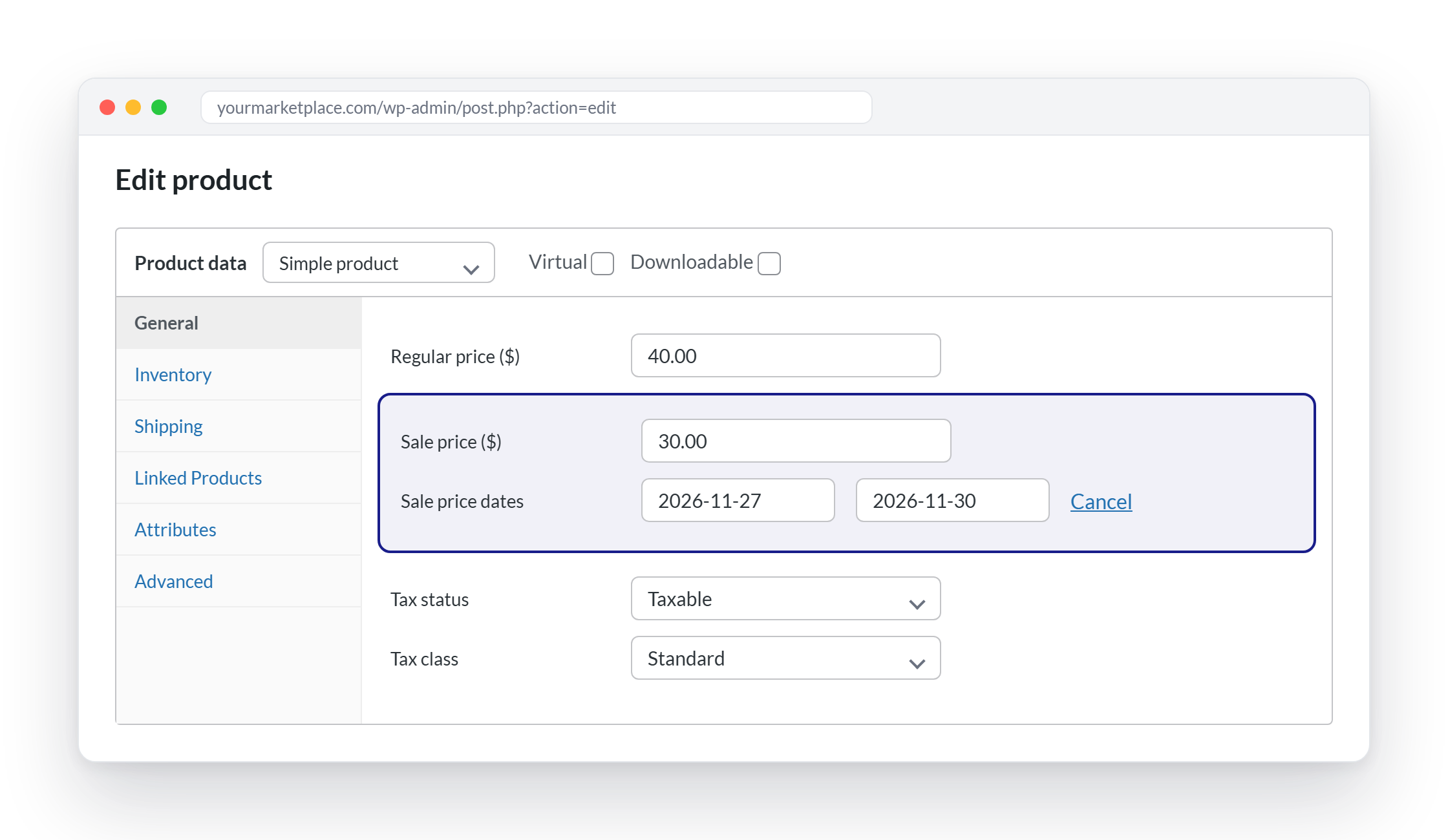
Not every discount needs a code. Sale prices show the reduced price directly on the product page and require no action from the shopper. In the WooCommerce product editor, enter a sale price and select Schedule to set start and end dates, and the sale ends at 11:59 pm on the end date, per WooCommerce’s product editor documentation. Vendors on a WC Vendors marketplace can set the same sale price dates from the product form in their vendor dashboard.
4. Free shipping
Free shipping is one of the most effective ways to rescue carts, and it doesn’t touch your product prices. In WooCommerce, the Free Shipping method can require a valid free shipping coupon, a minimum order amount, either one, or both. If you pair it with a minimum order amount, decide whether to tick “Apply minimum order rule before coupon discount,” which checks the threshold against the pre-coupon total.
On a WC Vendors marketplace with vendor shipping turned on, vendors can also offer free shipping above an order amount in their own shipping settings, or tick Allow free shipping on their own coupons.
5. BOGO and buy more, save more
BOGO deals (“buy two, get one free” or “buy a coffee machine, get pods half price”) are powerful for consumables, accessories and gifts. Because core WooCommerce has no BOGO discount type, you’ll need an extension. Advanced Coupons Premium adds “Buy X, Get X” style offers on top of WooCommerce, and its guide to creating a WooCommerce BOGO coupon walks through the setup. Whatever tool you use, cap the free item quantity and test the cart before launch.

6. Bundles
Bundles lift order value and help move slower products alongside bestsellers. The simplest approach is a dedicated bundle product priced below the combined cost of its items. For dynamic bundles with shared inventory, WooCommerce’s official Product Bundles extension handles the stock tracking for you. On a marketplace, bundles work best within a single vendor’s catalog, since each vendor ships their own items.
7. VIP early access codes
Early access rewards your best customers and spreads demand across November instead of cramming it into one day. Create a coupon, add your VIP customers’ addresses to the Allowed emails restriction, set a usage limit per user of 1 and schedule your announcement for the week before Thanksgiving. Our November promotion ideas include more ways to build anticipation before the main event.
8. Gift cards
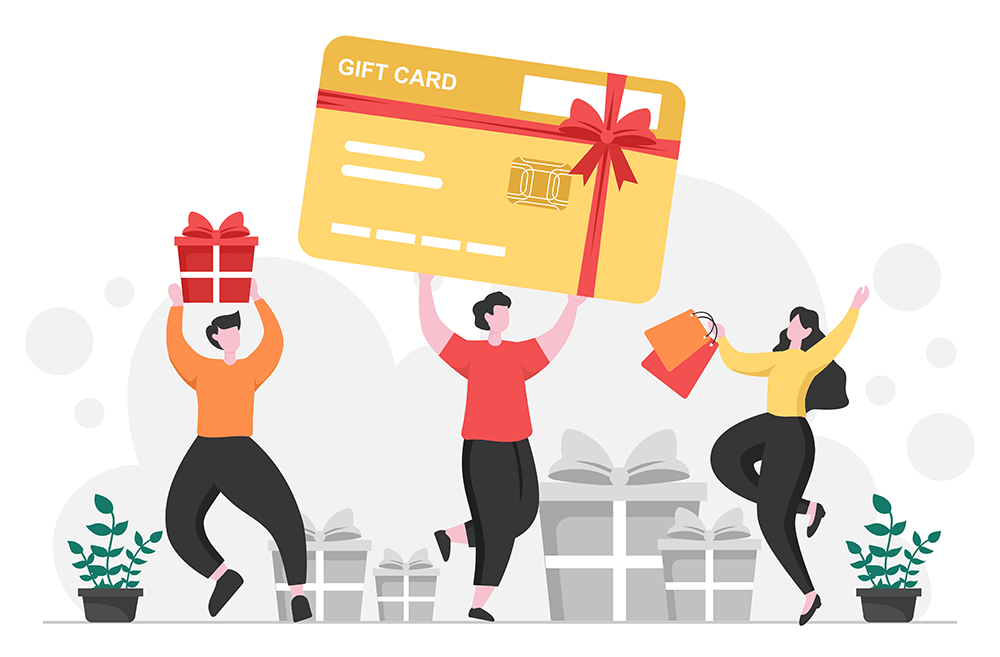
Gift cards are a natural fit for the holidays: shoppers who can’t decide buy one for someone else, and recipients come back in December and January to spend it, sometimes buying more than the card covers. Core WooCommerce doesn’t include gift cards, so you’ll need an add-on. Advanced Coupons’ WooCommerce gift cards plugin lets you sell fixed or variable gift card products, choose from built-in or custom designs, email cards with a personal message on a scheduled delivery date and have recipients redeem them as store credit.
A gift card works well as a Black Friday “bonus” offer, too, such as a $10 card with every order over $100, because the reward pulls customers back for a second purchase.
9. Loyalty points
Loyalty programs reward the customers who already love your marketplace, and Black Friday is the perfect moment to remind them. Offer double points on Black Friday orders, or let members redeem points early for exclusive deals. WooCommerce doesn’t have a built-in loyalty program. Advanced Coupons’ WooCommerce loyalty program lets customers earn points for purchases, account sign-ups, product reviews, blog comments and referrals, then redeem them as store credit or for reward coupons.

Vendor Coupons Vs. Marketplace-Wide Coupons
On a single-seller store, a coupon is simple: the store owner pays for the discount. On a multi-vendor marketplace, every WooCommerce Black Friday coupon raises a second question: who funds it?
Marketplace-wide coupons are the ones you create in WooCommerce as the admin. They’re best for headline campaigns that span many vendors, such as a sitewide code or a free shipping weekend.
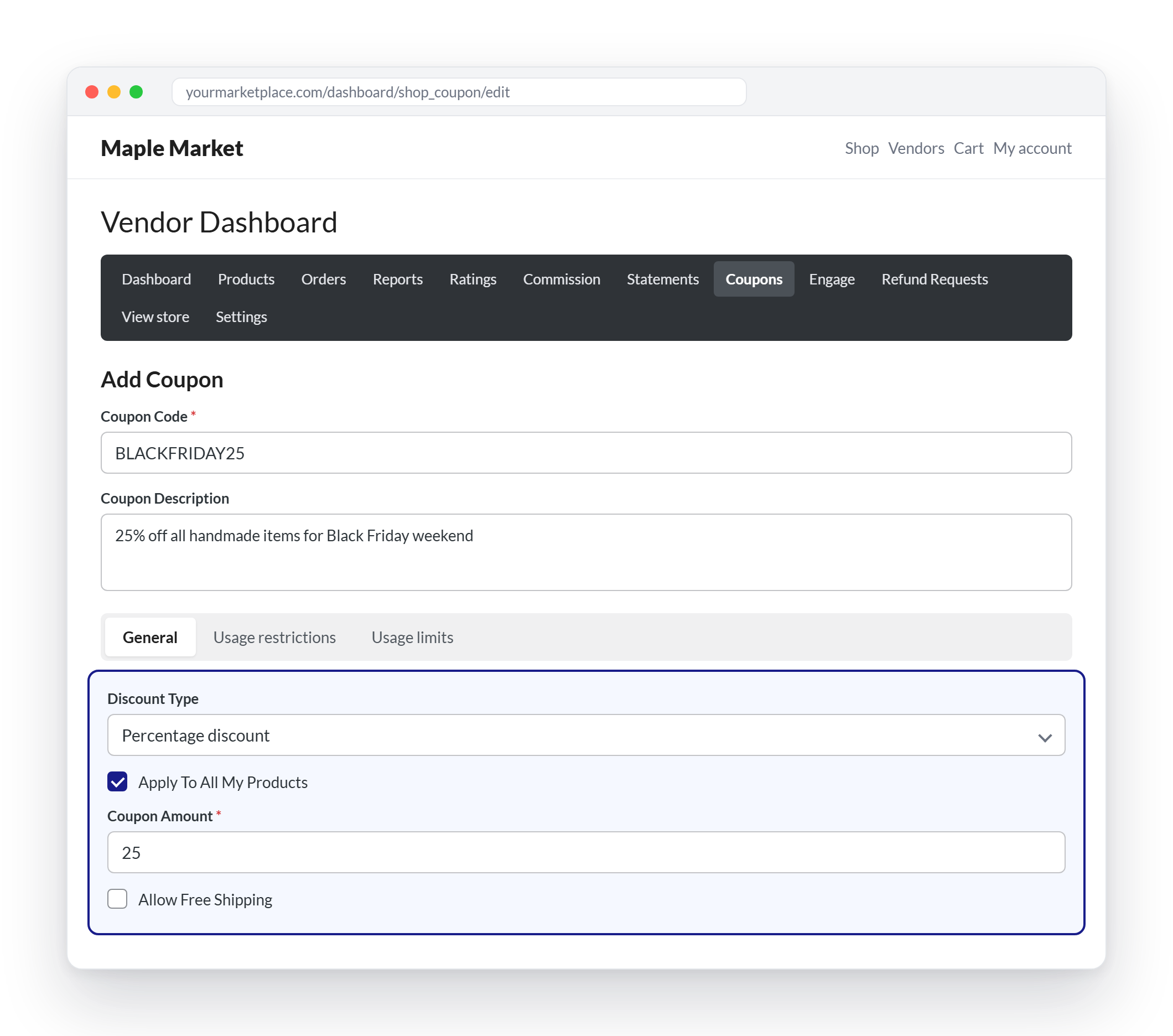
Vendor coupons are included in every paid WC Vendors plan. Vendors create them from the Coupons section of their dashboard and can choose:
- A percentage discount or a fixed discount
- Whether the coupon applies to all their products or only selected ones, with exclusions
- Free shipping, an expiry date and minimum or maximum spend
- Individual use only and exclude sale items
- Usage limits per coupon and per customer, plus restrictions to specific email addresses
Vendor coupons let each seller run promotions that fit their own margins, while your marketplace-wide coupons drive the big campaign. For more on helping sellers get their stores ready, see our Black Friday online store guide for vendors.
How To Protect Margins And Commissions
Discounts that wipe out profit aren’t a win, no matter how many orders they bring in. Build these safeguards into every WooCommerce Black Friday offer.
Decide how coupons affect commission
Every paid WC Vendors plan adds a Coupon Action setting under WC Vendors > Settings > Commission. It controls whether commission is calculated after the coupon is applied (on the discounted price) or before it (on the original price). Only coupons created by the product’s vendor or by an administrator are factored into that calculation.
Here’s a simple illustration with an 80% vendor commission and a 20% off coupon on a $100 product:
- After: commission is calculated on $80, so the vendor earns $64 and the marketplace keeps $16. Both sides share the cost of the discount.
- Before: commission is calculated on $100, so the vendor earns $80, and the discount comes out of the marketplace’s share.
Neither option is wrong. What matters is that you choose deliberately and tell vendors before Black Friday, so payouts don’t come as a surprise.
Stop discounts from stacking
Tick “Exclude sale items” on coupons when products already carry a scheduled sale price, and use “Individual use only” on your biggest codes. Otherwise, a 30% sale price plus a 20% coupon can push a product below cost.
Limit exposure
Use expiry dates that match your campaign window, usage limits per user to stop code sharing from draining your budget, and minimum spend rules to make sure discounted orders are still worth fulfilling. Our guide to running limited-time WooCommerce flash sale deals covers more ways to create urgency without giving away too much.
Test every offer
Before November 27, add products from two or three different vendors to a cart and apply each coupon. Check the discount, the shipping total and the commission recorded for each vendor. Ten minutes of testing beats a weekend of refunds.
A WooCommerce Black Friday Offer Calendar For 2026
Use these 2026 dates to sequence your offers rather than launching everything at once:
- Early November: VIP early access codes and teaser emails, in line with Adobe’s forecast of early-November deals of up to 14% off.
- Week of November 23: Category coupons and scheduled sale prices go live before Thanksgiving, Thursday, November 26.
- Black Friday, November 27: Headline sitewide or category coupon plus doorbuster sale prices.
- Small Business Saturday, November 28: Spotlight your smaller vendors and their own vendor coupons.
- Cyber Monday, November 30: Free shipping thresholds or tiered spend offers to close the weekend strong.
- Giving Tuesday, December 1, and beyond: Gift-focused bundles and modest December discounts ahead of shipping cutoffs.
Conclusion
A strong WooCommerce Black Friday sale isn’t about the deepest discount. It’s about choosing the right offer for each goal and setting it up properly: percentage coupons for headline campaigns, tiered spend and bundles to raise order value, scheduled sale prices for zero-friction savings, free shipping to rescue carts, BOGO through an extension, VIP codes for early access, and gift cards and loyalty points to bring customers back after the sale.
On a multi-vendor marketplace, the setup goes one step further. Decide which offers you’ll fund as marketplace-wide coupons and which vendors will run themselves, choose your Coupon Action setting on purpose, and use exclusions, limits and expiry dates to protect margins. Put your WooCommerce Black Friday offers in place before Thanksgiving week, test them across several vendors, and your marketplace will be ready to turn the November 27 rush into profitable orders.
Here’s what we covered in this article:
- What shoppers expect from WooCommerce Black Friday offers in 2026
- Start with the WooCommerce coupon basics
- 9 WooCommerce Black Friday offers that work
- Vendor coupons vs. marketplace-wide coupons
- How to protect margins and commissions
- A WooCommerce Black Friday offer calendar for 2026