
Every new vendor creates a queue of admin tasks. Application review, approval email, welcome message with dashboard instructions, commission rate explanation, payment setup guidance, and a first product walkthrough all stack up quickly. This signals to you that you should automate onboarding process.
According to Swell, marketplaces now account for 62% of global retail e-commerce sales, and as marketplace platforms scale, vendor onboarding efficiency becomes a competitive advantage. Research from McKinsey & Company shows that businesses can cut hiring and onboarding time by 67% when workflow automation replaces manual handoffs, and marketplaces that automate onboarding process see similar gains.
When mapping out the full vendor onboarding process for a test marketplace, seven of those were automatable with WC Vendors configuration and a few email templates. The remaining four (the genuinely human touchpoints) were actually better left to manual approval.
This guide covers what to automate, how to do it, and what to keep intentionally manual.
Why You Should Automate Onboarding Process Workflows First
Before jumping into configuration, it helps to understand the financial stakes. According to research compiled by Netguru, traditional manual seller onboarding costs marketplaces approximately $35,000 per vendor, while automated systems bring that figure down to around $2,400, a 93% reduction. Sellers who wait more than two weeks to get activated abandon at rates above 40%, so every day you shave off the process directly impacts your vendor acquisition rate.
The case for moving to automate onboarding process workflows is strong for three reasons:
- Speed matters for retention. Marketplaces that activate sellers within 48 hours see abandonment rates below 10%, compared to 40% for platforms that drag past two weeks.
- Error rates drop significantly. Automated tax and compliance processing reduces error rates from 12% to below 1%, according to industry benchmarks.
- You scale without headcount. A marketplace that can automate onboarding process flows can handle hundreds of new vendors per month without hiring additional staff.
This is not about replacing human judgment. It is about removing the repetitive admin work that fills your inbox so you can focus on building vendor relationships that actually matter.
What Vendor Onboarding Process Covers
Step 1: Configure vendor registration settings
Where to configure: WC Vendors → Settings → General → Vendor Registration
Auto-approve vs. manual review:
WC Vendors gives you the choice to automatically approve new vendor registrations or require admin review before the account is activated.
- Auto-approval works well when your marketplace has clear vendor criteria and low fraud risk. A seller on a niche craft marketplace is very different from a seller on a general goods platform. If you know who your vendors are (existing customers, people from a specific community), auto-approval speeds onboarding dramatically and is the fastest way to automate onboarding process entry points.
- Manual review is appropriate when quality control is part of your marketplace value proposition (curated vendors only), or when fraud and spam applications are a real risk. The trade-off: every manual review creates delay.
If your marketplace charges vendors for membership plans, this setting determines how billing works. With membership plan selection built into the signup form, auto-approved vendors are sent straight to checkout with their chosen plan already in the cart, while manually approved vendors are billed the moment you click Approve.
When you’re setting up a curated vertical like apparel, this decision carries extra weight — see the full vendor selection and listing standards walkthrough in our guide to how to build a fashion marketplace with WooCommerce.
Application form fields:
Configure what information vendors must provide at registration. At minimum, collect:
- Business or store name
- Contact email
- Country/region (for payout currency and tax considerations)
- Brief description of what they plan to sell
Additional qualifying fields help manual reviewers make decisions faster, but create friction for auto-approval flows. If your goal is to automate onboarding process steps end-to-end, keep the form short and verify the rest post-approval.
Step 2: Set up automated welcome emails
When a vendor account is approved, WC Vendors triggers an email notification. This is your primary automated touchpoint, and getting it right dramatically reduces vendor setup questions.
What the welcome email should include:
- Dashboard link. Direct URL to the vendor dashboard, not the WordPress admin login.
- Credentials confirmation. Username and link to set or reset password.
- Commission rate. State their default commission rate clearly (for example, “You earn 80% of each sale”).
- Payment setup instruction. Direct link to the Stripe Connect setup section in their dashboard, with a brief instruction: “Connect your Stripe account before your first sale to receive automatic payouts.”
- First steps checklist. Three to five bullet points covering: complete your store profile, connect Stripe, list your first product.
- Link to your vendor knowledge base. If you have a FAQ or vendor documentation, link it here.
Setting up the email in WC Vendors:
Navigate to WC Vendors → Settings → Emails and customize the vendor approval email template. Use the available template tags (vendor name, login URL, dashboard URL) to personalize automatically.
For more control over the welcome email (conditional content, drip sequences, branded HTML), connect WooCommerce to your email marketing platform and trigger vendor onboarding sequences from the vendor approval event. This lets you automate onboarding process emails beyond what the core plugin provides, including multi-day drip sequences for paid-tier vendors. Our sister brand’s guide to wholesale email automation breaks down which emails the core tools handle natively and where a third-party platform earns its place.
Step 3: Create a vendor setup checklist
A checklist inside the vendor dashboard makes onboarding self-service. Vendors know exactly what they need to do, and you do not need to follow up individually.
Core checklist items:
- Complete your store profile (banner image, bio, contact details)
- Connect your Stripe account for automatic payouts
- Review your commission rate and payout schedule
- Read the vendor policy document
- List your first product
Where to place it:
WC Vendors allows you to add custom content to the vendor dashboard. Add a notice or widget at the top of the dashboard that links to the checklist items. For new vendors who have not completed all steps, this acts as a persistent reminder without requiring you to send follow-up emails.
Some marketplace operators build a simple “vendor onboarding” WordPress page and link to it from the dashboard and the welcome email. Once built, it runs without maintenance for months. This is one of the highest-leverage ways to automate onboarding process guidance because a single well-built page replaces dozens of individual email explanations.
Step 4: Automate commission and payout configuration
Default commissions
When a new vendor registers, they automatically inherit your global commission rate. No manual configuration needed per vendor. If you have vendor tiers or categories with different rates, configure these in WC Vendors → Settings → Commissions as default rules rather than per-vendor overrides. WC Vendors Pro supports multiple commission types, including percentage, fixed fee, percentage plus fee, and tiered commissions.
Stripe Connect self-service
This automation saves the most admin time. According to Chargeflow, 75% of the world’s top marketplaces use Stripe Connect, and usage increased by more than 58% in 2025. It is the standard for marketplace payment onboarding. Instead of collecting bank details and setting up manual vendor payouts, WC Vendors Stripe Connect lets vendors connect their own Stripe accounts directly:
- Vendor clicks “Connect with Stripe” in their dashboard
- Stripe’s OAuth flow guides them through account creation or login
- Connection is authorized, and the vendor returns to their dashboard
- All future orders are split automatically at checkout
The payment setup is quick and self-service for the vendor, requiring zero admin involvement. WC Vendors is a Verified Stripe Partner, which means the integration is kept up to date with the latest Stripe features and security standards. Include the link and instructions in your welcome email and setup checklist so vendors can complete them before their first sale. For a full walkthrough of the configuration, see the WC Vendors Stripe Connect Getting Started Guide.
Automating payouts through Stripe Connect is the single highest-ROI way to automate onboarding process payments, because it removes both the admin work on your end and the friction of waiting for manual payouts on the vendor’s end.
Step 5: Set up vendor dashboard guidance
The vendor dashboard is where new vendors spend most of their onboarding time. Reducing confusion here reduces support requests.
Dashboard notices
WC Vendors allows custom notices at the top of the vendor dashboard. Use these to:
- Direct new vendors to incomplete setup steps (profile not complete, Stripe not connected)
- Communicate policy updates
- Highlight important links (knowledge base, support contact, payout schedule dates)
Vendor knowledge base
Build a basic vendor FAQ covering the most common setup questions: how to connect Stripe, when payouts happen, how to manage products, your refund policy, and how to contact support. A simple WordPress page with anchor-linked sections is sufficient. Update it as you learn which questions vendors actually ask. For reference, the WC Vendors knowledge base is a good model for structure and depth.
A well-maintained knowledge base is one of the most underrated ways to automate onboarding process support, because it lets vendors self-serve answers at any hour.
Step 6: Handle product approval automatically or manually
Where to configure: WC Vendors → Settings → Products → Product Management
Auto-publish vendor products
When enabled, vendor product listings go live immediately upon submission without admin review. This is the right choice for established marketplaces with trusted vendor communities, niches where product quality is relatively standardized, or high-volume marketplaces where manual review creates a backlog.
Require admin approval
All vendor products require admin review before going live. Use this when quality curation is part of your marketplace value proposition, you are in a regulated category, or you are early-stage and building a reputation for quality.
Hybrid approach
Some marketplace operators auto-publish for established vendors and require approval for new vendors during a probation period. WC Vendors supports per-vendor overrides through capabilities settings, so you can automate the graduation from “review required” to “auto-publish” as part of your vendor performance process. This hybrid model is the most sustainable way to automate onboarding process product approvals because it balances quality control with scalability.
Step 7: Ongoing communication automation
After initial onboarding, vendor communication should be largely automated:
Order notifications
WC Vendors automatically sends vendors email notifications when they receive new orders. Configure the email template in WC Vendors → Settings → Emails → New Order to Vendor.
Commission payment notifications
When a payout is processed (via Stripe Connect or manual payment), vendors receive notification. For Stripe Connect users, Stripe handles this directly.
Policy updates
For broader communication (policy changes, new features, marketplace news), use your email marketing platform to segment vendor contacts and send targeted updates. Treat your vendor list as a distinct segment in your email tool.
Once all three of these channels are configured, you have fully automated the routine vendor communication loop. This is what it means to automate onboarding process communication end-to-end.
What To Keep Manual
Automation handles the routine. These four touchpoints are worth keeping human-based:
1. High-value vendor onboarding calls
For vendors with large catalogs or significant earning potential, a 30-minute setup call builds a relationship that pays back in long-term retention. Automate the routine; invest personally in the high-value. This personal investment in your top sellers also ties directly into long-term vendor retention. Once onboarding is complete, the communication strategies, tiered commissions, and support practices covered there keep those sellers engaged for years.
2. Escalated support
Automated responses and FAQ documentation handle roughly 80% of vendor questions. The remaining 20% (order disputes, payment issues, policy exceptions) need human judgment.
3. Vendor performance reviews
If you have vendor tiers or curation standards, the review of whether a vendor is meeting them is a judgment call. Automation can surface the data (sales volume, reviews, complaint rate); the decision stays with you.
4. Policy violations and fraud
Reviewing and acting on flagged vendor behavior is not something to automate. Set up monitoring to surface potential issues, but keep the final action manual.
Common Mistakes When You Automate Onboarding Process Workflows
Even marketplaces that invest in automation sometimes get it wrong. These are the most common pitfalls:
- Over-automating the high-value touchpoints. Sending a generic welcome email to a vendor who will bring $50,000/month in sales wastes a relationship-building opportunity.
- Under-communicating during the automated flow. Silence between registration and first sale makes vendors think nothing is happening. A few automated check-in messages prevent abandonment.
- Skipping the testing phase. Configure every step, then actually sign up as a test vendor and walk through the flow. Broken automations are worse than no automation at all.
- Ignoring feedback from onboarded vendors. Your automation works or it does not based on whether vendors actually activate. Ask them what was confusing in their first week, and iterate.
Best Practices For A Better Vendor Onboarding Experience
Here are some practices that can make onboarding clear and enjoyable for everyone:
Keep communication open
Communication should not stop after registration. Sending an automatic welcome email is a great start. It tells vendors that their account is ready and gives them confidence that everything went smoothly.
You can include brief setup instructions in this message, such as how to upload products or set store details. Adding helpful links to guides or tutorials provides vendors with an easy way to find answers without needing to ask for help. This saves time for both the vendor and the admin team.
Offer quick start guides or tutorials
Even simple dashboards can feel confusing at first. Providing clear guides or short videos helps vendors learn more quickly. These resources should show how to upload products, manage orders, and view reports.
You can also create a “Getting Started” page that answers common questions. When vendors can learn independently, they become confident sellers who require less support later on.
Regularly test your registration flow
Sometimes, minor issues go unnoticed until someone points them out. Testing your registration flow regularly helps you catch problems early. Try signing up as a vendor yourself every few months. You may notice steps that seem unclear or sections that could be shortened.
You can also ask new vendors for feedback. A brief survey after sign-up helps you understand what worked well and what didn’t. This habit keeps your marketplace experience up to date and easy to follow.
How WC Vendors Streamlines The Registration Process
Even though each marketplace is unique, tools like WC Vendors can make vendor onboarding more organized and easier to manage. It was made for WooCommerce marketplaces that need clear systems for vendor sign-ups, approvals, and setup.
Here are some of the key features that help vendors register and get started:
Built-in registration forms for vendors
WC Vendors Signup includes a ready-to-use registration page that new sellers can fill out. This form can collect details such as store name, contact email, and payment information. Since it is already designed for vendor sign-ups, you do not have to build a new form from scratch.
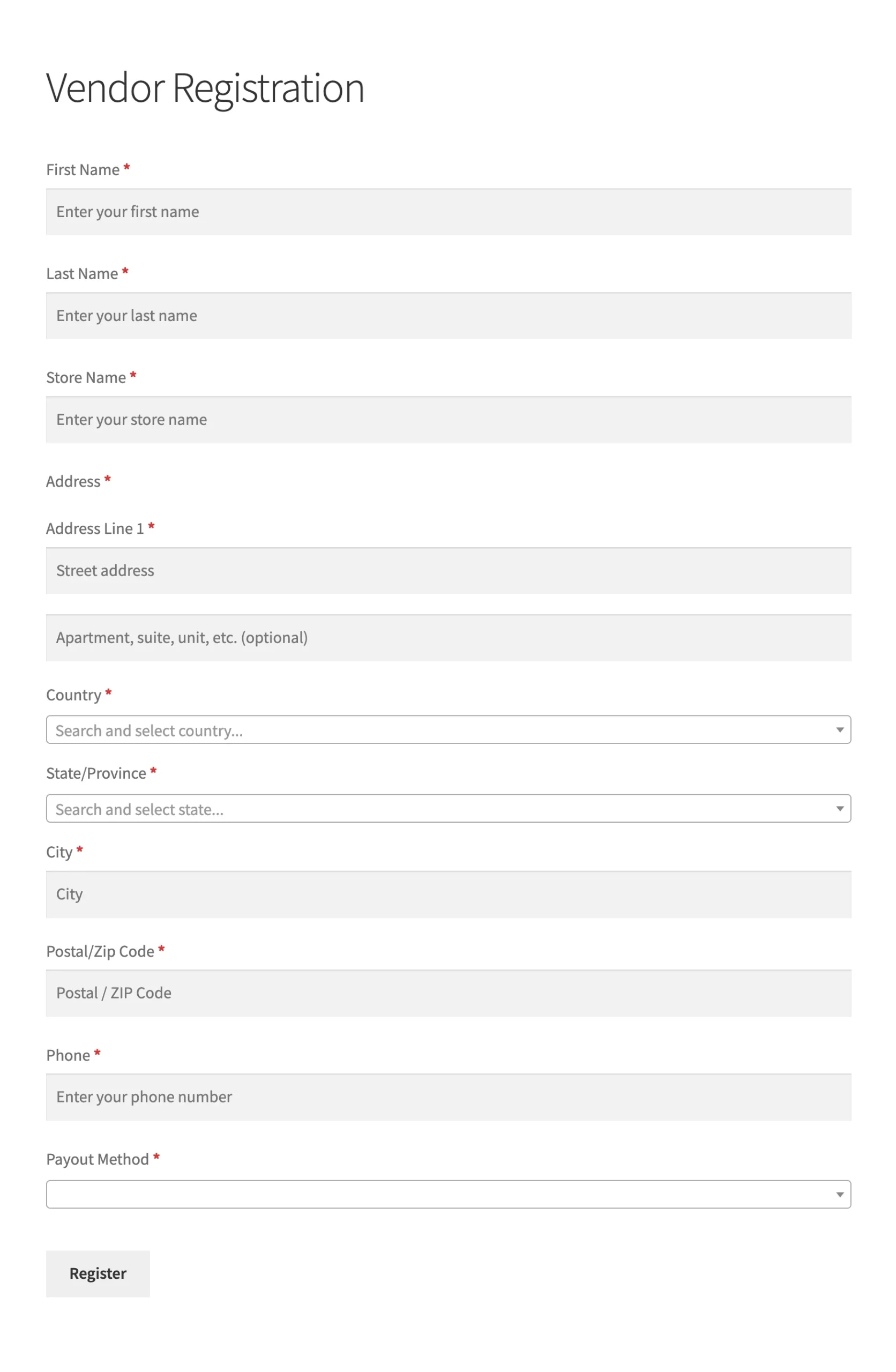
The form also supports customization. You can add or remove fields to match your marketplace’s needs. For example, if you only want vendors from a certain country, you can include a country field. This saves setup time while keeping your sign-up process clear.
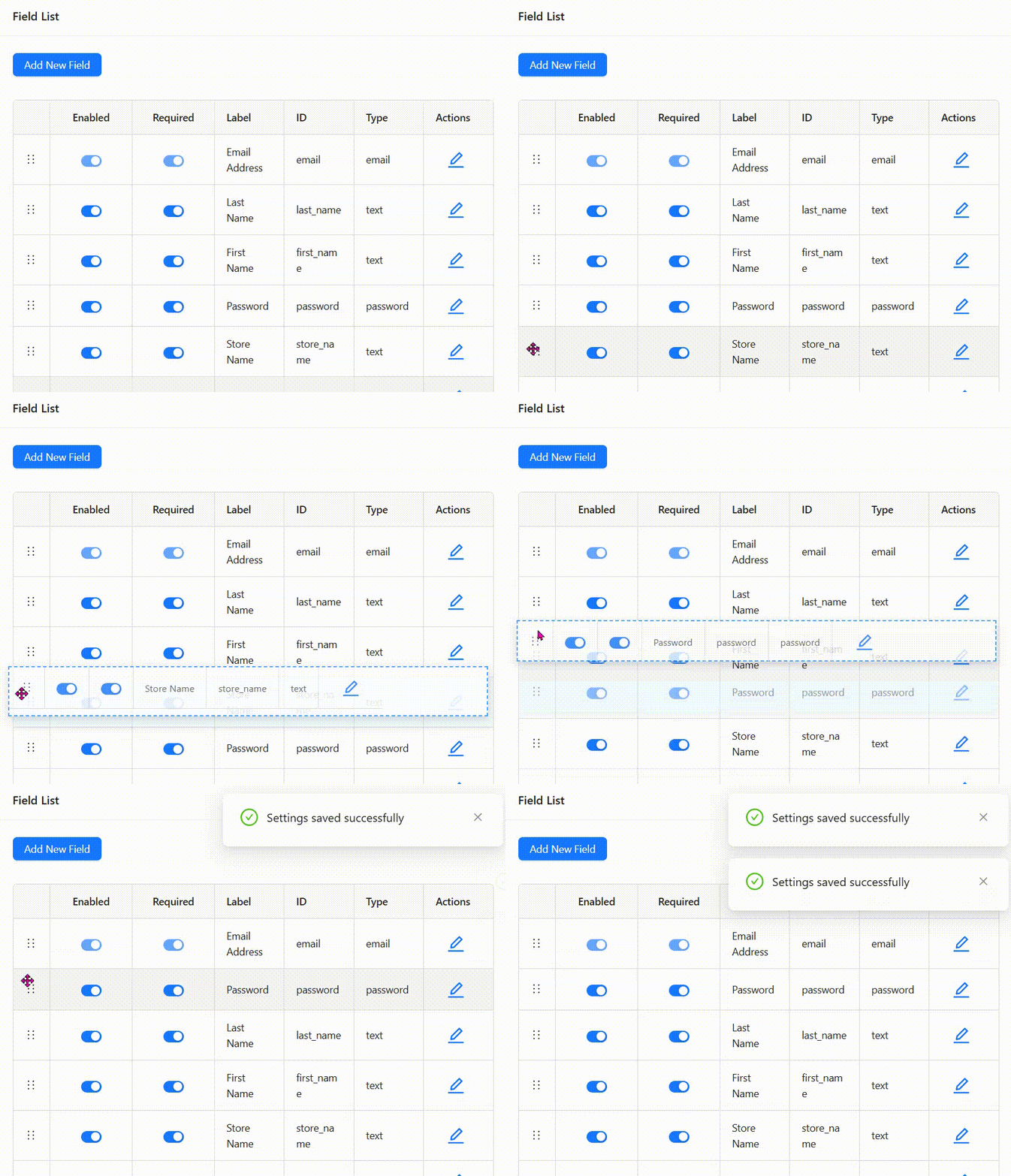
To know more about custom registration, you may read: Custom Registration Form For Vendor Onboarding.
Admin approval or auto-approval options
One of WC Vendors’ most helpful features is the control it gives admins over vendor approvals. You can choose between manual approval and automatic approval.
Manual approval allows you to review every application carefully before vendors can sell. This is ideal when your marketplace handles sensitive products or requires quality checks. On the other hand, auto-approval can be used when you trust your vendors or want faster onboarding.
Having both options helps strike a balance between speed and control. You can adjust your settings depending on how your marketplace operates.
Vendor dashboard for fast setup
Once vendors are approved, they can start working right away through the WC Vendors dashboard. From here, they can upload products, change prices, manage orders, and view earnings. The dashboard is simple and helps vendors understand how everything works without needing constant help from the admin team.
📝 Additional Note: You can try our Demo Site to explore all the WC Vendors Marketplace features live. Click HERE.
Conclusion
Choosing to automate onboarding process workflows in your WooCommerce marketplace is less about removing the human element and more about freeing your time for the parts of the business that actually benefit from your attention. Marketplaces that invest in this kind of systematic automation consistently onboard more vendors, activate them faster, and retain them longer than those that rely on ad hoc manual processes. The tools are already available in WC Vendors and its ecosystem, so the only real question is how quickly you can implement them.
Here is a quick recap of what this article covered:
- Why you should automate onboarding process workflows first
- What vendor onboarding actually covers
- Step 1: Configure vendor registration settings
- Step 2: Set up automated welcome emails
- Step 3: Create a vendor setup checklist
- Step 4: Automate commission and payout configuration
- Step 5: Set up vendor dashboard guidance
- Step 6: Handle product approval automatically or manually
- Step 7: Ongoing communication automation
- What to keep manual
- Common mistakes when you automate onboarding process workflows
If you are ready to put these automations in place, start by exploring WC Vendors Pro and pairing it with WC Vendors Stripe Connect for payouts. Together, these two tools give you everything you need to automate onboarding process flows end-to-end.
Frequently Asked Questions
Can I auto-approve some vendors and manually review others?
The approval mode applies globally. However, you can auto-approve all registrations and then manually suspend accounts that do not meet your standards during a monitoring period. This is often more efficient than reviewing every application upfront.
What if a vendor does not complete their Stripe setup before their first sale?
Orders placed before a vendor connects Stripe fall into your fallback payout queue, typically manual payment. Configure a fallback payout method in WC Vendors → Settings → Payments and include clear urgency in your welcome email: connect Stripe before your first sale to receive automatic payouts.
How do I reduce vendor support questions about basic setup?
The two highest-ROI investments are: (1) a comprehensive welcome email that answers setup questions proactively, and (2) a vendor knowledge base linked from the dashboard. Most support questions come from vendors who could not find the answer, not from questions that do not have good answers.
Do I need WC Vendors Pro to automate onboarding process workflows?
The free WC Vendors plugin handles basic vendor registration and approval. WC Vendors Pro adds Stripe Connect integration (the most impactful automation for payouts), advanced commission configuration, and more granular vendor dashboard controls. For a fully automated onboarding workflow, WC Vendors Pro is required. You can see full plan inclusions on the WC Vendors pricing page.
How long does it take to automate onboarding process workflows from scratch?
For most marketplaces, a weekend of focused configuration is enough to get the core automations in place: registration settings, welcome email, Stripe Connect, dashboard checklist, and order notifications. Refinement (drip sequences, advanced commission tiers, knowledge base expansion) happens over weeks and months as you learn what vendors ask about.

