This article covers what actually happens when you switch marketplace plugins away from MultiVendorX, what data moves on its own, what you rebuild by hand, and how WC Vendors Pro compares as the plugin to switch to. That gap is why you should choose a MultiVendorX alternative.
Learn more about why store owners start looking, what to judge a MultiVendorX alternative on, where the two plugins differ, and what actually carries across when you switch. We pulled every price and plan detail below from each vendor’s own pages.
What To Look For In A MultiVendorX Alternative
Judge a MultiVendorX alternative on the five things you will touch every week, not on the length of the feature list. A long feature count is marketing, while these five decide what your admin work actually looks like.
- Commission control: How many commission structures you get, whether rates can differ by vendor or product, and who absorbs your fee.
- Payouts: Whether vendors are paid automatically at the point of sale or by you doing bank transfers on a Friday.
- What vendors can do alone: Every task a seller cannot do for themselves becomes a support ticket addressed to you.
- What ships in the box: Separate the base plugin from the modules and companion plugins your build genuinely needs, then total the cost.
- Platform compatibility work: WooCommerce keeps changing, so someone has to keep your marketplace layer current.
Vendor management sits at the center of all five. According to Forrester, marketplaces were expected to account for two-thirds of global business-to-consumer ecommerce, with third-party sellers driving more than 70% of marketplace sales growth. Your seller experience is the product, not a side panel.
If you are still mapping out how those five pieces fit together, our guide on how to build a multi vendor marketplace walks the sequence from vendor onboarding through payouts.
One piece of housekeeping before the comparison. If you want the row-by-row head-to-head, our WC Vendors vs MultiVendorX comparison does that job. This page assumes you’ve mostly made your decision and now want to know what a move costs in a rebuilt configuration.
Feature Comparison: WC Vendors Pro And MultiVendorX
Both plugins cover the marketplace basics, so the useful comparison is where each one puts the settings that create work for you later.
| WC Vendors Pro | MultiVendorX | |
|---|---|---|
| Entry price | $99.50 | Starter listed at $79 a year for one site |
| Commission types | Four standard types plus three tiered types, and a vendor or customer fee mode | Commission management included; individual structures not broken out on their plan pages |
| Vendor dashboard | Frontend, on the storefront | Vendor dashboard included |
| Vendor payouts | Stripe Connect gateway | Stripe and PayPal marketplace payments in Pro |
| Capability model | Features by tier, three tiers | Features by module, with every paid tier carrying the same features |
| Extra marketplace types | Auctions via a third-party plugin, on Business | Subscription, booking, auction, rental and more via third-party plugins |
| Money-back window | 14 days | 15 days |
Commission is worth seeing, not just reading about. On our side, the global commission type covers fixed, fixed plus fee, percentage, and percentage plus fee, and a separate mode decides whether your marketplace fee comes out of the vendor’s earnings or is added to the customer’s cart.
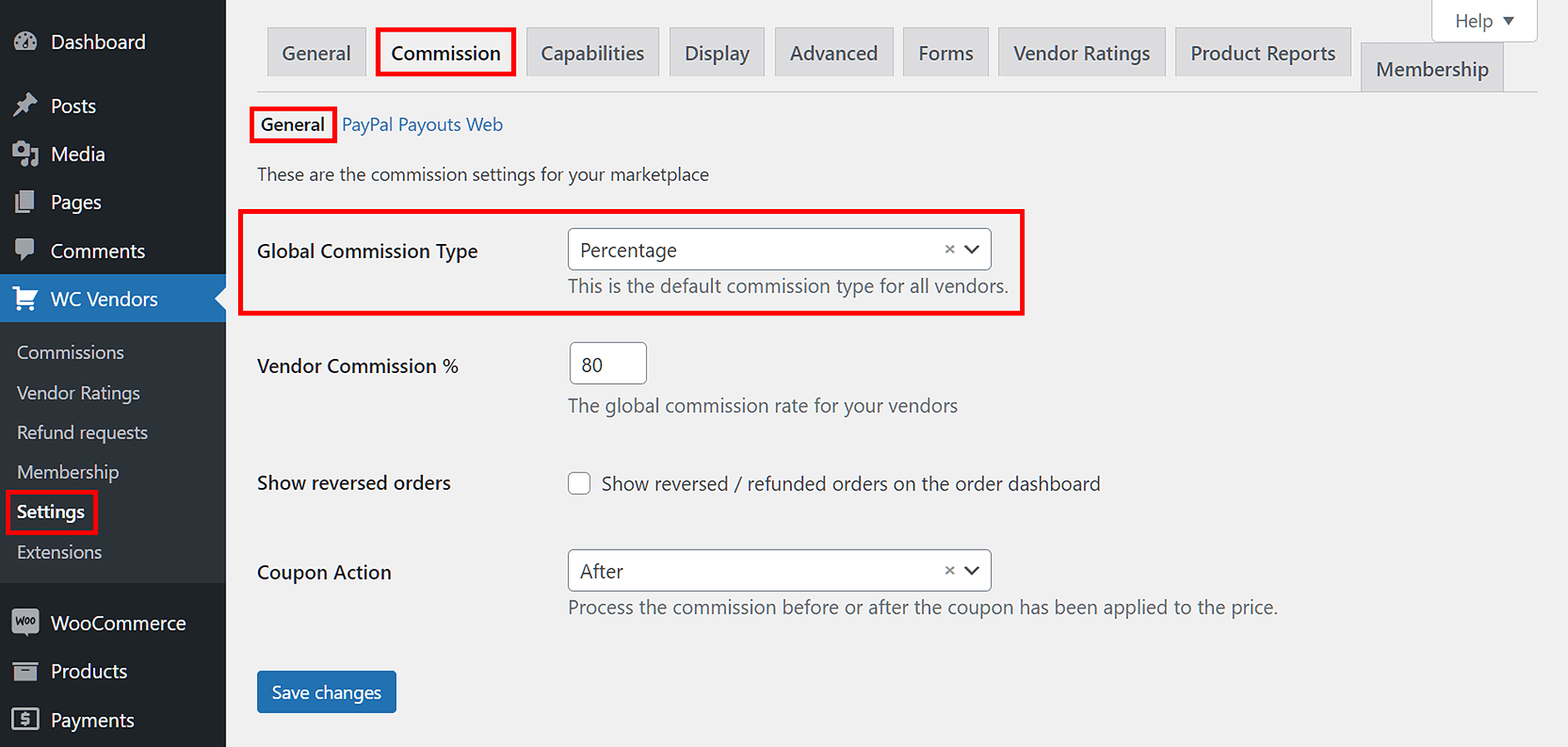
How far the commission model goes belongs here. Alongside the four standard types, WC Vendors Pro carries three tiered types: Sales By Vendor, Sales by Product, and Product Price. Our WooCommerce commissions guide puts tiered commissions at the global and vendor levels, with the product level supporting the product-price tier, so you can set rates that step down as a seller’s volume rises without waiting for a higher plan. Tiered rates are the one thing you cannot set at the category level. Plan-based commission, a different mechanism, is tied to vendor memberships further up the ladder.
The vendor dashboard is the other place the two products feel different in practice. Ours sits on the storefront, so testing it means you log in as a vendor in a second browser rather than issuing a WordPress admin account to a seller. That sounds minor until you have thirty vendors and a support inbox.
WC Vendors Pro As The MultiVendorX Alternative
WC Vendors Pro is a WooCommerce-only marketplace plugin built and maintained by Rymera Web Co, and the frontend vendor dashboard is its core rather than an add-on.
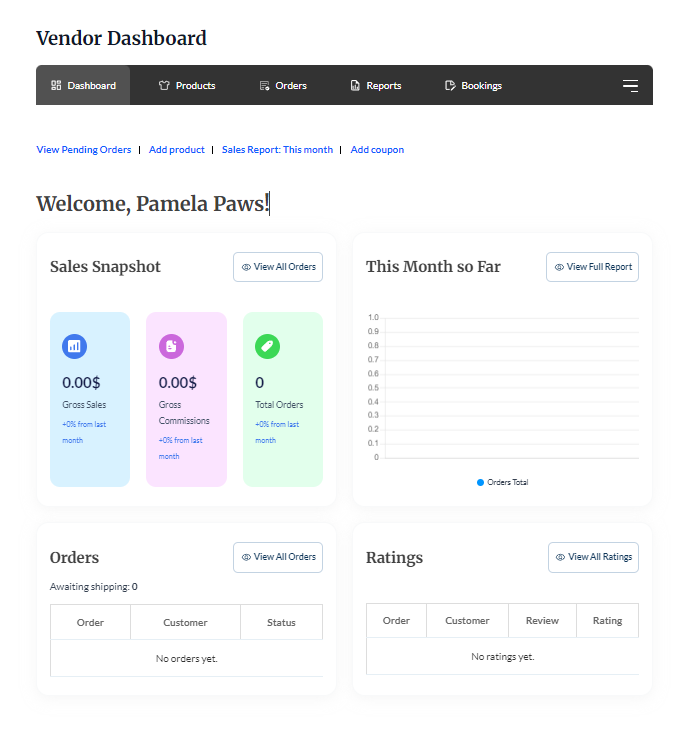
Your sellers register, then manage their own products, orders, shipping, and reports from the storefront. Admin approval sits in front of that, so a new vendor waits for you before anything reaches your catalog.
Payouts run through the Stripe Connect gateway included with Pro. Each vendor connects their own Stripe account, and commission is split at the point of sale instead of you calculating it by hand at the end of the month.
Vendors get their own order view, which is the part that removes the most administrative work from your week.
The ladder above Pro matters if your marketplace plans to add vendors. Growth adds vendor memberships, subscription selling and the plan-based commission type, while Business adds bookings and the Simple Auctions integration. Current figures for all three tiers are on the WC Vendors pricing page.
To be direct: MultiVendorX gives you a free entry point, a larger module catalog, and more marketplace types from a single purchase. A MultiVendorX alternative like WC Vendors Pro gives you a tier ladder to grow into, payouts in the product rather than in a module catalog, and one platform receiving all the engineering attention.
What Migrates, And What You Rebuild
Your catalog, customers, and order history belong to WooCommerce, so they stay put. Commission rules, vendor shipping configuration, store URLs, and shortcodes belong to the plugin, so they are your work.
We do not promise a one-click import from MultiVendorX, and you should be wary of anyone who does. Migration tooling in this market points inward: their own migration page names Dokan, WC Vendors and WCFM as places to come from, and nothing in that flow helps you leave.
Their post-migration checklist says the same thing from the other direction, telling incoming users to configure shipping settings and admin preferences by hand once the automated part finishes.
Here is how the pieces divide, based on what both plugins document about their migration paths.
| Data | Moves with the switch? | Notes |
|---|---|---|
| Products and categories | Yes | Stored by WooCommerce, not by the marketplace plugin |
| Customers and order history | Yes | Also WooCommerce data |
| Vendor accounts | Yes, as WordPress users | Roles get reassigned to the new plugin |
| Commission rules | No, rebuild | Plugin settings, including per-vendor rates |
| Vendor shipping configuration | No, rebuild | Named as manual work by both vendors |
| Vendor store URLs | No, redirect | URL structures differ, so plan 301s |
| Shortcodes on pages | No, replace | Each plugin ships its own |
| Payout history | Export first | Keep the records before deactivating anything |
A sensible order of work looks like this:
- Clone your site to staging and do the entire move there first.
- Export your commission rules, per-vendor rates, shipping settings, and payout history while the old plugin is still active.
- Install WC Vendors Pro, rebuild your commission and shipping configuration, and reconnect payouts.
- Map old vendor store URLs to the new ones and prepare the redirects.
- Place a test order spanning two vendors, refund part of it, and confirm both payouts.
- Repeat the move on production during your quietest trading window.
Three of our own write-ups are worth reading first. Our WooCommerce migration guide walks through the same sequence in detail, the WCFM marketplace migration case study shows how it went for a marketplace carrying years of settings, and the Skolmagi case study covers a move with 1,400 vendors.
Switching From MultiVendorX Without Losing Your Configuration
Switching without losing your configuration comes down to rebuilding four things on staging first: commission rules, vendor shipping, store URL redirects and shortcodes. Everything else belongs to WooCommerce and stays where it is, which is the single most reassuring fact in this whole exercise.
The reframe worth taking away is that a marketplace plugin is infrastructure, so the cost of choosing one is small next to the cost of changing it later. A switch is therefore better done now than in two years with twice the vendors. That logic holds whichever way you end up going, and it is why the sticker price deserves less of your attention than it usually gets.
For a WooCommerce marketplace, WC Vendors Pro is the MultiVendorX alternative worth moving to. Payouts through Stripe Connect sit in the product rather than in a module catalog, the commission types you are most likely to need are in the entry tier, and the renewal figure is published rather than promotional. MultiVendorX has the free tier and the longer module list, and neither of those helps on the morning one of your vendor payouts looks wrong.
Here’s what we covered in this article:
- What to look for in a MultiVendorX alternative
- Feature comparison: WC Vendors Pro and MultiVendorX
- WC Vendors Pro as the MultiVendorX alternative
- What migrates, and what you rebuild
Ready to plan your move? Start with what WC Vendors Pro includes at the entry tier, then rebuild your commission rules on staging before a single vendor notices anything changed.
Frequently Asked Questions
Is there a one-click migration between the two plugins?
No, and treat any promise of one carefully. Migration wizards in this market are built to bring stores in, not to help them leave, so the automated path runs the other way. Your products, customers, and orders are safe because WooCommerce owns them. Commission rules, vendor shipping, and shortcodes are plugin settings, and you rebuild those by hand on a staging copy first.
Will my vendors lose their stores or products?
Vendor products stay where they are, because WooCommerce stores them rather than the marketplace plugin. Vendor accounts are WordPress users, so those survive too and their roles get reassigned. What changes is the store URL structure, which is why redirects belong in your plan. Warn your vendors that their dashboard will look different, and give them one page showing where things moved.
Which commission structures can I set up after switching?
WC Vendors Pro gives you four standard commission types: fixed, fixed plus fee, percentage, and percentage plus fee. A separate mode determines whether you deduct your fee from the vendor’s earnings or add it to the customer’s cart, and you can apply rates by vendor or product. Three tiered types sit alongside them: Sales By Vendor, Sales by Product, and Product Price, applied at the global and vendor levels, so a rate card that steps down with volume transfers across. Category-level commissions are the one place tiered rates do not apply.
How do I decide whether a MultiVendorX alternative is worth the switch at all?
In practice, that list is usually short, because WC Vendors Pro’s four standard and three tiered commission types cover most rate cards without custom development, and Stripe Connect payouts ship in the same Pro tier rather than a separate module purchase.