A gap runs through almost every guide to ecommerce accessibility. The advice assumes one person controls the whole store: fix your alt text, your contrast, and headings. On a multi-vendor marketplace, the person who has to fix the problem and the person who created it are two different people.
This guide covers what WCAG asks for in practical terms, where the law currently stands in the EU and the US, and the part most guides skip: how to set ecommerce accessibility rules for content other people upload, and how to check that they followed them.
What WCAG Actually Requires
The Web Content Accessibility Guidelines are testable success criteria published by the W3C, and each criterion sits at Level A, AA, or AAA. Level AA is the target nearly every policy points at.
The current published version, WCAG 2.2, is dated 12 December 2024. It builds on WCAG 2.1, and the W3C states that content conforming to WCAG 2.2 also conforms to 2.0 and 2.1. Aiming at 2.2 therefore covers rules written for the older versions as well.
The levels, and which one to aim for
Level A is the floor, covering things that block access outright, such as an image with no text alternative. Level AA adds the requirements most people think of as real accessibility work, including color contrast and text resizing. Above that, AAA sets a stricter bar that few sites meet across every page.
Aim at WCAG 2.2 Level AA and write that down as your marketplace’s ecommerce accessibility standard. Committing to AAA across content you did not write is not realistic, and picking a level in advance saves you arguing about scope later.
The criteria a vendor’s listing actually touches
Seven criteria carry most of the weight on a product page. Each one below is listed at the level the W3C assigns it:
- 1.1.1 Non-text Content (Level A): non-text content needs a text alternative that serves the equivalent purpose. This is the alt text rule.
- 1.2.2 Captions (Prerecorded) (Level A): captions are required for prerecorded audio in synchronized media, which covers a typical product demo video.
- 1.3.1 Info and Relationships (Level A): structure and relationships shown visually must also be programmatically determined or available in text, which is what real headings and lists provide.
- 1.4.3 Contrast (Minimum) (Level AA): text and images of text need a contrast ratio of at least 4.5:1, or 3:1 for large-scale text (at least 18 point, or 14 point bold).
- 1.4.5 Images of Text (Level AA): where the technology can achieve the visual presentation, information should be conveyed as text rather than as a picture of text.
- 1.4.11 Non-text Contrast (Level AA): visual information needed to identify a control, or the parts of a graphic needed to understand it, needs at least 3:1 against adjacent colors.
- 2.4.6 Headings and Labels (Level AA): headings and labels have to describe topic or purpose.
Read that list again with a vendor in mind. On a product page, most of those criteria are decided by whoever uploaded the listing, not by whoever chose the theme.
What WCAG says about content other people add
WCAG anticipates this situation. Section 5.4 of WCAG 2.2 covers pages with content added after they are built, including user-contributed content, and offers two routes.
If that content is monitored and repaired within two business days, meaning non-conforming content is removed or brought into conformance, a conformance claim can still be made. Otherwise, the most a site can offer is a statement of partial conformance, which says the page does not conform but could if the uncontrolled parts were removed.
For a marketplace operator, that gives you a useful benchmark: a review process that catches and fixes vendor problems quickly. It also shows why “we could not control what vendors uploaded” is a weak position. In WCAG’s own terms, it describes a page that does not conform.
The Legal Position On Ecommerce Accessibility
Ecommerce accessibility law differs by country, and nothing here is legal advice. The direction of travel is consistent, though: private online commerce is being brought into scope rather than left out.
The European Union
According to the European Commission, the European Accessibility Act is a directive covering products and services, including e-commerce, and Member States had to incorporate it into national law by June 2022. Its requirements have applied since 28 June 2025. Because the Act is a directive, you must meet each country’s national version, not the directive text.
National guidance shows how directly marketplaces are named. Business.gov.nl, published by the Netherlands Enterprise Agency, defines an e-commerce service as a website or app where entrepreneurs or others offer products or services to consumers, and it gives an online marketplace as an example. The same guidance says these services must publish an accessibility statement that users can find easily.
That Dutch guidance also lists content from others that you do not control among the parts of a site that do not need to meet the rules. On a marketplace, that exception deserves care. If you hold vendor listings for approval before they go live, it is fair to ask whether that content is really outside your control, and the answer is one for a lawyer who knows your market. The guidance also applies to businesses with more than 10 employees or more than €2 million in annual turnover, so check where your business sits.
The technical benchmark is also evolving. According to AccessibleEU, a new version of the European accessibility standard, EN 301 549 v4.1.1, was published in September 2026 and adopts WCAG 2.2 as the website benchmark. Until the Commission formally cites it in the Official Journal, the legal reference remains EN 301 549 v3.2.1, which is based on WCAG 2.1 Level AA. Targeting WCAG 2.2 Level AA now meets the WCAG portion of the current reference and prepares you for the next one.
The United States
The Department of Justice’s guidance on web accessibility and the ADA says the Department has consistently taken the position that the ADA applies to the goods and services businesses open to the public offer on the web, and it lists retail stores among those businesses.
The same guidance says the DOJ has no regulation setting out detailed standards, so businesses currently have flexibility in how they comply. It points to WCAG and the Section 508 Standards as helpful technical guidance. A separate rule published in 2024 sets requirements for state and local governments, not private businesses.
One recommendation in that guidance is easy to act on: give the public a way to report accessibility problems so you can fix them.
What this means for an operator
In both frameworks, the obligation is framed around the business that offers the service, and on your marketplace that service is your site. “My vendors wrote it” is unlikely to carry much weight with a customer who never visited your vendor’s own website. They bought from you.
Where liability lands in your jurisdiction is a question for a lawyer, and any guide that answers it confidently for you is guessing. What can be said safely is narrower: set WCAG 2.2 Level AA as your working standard, so your vendor rules do not need rewriting every time a national rule shifts.
The Vendor-Generated Content Problem
Vendors create several parts of a marketplace listing, and each maps to a criterion you will be measured against. Nothing in your theme fixes any of them.
The problem is measurable. According to the WebAIM Million, an annual accessibility evaluation of the top one million home pages now in its eighth year, 95.9% of home pages had detected WCAG 2 failures in February 2026, up from 94.8% a year earlier. Shopping sites came out worse than average: 71.0 detected errors per home page, against 56.1 across the full sample.
Platform alone does not settle it. The same report found WordPress home pages averaged 52.8 detected errors, slightly below the overall average but nowhere near zero. A sound platform is a starting point for ecommerce accessibility, not a result.
Images and alternative text
Product photos are where this starts, and WCAG 1.1.1 gives no wriggle room. The WebAIM Million found 16.2% of home page images had missing alternative text in February 2026, an average of 10.8 images per page. Of the images that did have alt text, 10.8% had questionable or repetitive text, such as “image”, “graphic,” or a file name.
WC Vendors Pro allows four gallery images per product by default, so a vendor listing forty products with a featured image and a full gallery on each is uploading 200 images. Alt text on a WooCommerce store lives on the WordPress media attachment rather than in the product description, so a vendor who writes a careful description can still leave every image unlabeled.
Having alt text is not the same as having useful alt text. The DOJ’s guidance puts it simply: to be useful, the text should be short and descriptive. For a product photo, that usually means the details a shopper would otherwise get from looking, such as color, material, or what is included. Our guide to product image galleries covers the photography side of the same job.
Descriptions, headings, and images of text
Vendor descriptions often break several criteria at once, usually for one reason. Specifications get pasted in as a screenshot from a supplier’s PDF.
An image of text fails 1.4.5 wherever real text could have been used. It also gives a screen reader nothing unless the alt text repeats every word, and it does not resize or reflow the way real text does. Bolding a line to make it look like a heading leaves the structure visual only, which is what 1.3.1 is about. Vague subheadings such as “More info” fall short of 2.4.6, which asks that headings describe topic or purpose.
Our guide to writing vendor product listings covers the wider quality question, and our guide to product descriptions goes deeper on the writing. Accessibility fits inside both rather than sitting alongside them.
Store banners and color choices
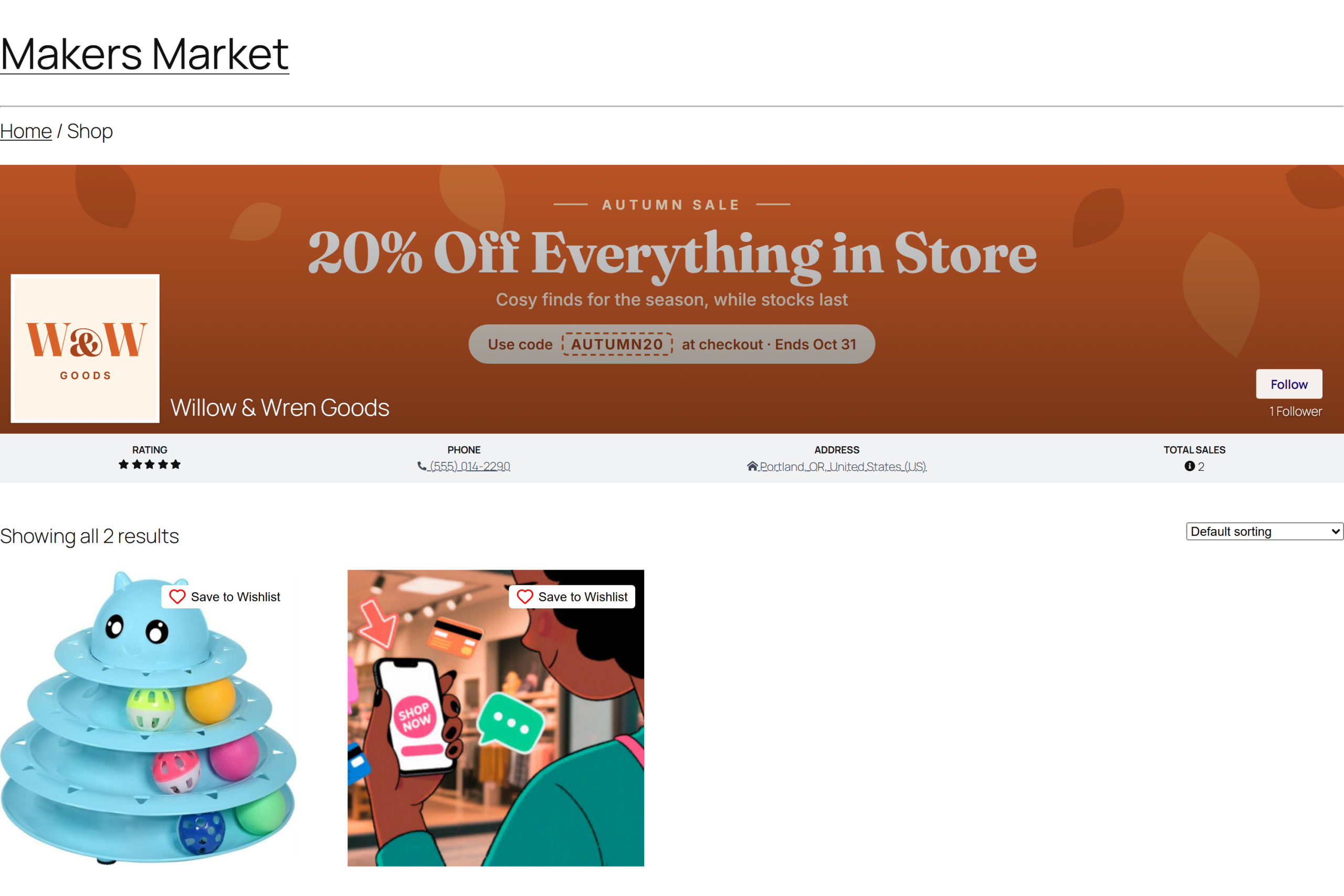
Color is the vendor-controlled element operators forget about most often. Vendor store banners and headers carry vendor-chosen colors, and text placed over them is where contrast failures collect.
Low contrast text was the most commonly detected issue in the WebAIM Million, found on 83.9% of home pages in February 2026, up from 79.1% in 2025, with an average of 34 distinct instances per page.
On a vendor banner, the photograph is rarely the problem. A common pattern is a short line of promotional text placed over the vendor’s brand color, often a mid-tone where neither white nor black text reads well. WCAG 1.4.3 exempts text that is part of a logo or brand name, so the logo itself is not the issue. The sale message beside it is.
Vendor video
Video in a listing brings 1.2.2 Captions (Prerecorded) into play at Level A. A product demo with a voiceover and no captions fails. The DOJ’s guidance describes accessible video as having synchronized captions that are accurate and identify speakers, so auto-generated captions are something to check rather than assume.
Vendor policies and store text
Product pages carry more vendor text than the description. WC Vendors can show vendor store policies, such as shipping and returns, on product pages, and vendors write that text themselves unless you set marketplace policies that apply to everyone. If you give vendors an editor for policies, the same habits around headings and formatting apply there too.
Here’s how the split typically falls on a multi-vendor store. This is an example allocation for a standard marketplace setup, not a legal division of responsibility:
| Element | Who controls it | Who must fix it |
|---|---|---|
| Theme, navigation, checkout | Operator | Operator |
| Product images and alt text | Vendor | Vendor, enforced by operator |
| Product descriptions and headings | Vendor | Vendor, enforced by operator |
| Text over vendor banner colors | Vendor | Vendor, against rules the operator sets |
| Vendor video captions | Vendor | Vendor, enforced by operator |
| Store policy text | Vendor, unless global policies apply | Vendor or operator, depending on setup |
A common blind spot: an operator fixes the theme, passes a scan of the home page and the checkout, and never scans a product page belonging to a vendor who joined last month. The audit sample is built from the pages the operator built. Meanwhile, the pages that carry the actual selling, and the actual failures, are added weekly by people who may never have heard of WCAG.
The Parts Of The Marketplace You Still Control
Vendor content gets most of the attention in this guide because so few others cover it. Your own layer still has to pass, though, and ecommerce accessibility starts with the parts only you can change.
Checkout, login, and account forms
WCAG 2.2 added several criteria that land on pages operators own. Among them are 2.5.8 Target Size (Minimum) at Level AA, which asks for pointer targets of at least 24 by 24 CSS pixels with some exceptions, 3.3.8 Accessible Authentication (Minimum) at Level AA, and 3.3.7 Redundant Entry at Level A. Checkout, registration and login are where these get tested.
Forms deserve particular attention. The WebAIM Million found that one third (33.1%) of home page form inputs were not properly labeled. The DOJ’s guidance lists labels, keyboard access, clear instructions and clear error messages as the basics of an accessible form.
The vendor dashboard
Your vendors can have disabilities too. The vendor dashboard is part of your site, and its forms and charts fall under the same criteria as your storefront. WC Vendors lets you set the colors of dashboard charts, and its documentation notes that random colors may change every time the page refreshes. Choosing fixed colors with enough contrast against each other is the safer setting under 1.4.11.
An accessibility statement and a way to report problems
The Dutch guidance above expects e-commerce services to publish an accessibility statement, and the DOJ recommends giving people a way to report problems. The W3C has guidance on writing accessibility statements if you are starting from nothing. On a marketplace, route any report about a specific listing into your review process so the vendor who created the problem fixes it.
Enforcing Standards On Vendors
You cannot write a vendor’s alt text for them. What you can do is publish the rules in plain words, gate publishing, make the fields you do control compulsory, and send listings back when they fall short. That is how ecommerce accessibility gets enforced on content you do not own.
Publish the rules where vendors will read them
A link to the WCAG specification will not change a single listing. A five-line checklist written in the language of the job the vendor is doing has a chance.
Something this short works better than anything longer:
- Describe what the photo shows, in plain words, in the Alternative Text field.
- Type your specifications as text. Do not paste them in as a screenshot.
- Use the heading tools instead of bolding a line to make it look like a heading.
- Check that your banner text is readable against the color behind it.
- Add accurate captions to any video.
Put that checklist where vendors already look. In WC Vendors Pro, the Vendor Dashboard Notice is always displayed at the top of the vendor dashboard, and the Vendor Signup Notice appears on the registration page while someone applies. Include the same standards in the terms vendors agree to when they join, alongside the listing guidelines our guide to managing vendors recommends.
Hold new listings for approval
Approval before publishing is the enforcement step that actually holds, because it happens before a customer can see the page. WC Vendors includes a Publish Approval setting under WC Vendors > Settings > Capabilities, available in both the free plugin and Pro, that determines whether vendor products must be approved before they are published.
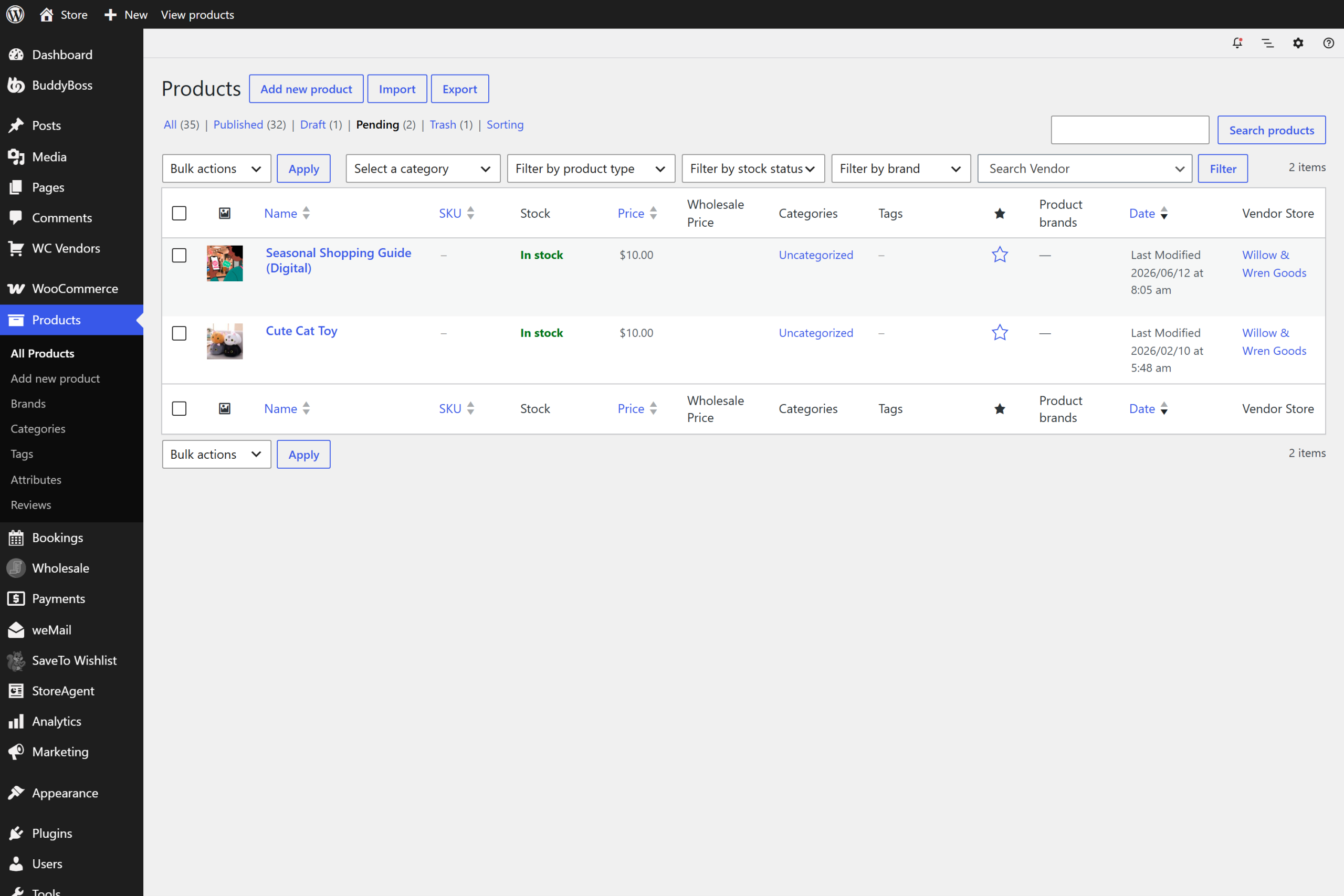
Set it so vendors cannot publish directly, and products awaiting review get the status Pending. The product management documentation walks through approving them from Products > All Products > Pending, and our walkthrough on publishing products only with your approval covers the setting step by step.
Edits are the gap to think about. The Edit Live Products setting controls whether vendors can edit products that are already published. In Pro, Edit Approved Products lets vendors publish edits to approved products while new products still need approval. That saves review time, but it also means a gallery image swapped after approval goes live without a second look, so decide on it deliberately and keep approved vendors in your audit sample.
It is worth being precise here, because this is where accessibility marketing usually overreaches. No plugin makes a site WCAG-compliant. Conformance is a property of the whole site and everything published on it. WC Vendors gives you the gate and the review step, and you set the standard those reviews apply to.
Use AI moderation for speed, not as an accessibility check
Large marketplaces can review faster with the StoreAgent AI product moderation integration. When AI Moderate is enabled, the Publish Approval setting is automatically disabled so that every product requires admin approval, and pending products can be reviewed from WC Vendors > Products.
The AI review shows a status, a risk score, and audit results for content safety, pricing integrity, and visual consistency, plus suggestions for descriptions, images, and categories. It does not approve or reject products on its own. Those audit areas are not described as accessibility checks, so treat the AI review as a time saver and keep your accessibility checklist in the human part of the review.
The integration does make the feedback loop easier. When you click Request Change, the vendor gets an email, the feedback appears in a Review Suggestions section of their product edit form, and the product moves from Pending to Draft until it is resubmitted. You can write accessibility feedback straight into that message. Unpublish does the same for a listing that is already live, moving it from Published back to Draft.
Make the fields you control compulsory
The vendor product form is configurable, and that configuration is an enforcement tool. Under WC Vendors > Settings > Forms > Product, WC Vendors Pro lets you choose which fields appear on the vendor product form and which of them are required, grouped into areas such as Basic, Media, General, Inventory and Shipping. The Media group covers the featured image and gallery.
This is also where the limits of this approach show up. You can require a featured image. You cannot require alternative text, because alt text belongs to the media attachment rather than to a field on the product form.
So the required-field control gets you an image, not a described image. That description gap closes at the approval step or not at all, which is the practical reason the two mechanisms belong together.
A few other form settings matter for ecommerce accessibility. The Use HTML option enables the WordPress editor for the product description and short description, which gives vendors real heading and list formatting instead of bolded lines. Allow Media lets vendors insert images into those descriptions, and every one of those images needs alt text too, so leave it off unless your vendors genuinely need it. You can hide vendor store branding fields without making them required, which helps if banner text keeps failing contrast checks.
Auditing A Multi-Vendor Store
Automated scanners find a fraction of real ecommerce accessibility problems, and on a marketplace they usually test the wrong sample as well. Both limits need correcting before an audit means anything.
WebAIM is direct about the first limit in its methodology: all automated tools have limitations, not all conformance failures can be detected automatically, and the absence of detected errors does not mean a page is accessible or conformant. The DOJ makes the same point, noting that a clean report from an automated checker does not necessarily mean everything is accessible and suggesting a manual check alongside it.
The sampling problem is specific to marketplaces. Scanning ten product pages tells you about ten pages, and if they all belong to one vendor, it tells you about one vendor’s habits. Sample one listing per vendor instead, and re-sample after every onboarding wave, because your exposure grows each time somebody new starts listing. If you allow edits to approved products, include those vendors too.
Five manual checks on one listing per vendor catch what scanners miss:
- Keyboard only: tab from the top of the listing to the add-to-cart button without touching the mouse.
- Screen reader: have one listing read aloud and listen for whether the images say anything useful.
- Contrast check: test the vendor’s banner text with a tool such as the WebAIM Contrast Checker, not just your theme’s text.
- Images of text: look for specifications that are pictures rather than words.
- Zoom to 200%: make sure the description and buttons stay readable and usable at double size.
Approach this as part of listing review rather than as a separate project. Our guide to product listing optimization covers the quality checks that sit alongside these, so ecommerce accessibility becomes one more line on a review you already run.
Where To Start With Ecommerce Accessibility
Ecommerce accessibility on a marketplace is a supplier quality problem wearing technical clothes. You already review vendors on photo quality, pricing, and shipping claims, and accessibility is one more line on a review you run anyway. Treating it that way keeps it out of the category of one-off projects that get done once and then quietly decay.
The standard is clear enough to act on. WCAG 2.2 Level AA covers the older 2.1 requirements that today’s European reference standard is built on, and the next version of that standard has already moved to 2.2. The law is heading in one direction in both the EU and the US, even where the details differ, and the weak point in any marketplace is the content you didn’t write.
The tools for that weak point are ordinary marketplace tools: written rules vendors actually see, an approval gate, required fields, and a feedback loop that sends listings back when they fall short. Start by picking your level, putting five plain rules on the vendor dashboard and turning the approval gate on, then sample one listing per vendor by hand. If you want the form controls, dashboard notices and edit permissions that make this workable at scale, take a look at what WC Vendors Pro adds to the approval step that every WC Vendors marketplace already has.
Here’s what we covered in this article:
- What WCAG actually requires
- The legal position on ecommerce accessibility
- The vendor-generated content problem
- The parts of the marketplace you still control
- Enforcing standards on vendors
- Auditing a multi-vendor store
Frequently Asked Questions
Does a plugin make my marketplace WCAG compliant?
No, and no plugin can. Conformance is a property of a whole site and everything published on it, including content vendors upload after any plugin was configured. Software can give you useful controls, such as holding submissions for approval or making form fields required, but the standard being applied and the review that applies it are yours. Treat any product claiming to deliver compliance on its own with real caution.
Which WCAG level and version should a multi-vendor marketplace aim for?
WCAG 2.2 Level AA. The current European reference standard, EN 301 549 v3.2.1, is based on WCAG 2.1 Level AA, and the newly published v4.1.1 moves to WCAG 2.2. The W3C states that content conforming to WCAG 2.2 also conforms to 2.1, so the higher target covers both. Level A alone leaves out color contrast entirely, and Level AAA is stricter than most sites achieve across content they do not write.
Does the European Accessibility Act apply to my marketplace?
It may. The Act covers e-commerce services and has applied since 28 June 2025, and Dutch government guidance names online marketplaces as an example of an e-commerce service. Because the Act is a directive, the version that applies to you is the national law in each country you sell into, and size thresholds can matter. Check that national version, and ask a lawyer who knows your market how it applies to your business.
Who is responsible when a vendor uploads an inaccessible product image?
Where legal responsibility sits depends on your jurisdiction and is a question for a lawyer who knows your market. Practically, the customer bought from your marketplace and never saw your vendor’s own site, so the complaint arrives with you. That is why operators put the obligation in their vendor terms and then check it at the approval step, rather than relying on a term nobody reads.
Do accessibility overlay widgets fix vendor-generated content?
An overlay cannot know what a vendor’s photograph shows. It can adjust presentation, such as text size or color, but writing an accurate description of a specific product is not something a script can do from the outside, and specifications pasted in as a screenshot are simply not text on the page. The DOJ’s guidance also says automated checkers and overlays need to be used carefully. Fixing vendor content means changing the content.
Can I require vendors to add alt text before publishing?
Not through a required field on the product form. WC Vendors Pro lets you set which product form fields are shown and which are required, but alternative text lives on the WordPress media attachment rather than on the product form itself. The workable route is to state the expectation in your vendor rules and dashboard notice, then check it while the listing is held for approval.
Does AI product moderation check accessibility?
Not as documented. The StoreAgent integration for WC Vendors reports on content safety, pricing integrity and visual consistency and suggests changes to descriptions, images and categories, but it is not described as an accessibility checker. Use it to speed up review and to send structured feedback, and keep accessibility checks in the human part of your review.
Does ecommerce accessibility work help SEO as well?
Some of it overlaps. Descriptive alt text, real headings instead of bolded lines, and specifications typed as text all put readable words on the page that a screenshot or an empty attribute would not. The overlap is partial, though, because contrast and keyboard access help people without changing what a crawler reads. Treat search benefits as a side effect rather than the reason to do the work.