
WC Vendors Pro includes several powerful widgets that you can use on your marketplace. One of them is the Contact Store widget that allows customers to easily contact vendors directly from their store page. This feature improves customer communication, builds trust, and helps vendors respond to pre-sale and post-sale questions without exposing private contact details.
What Is the Contact Store Widget?
The Contact Store widget is a WC Vendors Pro feature that displays vendor contact information and an optional contact form on the vendor’s store page.
It is designed to give customers multiple ways to reach vendors while keeping communication organized and secure.
Why Use the Contact Store Widget?
Using the WC Vendors Pro Contact Store feature helps you:
- Improve customer trust and engagement
- Reduce abandoned carts due to unanswered questions
- Enable direct vendor–customer communication
- Keep vendor contact details secure
- Create a more professional multi-vendor marketplace
How to Add the Contact Store Widget
WC Vendors supports modern WordPress block-based widgets, allowing you to add and manage vendor widgets using the block editor for greater flexibility and control.
To display the Contact Store widget on vendor store pages:
- Log in to your WordPress Dashboard
- Go to Appearance → Widgets
- Locate the WC Vendors Pro Contact Store widget
- Drag the widget into the Store Sidebar or any widgetized area on your marketplace
- Configure which contact details you want to display
- Click Save
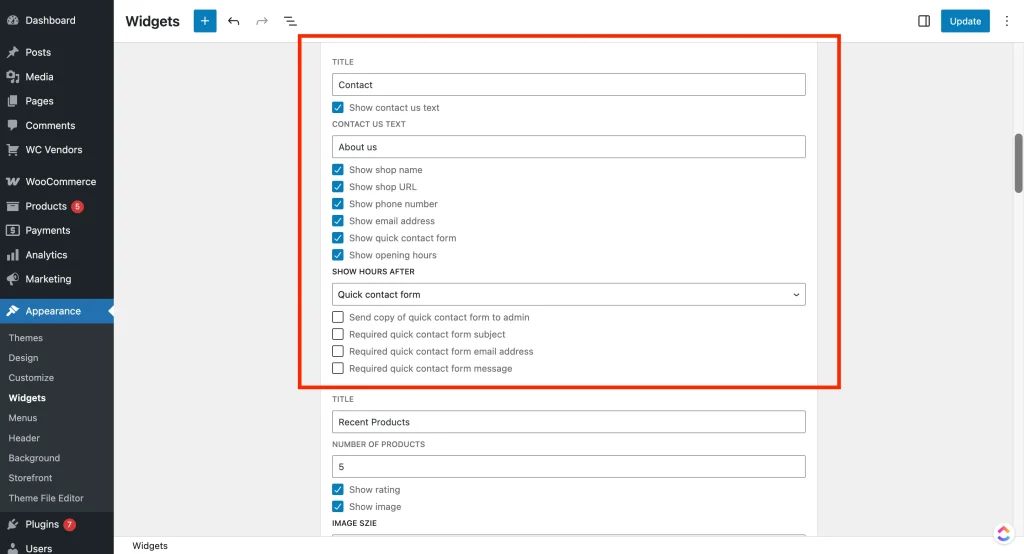
Once added, the widget will automatically appear on vendor store pages only.
What Information Can Be Displayed
The Contact Store widget can output the following vendor details:
- Store Name
- Store URL
- Email Address
- Phone Number
- Email Contact Form
- Store Opening Hours
You can choose which details to display based on your marketplace needs.
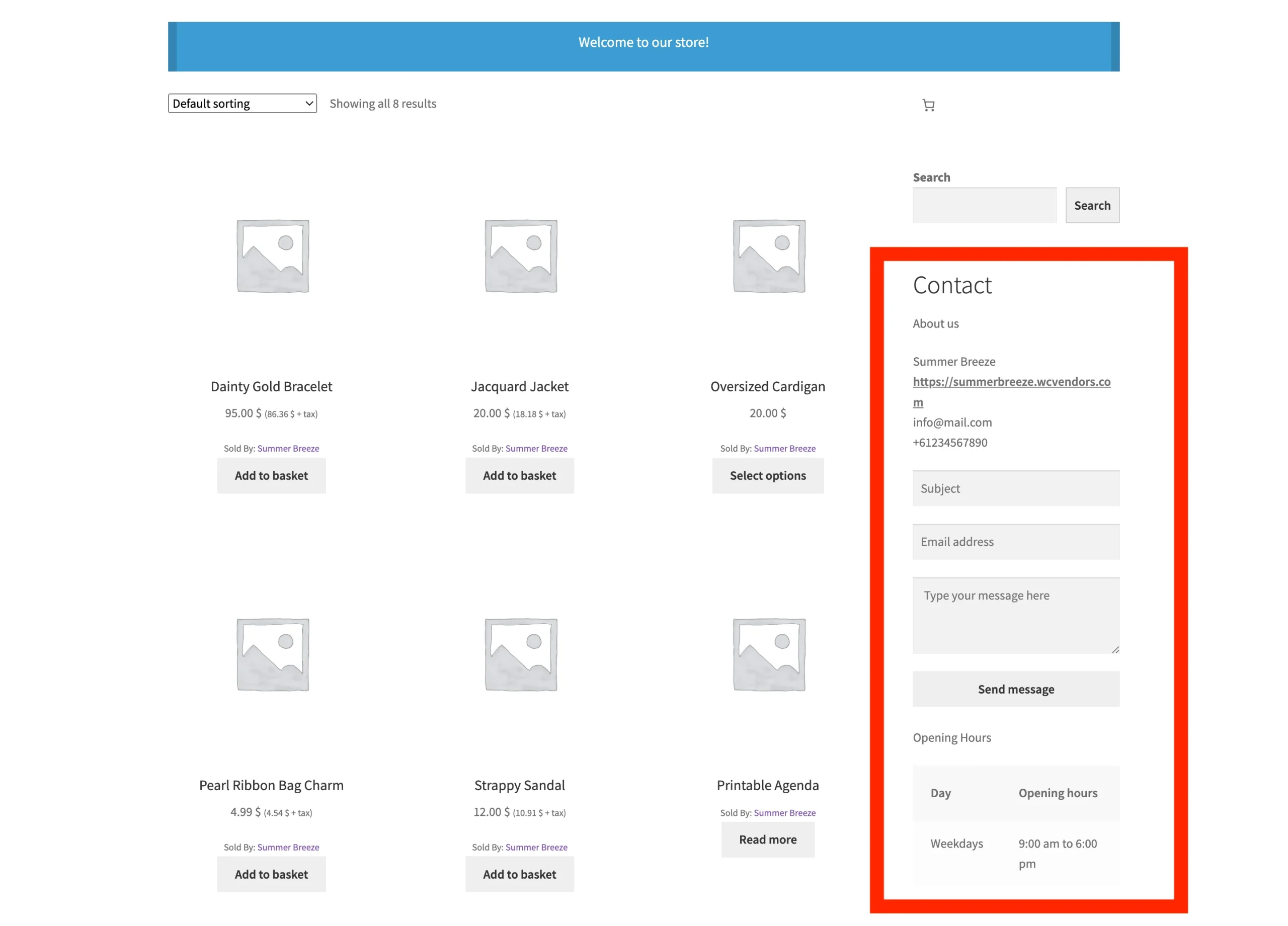
Vendor Contact Form
The built-in email contact form allows customers to send messages directly to vendors without revealing the vendor’s email address.
How the Contact Form Works
- Displays only on the vendor’s store page
- Sends customer messages directly to the vendor’s email
- Helps reduce spam and protect vendor privacy
- No additional plugins required
This makes it easy for customers to ask questions about products, availability, shipping, or custom requests.
Widget Display Location
The Contact Store widget will appear only in the selected widgetized area on the vendor’s Store page.
This ensures:
- The form does not appear on unrelated pages
- A clean and consistent store layout
- A focused communication experience for customers
Customizing the Vendor Email Template
The Vendor Store Contact Widget email uses its own WooCommerce email template, which can be customized just like any standard WooCommerce email.
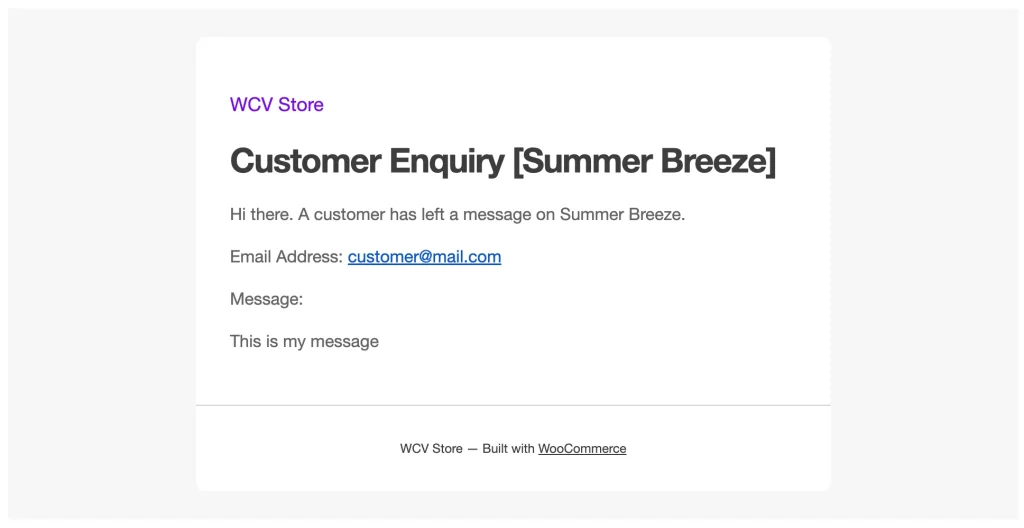
How to Access the Email Template
- Click Manage to open the email settings
- Go to WooCommerce → Settings → Emails
- Locate the Vendor Store Contact Widget email
Available Email Settings
Within the Vendor Store Contact Widget email template, you can configure the following options:
- Enable/Disable
Turn this email notification on or off. - Subject
Controls the email subject line.
Leave blank to use the default:[{storename} - Customer Enquiry] {subject} - Email Heading
Controls the main heading displayed in the email.
Leave blank to use the default:Customer Enquiry [{storename}] - Email Type
Choose the format of the email to send:- Plain text
- HTML (default)
- Multipart (includes both HTML and plain text)
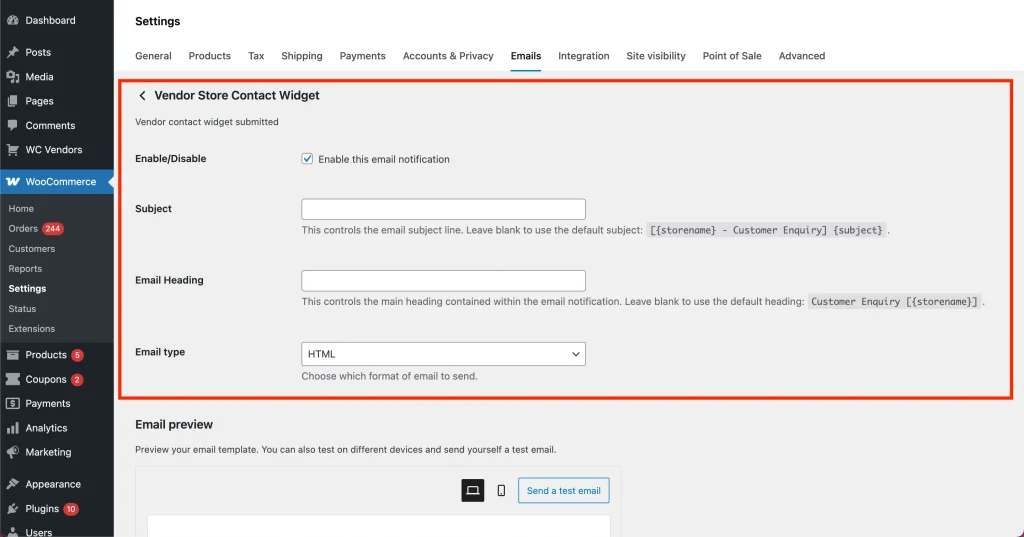
These settings allow you to tailor how vendor enquiry emails are delivered and displayed to vendors.
Email Style Customization (Global WooCommerce Settings)
For styling options such as colors, fonts, header images, and footer text, you can use WooCommerce’s global email settings.
Learn more here: WooCommerce Email Templates – Email Style Customization
This ensures all vendor emails match your marketplace branding and provide a consistent, professional appearance.
Your WC Vendors Pro Contact Store widget is all set! Now customers can securely send messages to vendors, view store information, and receive branded email notifications. This would definitely boost trust and engagement in your marketplace.
Need help?
If you have a question or run into any issues, we’re here to help.
- Premium users: Open a support ticket
- Free users: Visit our community forum