
This guide covers the specific Dokan pain points driving the switch from Dokan to WC Vendors, how WC Vendors solves each one, and what to consider when planning your migration. We will also look at the data behind marketplace growth, the real cost differences over multiple years, and a step-by-step path to move your store without losing data.
Why The Marketplace Plugin Decision Matters In 2026
Before getting into the specific reasons owners switch from Dokan to WC Vendors, it helps to look at the bigger picture. The marketplace model is no longer a niche category. It is one of the dominant forces in retail, and the plugin you build on directly affects whether you can capture that growth or get left behind.
According to research from McKinsey on the future of ecommerce, worldwide online sales nearly doubled in the five years leading up to 2022 and were on track to almost double again by 2026. A separate analysis from Statista’s online shopping research hub, reported through industry trackers, projects that more than 2.86 billion people will shop online in 2026. Marketplaces account for the largest share of those purchases worldwide, thanks to network effects: more sellers attract more buyers, which in turn attract more sellers.
As Harvard Business Review explains in “Network Effects Aren’t Enough”, online marketplaces are, in many ways, the perfect business model. They facilitate transactions between independent suppliers and customers without taking possession of inventory, which gives them inherently low cost structures and fat gross margins (around 70% for eBay and 60% for Etsy). Once established, they are highly defensible thanks to the same network dynamics.
What this means for you…
For an owner running a multi-vendor store, that means two things. First, the opportunity is enormous. Second, any plugin that artificially caps your growth, whether through vendor limits or feature gating, becomes an immediate bottleneck. That is exactly why so many owners choose to switch from Dokan to WC Vendors once they realize their plugin is fighting against the natural growth curve of their business.
The Most Common Dokan Pain Points
The decision to switch marketplace plugins is rarely impulsive. It builds over time as limitations compound.
Vendor limits that hold your marketplace back
Dokan’s Starter plan at $149/yr caps you at 10 vendors. The Professional plan at $249/yr raises that to 25. Only the Business plan at $499/yr removes the cap entirely.
For a marketplace that is actively recruiting sellers, hitting a hard ceiling at 10 is a serious problem. You have invested time and money into vendor acquisition, your marketplace is gaining traction, then suddenly you are told to pay $100 more per year just to add a few more sellers. That feels like a tax on success, not a fair pricing model.
A 2024 Harvard Business Review feature, “Will That Marketplace Succeed?”, notes that marketplaces now span every imaginable sector, from sneakers and home design to digital goods, and the strongest ones grow because nothing in their model artificially restricts seller participation. Capping your vendor count at the plugin level runs directly counter to that growth dynamic, and it is the single biggest reason owners switch from Dokan to WC Vendors.
Pricing that escalates quickly
Dokan’s pricing tiers create a steep escalation curve:
- Lite: free, basic features and percentage commissions
- Starter: $149/yr, 10 vendor limit
- Professional: $249/yr, 25 vendor limit
- Business: $499/yr, unlimited vendors
- Enterprise: $999/yr, multi-site licensing
Going from Starter to Business is a $350/yr jump. Over three years, a Dokan Business subscription costs $1,497. A WC Vendors Pro plan with unlimited vendors costs $298.50 over the same period. That is a $1,198.50 difference, which is enough to fund vendor recruitment, theme upgrades, or marketing campaigns. When owners see those numbers laid out, the decision to switch from Dokan to WC Vendors becomes much easier to justify.
Commission limitations in the free version
Dokan’s free version only supports percentage-based commissions. If your marketplace model requires fixed commissions, tiered rates, or combination structures such as a percentage plus a flat fee, you are immediately pushed into a paid Dokan plan.
WC Vendors Pro offers nine commission types at $99.50/yr: percentage, fixed, percentage plus fee, fixed plus fee, sales by vendor, sales by product, product price, product category, and tiered structures. When you configure commission types for a test marketplace, the flexibility to combine structures at three different levels (global, per-vendor, per-product) made it straightforward to design fair commission rates for sellers with very different sales volumes.
Features gated behind expensive tiers
Dokan locks several features that many marketplace owners consider essential behind its higher tiers. Vendor verification, store support, auction modules, and advanced reporting all require the Professional or Business plan.
WC Vendors includes features such as Stripe Connect, vendor coupons, vendor ratings, table-rate shipping, and a full front-end dashboard in the Pro plan at $99.50/yr. You do not need to reach the $499/yr tier to access core marketplace management features. That single difference is enough to convince many owners to switch from Dokan to WC Vendors.
How WC Vendors Solves Each Problem
Every Dokan pain point has a direct answer in WC Vendors. Here is the breakdown of how owners benefit when they switch from Dokan to WC Vendors.
Unlimited vendors on every plan
WC Vendors supports unlimited vendors on every plan, including the free version. There are no caps, artificial ceilings, or forced upgrades when your marketplace grows. Your 11th vendor costs exactly the same as your first: nothing extra.
Transparent, affordable pricing
WC Vendors’ pricing is straightforward and follows a logical progression based on features rather than vendor count:
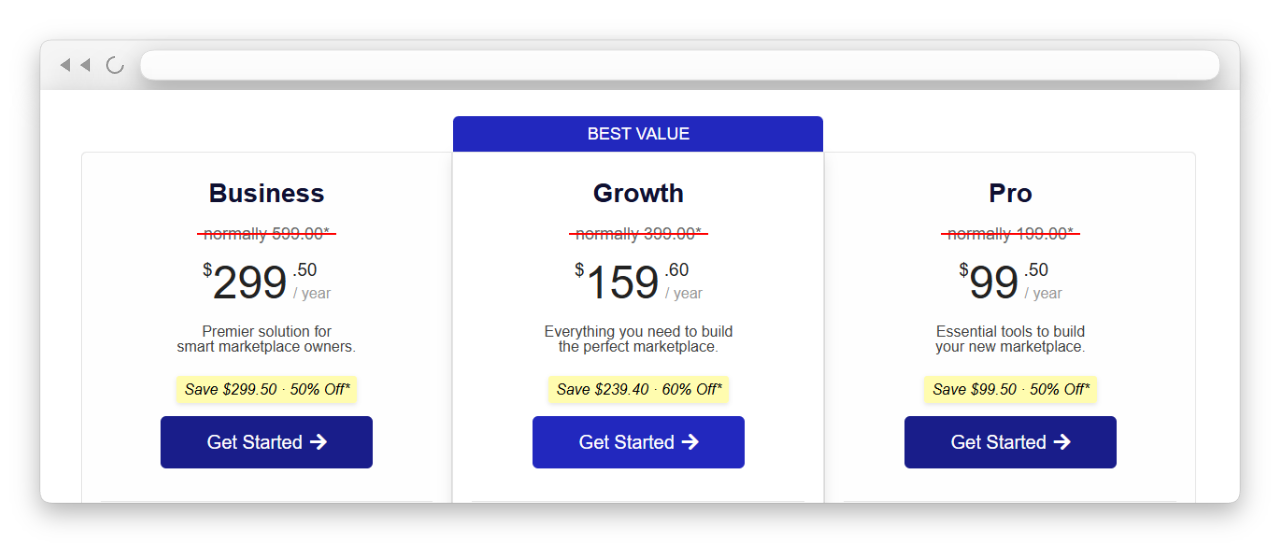
- WC Vendors Free: $0, unlimited vendors, basic dashboard, percentage commissions
- Pro: $99.50/yr, all 9 commission types, full front-end dashboard, vendor ratings
- Growth: $159.60/yr, adds Stripe Connect, subscriptions, memberships, verified sellers
- Business: $299.50/yr, adds Bookings and Auctions
Every tier includes unlimited vendors. The price differences reflect added features, not seller count restrictions. That is one of the most compelling reasons owners decide to switch from Dokan to WC Vendors.
Nine commission structures built for real marketplaces
WC Vendors Pro gives you nine ways to structure vendor commissions:
- Percentage: standard revenue share, e.g. vendor gets 80%
- Fixed: a flat dollar amount per sale
- Percentage plus fee: revenue share plus a flat processing fee
- Fixed plus fee: a fixed amount plus an additional flat fee
- Sales by vendor: tiered rates based on a seller’s total sales volume
- Sales by product: tiered rates based on how many times an item sells
- Product price: rate adjusts based on the price of the item sold
- Product category: different rates for different product categories
- Tiered: rates that change based on volume thresholds
These work at three levels: global (site-wide default), per-vendor (custom rates for individual sellers), and per-product (overrides for specific items). Read the full WooCommerce commission guide for setup details.
Learn more about how commission levels benefit marketplaces.
Core marketplace features included, not gated
Once you switch from Dokan to WC Vendors, the entire Pro feature set comes in at $99.50/yr:
- Stripe Connect for automated split payments and vendor payouts (available as part of the Growth plan and the dedicated Stripe Connect add-on)
- Front-end vendor dashboard for products, orders, coupons, and shipping management
- Vendor ratings and reviews
- Vendor coupon management
- Per-product shipping controls
- Table rate shipping by country
These features are not locked behind a $499/yr tier. They are available on the base plan, which is exactly why so many owners eventually switch from Dokan to WC Vendors.
According to data referenced in WPBeginner’s roundup of the best WooCommerce multi-vendor plugins, WC Vendors is consistently listed among the top options in the WooCommerce ecosystem. WooCommerce itself powers a substantial share of all online stores, according to research aggregated by Forbes Advisor, so building on a stable, native WooCommerce plugin protects your long-term investment.
Dokan Vs WC Vendors: Feature Comparison
Here is a side-by-side comparison of the features that matter most for marketplace operations:
| Feature | Dokan | WC Vendors |
|---|---|---|
| Vendor limit (entry paid plan) | 10 vendors (Starter) | Unlimited (Pro) |
| Entry paid plan price | $149/yr | $99.50/yr |
| Price for unlimited vendors | $499/yr (Business) | $0 free or $99.50/yr Pro |
| Commission structures (paid) | Varies by tier | 9 types at 3 levels |
| Commissions in free version | Percentage only | Percentage only |
| Stripe Connect | Module purchase | Included from Growth plan |
| Front-end vendor dashboard | Higher tier required | Included in Pro |
| Vendor ratings | Higher tier required | Included in Pro |
| Vendor coupons | Higher tier required | Included in Pro |
| Three-year cost (unlimited vendors) | $1,497 | $298.50 |
| Money-back guarantee | 14 days | 14 days |
| Years actively developed | 10+ | 10+ |
For a detailed feature-by-feature breakdown, see the full WC Vendors vs Dokan comparison. The value gap is the clearest argument for owners who are still on the fence about whether to switch from Dokan to WC Vendors.
Real Marketplace Owners Who Made The Switch
Beyond the feature comparison, real case studies make the value of the move concrete. Owners who switch from Dokan to WC Vendors typically report the same set of wins: faster admin, smoother vendor onboarding, lower running costs, and a cleaner dashboard for sellers.
A representative example is the Skolmagi case study, which documented a 20% increase in revenue after migrating to WC Vendors. While that particular store moved from a different plugin, the operational benefits described, such as easier vendor onboarding and a streamlined commission system, are the same gains owners report when they switch from Dokan to WC Vendors. Another widely cited example is Sonniss, a digital audio marketplace using WC Vendors to manage hundreds of contributors with custom onboarding workflows and quality controls, as referenced in the WC Vendors guide to vendor contracts.
Conclusion
Beyond pricing, with proper staging and clear vendor communication, you can complete the switch from Dokan to WC Vendors in a few focused hours.
To recap the article in one place, here is everything we covered in sentence case bullet form:
- Why the marketplace plugin decision matters in 2026
- The most common Dokan pain points
- How WC Vendors solves each problem
- Dokan vs WC Vendors: feature comparison
- Real marketplace owners who made the switch
If those pain points sound familiar, the next move is straightforward. Review the WC Vendors pricing page, install the free version on a staging site to feel the difference yourself, and follow the step-by-step migration guide when you are ready to go live. Many marketplace owners have already switched from Dokan to WC Vendors, and most wish they had done so sooner.
Frequently Asked Questions
Can I migrate my vendors from Dokan to WC Vendors?
Yes. Your vendor user accounts exist inside WordPress regardless of which marketplace plugin is active. Products, orders, and customer data are stored in the WooCommerce database. Vendor-specific settings, such as commission rates, store configurations, and profiles, need to be reconfigured within WC Vendors. Core data carries over, but plugin-specific settings do not. The full process is in the migrate from Dokan to WC Vendors guide.
Will I lose my Product Data when I switch?
No. Product data is stored in WooCommerce, not in the marketplace plugin. When you switch from Dokan to WC Vendors, your product catalog, images, descriptions, pricing, and inventory levels remain in place. Test on a staging site first to verify everything looks correct before switching to your live marketplace. If your host makes staging easy, this step takes minutes. On Levamo (our recommended marketplace host), every plan includes instant staging plus free migration, so you can build and test the switch safely, then push it live with zero downtime. Plans start at $29/month, with no traffic-based overage fees.
Is WC Vendors easier to use than Dokan?
Both plugins run on WooCommerce and follow similar patterns. However, the biggest usability advantage is not having to worry about vendor limits or feature gating when configuring your marketplace, which is yet another reason owners choose to switch from Dokan to WC Vendors.
How long does the migration take?
For a marketplace with fewer than 50 sellers, the technical move takes a few hours. That includes installing WC Vendors, configuring commission settings, setting up vendor accounts, and testing the checkout flow. Add a day or two for vendor communication and staging environment testing. Larger marketplaces with custom integrations may need more planning, but most owners complete the switch from Dokan to WC Vendors in under a week.
Does WC Vendors support Stripe, like Dokan?
Yes. WC Vendors Pro includes Stripe Connect through the dedicated add-on and as part of the Growth plan, supporting automated split payments and vendor payouts. This is the industry standard for marketplace payments, automatically handling KYC verification, tax reporting, and payout scheduling. Read more about Stripe Connect vendor payouts inside WC Vendors.
Can I try WC Vendors before fully committing?
Yes. The free version of WC Vendors includes unlimited vendors and percentage-based commissions. You can install it on a staging site alongside Dokan to test the experience before you fully switch from Dokan to WC Vendors. WC Vendors Pro also comes with a 14-day money-back guarantee for risk-free evaluation.

