On a multi-vendor marketplace, a single spam customer rarely hits just one vendor. One bad shopper can flood several stores in the same checkout session, triggering failed payments and tied-up inventory across your whole platform. That makes WooCommerce spam orders a marketplace problem, not a single vendor’s problem.
The order screen tells the story fast. You log in expecting a normal morning, only to see a cluster of pending orders under one name, spread across four or five vendors, half of them already declined. Each vendor thinks it’s their own isolated headache. It isn’t. The same person hit all of them, and now five sellers are chasing the same ghost. When the abuse is centralized, the fix has to be centralized too, and that’s the part most marketplace operators miss.
How One Spam Customer Reaches Every Vendor At Once
A marketplace checkout pools products from multiple vendors into a single cart and payment. So when a spam customer fills that cart, they’re not ordering from one seller; they’re ordering from all of them in a single transaction. One abusive checkout becomes several vendor orders in an instant.
That structure is what makes marketplace spam different. On a single store, a junk order annoys one owner. On your platform, the same junk order splits across every vendor whose product landed in that cart. The payment fails once, but the cleanup multiplies. Refund and policy abuse is now a common headache for merchants, and on a marketplace, that abuse rides through your shared checkout and lands on multiple sellers in one go.
The scale isn’t trivial either. Marketplaces tend to get hit harder than standalone stores, because one bad actor can touch many vendors at once. Your vendors feel that as failed orders and wasted hours, even when no money changes hands. Left unchecked, WooCommerce spam orders quietly erode the trust vendors placed in your platform when they joined.
The Hidden Cost: Failed Payments And Tied-Up Inventory
The damage from WooCommerce spam orders isn’t only the fake order itself. It’s the failed payment that disrupts each vendor’s reporting and the inventory that gets reserved against a sale that never completes. Multiply that by every vendor in the cart and a single spammer quietly drags down your whole platform.
Here’s what actually happens behind the scenes. A spam order places a hold on stock the moment it’s created, so each affected vendor now shows that item as committed. The payment then fails, but the reservation can linger until someone notices and clears it. Across a busy marketplace, that means real products sitting unsellable while a fake order works its way through your queue. The wider trend backs this up: global ecommerce fraud losses reached roughly $44.3 billion in 2024, according to Juniper Research. A small marketplace won’t carry billions in loss, but the same mechanics scale down to your platform.
There’s also a knock-on effect vendors hate. When WooCommerce spam orders pollute the order list, genuine reports become harder to trust, payouts become harder to reconcile, and support time is eaten by phantom sales. A clean order screen is part of the value you promised vendors when they joined.
Why Per-Vendor Fixes Don’t Solve A Platform Problem
Asking each vendor to defend their own store against marketplace spam is a losing setup. The spammer operates at the platform level, hitting the shared checkout, so a defense scattered across individual vendor settings will always leave gaps. The fix needs to sit where the abuse enters: the checkout you control as the operator.
Think about the math. If you have 40 vendors and you rely on each to recognize and block a repeat offender, you need 40 people to spot the same name, agree it’s a problem, and act before that person stops hurting your platform. That never happens cleanly. Some vendors are part-time, some never check, and the spammer keeps placing orders in the meantime. A scattered defense moves at the speed of your slowest vendor.
The other trap is reaching for heavy automated fraud scoring as the answer. Risk-scoring tools have their place for catching unknown fraud at scale, but they guess, and guessing produces false positives that block legitimate shoppers and frustrate your honest vendors. When your real problem is a handful of named repeat offenders you’ve already identified, you don’t need a system that scores strangers. You need one that cleanly refuses the specific people you already know about at the door. For the wider landscape of options, our guide on WooCommerce fraud prevention compares the main approaches, and our guide on how to manage vendors in your marketplace is a good companion read. If you want the full picture beyond checkout fraud (vendor verification, GDPR, and incident response), our complete WooCommerce marketplace security guide covers it end to end.
The Centralized Fix: Block WooCommerce Spam Orders At The Store Level
The clean answer is a block list you control as the operator, applied once at the store checkout so it protects every vendor at the same time. Add the offender once, and the next time their order tries to come through your shared checkout, it’s refused, no matter which vendors are in the cart. Checkout Guard is built to do exactly that.
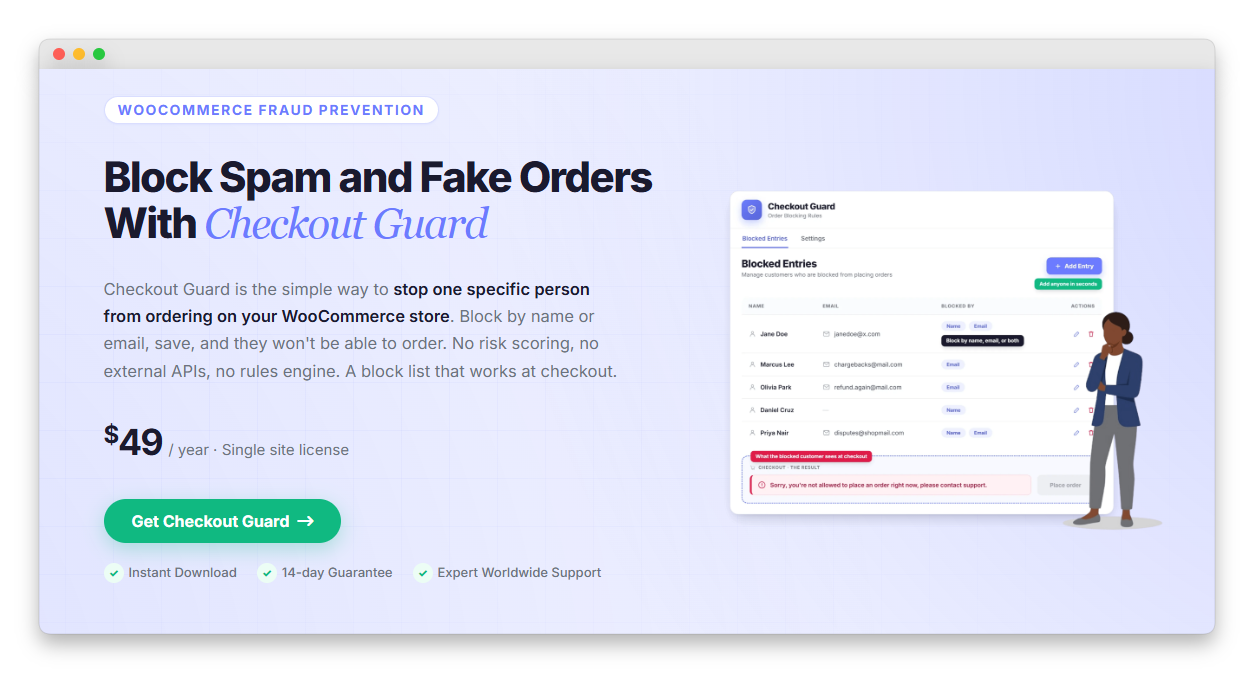
Here’s how it works in practice. You, the marketplace operator, add an entry with a billing first name, last name, and/or email address, plus an optional note so you remember why. When an order comes through where the billing name or email exactly matches an entry on your list, Checkout Guard blocks it right at checkout. On the newer Block (Store API) checkout, the pending order is deleted and the cart is emptied; on the classic shortcode checkout, the block fires during validation before an order is ever created. Either way, the shopper sees a denial message you’ve customized in the settings, and the check runs whether they’re logged in or buying as a guest.
The reason this fits a marketplace so well is the level at which it acts. Because the block list lives at the store level and runs at your shared checkout, one entry protects every vendor at once. You don’t ask 40 vendors to each block the same person; you add them once and the whole platform is covered. It’s deterministic, too. Checkout Guard doesn’t score orders or automatically detect anyone. It refuses the exact names and emails you put on the list and leaves every other shopper alone, which means zero false positives on the legitimate customers your vendors depend on.
If you already know who’s been abusing your platform, you can block WooCommerce spam orders from that person across every vendor with a single entry. That’s the kind of centralized control a marketplace operator actually needs.
How To Set Up Checkout Guard On Your Marketplace
Setting up Checkout Guard to stop WooCommerce spam orders takes three steps: enable it on your store, add each confirmed offender as a blocked entry, and set the denial message shoppers see. Because the plugin runs at your shared store checkout, that single setup protects every vendor at once, so you configure it as the operator and nobody at the vendor level has to touch it.
Step 1: Open the Checkout Guard admin screen
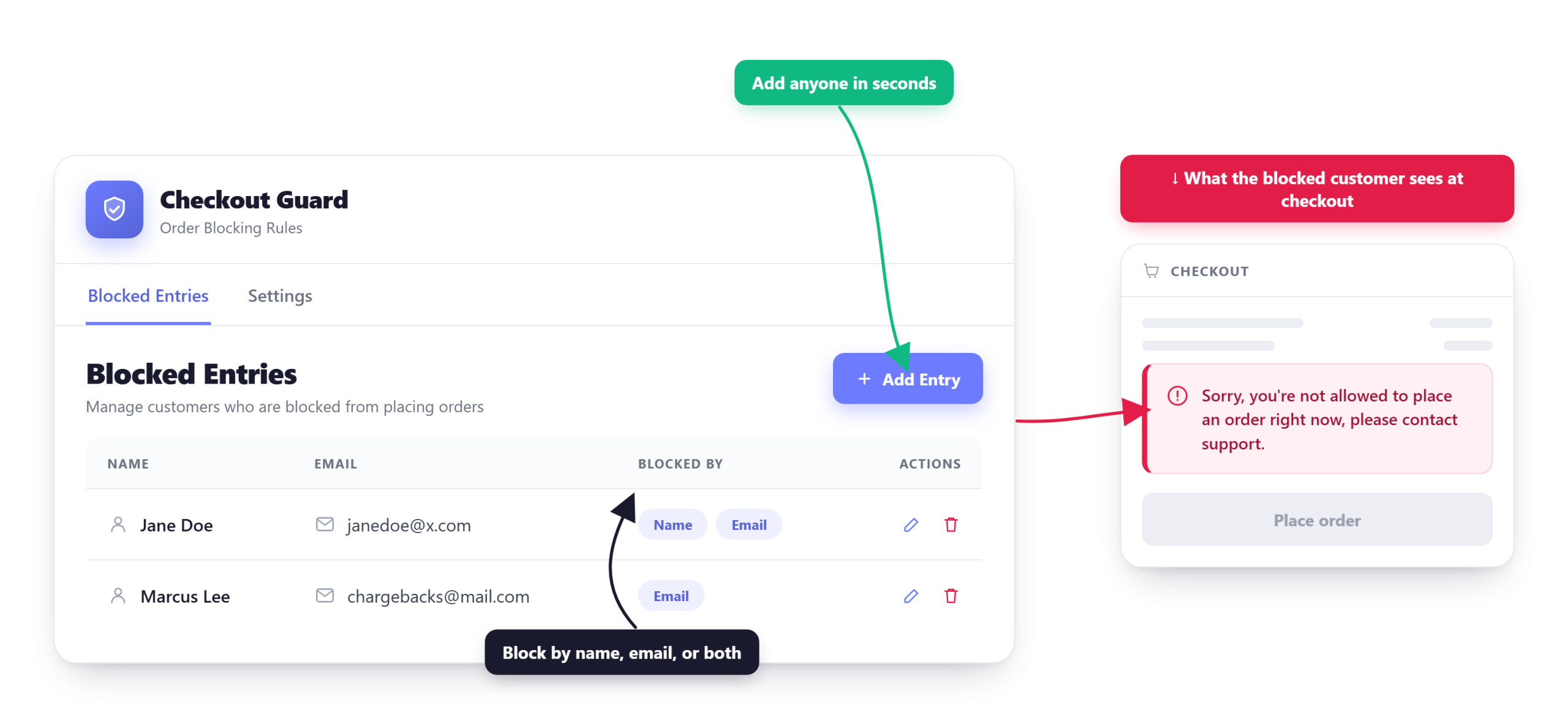
Once Checkout Guard is installed and active on your marketplace, open its admin screen from your WordPress dashboard. You’ll see two tabs: Blocked Entries, where you manage the customers who can’t place orders, and Settings, where you control the message a blocked shopper sees. This is the operator control panel for the whole platform, not a per-vendor setting.
Step 2: Add the offender as a blocked entry
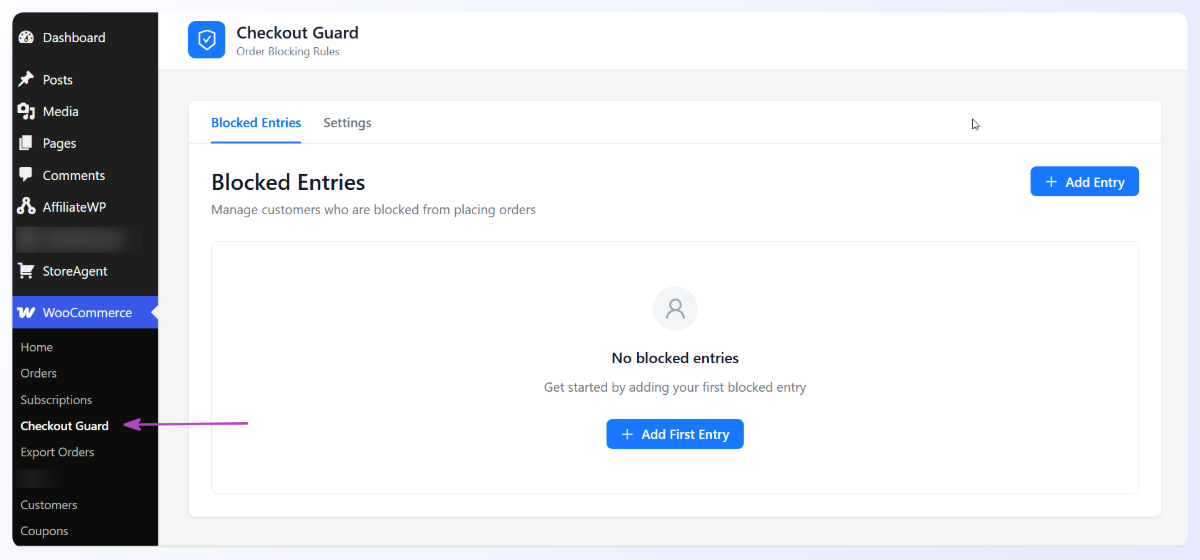
On the Blocked Entries tab, click Add Entry to open the Add Blocked Entry dialog. Fill in the billing details from the offending order: First Name, Last Name, and Email Address. There’s an optional IP Address field for a single exact IPv4 or IPv6 match, plus a short note so a teammate understands the entry later. You only need one field filled to save, and everything is an exact match, so the entry only ever stops the specific person you named.
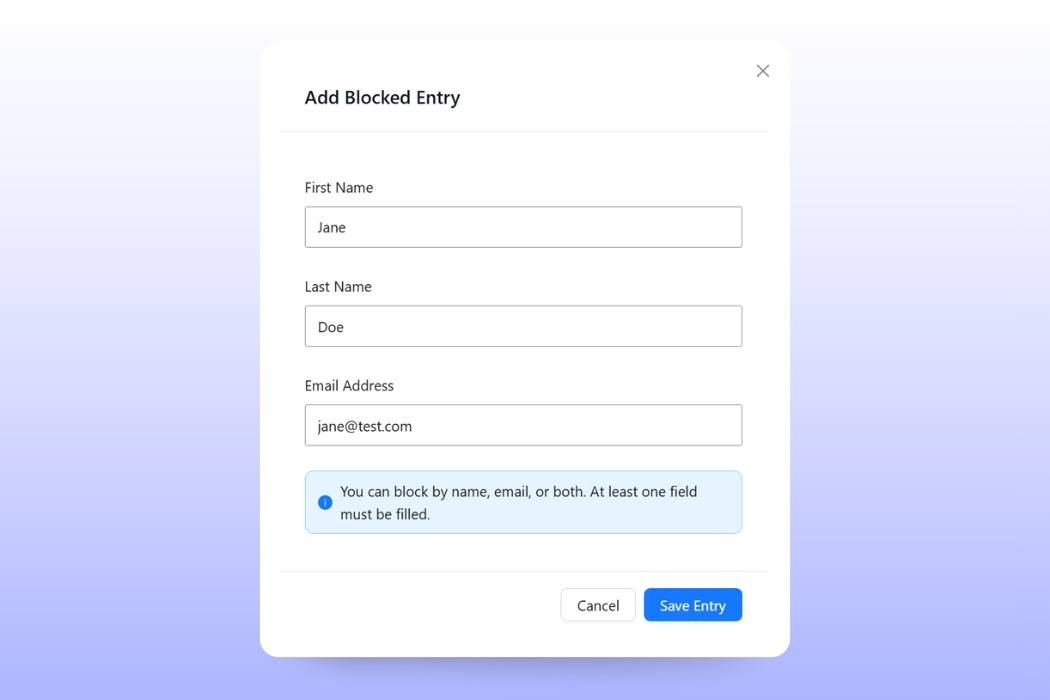
Step 3: Review your list and set the denial message
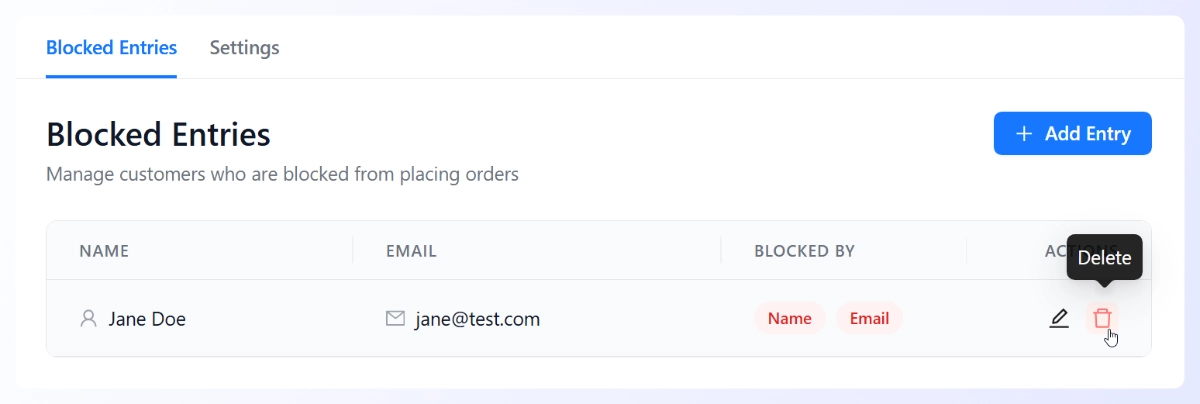
Back on the Blocked Entries tab, your list shows every person you’ve blocked, so you can review it, edit an entry, or remove anyone added by mistake.
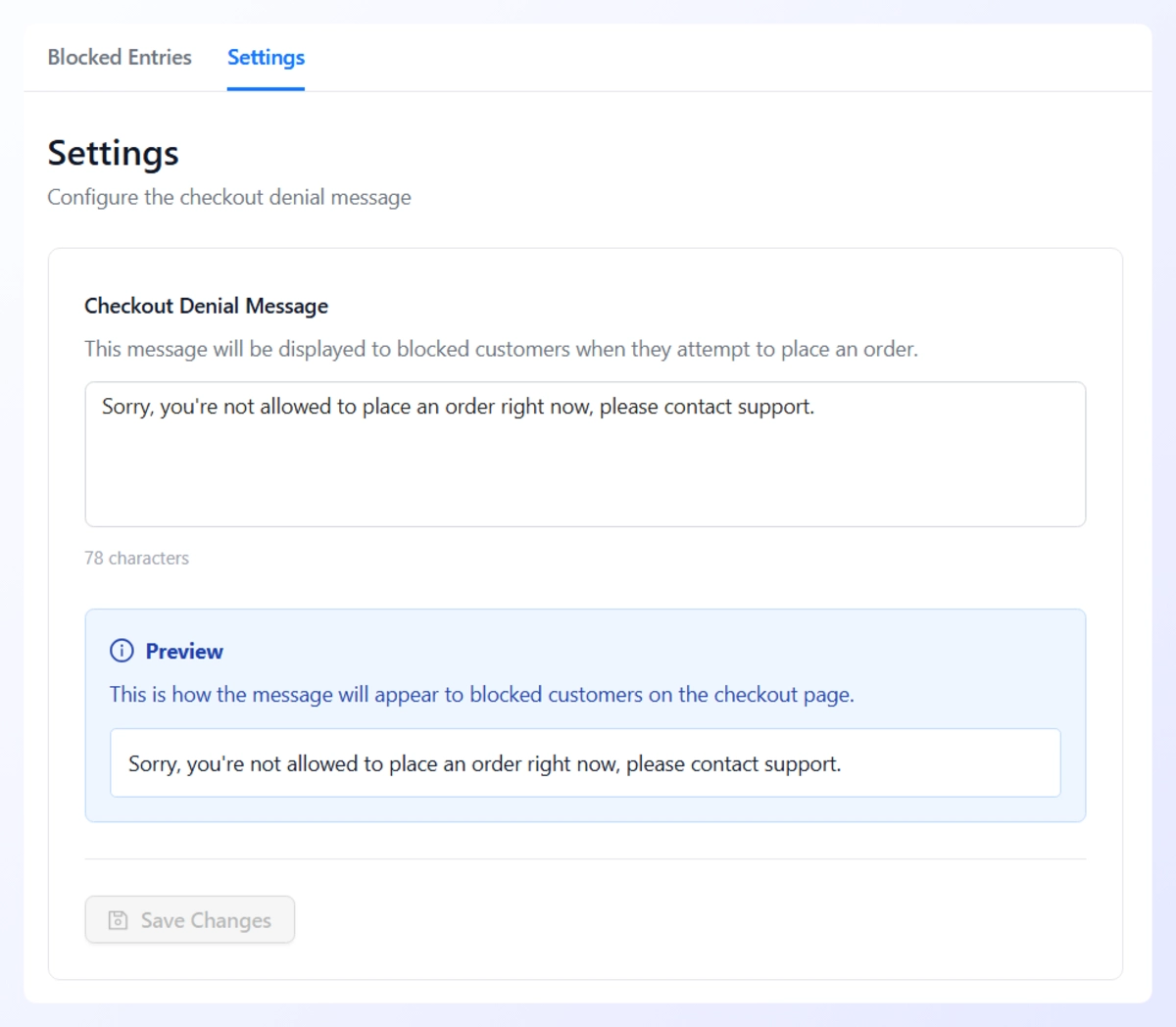
Then open the Settings tab and set the Checkout Denial Message, the message a blocked shopper sees at checkout. From this point on, any order whose billing name or email matches an entry is refused across every vendor automatically.
How To Roll This Out Across Your Marketplace
Treat spam defense as an operator responsibility, not a vendor chore. The practical sequence is simple, and it keeps your vendors out of the firefighting business entirely.
Start by gathering reports. Give vendors one easy way to flag a problem order to you, with the billing name and email attached. When the same name shows up from two or more vendors, you’ve confirmed a platform-level offender rather than a one-off. Add that entry to your store-level block list, write a short note about why, and every vendor is protected without lifting a finger.
Keep the list as a living record: review it occasionally, remove anyone added by mistake, and lean on the notes so a teammate can understand each entry later. Handled this way, WooCommerce spam orders stop being a recurring fire drill and become a quick, one-time entry. If you’re still building out your platform, our walkthrough on creating a multi-vendor marketplace pairs well with this, and you can learn more about running a marketplace on the WC Vendors site.
Take Back Control Of Your Marketplace Orders
Spam orders on a marketplace are never one vendor’s problem. One bad shopper rides your shared checkout into multiple stores at once, and a scattered, per-vendor defense will always lag behind them. Because WooCommerce spam orders enter through the checkout you control, the fix that matches the problem is centralized: a block list you own at the store level, protecting every vendor with a single entry.
You don’t need a heavy risk engine that guesses at strangers and risks blocking real buyers. When you can name the people abusing your platform, the cleanest move is to refuse them once, for everyone, and hand your vendors back the clean order screen you promised them. See how Checkout Guard blocks known WooCommerce spam orders across your whole marketplace and take back control of your order list.
Here’s what we covered in this article:
- How one spam customer reaches every vendor at once
- The hidden cost of failed payments and tied-up inventory
- Why per-vendor fixes don’t solve a platform problem
- The centralized fix: block WooCommerce spam orders at the store level
- How to set up Checkout Guard on your marketplace
- How to roll this out across your marketplace
Frequently Asked Questions
Can a marketplace operator block a customer for all vendors at once?
Yes. A store-level block list like Checkout Guard runs at your shared marketplace checkout, so one entry covers every vendor automatically. You add the offender’s billing name and/or email once, and any matching order is refused no matter which vendors are in the cart. You don’t need each vendor to set up their own block, which is exactly why a centralized list suits a multi-vendor platform.
Why are WooCommerce spam orders worse on a marketplace than a single store?
WooCommerce spam orders hit marketplaces harder than single stores because marketplaces pool many vendors into a single cart and payment. A single spam checkout becomes several vendor orders at the same time, triggering failed payments and tied-up inventory across multiple sellers in one transaction. On a single store, the same order only hurts one owner, so the multiplying effect is unique to platforms.
Does Checkout Guard automatically detect fraud?
No, and that’s intentional. Checkout Guard is a manual, deterministic block list. It refuses orders that exactly match a name or email you’ve added yourself; it does not score orders, make guesses, or automatically detect anyone. It’s the right tool when you’ve already identified repeat offenders by name, rather than trying to automatically detect unknown fraud across your entire platform.
Will blocking spam orders affect my honest vendors or their customers?
It shouldn’t. A deterministic block list only blocks the exact names and emails you add, so it never affects shoppers who aren’t on the list. Your honest vendors keep every legitimate sale, and only the offenders you’ve identified get refused at checkout. False positives come mainly from automated scoring tools that guess what kind of product it is.
What information do I need to block someone?
Just the billing details from the offending order: a first name and last name, and/or an email address, plus an optional note explaining why. There’s also an optional IP address field if you want an exact match on a single address. When an order’s billing name or email matches an entry, WooCommerce blocks spam orders from that person at checkout across all vendors. Gathering those details from vendor reports is usually all the prep you need.