
Running a WC Vendors marketplace? A security researcher reported a vulnerability in one of the plugin’s admin-only REST API endpoints, and we’ve fixed it in version 2.7.1. Here’s what happened, who it affects, and what you need to do to stay protected.
What happened
A security researcher found a SQL injection vulnerability in one of WC Vendors’ admin REST API endpoints, the kind of behind-the-scenes connection the plugin uses to manage vendor data. It’s tracked as CVE-2026-15351 and rated Medium severity. The vulnerability was reported to us before it became public, and no evidence of it being exploited against customer sites has come to light.
We’re intentionally keeping the technical details of the exploit vague in this advisory. Publishing the exact mechanics makes it easier for anyone still running an older version to be targeted, so we’re focusing on what matters to you: whether you’re affected and what to do about it.
Who’s affected
Every WC Vendors marketplace running version 2.7.0 or earlier is affected. Exploiting the vulnerability required a WordPress account with Shop Manager-level access or higher (technically, the manage_woocommerce capability), not a regular customer or vendor login. Your risk is highest if you’ve given Shop Manager access to someone outside your core admin team, or if a Shop Manager or Administrator account on your site uses a weak or reused password.
What we fixed
In version 2.7.1, we corrected how the affected endpoint handles the input it receives, closing off the injection path entirely. The fix doesn’t change any of your settings, vendor records, or order data. It’s a drop-in update.
What you should do
Update WC Vendors to version 2.7.1 or later as soon as possible.
- From your WordPress admin, go to Plugins > Installed Plugins.
- Find WC Vendors in the list.
- If an update is available, click update now under the plugin name.
- Once it finishes, confirm the version number shown under WC Vendors reads 2.7.1 or later.
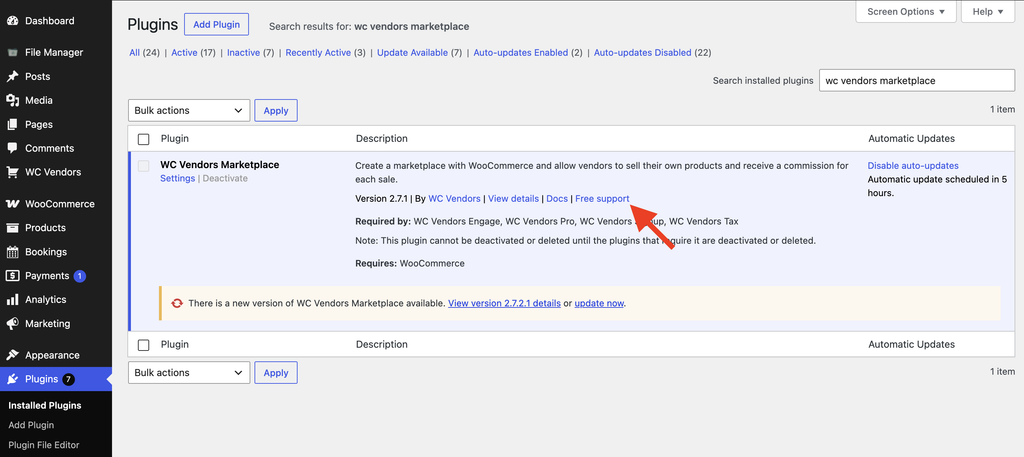
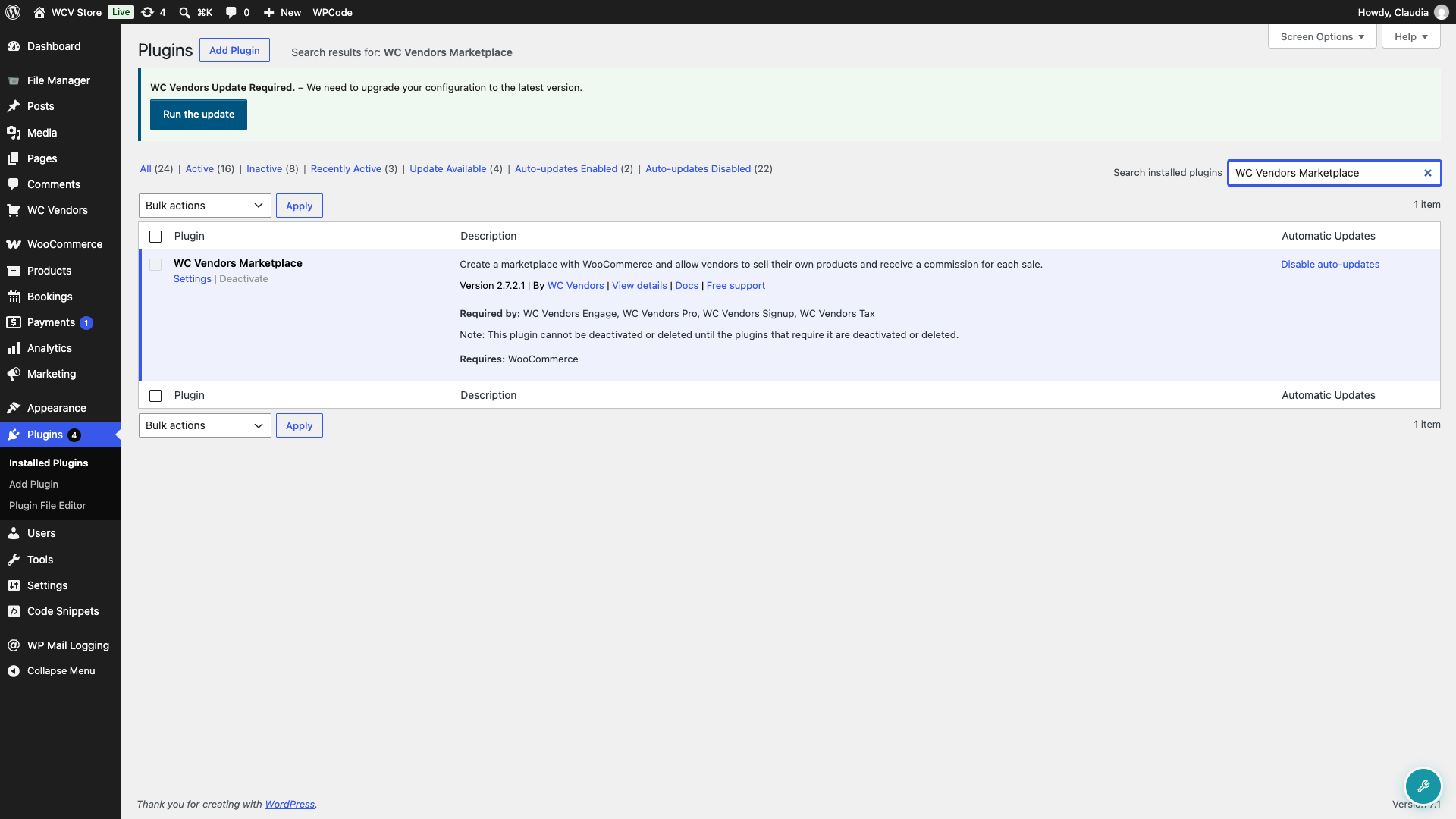
If you have automatic updates turned on for WC Vendors, you may already be on 2.7.1. It’s worth checking your version to be sure, especially if you manage more than one marketplace site. If you’re prompted to update to a later version, such as 2.7.2 or 2.7.2.1, that’s fine too, since those releases include 2.7.1’s fix along with later improvements.
While you’re updating, it’s also a good time to review who on your site has Shop Manager or Administrator access, and to make sure those accounts use strong, unique passwords.
Troubleshooting
I’m not sure which version I’m running
Go to Plugins > Installed Plugins and look under the WC Vendors name. The current version number is listed there.
No update is showing up in my dashboard
WordPress.org can take a little while to propagate a new release to every site. Try clicking check again on Dashboard > Updates, or clear any caching plugin that might be storing an old plugin-update check. If it still doesn’t appear after a few hours, download 2.7.1 directly from the plugin’s WordPress.org page and upload it manually.
I can’t update right away
If you need time before you can update, limit Shop Manager and Administrator access to people you trust, and make sure those accounts have strong, unique passwords in the meantime. Update as soon as you’re able to.
Frequently asked questions
Do I need to change my passwords?
It’s not a required step for this specific fix, but using strong, unique passwords for any Shop Manager or Administrator account is always good practice.
How do I report a security issue if I find one?
You can report security bugs directly through our Support page. Our internal team will validate, triage, and handle your security reports.
Need help?
- Premium users: Open a support ticket
- Free users: Visit our community forum