
When a vendor’s account is put on hold, their products usually stay live. Customers can still buy from a store that’s no longer being managed. WC Vendors gives you a setting to change that. You can configure it to automatically hide a vendor’s products the moment their account moves to Pending, and restore them automatically when the vendor is re-approved.
What you’ll need
- WC Vendors (free or Pro) installed and active
- WooCommerce installed and configured
How to configure the setting
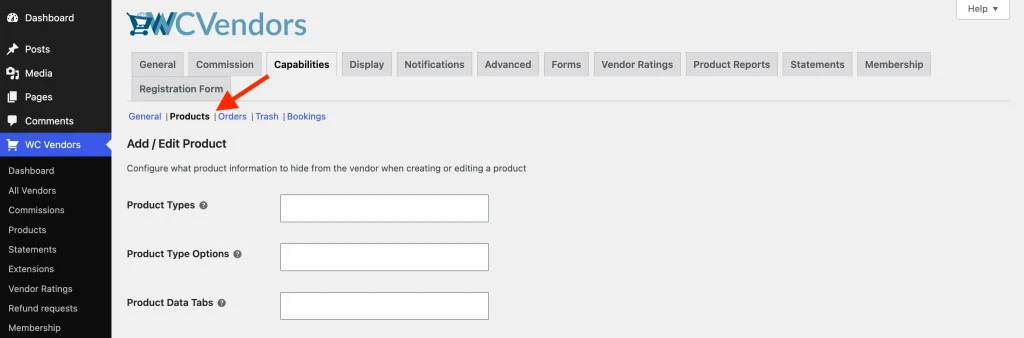
- In your WordPress admin, go to WC Vendors → Settings.
- Click the Capabilities tab.
- Click Products in the sub-navigation.
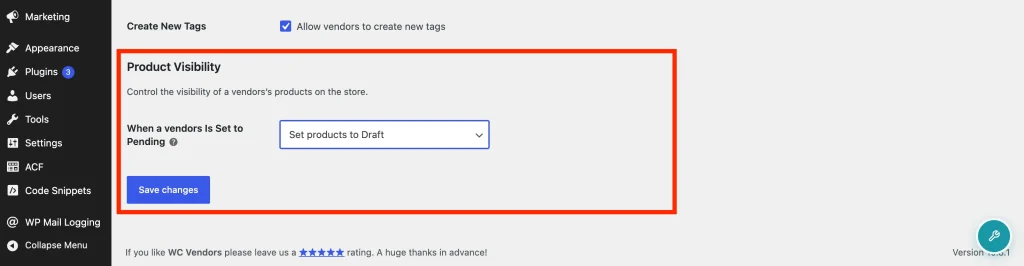
- Scroll down to the Product Visibility section.
- Under When a Vendor Is Set to Pending, choose one of the following options:
- Leave products as is: no action is taken (default)
- Set products to Draft: the vendor’s published products are moved to Draft and hidden from the store immediately
- Set products to Pending Review: the vendor’s published products are moved to Pending Review
- Click Save Changes.
How it works
When you change a vendor’s role to Pending Vendor, WC Vendors checks this setting and updates all of that vendor’s currently published products. Only products that were published at the time are affected. Products already in Draft or Pending Review are left alone. Product variations aren’t changed directly; they just become inaccessible when the parent product is hidden.
WC Vendors also stores a record of which products were affected and what status they were moved to. When you re-approve the vendor (change their role back to Vendor), those products are automatically restored to Published, as long as no one manually changed their status while the vendor was pending. Any product whose status was changed manually during that time keeps its current status and isn’t touched.
This restore happens automatically whether you approve the vendor through the WC Vendors dashboard, WordPress Admin → Users, the REST API, or WP-CLI.
Frequently asked questions
Products weren’t hidden when I set the vendor to pending. What’s wrong?
Check that When a Vendor Is Set to Pending isn’t set to Leave products as is. That’s the default and means no action is taken. Also confirm you’re changing the role to Pending Vendor specifically, since the setting only fires on that exact role change.
The vendor’s products weren’t restored when I re-approved them.
Products are only restored if they’re still in the exact status that was applied at demotion. If someone manually changed a product’s status while the vendor was pending, that product keeps its current status and won’t be restored automatically.
What happens if I change the setting while a vendor is already pending?
The setting is read at the moment a vendor is set to pending. If you change the setting after a vendor was already demoted, it doesn’t retroactively update their products. It applies to future role changes only.
Need help?
If you have a question or run into any issues, we’re here to help.
- Premium users: Open a support ticket
- Free users: Visit our community forum