
Want a vendor store page, dashboard screen, or email to look different? WC Vendors Pro builds these screens from template files that you can copy into your theme and edit. This guide lists every WC Vendors Pro template, what it controls, and the exact path for your copy.
How template overrides work
A template override is your own copy of a template file, saved inside your theme. WC Vendors Pro loads your copy instead of the plugin file, so your changes stay in place when the plugin updates.
- Open the WC Vendors Pro plugin folder.
- Find the file in its
templatesfolder, for exampletemplates/store/store-header-modern.php. - Copy the file into your theme, at the path in the Override path in your theme column below.
- Edit your copy.
Use a child theme for your overrides. A theme update replaces the parent theme folder and removes any files you added to it.
Most vendor dashboard screens, such as Orders, Reports, and the dashboard navigation, come from the free WC Vendors plugin. You find those templates in the WC Vendors marketplace templates overview.
Vendor dashboard templates
These templates control the Pro sections of the vendor dashboard, such as store settings, coupons, statements, and the product exporter.
| Template file | What it controls | Override path in your theme |
|---|---|---|
dashboard/attributes-edit.php | Attribute Library edit screen | wc-vendors/dashboard/attributes-edit.php |
dashboard/attributes-list.php | Attribute Library list | wc-vendors/dashboard/attributes-list.php |
dashboard/custom-social-networks.php | Custom social networks section in the store settings | wc-vendors/dashboard/custom-social-networks.php |
dashboard/custom-social-item.php | One custom social network row in that section | wc-vendors/dashboard/custom-social-item.php |
dashboard/dashboard-notice.php | Vendor dashboard notice | wc-vendors/dashboard/dashboard-notice.php |
dashboard/order/shipping-label.php | Shipping label | wc-vendors/dashboard/order/shipping-label.php |
dashboard/product/exporter.php | Export Products screen | wc-vendors/dashboard/exporter.php |
dashboard/product/product-thumbnail-modal.php | Product thumbnail pop-up | wc-vendors/dashboard/product/product-thumbnail-modal.php |
dashboard/reports/overview-recent.php | Recent Orders and Recent Products sections of the reports | wc-vendors/dashboard/reports/overview-recent.php |
dashboard/reports/product-totals.php | Total Product Sold chart of the reports | wc-vendors/dashboard/reports/product-totals.php |
dashboard/shop_coupon-edit.php | Coupon form | wc-vendors/dashboard/shop_coupon-edit.php |
dashboard/statements/detail.php | Statement detail screen | wc-vendors/dashboard/statements/detail.php |
dashboard/statements/generate-modal.php | Generate statement pop-up | wc-vendors/dashboard/statements/generate-modal.php |
dashboard/store-opening-hours-new-row.php | New row in the store opening hours | wcvendors-pro/dashboard/store-opening-hours-new-row.php |
dashboard/store-settings.php | Store settings form | wc-vendors/dashboard/store-settings.php |
Email templates
These templates control the emails that WC Vendors Pro sends. Each email has an HTML version and a plain text version. The Email type setting of each email in WooCommerce decides which version is sent, so override the version your store uses.
HTML emails
| Template file | What it controls | Override path in your theme |
|---|---|---|
emails/customer-mark-received.php | Asks the customer to mark the order as received | woocommerce/customer-mark-received.php |
emails/vendor-contact-widget.php | Sends the vendor a message from the Contact Store widget | woocommerce/vendor-contact-widget.php |
emails/vendor-invoice.php | Vendor invoice email | woocommerce/emails/vendor-invoice.php |
emails/statement-vendor-notification.php | Tells the vendor that a statement is ready | wc-vendors/emails/statement-vendor-notification.php |
emails/product-report-submitted.php | Product report submitted | woocommerce/product-report-submitted.php |
emails/product-report-accepted.php | Product report accepted | woocommerce/product-report-accepted.php |
emails/product-report-accepted-reporter.php | Product report accepted, sent to the person who made the report | woocommerce/product-report-accepted-reporter.php |
emails/product-report-adjusted.php | Product report adjusted | woocommerce/product-report-adjusted.php |
emails/product-report-responded.php | Product report responded | woocommerce/product-report-responded.php |
emails/product-report-resolved.php | Product report resolved | woocommerce/product-report-resolved.php |
emails/product-report-details.php | Report details table used inside the product report emails | woocommerce/product-report-details.php |
Plain text emails
| Template file | What it controls | Override path in your theme |
|---|---|---|
emails/plain/customer-mark-received.php | Asks the customer to mark the order as received | woocommerce/plain/customer-mark-received.php |
emails/plain/vendor-contact-widget.php | Sends the vendor a message from the Contact Store widget | woocommerce/plain/vendor-contact-widget.php |
emails/plain/vendor-invoice.php | Vendor invoice email | woocommerce/emails/plain/vendor-invoice.php |
emails/plain/statement-vendor-notification.php | Tells the vendor that a statement is ready | wc-vendors/emails/plain/statement-vendor-notification.php |
emails/plain/product-report-submitted.php | Product report submitted | woocommerce/plain/product-report-submitted.php |
emails/plain/product-report-accepted.php | Product report accepted | woocommerce/plain/product-report-accepted.php |
emails/plain/product-report-accepted-reporter.php | Product report accepted, sent to the person who made the report | woocommerce/plain/product-report-accepted-reporter.php |
emails/plain/product-report-adjusted.php | Product report adjusted | woocommerce/plain/product-report-adjusted.php |
emails/plain/product-report-responded.php | Product report responded | woocommerce/plain/product-report-responded.php |
emails/plain/product-report-resolved.php | Product report resolved | woocommerce/plain/product-report-resolved.php |
Storefront templates
Customers see these templates on your marketplace, for example the vendor list, the store blocks, and the vendor application form.
| Template file | What it controls | Override path in your theme |
|---|---|---|
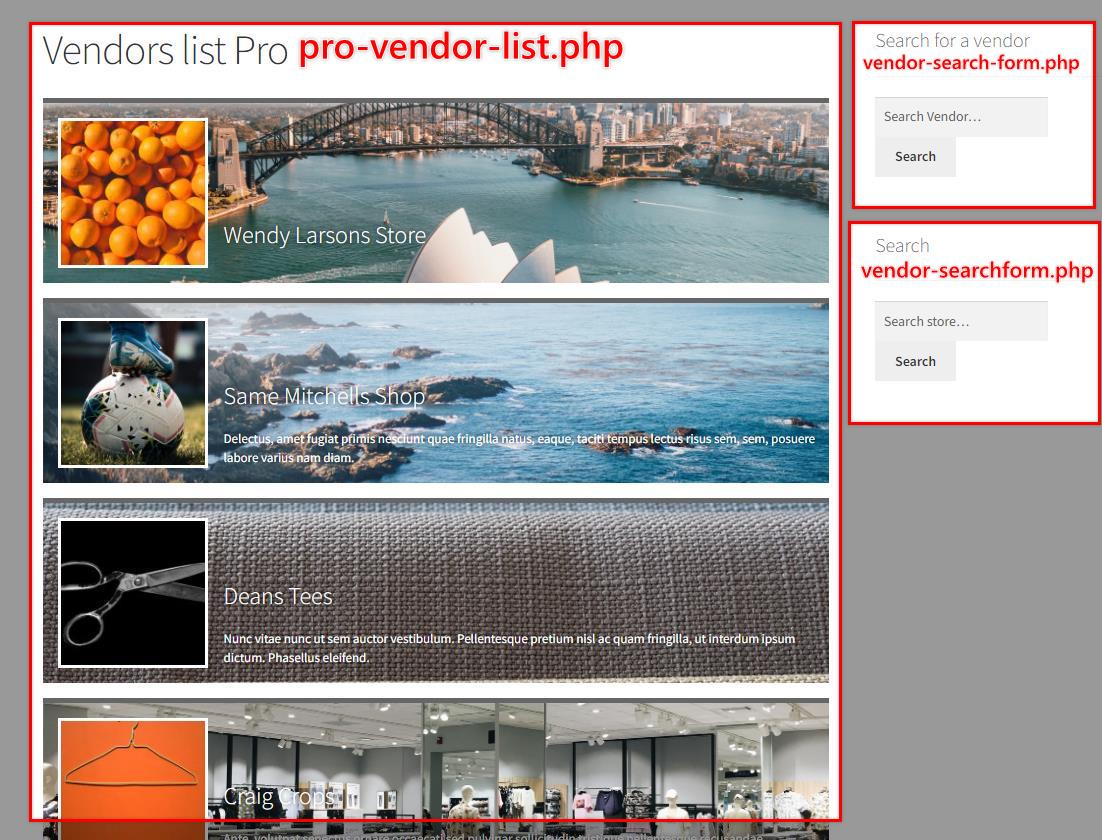
front/pro-vendor-list.php | Vendor list wrapper | wc-vendors/front/pro-vendor-list.php |
front/pro-vendor-list-item.php | One vendor in the vendor list shortcode | wc-vendors/front/pro-vendor-list-item.php |
front/pro-vendor-list-filter.php | Filters above the vendor list | wc-vendors/front/pro-vendor-list-filter.php |
front/vendor-search-form.php | Vendor search form | wc-vendors/front/vendor-search-form.php |
front/vendor-searchform.php | Store search form | wc-vendors/front/vendor-searchform.php |
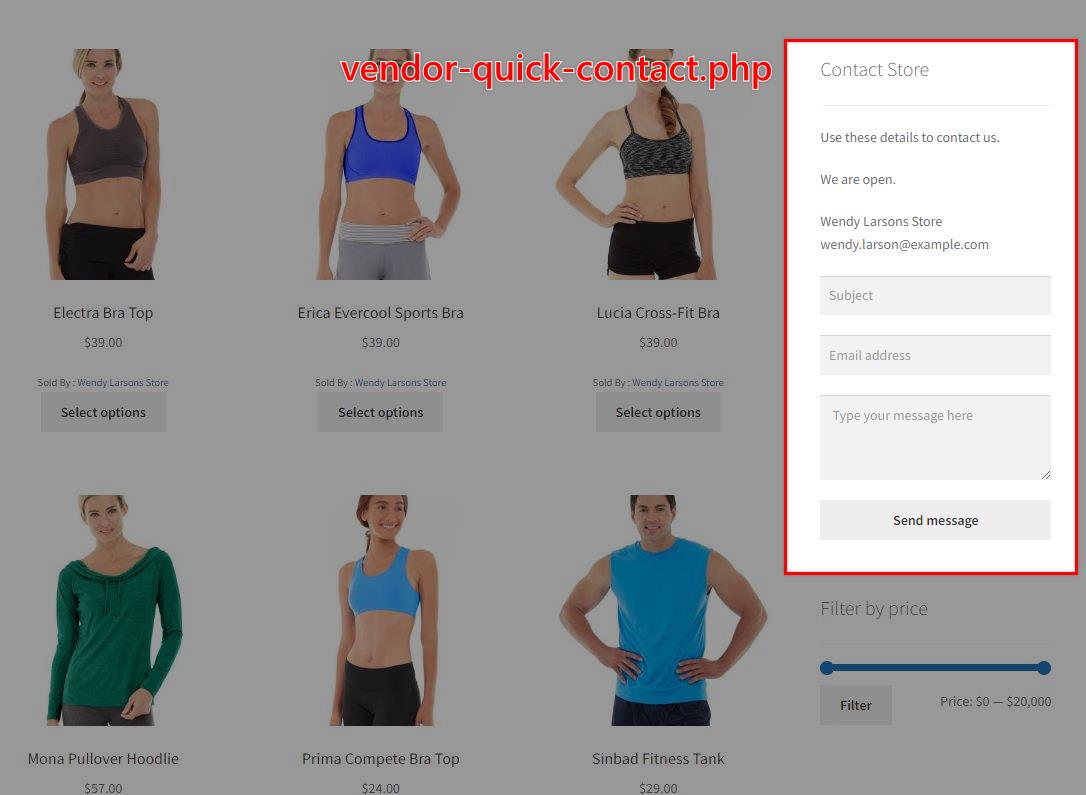
front/vendor-quick-contact.php | Contact Store widget | wc-vendors/front/vendor-quick-contact.php |
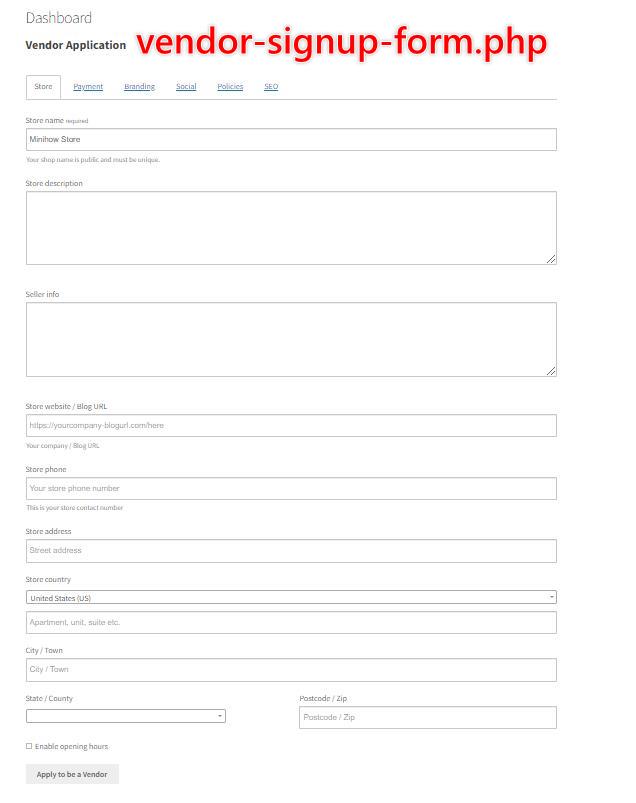
front/vendor-signup-form.php | Vendor application form | wc-vendors/front/vendor-signup-form.php |
front/vendor-recent-products.php | Store Recent Products block | wc-vendors/front/vendor-recent-products.php |
front/vendor-short-description.php | Store Short Description block | wc-vendors/front/vendor-short-description.php |
front/vendor-store-map-address.php | Store map and address block | wc-vendors/front/vendor-store-map-address.php |
front/vendor-store-social-media.php | Store social media links | wc-vendors/front/vendor-store-social-media.php |
front/vendor-store-ratings.php | Store Ratings block | wc-vendors/front/vendor-store-ratings.php |
front/vendor-total-sale.php | Store total sales block | wc-vendors/front/vendor-total-sale.php |
front/vendor-store-category-filter.php | Category filter on the store and shop pages | wc-vendors/front/vendor-store-category-filter.php |
front/vendor-store-attributes-filter.php | Store attributes filter block | wc-vendors/front/vendor-store-attributes-filter.php |
front/vendor-store-price-filter.php | Store price filter block | wc-vendors/front/vendor-store-price-filter.php |
front/vendor-store-ratings-filter.php | Store ratings filter block | wc-vendors/front/vendor-store-ratings-filter.php |
Ratings templates
| Template file | What it controls | Override path in your theme |
|---|---|---|
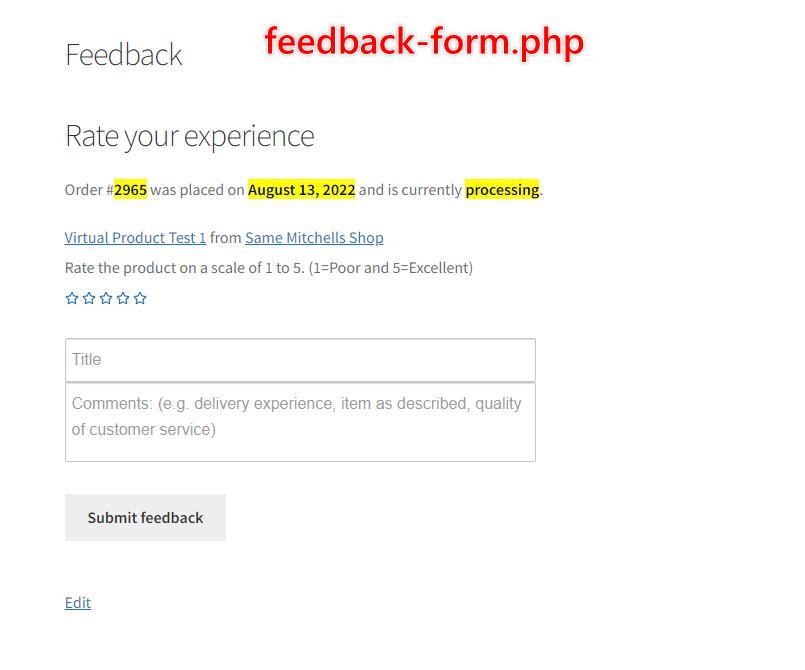
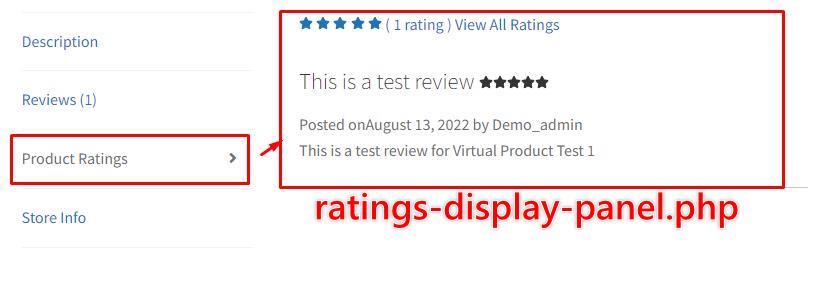
front/ratings/feedback-form.php | Feedback form that customers use to rate a vendor | wc-vendors/front/ratings/feedback-form.php |
front/ratings/ratings-display-panel.php | Product Ratings tab on the product page | wc-vendors/front/ratings/ratings-display-panel.php |
Shipping templates
| Template file | What it controls | Override path in your theme |
|---|---|---|
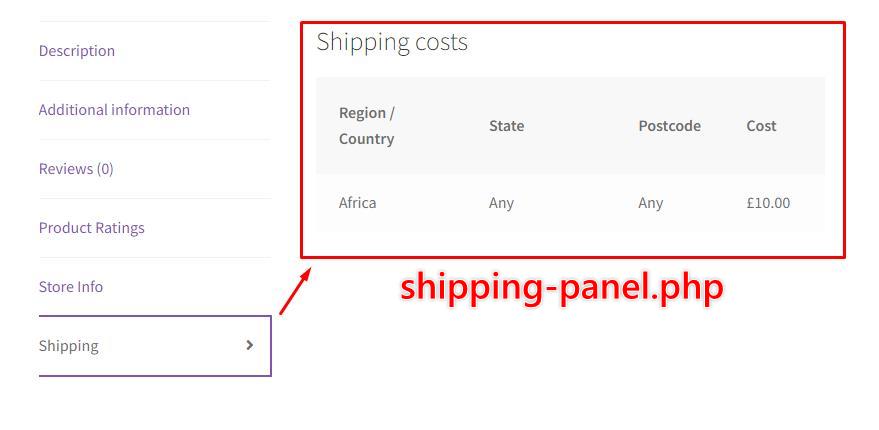
front/shipping/shipping-panel.php | Shipping tab with the vendor shipping costs on the product page | wc-vendors/front/shipping/shipping-panel.php |
Product page templates
These templates add WC Vendors Pro features to the single product page.
| Template file | What it controls | Override path in your theme |
|---|---|---|
product/product-reports.php | Report product button and pop-up | wc-vendors/product/product-reports.php |
product/product-seo-meta.php | SEO meta in the product page header | wc-vendors/product/product-seo-meta.php |
single-product/minimum-order-quantity.php | Minimum order quantity message | woocommerce/single-product/minimum-order-quantity.php |
Store page templates
These templates output the elements on each vendor store page.
| Template file | What it controls | Override path in your theme |
|---|---|---|
store/store-header-modern.php | Pro Modern store header | wc-vendors/store/store-header-modern.php |
store/store-header.php | Pro store header | wc-vendors/store/store-header.php |
store/store-ratings.php | Store ratings | wc-vendors/store/store-ratings.php |
store/store-vacation-message.php | Store vacation message, when vacation mode is on | wc-vendors/store/store-vacation-message.php |
store/upload-limits-notice.php | Vendor upload limits notice | wc-vendors/store/upload-limits-notice.php |
store/vendor-store-notice.php | Vendor store notice | wc-vendors/store/vendor-store-notice.php |
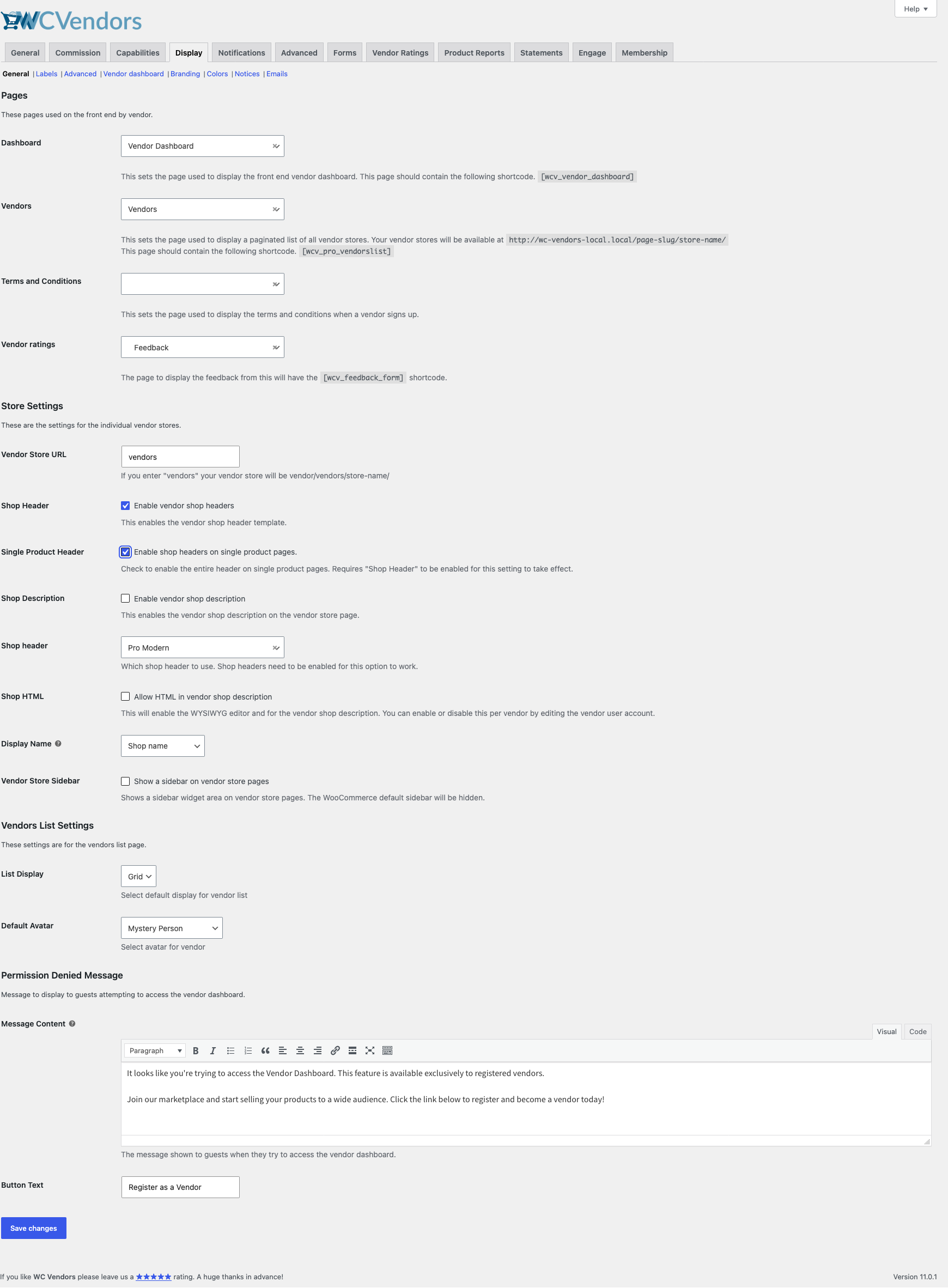
Two settings in WC Vendors > Settings > Display control the store header. The Shop Header checkbox turns store headers on. The Shop header dropdown then picks the template: Pro Modern uses store-header-modern.php, and Pro uses store-header.php. The Single Product Header checkbox shows the same header on single product pages.
Add content below the store name
From WC Vendors Pro 2.1.0, the Pro Modern store header has an action hook called wcvendors_after_header_name. An action hook is a point in the template where your own code can add output. It runs after the store name and the verified or trusted badges, and before the store description.
Use the hook when you only want to add something, such as a tagline. You keep the plugin template, so you have no override to update after each release. The hook passes the vendor’s user ID to your function.
add_action( 'wcvendors_after_header_name', function ( $vendor_id ) {
	echo '<p class="my-store-tagline">Handmade in small batches</p>';
} );
Add the code to your child theme’s functions.php file, or use a code snippets plugin. The hook runs wherever the Pro Modern header shows: on store pages when the Shop Header checkbox is on, and on single product pages when the Single Product Header checkbox is on. In both cases, the Shop header dropdown must be set to Pro Modern.
PDF invoice and statement templates
| Template file | What it controls | Override path in your theme |
|---|---|---|
invoices/pdf-invoice.php | Vendor invoice PDF | wc-vendors/invoices/pdf-invoice.php |
statements/pdf-statement.php | Vendor statement PDF | wc-vendors/statements/pdf-statement.php |
BuddyBoss templates
These templates only load when you use WC Vendors Pro with BuddyBoss BuddyBoss Platform. They use a buddyboss folder in your theme, not wc-vendors.
| Template file | What it controls | Override path in your theme |
|---|---|---|
buddyboss/members/single/wcv-store.php | Store tab on a vendor’s BuddyBoss profile | buddyboss/members/single/wcv-store.php |
buddyboss/parts/group-store-card.php | Store card in a BuddyBoss group | buddyboss/parts/group-store-card.php |
buddyboss/parts/forum-tab-link.php | Vendor forum link | buddyboss/parts/forum-tab-link.php |
buddyboss/parts/latest-products.php | Latest products in the store widget | buddyboss/parts/latest-products.php |
buddyboss/parts/rating.php | Star rating in the store widget | buddyboss/parts/rating.php |
buddyboss/parts/recent-reviews.php | Recent reviews in the store widget | buddyboss/parts/recent-reviews.php |
buddyboss/parts/stat-row.php | Stat fields in the store widget | buddyboss/parts/stat-row.php |
Frequently Asked Questions
Why can’t I find the Orders, Reports, or dashboard navigation templates here?
Those screens come from the free WC Vendors plugin, so their templates live in its templates folder. See the WC Vendors marketplace templates overview.
I copied exporter.php to my theme, but nothing changed. Why?
Save it as wc-vendors/dashboard/exporter.php. The exporter override goes straight into the dashboard folder, not into a product subfolder.
I override store-header-modern.php. Does the new hook work for me?
Not until you update your copy. Your copy replaces the plugin file, so it does not have the wcvendors_after_header_name hook. Copy the template from WC Vendors Pro 2.1.0 or later again, and add your changes back.
My template changes stopped working after a plugin update. What do I do?
Compare your copy with the plugin file, and bring your copy up to date. See how to fix outdated templates.
Need Help?
If you have a question or run into any issues, we’re here to help.
- Premium users: Open a support ticket
- Free users: Visit our community forum